
1. Wprowadzenie
The Withings Body Digital Wi-Fi Smart Scale is designed to provide accurate weight and Body Mass Index (BMI) measurements, helping you monitor your health and fitness progress. This smart scale offers seamless data synchronization to the Health Mate app via Wi-Fi or Bluetooth, supports multiple users, and includes specialized modes for pregnancy tracking and baby weighing. This manual provides detailed instructions for setup, operation, maintenance, and troubleshooting to ensure optimal performance of your device.

Image: Withings Body Smart Scale, highlighting its clinically tested status for weight and BMI measurements.
2. Rozpoczęcie pracy
2.1. Co znajduje się w pudełku
- Withings Body Smart Scale (Black)
- Alkaline cells (AAA batteries) - already installed
- Szybki przewodnik instalacji
- Carpet feet (for use on soft surfaces)
2.2. Instalacja baterii
The Withings Body scale comes with batteries pre-installed. If you need to replace them, locate the battery compartment on the underside of the scale. Insert four standard AAA batteries, ensuring correct polarity. The scale is designed for long-lasting battery life, operating for up to 18 months on a single set of batteries.
2.3. Initial Setup & App Connection
To begin using your Withings Body scale, you must first connect it to the Health Mate app. This app is compatible with iPhone (4S or higher), iPod Touch (5th generation or higher), iPad (3rd generation or higher, as well as any iPad Mini), and Bluetooth Low Energy compatible Android devices (OS 5.0 or higher).
- Pobierz Health Mate app ze sklepu Apple App Store lub Google Play Store.
- Otwórz aplikację i postępuj zgodnie z instrukcjami wyświetlanymi na ekranie, aby utworzyć nowe konto lub zalogować się do istniejącego.
- Select 'Install a device' and choose 'Scales', then 'Body'.
- Follow the app's prompts to pair your scale via Bluetooth and configure its Wi-Fi connection. Ensure your Wi-Fi network is 802.11 b/g/n compatible with WEP/WPA/WPA2-personal networks.
- Once connected, the scale will automatically synchronize data to the app after each weigh-in.

Image: The Withings Body scale showing a weight trend on its display, alongside a smartphone running the Health Mate app with detailed weight and BMI data.
3. Instrukcja obsługi
3.1. Wykonywanie pomiaru
For accurate readings, place the scale on a hard, flat surface. If using on carpet, attach the included carpet feet.
- Wejdź na wagę boso. Waga włączy się automatycznie.
- Opatentowany Position Control Technology will guide you to center yourself on the scale using on-screen arrows, ensuring the most precise measurement.
- Stand still until your weight is displayed and stabilized. The scale will then show your BMI and a trend graph of your last 8 measurements.
- Your data will automatically sync to the Health Mate app via Wi-Fi or Bluetooth.

Image: A person's feet positioned on the Withings Body Smart Scale, illustrating proper stance for measurement. Icons for Wi-Fi and Bluetooth connectivity are shown.
3.2. Multi-User Recognition
The Withings Body scale can automatically recognize up to 8 different users. Each user can weigh themselves and access their personal weight histories within the Health Mate app. Ensure each user creates a profile in the app and performs an initial weigh-in for the scale to learn their profile.
3.3. Pregnancy Tracker & Baby Mode
The scale offers specialized modes to support family health monitoring:
- Pregnancy Tracker: Monitor healthy weight gain range and access obstetrician-reviewed advice within the Health Mate app.
- Tryb dziecka: Track the weight of the youngest family members by holding the baby while weighing yourself, then subtracting your own weight in the app.
3.4. Zrozumienie odczytów wyświetlacza
The scale's display provides instant feedback:
- Instant Weight: Your current weight is displayed prominently.
- Weight Trends: A small graph shows your weight trend over your last 8 measurements, helping you visualize progress.
- BMI: Your Body Mass Index is calculated and displayed, indicating if you are within a healthy range.

Image: The Withings Body scale's display showing current weight and BMI, along with a visual representation of weight trends over time.
4. Zaawansowane funkcje
4.1. Wi-Fi & Bluetooth Synchronization
The Withings Body scale offers robust connectivity options:
- Automatyczna synchronizacja danych: Data from every weigh-in appears automatically in the Health Mate app via Wi-Fi or Bluetooth. This means you do not need your phone nearby during measurements for data to be recorded. The scale can store up to 16 readings if it cannot sync wirelessly immediately.
- Wysoka kompatybilność: The Health Mate app syncs with Apple Watch and over 100 top health and fitness apps, including Apple Health, Fitbit, and Google Fit.
4.2. Position Control Technology
This exclusive patented technology guides you into the correct stance on the scale, ensuring each weigh-in is precise up to 0.1 kg / 0.2 lbs. The scale also adjusts its measurements based on Wi-Fi location to compensate for gravity, further enhancing accuracy.

Image: Visual representation of the Withings Body scale's exceptional reliability due to Position Control Technology and its ease of use with automatic Wi-Fi synchronization.
4.3. Health Mate App Features
The free Withings Health Mate app is central to your experience, providing important trends and insights:
- Kompleksowe śledzenie stanu zdrowia: View your weight history, BMI, and other health metrics.
- Obsługa wielu użytkowników: Zarządzaj profiledla maksymalnie 8 użytkowników.
- Nutrition Tracking: Integrate with MyFitnessPal to put your caloric intake into perspective.
- Daily Weather & Activity: The scale can display daily weather forecasts and activity levels on its screen.

Image: A collage showing the Health Mate app interface on a smartphone, alongside icons representing multi-user support, pregnancy & baby mode, athlete mode, daily weather & activity display, and up to 18 months battery life.
5. Pielęgnacja i konserwacja
5.1. Czyszczenie
Aby wyczyścić wagę Withings Body, użyj miękkiej,amp cloth. Do not use abrasive cleaners or immerse the scale in water. Keep the surface dry to prevent slipping.
5.2. Wymiana baterii
When the battery indicator appears on the scale's display or in the Health Mate app, it's time to replace the batteries. Open the battery compartment on the underside of the scale and replace the four AAA batteries with new ones, observing correct polarity. Ensure the scale is properly reconnected to the app after battery replacement.
6. Rozwiązywanie Problemów
6.1. Typowe problemy i rozwiązania
- Waga się nie włącza:
- Sprawdź, czy baterie są prawidłowo zainstalowane i wystarczająco naładowane. W razie potrzeby wymień je.
- Scale not connecting to app/Wi-Fi:
- Ensure Bluetooth is enabled on your smartphone during initial setup.
- Verify your Wi-Fi network credentials in the Health Mate app.
- Move the scale closer to your Wi-Fi router.
- Restart your Wi-Fi router and the scale (by removing and reinserting batteries).
- If issues persist after battery change, re-pair the scale with the app.
- Niedokładne odczyty:
- Ensure the scale is on a hard, flat surface. Use carpet feet if on carpet.
- Stand still and centered on the scale during measurement, following the Position Control Technology guidance.
- Upewnij się, że Twoje stopy są czyste i suche.
- Multi-user recognition issues:
- Upewnij się, że każdy użytkownik ma odrębny programfile in the Health Mate app and has performed an initial weigh-in.
- If the scale cannot identify a user, it may display a question mark or prompt you to assign the measurement in the app.
7. Specyfikacje
7.1. Specyfikacje techniczne
| Funkcja | Szczegół |
|---|---|
| Numer modelu | WBS06-Czarny-Wszystko-Intern |
| Wymiary produktu | 12.87 x 12.87 x 0.91 cala; 4.41 funta |
| Źródło zasilania | Baterie 4 x AAA (w zestawie) |
| Żywotność baterii | Do 18 miesięcy |
| Łączność | Wi-Fi 802.11 b/g/n (WEP/WPA/WPA2-personal), Bluetooth Low Energy |
| Typ wyświetlacza | OLED |
| Jednostki miary | kg, funt, st funt |
| Dokładność wagi | 0.1 kg / 0.2 funta |
| Maksymalna liczba użytkowników | 8 użytkowników |
| Producent | Withings Inc |
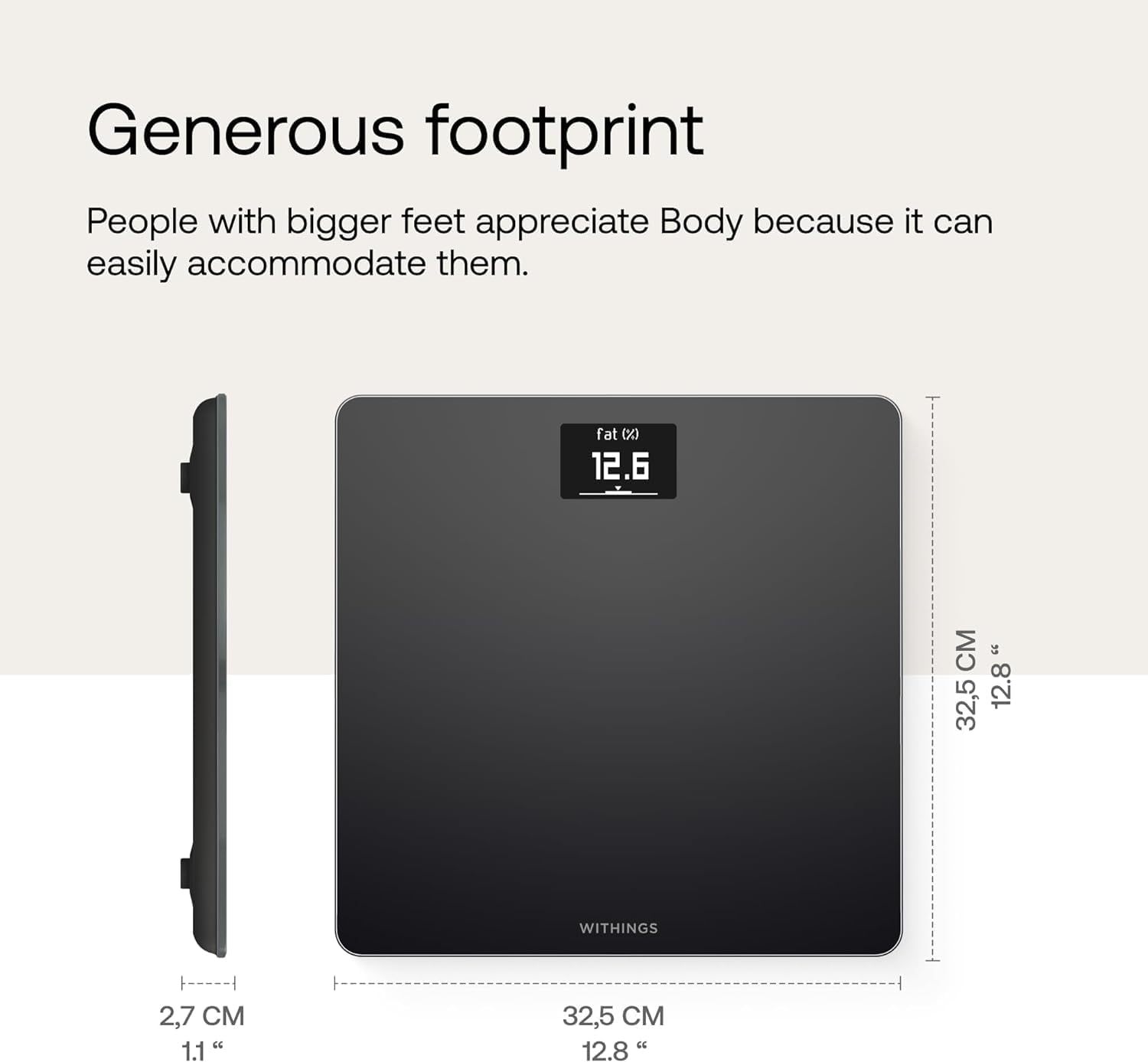
Image: Side and top view of the Withings Body Smart Scale, illustrating its compact dimensions of 32.5 cm (12.8 inches) by 32.5 cm (12.8 inches) and a thickness of 2.7 cm (1.1 inches).
8. Gwarancja i pomoc techniczna
8.1. Informacje o gwarancji
Withings products are manufactured to the highest quality standards. For specific warranty terms and conditions, please refer to the warranty information provided with your purchase or visit the official Withings webstrona.
8.2. Customer Support & Resources
Aby uzyskać dalszą pomoc, wsparcie techniczne lub dostęp do dodatkowych zasobów, skorzystaj z następujących źródeł:
- Oficjalna instrukcja obsługi (PDF): Pobierz PDF
- Withings Brand Store: Visit Withings Store on Amazon
- Health Mate App: Access FAQs and support directly within the app.