
1. Wprowadzenie
The LaiPuDuo RGBW Wall-Mounted Touch Panel Dimmer Switch is designed for controlling various LED light sources, including point light sources, flexible light strips, and wall washer lamps. It features a glass panel design and a high-precision capacitance touch control chip for enhanced touch sensitivity and reduced false triggers. This controller allows for various lighting effects such as jump change, gradual change, and strobe, based on application requirements.
2. Zawartość opakowania
Sprawdź, czy w przesyłce znajdują się wszystkie elementy:
- 1 x RGBW Full Color Touch Panel Controller
- 1 x Instrukcja obsługi

Image: The LaiPuDuo RGBW Touch Panel Controller shown next to its product packaging box.
3. Specyfikacje techniczne
- Temperatura pracy: -20°C do 60°C
- Objętość dostawtage: DC 12-24V
- Kanały wyjściowe: 4 kanały
- Tryb połączenia: Wspólna anoda
- Wymiary zewnętrzne: L86 × W86 × H37mm (3.39 x 3.39 x 1.46 inches)
- Masa netto: 128g
- Statyczne zużycie energii: <1 W
- Prąd wyjściowy: <4A (each channel)
- Moc wyjściowa: 12V: <192W, 24V: <384W
- Tworzywo: Glass (panel), Metal (contact)
- Metoda sterowania: Dotykać
- Typ montażu: Montaż ścienny
- Protokół łączności: Wi-Fi (as per specifications, though primary control is touch)
- Stopień ochrony międzynarodowej: IP54
4. Instalacja
Follow these steps for proper installation of the RGBW Touch Panel Dimmer Switch:
- Przygotuj okablowanie: Ensure the power supply is disconnected before beginning installation. Identify the input (DC12-24V) and output (RGBW) terminals on the back of the controller.
- Podłącz pasek LED: Connect the corresponding wires from your RGBW LED light strip to the output terminals (R, G, B, W, and + for common anode) on the controller.
- Podłącz zasilanie: Connect the DC12-24V power supply wires to the input terminals (+ and -) on the controller.
- Kontroler montażu: Securely mount the controller to the wall using appropriate mounting hardware (not included).
- Podłącz zasilacz: Once all connections are secure, connect the power adapter to the power source.

Image: The rear of the controller displaying the input and output wiring terminals for power and LED strip connections.
Instrukcja wideo instalacji
Video: This video demonstrates the wiring process for connecting the RGBW controller to an LED strip and power supply, followed by a demonstration of its basic operation.
5. Instrukcja obsługi
The touch panel provides intuitive control over your LED lighting. Refer to the image below for button layout and functions.
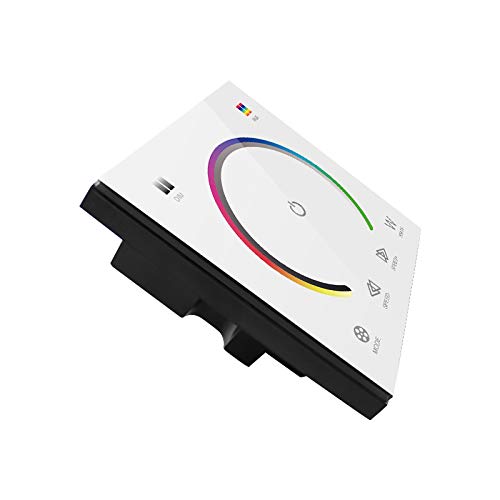
Image: The front of the touch panel controller, showing the color wheel, power button, mode, speed, and white light controls.
- Przycisk zasilania (środkowy okrąg): Touch to turn the LED lights on or off.
- Koło kolorów: Slide your finger around the color wheel to select a desired RGB color. The LED strip will change to the selected color.
- White Light (W Button): Touch the 'W' button to activate or adjust the dedicated white light channel.
- Przycisk trybu: Przełącza między różnymi, wstępnie zaprogramowanymi, dynamicznymi trybami oświetlenia.
- Speed Buttons (Left/Right Arrows): Adjust the speed of dynamic lighting modes.
Przewodnik wideo dotyczący obsługi
Video: This video demonstrates the functionality of the touch panel, including color selection via the color wheel, switching between RGB and white light, and adjusting modes and speeds.
6. Konserwacja
To ensure the longevity and proper functioning of your touch panel dimmer switch:
- Czyszczenie: The glass panel can be cleaned with a soft, dry cloth. Avoid abrasive cleaners or harsh chemicals that may damage the surface.
- Środowisko: Operate the device within the specified working temperature range (-20°C to 60°C). Avoid exposure to extreme moisture or direct sunlight.
- Moc: Always disconnect power before performing any maintenance or wiring adjustments.
7. Rozwiązywanie Problemów
If you encounter issues with your RGBW Touch Panel Dimmer Switch, refer to the following common problems and solutions:
- Światła nie włączają się:
- Check if the power supply is correctly connected and providing the specified DC12-24V.
- Verify that the LED strip is properly connected to the output terminals.
- Ensure the power button on the touch panel is activated.
- Incorrect colors or incomplete color display:
- Confirm that the RGBW wires from the LED strip are connected to the correct corresponding terminals on the controller (R to R, G to G, B to B, W to W).
- Ensure the common anode (+) wire is correctly connected.
- Check if the LED strip itself is functioning correctly by testing it with another controller if possible.
- Touch panel is unresponsive:
- Ensure the panel is clean and dry. Moisture or dirt can affect touch sensitivity.
- Temporarily disconnect and reconnect the power supply to reset the controller.
- White light or RGB colors do not operate simultaneously:
- This controller is designed to switch between RGB colors and the dedicated white channel. Simultaneous operation of RGB and the separate white channel is not supported. You must select either an RGB color or the white light function.
8. Gwarancja i wsparcie
Aby uzyskać informacje o gwarancji lub pomocy technicznej, skontaktuj się bezpośrednio ze sprzedawcą lub producentem. Zachowaj paragon jako dowód zakupu.