
DAB 60161182
Instrukcja obsługi systemu podnoszenia ciśnienia wody DAB E.SYBOX 230V
Model: 60161182
1. Wprowadzenie
The DAB E.SYBOX is an integrated electronic water booster system designed for domestic and residential applications. This system provides constant water pressure while optimizing energy consumption. It is suitable for use with potable water in domestic plants, for gardening, and irrigation. The E.SYBOX can also be used to create groups of up to four pumps.
This manual provides essential information for the safe and efficient installation, operation, and maintenance of your E.SYBOX system. Please read it thoroughly before installation and keep it for future reference.
2. Informacje dotyczące bezpieczeństwa
WARNING: Before performing any operation on the pump, disconnect it from the main power supply.
- Upewnij się, że napięcie zasilaniatage matches the specifications of the E.SYBOX (230V).
- Instalację i konserwację powinien wykonywać wyłącznie wykwalifikowany personel.
- Do not operate the pump with flammable or explosive liquids.
- Chroń urządzenie przed ujemnymi temperaturami.
- Zapewnij odpowiednią wentylację wokół urządzenia, aby zapobiec przegrzaniu.
- Urządzenie musi być odpowiednio uziemione.
3. Zawartość opakowania
Sprawdź, czy po rozpakowaniu wszystkie elementy są obecne i nieuszkodzone:
- DAB E.SYBOX Water Booster System Unit
- Przewód zasilający
- Connection Pieces (e.g., 1" plastic unions)
- Instrukcja obsługi (ten dokument)
4. Konfiguracja i instalacja
The E.SYBOX is designed for straightforward installation and requires no additional components for basic setup. It can be installed either vertically or horizontally.
4.1. Wybór miejsca instalacji
Wybierz lokalizację, która jest:
- Protected from direct sunlight and extreme temperatures.
- In a closed space without a high level of air exchange, as the unit is water-cooled and quiet.
- Dostępne w celu konserwacji.
- Near the water source and the distribution system.
4.2. Instalacja fizyczna
- Umiejscowienie urządzenia: Place the E.SYBOX on a stable, level surface. The anti-vibration feet help reduce noise. The unit can be positioned vertically or horizontally.
- Podłączanie przewodów wodnych: Connect the inlet pipe from your water source to the suction port and the outlet pipe to your distribution system. Use the provided 1" plastic unions for secure connections. Ensure all connections are watertight.
- Podłączenie elektryczne: Connect the power cord to a grounded 230V AC outlet. Ensure the power supply is stable and protected from surges.
- Priming the Pump (if necessary): For initial startup or after maintenance, ensure the pump is filled with water before operation to prevent dry running. Refer to the display for priming instructions.
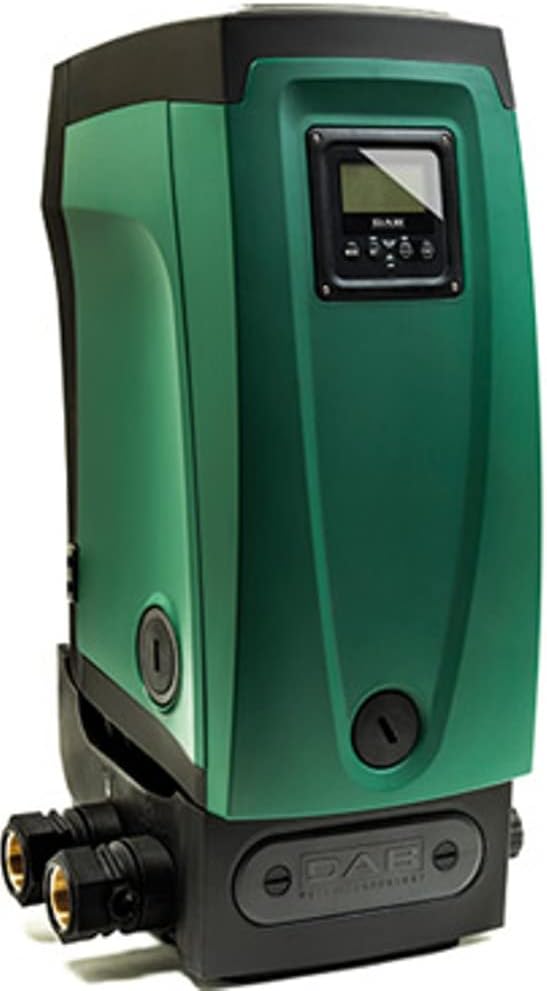
Rycina 1: Przód view of the DAB E.SYBOX unit, showing the display and general form factor.

Rysunek 2: Tył view of the E.SYBOX, highlighting the water inlet and outlet connections.
5. Instrukcja obsługi
The E.SYBOX features an adjustable, high-resolution LCD display for easy operation and monitoring.
5.1. Pierwsze włączenie zasilania
- Once connected to power, the LCD display will illuminate.
- Follow the on-screen prompts for initial setup, which may include language selection and basic pressure settings.
5.2. Ustawianie żądanego ciśnienia
The E.SYBOX allows you to set your desired water pressure. The system will then maintain this constant pressure by adjusting pump speed.
- Navigate through the LCD menu using the control buttons adjacent to the display.
- Locate the "Pressure Setting" option.
- Adjust the pressure value (e.g., in PSI or Bar) to your preference. The system can deliver up to 210 ft (approx. 90 PSI) of head.
- Confirm your selection. The system will automatically adjust to maintain this pressure.

Figure 3: E.SYBOX display showing operational parameters such as power consumption (360W), pressure (3 Bar / 43 PSI), and flow rate (3.2 GPM / 12 l/min).
5.3. Monitorowanie wydajności
The LCD display provides real-time statistics:
- Ciśnienie: Current system pressure.
- Przepływ: Instantaneous water flow.
- Zużycie energii: Energy consumption of the unit.
- Alarmy/Ostrzeżenia: Notifications for any operational issues.
6. Konserwacja
Regular maintenance ensures the longevity and optimal performance of your E.SYBOX system.
6.1. Rutynowe kontrole
- Kontrola wizualna: Periodically check for any leaks, unusual noises, or visible damage.
- Wymiana powietrza: Ensure the area around the unit is not obstructed to allow for proper air circulation for the water-cooled motor.
6.2. Czyszczenie czujnika
Over time, sediment may accumulate and affect the flow sensors. The E.SYBOX comes with a tool for cleaning these sensors.
- Odłącz zasilanie: Always disconnect the unit from the power supply before any maintenance.
- Locate Sensors: Refer to the detailed diagram in the full technical manual (if available) to locate the flow sensors.
- Czysty: Use the provided tool to carefully clean any accumulated sediment from the sensors.
- Na nowo połączyć: Reassemble any removed parts and reconnect power.
6.3. Zimowanie
If the unit is installed in an area subject to freezing temperatures, it must be drained to prevent damage.
- Odłącz zasilanie.
- Drain all water from the pump and associated piping.
- Store in a frost-free environment if possible, or ensure complete drainage.
7. Rozwiązywanie Problemów
This section addresses common issues you might encounter with your E.SYBOX system.
| Problem | Możliwa przyczyna | Rozwiązanie |
|---|---|---|
| No water flow / Pump not starting | No power; Air in pump; Clogged inlet; Low water level in source. | Check power connection; Prime the pump; Clean inlet filter; Ensure adequate water supply. |
| Niskie ciśnienie | Incorrect pressure setting; Partially clogged filter/pipes; Air in system. | Adjust pressure setting on LCD; Inspect and clean filters/pipes; Bleed air from system. |
| Pump runs continuously / Frequent on/off cycling | Leak in system; Small continuous flow (e.g., dripping faucet); Faulty sensor. | Check for leaks in plumbing; Address small continuous flows; Contact support if sensor is suspected. |
| Nietypowy hałas lub wibracje | Air in pump; Loose connections; Foreign object in pump. | Prime the pump; Check and tighten all connections; Disconnect power and inspect pump impeller (if safe and accessible). |
| LCD display error message | Konkretna usterka systemowa. | Zanotuj kod błędu i zapoznaj się z pełną instrukcją techniczną lub skontaktuj się z działem obsługi klienta. |
Jeśli po wypróbowaniu tych rozwiązań problem nadal występuje, skontaktuj się z obsługą klienta.
8. Specyfikacje
| Funkcja | Szczegół |
|---|---|
| Model | 60161182 |
| Tomtage | 230 wolty |
| Źródło zasilania | Prąd zmienny/stały |
| Maksymalna szybkość przepływu | 32 galona na minutę (GPM) |
| Maksymalna wysokość podnoszenia (głowa) | 210 stóp |
| Zakres temperatury cieczy | +32 to +95°F (domestic use), +32 to +102°F (other uses) |
| Maksymalna głębokość ssania | 26 stóp |
| Waga przedmiotu | 57 funtów |
| Wymiary produktu (dł. x szer. x wys.) | 14.25 x 10.35 x 22.2 cala |
| Tworzywo | ABS |
| Integrated Expansion Tank | 0.5 galonów |
9. Gwarancja i wsparcie
9.1. Informacje o gwarancji
DAB provides a limited warranty for the E.SYBOX 230V Water Booster System against defects in materials and workmanship under normal use and service. The specific duration and terms of the warranty may vary by region and purchase date. Please retain your proof of purchase for warranty claims.
For detailed warranty terms and conditions, refer to the warranty card included with your product or visit the official DAB webstrona.
9.2. Obsługa klienta
If you require technical assistance, have questions about installation, operation, or maintenance, or need to report a problem, please contact DAB customer support.
- Wsparcie online: Visit the official DAB Pumps website for FAQs, technical documents, and contact forms.
- Wsparcie telefoniczne: Refer to the contact information provided on the DAB webAby uzyskać numery regionalnego wsparcia, odwiedź witrynę lub opakowanie produktu.
- When contacting support, please have your product model (60161182) and serial number (if applicable) ready.
Ask a question about this manual
Ask about setup, troubleshooting, compatibility, parts, safety, or missing instructions. Manuals+ will review the question and use this page’s manual context to help answer it.