
Wstęp
This manual provides instructions for the installation, operation, and maintenance of the Black Box SERVSWITCH EC USB Server Cable, Model EHN9000U-0006. This 6-foot (1.8-meter) cable is designed to connect a server to a KVM switch, providing both USB and VGA connectivity.
Informacje dotyczące bezpieczeństwa
Please read and understand all safety instructions before using this product. Failure to follow these instructions may result in damage to the product or connected equipment.
- Do not expose the cable to excessive moisture or extreme temperatures.
- Unikaj gwałtownego zginania i załamywania kabla, ponieważ może to spowodować uszkodzenie wewnętrznych przewodów.
- Ensure all connections are secure before powering on equipment.
- Disconnect power from devices before connecting or disconnecting cables.
Zawartość opakowania
Sprawdź, czy w przesyłce znajduje się następujący element:
- 1 x Black Box SERVSWITCH EC USB Server Cable (EHN9000U-0006)
Produkt ponadview
The Black Box SERVSWITCH EC USB Server Cable is a specialized cable designed for KVM (Keyboard, Video, Mouse) applications. It integrates VGA video and USB keyboard/mouse signals into a single cable for streamlined connectivity between a server and a KVM switch.
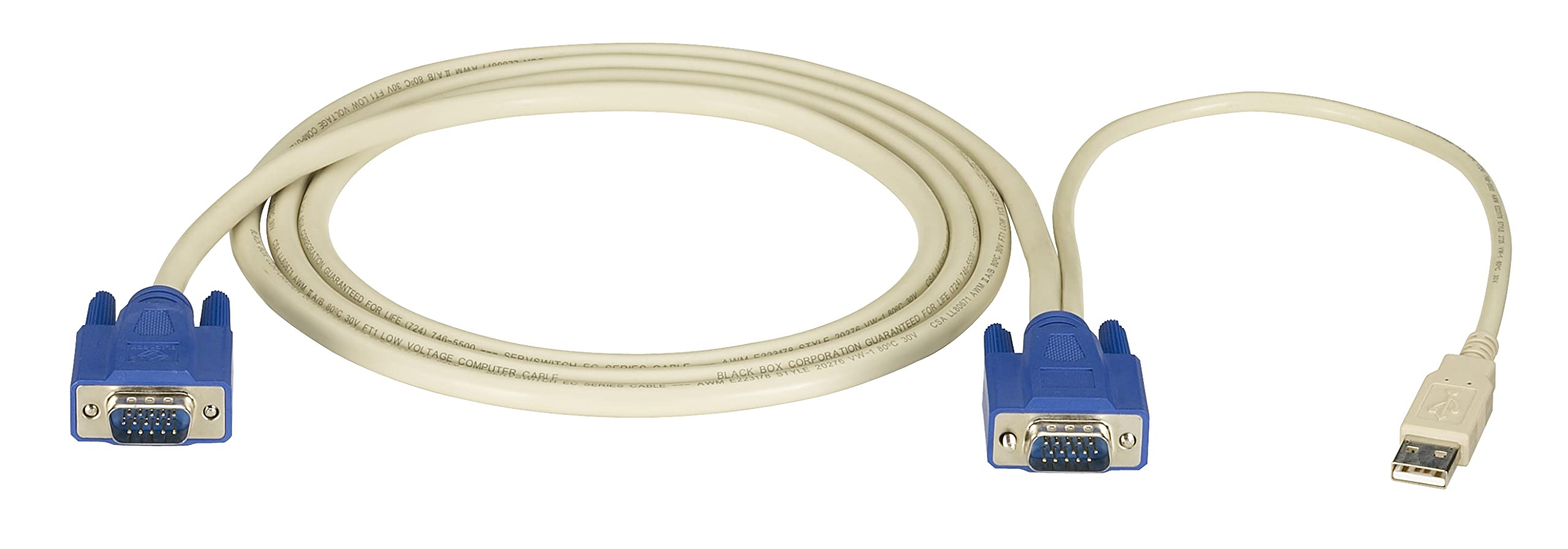
Obraz: Black Box SERVSWITCH EC USB Server Cable. This image displays the 6-foot cable with its distinct VGA (HD-15) and USB connectors, designed for server-to-KVM switch connections.
Główne cechy:
- Zintegrowana łączność: Combines VGA video and USB data into one cable.
- Długość: 6 feet (1.8 meters) for flexible placement.
- Zgodność: Designed for use with Black Box SERVSWITCH KVM systems.
- Konstrukcja zapobiegająca plątaniu: Helps prevent tangles and simplifies cable management.
Organizować coś
- Wyłącz urządzenia: Ensure both the server and the KVM switch are powered off before making any connections.
- Połącz z serwerem: Locate the VGA output port and an available USB port on your server. Connect the corresponding VGA (HD-15 male) and USB (Type-A male) connectors of the EHN9000U-0006 cable to these ports on the server.
- Połącz się z przełącznikiem KVM: Locate the KVM port on your KVM switch designated for the server. Connect the combined VGA (HD-15 female) and USB (Type-A female) end of the EHN9000U-0006 cable to the KVM switch's input port. Ensure a secure fit for both connectors.
- Włączanie: Once all connections are secure, power on the KVM switch, then power on the server.
Operacyjny
Once the cable is properly connected and devices are powered on, the KVM switch should detect the connected server. Use the KVM switch's controls (buttons, hotkeys, or OSD) to switch to the server connected via this cable. You should then have control over the server's video, keyboard, and mouse.
- Refer to your KVM switch's user manual for specific instructions on switching between connected servers.
- Ensure the KVM switch is configured to recognize the USB keyboard and mouse signals.
Konserwacja
The Black Box SERVSWITCH EC USB Server Cable requires minimal maintenance. Follow these guidelines to ensure longevity:
- Czyszczenie: Use a soft, dry cloth to wipe the cable and connectors. Do not use liquid cleaners or solvents.
- Składowanie: When not in use, store the cable in a cool, dry place, away from direct sunlight and extreme temperatures. Avoid tight coiling to prevent internal damage.
- Obsługiwanie: Always grasp the connector housing when plugging or unplugging the cable. Avoid pulling on the cable itself.
Rozwiązywanie problemów
| Problem | Możliwa przyczyna | Rozwiązanie |
|---|---|---|
| Brak wyświetlania wideo | Loose VGA connection; Incorrect KVM port selected; Server video output issue. | Ensure VGA connectors are fully seated and secured. Select the correct KVM port. Check server's video output directly. |
| Klawiatura/mysz nie reaguje | Loose USB connection; KVM switch USB emulation issue; Server USB port issue. | Ensure USB connectors are fully seated. Verify KVM switch USB settings. Test server USB ports with another device. |
| Przerywana łączność | Damaged cable; Loose connections; Electrical interference. | Inspect cable for visible damage. Re-seat all connections. Ensure cable is not near strong electromagnetic sources. |
Specyfikacje
- Model: EHN9000U-0006
- Marka: Czarna Skrzynka
- Typ kabla: USB, VGA
- Connector Type (Server End): HD-15 Male (VGA), USB Type-A Male
- Connector Type (KVM End): HD-15 Female (VGA), USB Type-A Female
- Długość: 6 stóp (1.8 metrów)
- Kolor: Czarny/Czerwony
- Dodatek specjalny: Bez plątania
- Zgodne urządzenia: Server (with VGA and USB ports)
- Wymiary produktu: 5 x 0.5 x 5 cali (przybliżone wymiary opakowania)
- Waga przedmiotu: 8.4 uncji (0.24 kilograma)
- Kod UPC: 822088018322
Gwarancja i wsparcie
Aby uzyskać informacje dotyczące gwarancji i pomocy technicznej, zapoznaj się z oficjalną instrukcją obsługi Black Box webOdwiedź witrynę lub skontaktuj się z działem obsługi klienta. Zachowaj paragon zakupu na wypadek reklamacji.
Czarna Skrzynka Webstrona: www.blackbox.com