
1. Koniec produktuview
The MikroTik RouterBOARD 1100AHx4 Dude Edition is a high-performance Gigabit Ethernet router designed for demanding network environments. It features an Annapurna Alpine AL21400 CPU with four Cortex A15 cores, each clocked at 1.4GHz, delivering a maximum throughput of up to 7.5Gbps. This device supports IPsec hardware acceleration, achieving speeds up to 2.2Gbps with AES128 encryption. It comes in a 1U rackmount case and includes 13 Gigabit Ethernet ports, an RS232 serial port, and dual redundant power supplies with -48V DC telecom power and 802.3at/af support. For storage-intensive features like a Dude database or proxy cache, the RB1100AHx4 Dude Edition provides two SATA and two M.2 high-speed storage connectors, with a 60GB M.2 drive pre-installed.

Rycina 1: Przód view of the MikroTik RouterBOARD 1100AHx4 Dude Edition router.
2. Zawartość opakowania
The MikroTik RouterBOARD 1100AHx4 Dude Edition package includes the following items:
- 2 x IEC power cords
- Kable SATA
- Zestaw śrub K46
- 60GB M.2 SSD (pre-installed)
- Uszy stojakowe

Figure 2: Included IEC power cord.
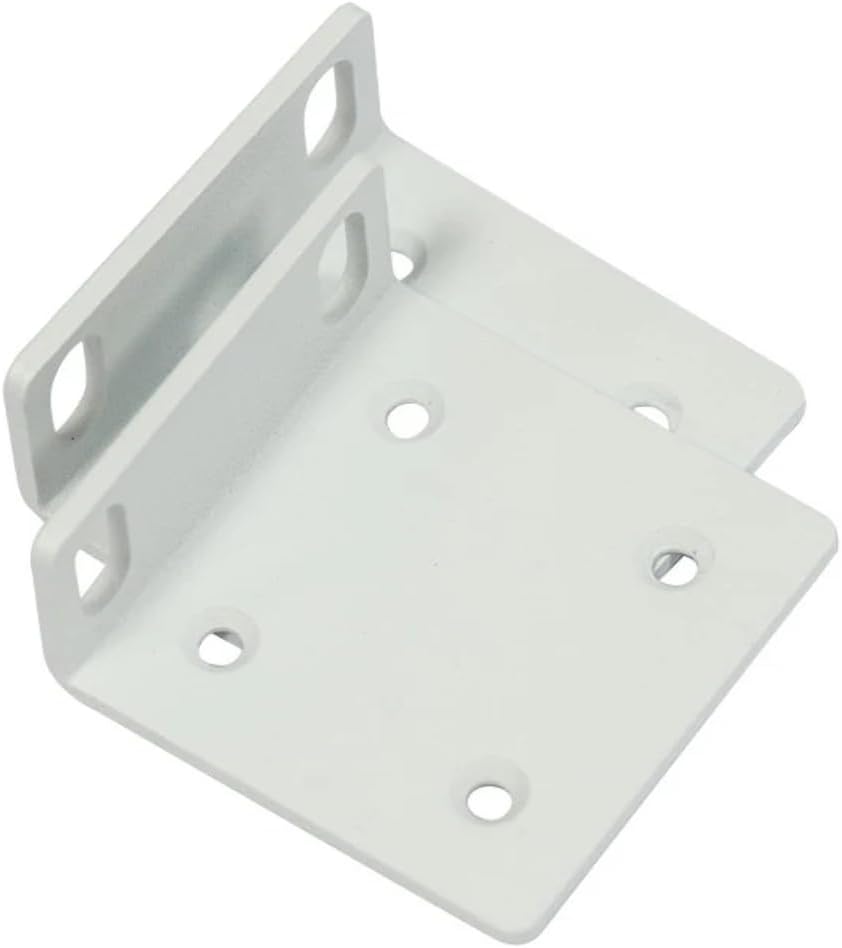
Figure 3: Rack ears for mounting.

Figure 4: K46 screw kit components.
3. Funkcje sprzętowe
The RB1100AHx4 Dude Edition is equipped with a robust set of hardware features to ensure high performance and reliability:
- Procesor: Annapurna Alpine AL21400 with four Cortex A15 cores, 1.4 GHz nominal frequency.
- BARAN: 1 GB.
- Porty Ethernet: 13 x 10/100/1000 Gigabit Ethernet ports.
- Port szeregowy: RS232.
- Moc: Dual redundant power supplies, supporting -48V DC telecom power and 802.3at/af PoE in.
- Składowanie: 2 x SATA3 ports, 2 x M.2 slots (60GB M.2 SSD included).

Rysunek 5: Wewnętrzne view of the router's mainboard.
4. Konfiguracja początkowa
Follow these steps for the initial setup of your MikroTik RouterBOARD 1100AHx4 Dude Edition:
- Podłączenie zasilania: Connect one of the provided IEC power cords to the device and a power outlet. The device supports dual redundant power supplies for enhanced reliability.
- Połączenie Ethernet: Connect your computer to any of the Gigabit Ethernet ports (ETH1-ETH13) using an Ethernet cable.
- Access RouterOS: Otwórz web browser on your connected computer and navigate to the default IP address (usually 192.168.88.1). Log in using the default username 'admin' and no password.
- Konfiguracja wstępna: Follow the on-screen instructions in RouterOS to perform the initial configuration, including setting a new password, configuring network interfaces, and updating the system.
- Połączenie internetowe: Connect your internet service provider's modem or main network line to the designated WAN port (typically ETH1, but configurable).
5. Instrukcja obsługi
The MikroTik RouterBOARD 1100AHx4 runs on RouterOS, a powerful and versatile operating system for MikroTik products. Key operational aspects include:
- Konfiguracja sieci: Utilize RouterOS to configure routing, firewall rules, NAT, VPNs (including IPsec hardware acceleration), and other advanced network settings.
- Zarządzanie portami: Manage the 13 Gigabit Ethernet ports, assigning them to different VLANs, bridge groups, or using them for WAN/LAN connectivity as needed.
- Wykorzystanie pamięci masowej: The included 60GB M.2 SSD can be used for storing Dude database information, proxy cache data, or other storage-intensive applications to enhance network services.
- Monitorowanie: Monitor network traffic, device performance, and system logs through the RouterOS interface or via external monitoring tools like The Dude.
6. Konserwacja
Regularna konserwacja zapewnia optymalną wydajność i długowieczność Twojego urządzenia:
- Aktualizacje oprogramowania układowego: Regularly check for and install the latest RouterOS firmware updates from the MikroTik website to benefit from new features, security patches, and performance improvements.
- Kopia zapasowa konfiguracji: Periodically back up your device configuration to prevent data loss in case of unexpected issues.
- Kontrola fizyczna: Ensure proper ventilation and keep the device free from dust and debris. Check cable connections for secure fit.
- Monitorowanie systemu: Monitor CPU usage, memory, and temperature to identify potential issues early.
7. Rozwiązywanie Problemów
If you encounter issues with your RouterBOARD 1100AHx4, consider the following troubleshooting steps:
- Brak zasilania: Verify that both power cords are securely connected and that the power outlets are functional. Check the power LED indicators on the device.
- Brak połączenia sieciowego: Ensure Ethernet cables are properly connected to the correct ports. Check port status LEDs. Verify IP address configurations and firewall rules in RouterOS.
- Niska wydajność: Check CPU and memory usage in RouterOS. Review network traffic statistics to identify bottlenecks. Ensure firmware is up to date.
- Problemy z logowaniem: If you cannot access RouterOS, try resetting the device to factory defaults using the reset button (refer to the Quick Guide for specific instructions).
- IPsec Performance: Ensure IPsec hardware acceleration is enabled and configured correctly for optimal VPN throughput.
8. Specyfikacje techniczne
| Funkcja | Specyfikacja |
|---|---|
| Kod produktu | RB1100AHx4 |
| Częstotliwość nominalna procesora | 1.4 GHz |
| CPU Core Count | 4 |
| Rozmiar pamięci RAM | 1 GB |
| Porty Ethernet 10/100/1000 | 13 |
| Gniazdo zasilania | 2 |
| Wejście PoE | 802.3af/at |
| Obsługiwana objętość wejściowatage | 20 V - 57 V |
| System operacyjny | RouterOS (License Level 6) |
| Maksymalne zużycie energii | 25 W |
| Port szeregowy | RS232 |
| Typ pamięci masowej | NAND (128 MB) |
| Rozszerzona pamięć masowa | 60GB M.2 SSD included |
| Wymiary | Wymiary: 444 x 148 x 47 mm |
9. Oficjalne filmy o produktach
There are no official product videos specifically for the MikroTik RouterBOARD 1100AHx4 Dude Edition provided by the seller at this time.
10. Gwarancja i wsparcie
For warranty information and technical support, please refer to the official MikroTik website or contact your authorized MikroTik distributor. Keep your proof of purchase for warranty claims.