
1. Wprowadzenie
The Duronic DMUSB5X1 is a desk-mounted monitor arm designed to optimize your workspace. It features a gas spring mechanism for smooth, effortless adjustments, allowing you to position your monitor for optimal viewing comfort. This model also integrates a USB hub and audio ports for convenient connectivity directly at your desk.
This manual provides detailed instructions for the safe and efficient installation, operation, and maintenance of your Duronic DMUSB5X1 monitor arm.
2. Instrukcje bezpieczeństwa
- Przed montażem i użyciem należy uważnie przeczytać wszystkie instrukcje.
- Ensure your desk surface is strong enough to support the monitor arm and attached monitor(s).
- Nie przekraczać maksymalnego udźwigu 8 kg (17.6 funtów) na ramię.
- Ensure all screws and connections are securely tightened before use. Periodically check for tightness.
- Trzymaj dzieci i zwierzęta domowe z dala od miejsca montażu.
- Use only the provided hardware. If any parts are missing or damaged, contact Duronic customer support.
- Adjust the gas spring tension carefully to match your monitor's weight. Improper tension can cause the monitor to drop or spring up unexpectedly.
3. Zawartość opakowania
Przed rozpoczęciem montażu należy sprawdzić, czy wszystkie elementy są obecne:
- Monitor Arm Assembly (Gas Spring Arm, Pole)
- Biurko Clamp Opierać
- Płyta montażowa VESA
- USB and Audio Extension Cables
- Sprzęt montażowy (różne śruby, podkładki, dystanse)
- Allen Keys for assembly and adjustment
4. Konfiguracja i instalacja
Follow these steps to install your Duronic DMUSB5X1 monitor arm:
- Dołącz biurko Clamp: Ustaw biurko klamp base on your desk edge. Ensure the desk clamp is securely fastened to a stable surface. The clamp can accommodate desk thicknesses up to 68mm. Tighten the clamp mocno przykręcić.

Rysunek 4.1: Klawiatura biurkowaamp instalacja.
- Assemble Arm to Pole: Insert the monitor arm onto the pole of the desk clamp. Secure it with the provided screws and Allen key.
- Zamontuj płytkę VESA do monitora: Carefully place your monitor face down on a soft, clean surface. Attach the VESA mounting plate to the back of your monitor using the appropriate screws and spacers (if needed). The arm supports VESA 75x75mm and 100x100mm patterns.
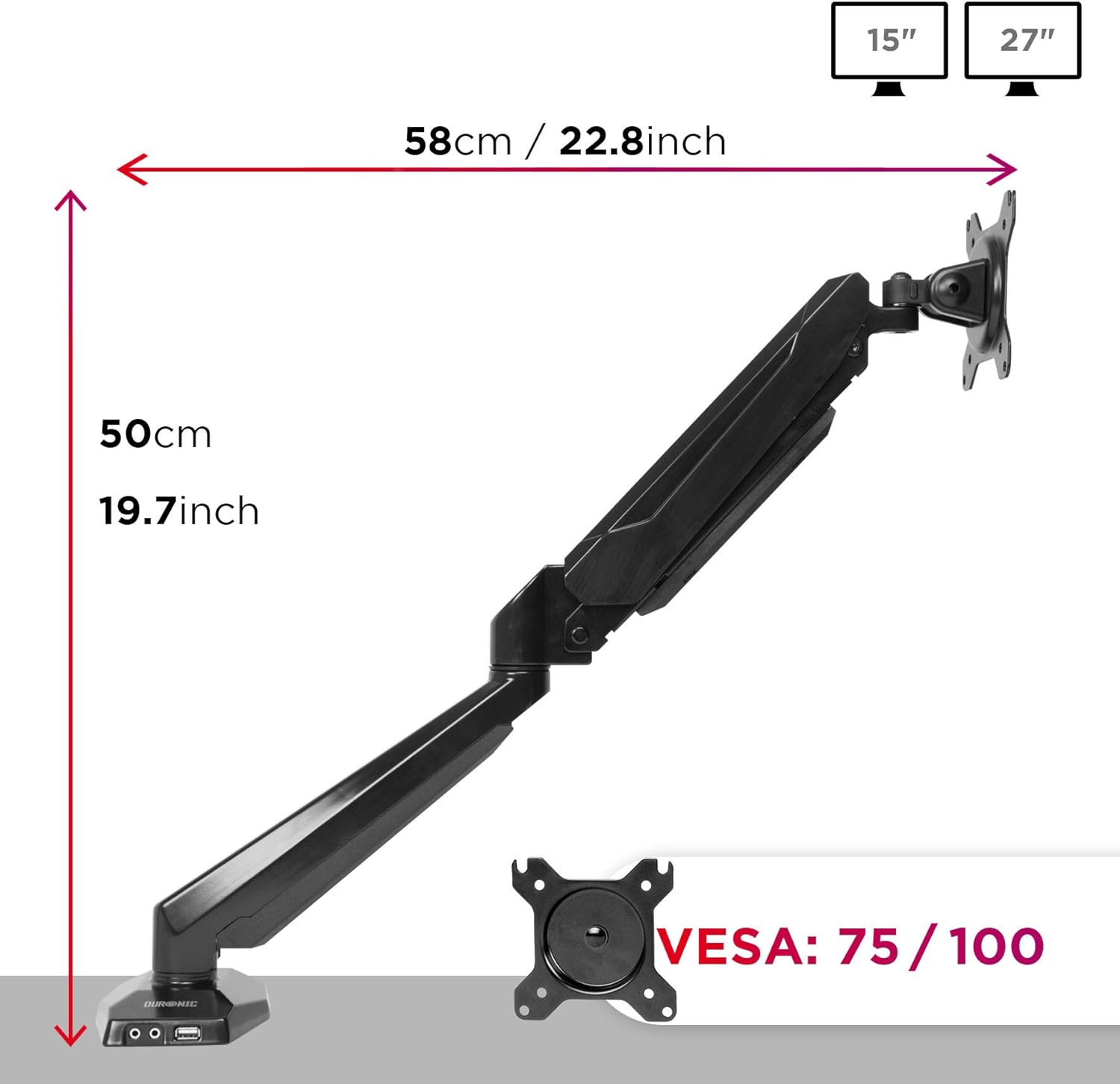
Figure 4.2: VESA plate and arm dimensions.
- Montaż monitora na ramieniu: Slide the monitor (with VESA plate attached) onto the arm's VESA head. Secure it with the locking mechanism or screws as per the specific design.
- Connect USB and Audio Cables: Connect the integrated USB and audio extension cables from the monitor arm base to the corresponding ports on your computer. This enables the convenient USB and audio ports on the arm's base.

Figure 4.3: Integrated USB and audio ports.
- Regulacja napięcia sprężyny gazowej: The gas spring comes pre-tensioned. You may need to adjust it to match your monitor's weight. Use the provided Allen key to turn the adjustment screw on the arm. Turn clockwise to increase tension for heavier monitors, and counter-clockwise to decrease tension for lighter monitors. Adjust until the monitor stays in position when moved.
5. Obsługa i regulacje
The Duronic DMUSB5X1 offers a wide range of adjustments for optimal viewing:
- Regulacja wysokości: The gas spring arm allows for smooth vertical movement. Gently push or pull the monitor to the desired height.
- Przechylenie: The VESA head allows tilting the monitor -90° (downwards) to +85° (upwards) to reduce glare and improve viewkąty.
- Obracać: The arm can swivel 180° left or right at the pole and at the arm joints, allowing you to share your screen or adjust its position.
- Obrót: The VESA plate allows for 360° rotation, enabling you to switch between landscape and portrait orientations.
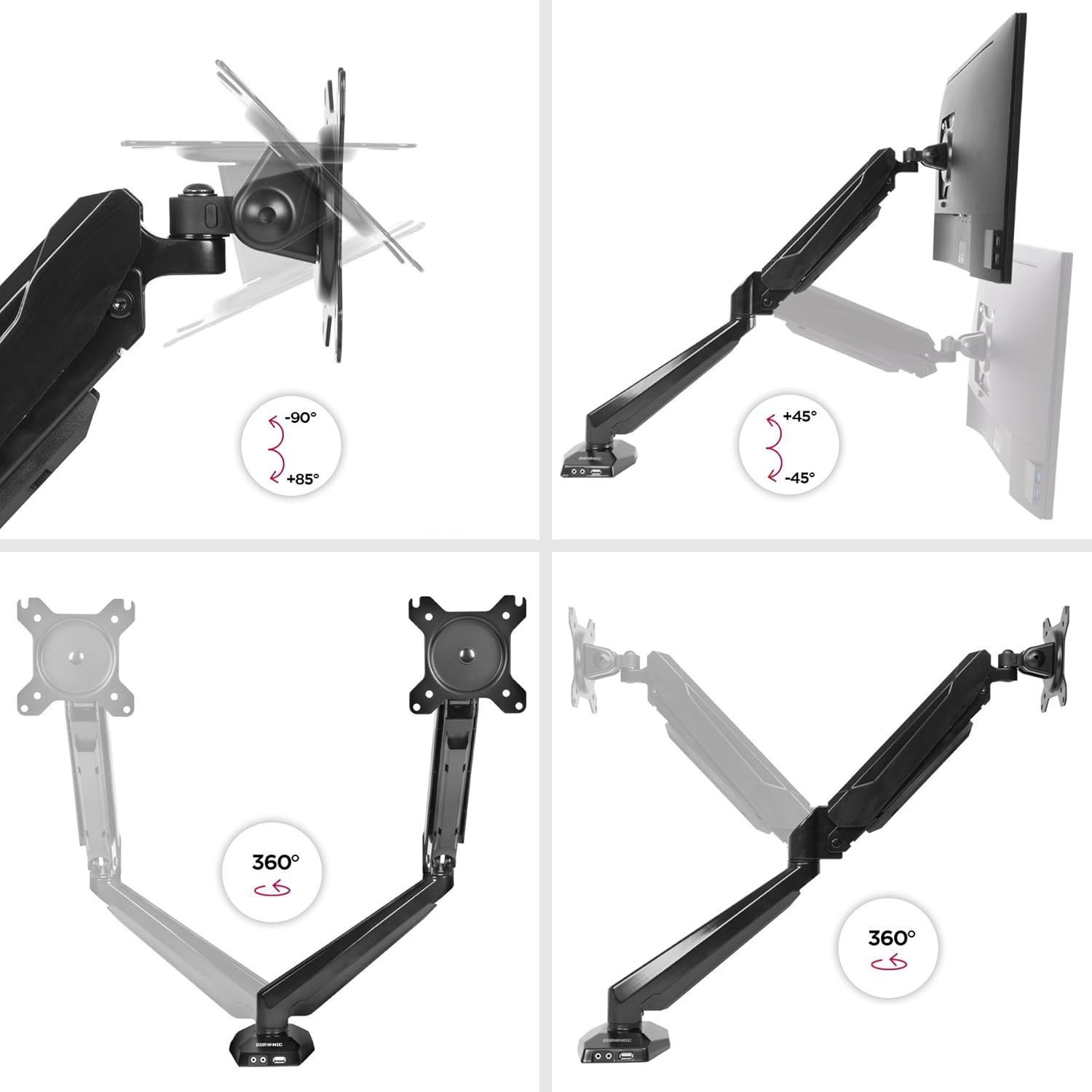
Figure 5.1: Monitor arm adjustment ranges.
- Integrated USB and Audio Ports: Use the two USB 2.0 ports for connecting peripherals like keyboards, mice, or USB drives. The headphone and microphone jacks provide convenient access for audio devices.
6. Konserwacja
- Czyszczenie: Przetrzyj ramię monitora miękką ściereczką.amp szmatką. Unikaj środków czyszczących o działaniu ściernym i rozpuszczalników, które mogą uszkodzić wykończenie.
- Kontrole okresowe: Regularnie sprawdzaj wszystkie śruby i połączenia, aby upewnić się, że są dobrze dokręcone i zabezpieczone. W razie potrzeby dokręć je ponownie.
- Regulacja sprężyny gazowej: If your monitor's weight changes, or if the arm no longer holds its position correctly, re-adjust the gas spring tension as described in the setup section.
7. Rozwiązywanie Problemów
| Problem | Możliwa przyczyna | Rozwiązanie |
|---|---|---|
| Monitor does not stay in desired position (sags or springs up). | Incorrect gas spring tension. | Adjust the gas spring tension using the provided Allen key. Turn clockwise for heavier monitors, counter-clockwise for lighter monitors. |
| Monitor cannot be attached to the VESA plate. | Monitor VESA pattern is not compatible (not 75x75mm or 100x100mm). | Verify your monitor's VESA compatibility. An adapter may be required for non-standard patterns. |
| USB or audio ports on the arm base are not working. | Extension cables are not properly connected to the computer. | Ensure the USB and audio extension cables from the monitor arm base are securely plugged into the corresponding ports on your computer. |
| Arm feels loose or unstable. | Biurkoamp is not tightened sufficiently or desk surface is unstable. | Ponownie dokręć biurkoamp. Ensure the desk surface is stable and within the recommended thickness. |
8. Specyfikacje
- Model: DMUSB5X1
- Marka: Duronic
- Tworzywo: Aluminium
- Monitor Size Compatibility: 15-27 cali (38-68 cm)
- Nośność: Up to 8 kg (17.6 lbs) per arm
- Zgodność z VESA: 75x75mm, 100x100mm
- Dostosowania:
- Pochylenie: od -90 ° do + 85 °
- Obrót: 180°
- Obrót: 360°
- Biurko Clamp Grubość: Do 68 mm
- Zintegrowane porty: 2 x USB 2.0, 1 x Headphone Jack, 1 x Microphone Jack
9. Gwarancja i wsparcie
Informacje o gwarancji: For detailed warranty terms and conditions, please refer to the manufacturer's official webwitryny lub karty gwarancyjnej dołączonej do opakowania produktu.
Obsługa klienta: If you encounter any issues or have questions regarding your Duronic DMUSB5X1 monitor arm, please visit the official Duronic website for support resources, FAQs, and contact information for their customer service team.