
VIGORWORK AF1313
VIGORWORK 1 Din Car Stereo Bluetooth Car Audio MP3 Recorder User Manual
Model: AF1313
Wstęp
Welcome to your new VIGORWORK 1 Din Car Stereo. This manual provides detailed instructions for the installation, operation, and maintenance of your car audio system. Please read it thoroughly before use to ensure proper functionality and safety.
Informacje dotyczące bezpieczeństwa
- Ensure proper installation by a qualified professional to prevent electrical damage or injury.
- Nie należy obsługiwać urządzenia w sposób rozpraszający uwagę kierowcy.
- Unikaj wystawiania urządzenia na działanie ekstremalnych temperatur, bezpośredniego światła słonecznego i wilgoci.
- Disconnect the car battery before installation or maintenance.
- Używaj tylko określonej objętościtage (12V DC) for operation.
Zawartość opakowania
Przesyłka powinna zawierać następujące elementy:
- 1x VIGORWORK 1 Din Car Stereo Unit (Model AF1313)
- 1x Pilot zdalnego sterowania
- 1x Power Cable (ISO Connector)
- 1x Instrukcja obsługi (angielski)
- 2x Fixed Iron Pieces (Installation Keys)

Image: Display of product accessories, including the car stereo unit, remote control, power cables, and installation keys.
Konfiguracja i instalacja
This section outlines the general steps for installing your car stereo. Professional installation is recommended to ensure correct wiring and prevent damage.
Schemat okablowania
Refer to the wiring diagram located on the top of the unit or in the included manual for correct connections. Ensure all wires are connected to their corresponding terminals (power, ground, speakers, antenna).

Obraz: Tył view of the car stereo unit with the wiring diagram label visible.
Instalacja fizyczna
- Upewnij się, że zapłon pojazdu jest wyłączony i odłącz zacisk ujemny akumulatora samochodowego.
- Wyjmij istniejące radio samochodowe z deski rozdzielczej.
- Connect the wiring harness from the new stereo to the vehicle's wiring. Ensure all connections are secure and correctly matched (power, ground, speakers, antenna).
- Slide the new stereo unit into the dashboard opening until it clicks into place. Use the provided fixed iron pieces if necessary to secure it.
- Podłącz ponownie akumulator samochodowy.
- Turn on the ignition and test the stereo's functions.
Instrukcja obsługi
Podstawowe sterowanie
The front panel features a rotary electronic volume control, mode button, band button, and various playback controls for easy access to functions.

Image: Front panel of the car stereo, showing the main controls and display.
Włączanie/wyłączanie zasilania
- Press the power button (often integrated with the volume knob) to turn the unit on or off.
- The clock display will be shown when the unit is powered off.
Kontrola głośności
- Rotate the volume knob clockwise to increase volume, and counter-clockwise to decrease.
Wybór trybu
- Press the "MODE" button to cycle through available audio sources: FM Radio, Bluetooth, USB, SD, and AUX.
Obsługa radia FM
- Press the "BAND" button to select between FM1, FM2, or FM3 bands.
- Press the "AMS" button for automatic station search and storage.
- Use the seek buttons (e.g., >>| or |<<) to manually tune or scan for stations.
- The unit supports storing up to 18 preset stations.
Image: The car stereo displaying an FM radio frequency.
Łączność Bluetooth
This unit supports Bluetooth for hands-free calling and audio streaming from compatible devices.
- Upewnij się, że Bluetooth jest włączony w Twoim urządzeniu mobilnym.
- Select "BT" mode on the car stereo. The display will show "BT PAIRING" or a similar indicator.
- Szukaj available devices on your phone and select "CAR BT" or "VIGORWORK" (or similar name).
- Once successfully paired, you can make/receive calls and stream music wirelessly.

Image: Visual representation of Bluetooth connectivity for hands-free calls and music playback.
Odtwarzanie z USB/karty SD
Insert a USB drive or SD card into the respective slot. The unit will automatically switch to USB/SD mode and begin playback of compatible audio files (MP3, WMA, WAV).
- Supports pause, preview, repeat, random play, and 10 tracks up/down selections.
- Supports folder playback function.

Image: Illustration of the SD card function for playing music files.
Wejście AUX
Connect external audio devices (e.g., smartphone, MP3 player) to the front AUX input using a 3.5mm audio cable. Select "AUX" mode on the stereo to play audio from the connected device.

Image: Visual guide for using the AUX input to connect external audio devices.
Funkcja ładowania
The USB port can provide 5V charging for mobile devices. Please note that this is not a professional charger and may not support all devices or fast charging capabilities.

Image: Illustration of the USB charging function for mobile phones.
Funkcja korektora (EQ).
Press the "EQ" button to cycle through preset equalizer modes such as Jazz, Rock, Pop, and Classical. You can also adjust bass, treble, left/right balance, and front/back fade settings to customize your audio experience.
Zdalne sterowanie
The included remote control allows for convenient operation of various functions from a distance, including power, volume, mode selection, and track control.
Image: The car stereo unit displayed alongside its remote control.
Konserwacja
- Clean the front panel with a soft, dry cloth. Do not use abrasive cleaners, solvents, or harsh chemicals, as these can damage the surface.
- Keep USB and SD card slots free of dust and debris to ensure proper connection and functionality.
- Zapewnij odpowiednią wentylację wokół urządzenia, aby zapobiec przegrzaniu.
Rozwiązywanie problemów
If you encounter any issues with your car stereo, please refer to the following table for common problems and their solutions.
| Problem | Możliwa przyczyna | Rozwiązanie |
|---|---|---|
| Brak zasilania | Nieprawidłowe okablowanie; Przepalony bezpiecznik; Niski poziom naładowania akumulatora pojazdu | Check wiring connections; Replace fuse; Charge/check car battery |
| Brak dźwięku | Głośność zbyt niska; Wyciszenie włączone; Nieprawidłowe okablowanie głośników | Zwiększ głośność; Wyłącz wyciszenie; Sprawdź połączenia głośników |
| Słaby odbiór FM | Antena nie jest podłączona; obszar o słabym sygnale | Ensure antenna is connected; Try a different location; Consider an external antenna booster |
| Brak połączenia Bluetooth | Bluetooth not enabled on device; Incorrect pairing mode; Device too far | Enable Bluetooth on phone; Ensure stereo is in BT pairing mode; Move device closer |
| USB/SD Not Playing | Nieobsługiwane file format; uszkodzony files; USB/SD card faulty | Zapewnić files are MP3/WMA/WAV; Reformat/replace USB/SD card; Try a different card |
| Pilot nie działa | Battery depleted; Obstruction; Remote not pointed at sensor | Replace battery; Remove obstructions; Point remote directly at unit |
Specyfikacje
| Marka | VIGORWORK |
| Model | AF1313 |
| Technologia tunera | FM |
| Kompatybilne urządzenia | Głośnik |
| Cechy specjalne | Equalizer, Hands-Free Calling |
| Tryb wyjścia audio | Stereofoniczny |
| Konfiguracja kanału dźwięku przestrzennego głośnika | 2 |
| Moc wyjściowatage | 25 watów |
| Typ złącza | Bluetooth, gniazdo 3.5 mm |
| Format mediów | WAV, WMA |
| Wymiary produktu | 12.5 x 17.8 x 5 cm; 400 g |
| ASIN | B07193ZG75 |
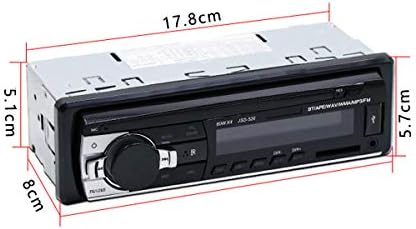
Image: Diagram showing the physical dimensions of the car stereo unit.
Gwarancja i wsparcie
This VIGORWORK product is covered by a standard manufacturer's warranty. For specific warranty details, please refer to the documentation included with your purchase or contact VIGORWORK customer support.
For technical assistance, troubleshooting, or further inquiries, please visit the VIGORWORK official webodwiedź witrynę lub skontaktuj się z działem obsługi klienta, korzystając z danych kontaktowych zamieszczonych wraz z produktem.
Ask a question about this manual
Ask about setup, troubleshooting, compatibility, parts, safety, or missing instructions. Manuals+ will review the question and use this page’s manual context to help answer it.