
1. Wprowadzenie
Dziękujemy za zakupasing the iHome IB90 Bluetooth Headphones. These headphones are designed to provide rich, detailed sound with an enhanced bass response, offering a comfortable listening experience with wireless freedom and extended battery life. This manual will guide you through the setup, operation, and maintenance of your new headphones.
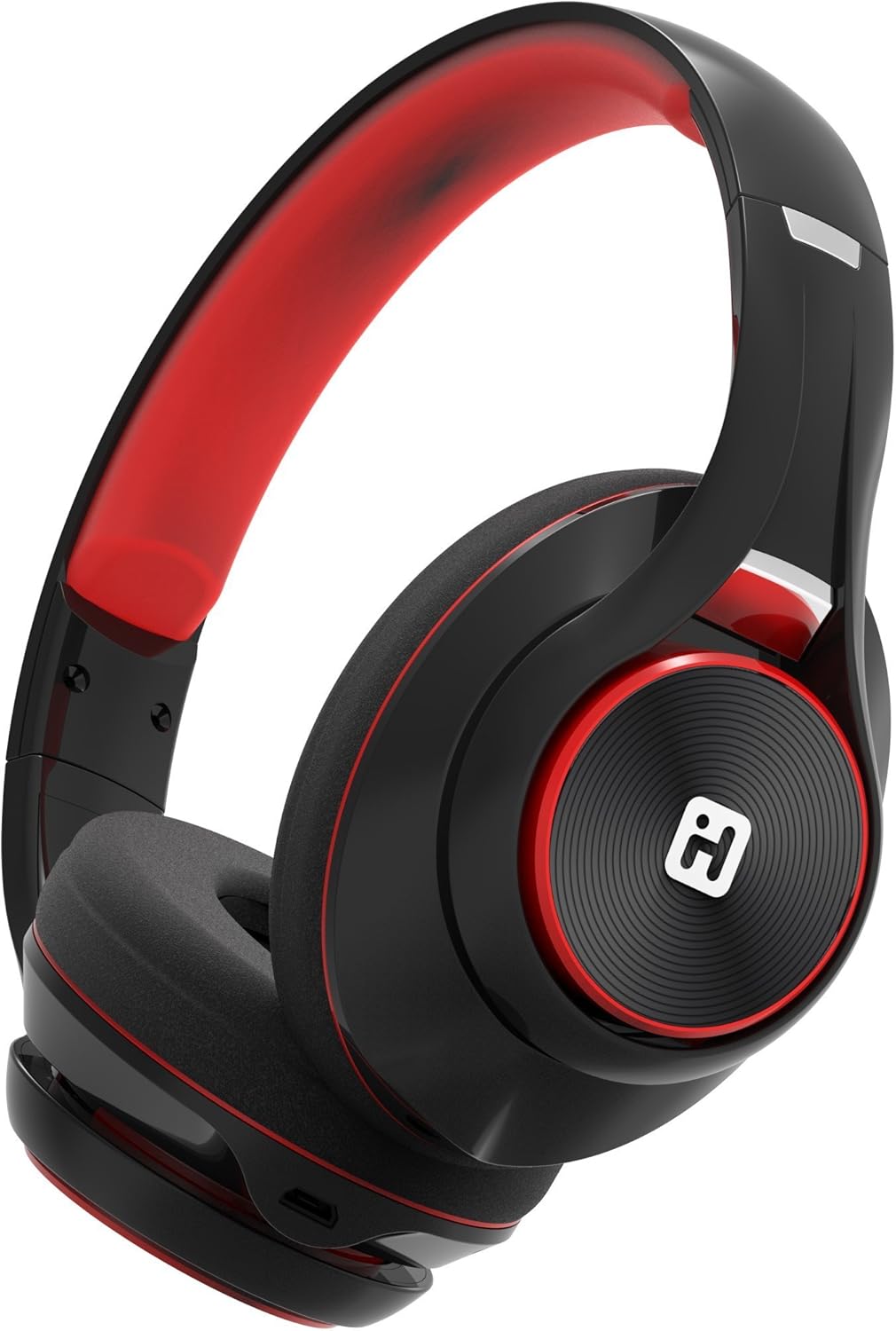
Image: iHome IB90 Bluetooth Headphones, featuring a comfortable over-ear design in black and red.
2. Zawartość opakowania
- iHome IB90 Bluetooth Headphones
- Audio Cable (for wired mode)
- Kabel ładujący USB (nie jest wymieniony wprost, ale sugeruje się jego używanie z akumulatorem)
3. Konfiguracja
3.1 Ładowanie słuchawek
Before initial use, fully charge your headphones. The extra-long life rechargeable battery provides up to 46 hours of continuous use on a single charge. A 10-minute charge can provide 1 hour of play when the battery is low.
- Podłącz dołączony kabel ładujący USB do portu ładowania słuchawek.
- Podłącz drugi koniec kabla USB do zasilanego portu USB (np. w komputerze, zasilaczu sieciowym).
- Podczas ładowania kontrolka ładowania będzie się świecić, a po pełnym naładowaniu zgaśnie.
3.2 parowanie Bluetooth
Pair your iHome IB90 headphones with your Bluetooth-enabled device to enjoy wireless audio.
- Sprawdź, czy słuchawki są naładowane i wyłączone.
- Press and hold the Power/Bluetooth button on the headphones until the indicator light flashes, indicating pairing mode. Voice prompts will confirm Bluetooth connection status.
- Na swoim urządzeniu (smartfonie, tablecie, komputerze) przejdź do ustawień Bluetooth i włącz Bluetooth.
- Select "iHome IB90" (or similar model name) from the list of available devices.
- Once connected, a voice prompt will confirm successful pairing, and the indicator light will change.
3.3 Melody Voice Assistant Setup
The iHome IB90 headphones are compatible with the free Melody voice-powered personal music assistant app, allowing you to control music from services like Spotify and iHeartRadio using voice commands. The voice control button on the earcup also works with Siri and Google Assistant.
Image: Melody Personal Music Assistant app logo.
- Download the Melody app from your device's app store (App Store for iOS, Google Play for Android).
- Open the Melody app and follow the on-screen instructions to set up your account and link your preferred music streaming services.
- Ensure your headphones are paired with your device.
- Use the voice control button on the earcup to activate Melody or your device's native voice assistant (Siri/Google Assistant) and issue commands.
Video: This video demonstrates the features and functionality of the Melody voice-powered personal music assistant, highlighting its integration with iHome products for hands-free music control and access to various streaming platforms.
4. Obsługa słuchawek
4.1 On-Ear Remote Control
The earcup features convenient controls for managing your audio and calls:
- Odtwórz/Pauza: Press the designated button to play or pause audio.
- Wybór ścieżki: Use the track buttons to skip forward or backward.
- Regulacja głośności: Dostosuj głośność za pomocą przycisków głośności.
- Odbieranie/kończenie połączeń: The built-in echo-cancelling microphone allows for hands-free phone calls. Press the call button to answer or end a call.

Image: Close-up of the iHome IB90 headphone earcup, illustrating the location of control buttons.
4.2 Sterowanie głosowe
Activate your personal voice assistant (Melody, Siri, or Google Assistant) by pressing the dedicated voice control button on the earcup. You can then use voice commands to:
- Play specific songs, artists, albums, or playlists.
- Check weather, set reminders, and make phone calls (via Siri/Google Assistant).
- Access music from various streaming platforms (via Melody app).
4.3 Tryb przewodowy
The headphones can also be used in wired mode with the provided audio cable, ensuring you can continue listening even if the battery is depleted. Simply connect the audio cable to the headphone's audio input and your device's audio output.
5. Konserwacja
5.1 Czyszczenie
Aby utrzymać słuchawki w dobrym stanie:
- Wytrzyj nauszniki i pałąk miękką, suchą ściereczką.
- Unikaj stosowania środków czyszczących o działaniu ściernym, rozpuszczalników i silnych środków chemicznych.
- Nie zanurzaj słuchawek w wodzie, gdyż nie są one wodoodporne.
5.2 Przechowywanie
When not in use, store your headphones in a cool, dry place away from direct sunlight and extreme temperatures. The foldable design allows for compact storage and portability.
6. Rozwiązywanie Problemów
If you encounter issues with your iHome IB90 headphones, refer to the following common solutions:
- Brak zasilania: Upewnij się, że słuchawki są w pełni naładowane. Podłącz je do źródła zasilania za pomocą kabla USB.
- Nie można sparować przez Bluetooth: Make sure the headphones are in pairing mode (flashing indicator light). Turn off and on your device's Bluetooth, then try re-pairing. Ensure the headphones are not already connected to another device.
- Brak dźwięku lub niski poziom głośności: Check the volume levels on both the headphones and your connected device. Ensure the headphones are properly paired. If using wired mode, ensure the audio cable is securely connected.
- Mikrofon nie działa: Verify that the headphones are properly connected via Bluetooth. Check your device's audio input settings to ensure the headphone microphone is selected.
- Wyciek dźwięku: The iHome IB90 headphones feature passive noise isolation, not active noise cancellation (ANC). While they provide an immersive sound environment, they may not completely block out all external noise, and some sound may be audible to others at higher volumes.
7. Specyfikacje
| Funkcja | Szczegół |
|---|---|
| Marka | iDom |
| Numer modelu | IB90v2BRC |
| Umieszczenie ucha | Na ucho |
| Współczynnik kształtu | Na ucho |
| Kontrola hałasu | None (Passive Noise Isolation) |
| Technologia łączności | Bluetooth |
| Technologia bezprzewodowa | Bluetooth |
| Typ sterowania | Zdalne sterowanie |
| Wbudowane media | Słuchawki |
| Waga przedmiotu | 0.5 funtów |
| Materiał obudowy | Plastikowy |
| Konkretne zastosowania produktu | Podróż |
| Poziom wodoodporności | Nie jest wodoodporny |
8. Gwarancja i wsparcie
Aby uzyskać informacje dotyczące gwarancji i obsługi klienta, zapoznaj się z dokumentacją dołączoną do produktu lub odwiedź oficjalną stronę internetową iHome website. This manual does not contain specific warranty details.


