
Wstęp
Dziękujemy za zakupasing the EtoBesy Mini Portable Wireless Cube Speaker. This device combines Bluetooth audio streaming, TF card playback, AUX input, FM radio, and hands-free calling in a compact design with colorful LED lighting. Please read this manual carefully to ensure proper use and optimal performance.
Co jest w pudełku
- 1 x Wireless Bluetooth 4.0 Radio Speaker
- 1 x kabel audio
- 1 x kabel ładujący USB
- 1 x Instrukcja obsługi (ten dokument)
Produkt ponadview
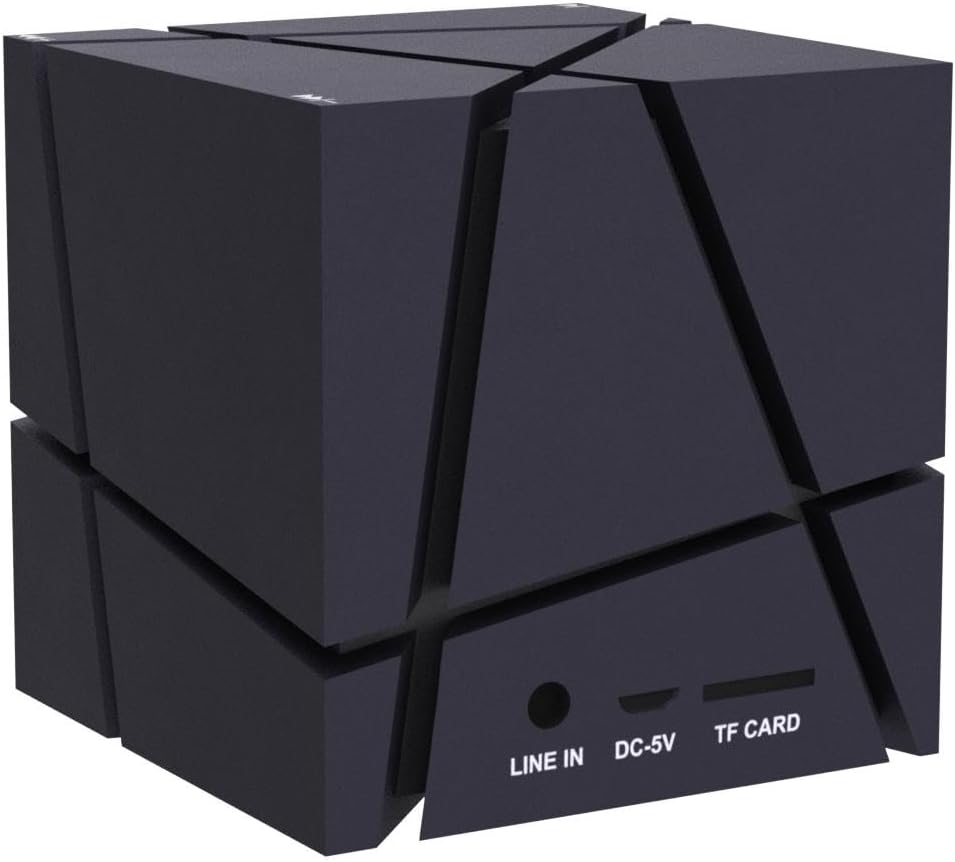
The EtoBesy Mini Portable Wireless Cube Speaker features a unique cube design with integrated controls and ports. Understanding these components is essential for operation.
Porty i połączenia
The speaker includes several ports for various connectivity options:
- WYRYSOWAĆ: 3.5mm audio input for connecting external devices via AUX cable.
- DC-5 V: Port micro USB do ładowania głośnika.
- KARTA TF: Slot for inserting a TF (Micro SD) memory card to play MP3 files bezpośrednio.
Przyciski sterujące
The speaker's control buttons are integrated into its design, specifically located on the feet of the device. These are pressure-sensitive buttons.
- Minus Button (-): Used to decrease volume or navigate tracks. Double-pressing this button turns off the LED lights.
- Plus Button (+): Used to increase volume or navigate tracks.
- Przycisk Odtwórz/Pauza: Controls media playback and answers/ends calls.

Organizować coś
Początkowe ładowanie
Before first use, fully charge the speaker. Connect the supplied USB charging cable to the DC-5V port on the speaker and the other end to a USB power source (e.g., computer USB port, USB wall adapter). The charging indicator light will show the charging status.
Włączanie/wyłączanie
Locate the power switch on the underside of the speaker (refer to the "Control Buttons" image). Slide the switch to the "ON" position to power on the speaker. Slide it to the "OFF" position to power off.
Instrukcja obsługi
Parowanie Bluetooth
- Ensure the speaker is powered on and in Bluetooth mode (it usually defaults to this mode upon power-on). A voice prompt or indicator light will confirm.
- Na swoim urządzeniu (smartfonie, tablecie, laptopie) włącz Bluetooth i wyszukaj dostępne urządzenia.
- Select "EtoBesy Speaker" or a similar name from the list of devices.
- Po sparowaniu głośnik poinformuje o pomyślnym nawiązaniu połączenia i będzie można rozpocząć bezprzewodowe odtwarzanie dźwięku.
The speaker supports Bluetooth 4.0 technology with a transmission distance of up to 10 meters (32.8 feet).

TF Micro SD Card Playback
To play music directly from a memory card:
- Insert a TF (Micro SD) card containing MP3 audio fileWłóż kartę TF do gniazda karty TF.
- The speaker will automatically detect the card and begin playing the audio files.
- Use the Plus (+) and Minus (-) buttons to skip tracks and the Play/Pause button to control playback.
Wejście AUX
W przypadku przewodowego połączenia audio:
- Connect one end of the supplied audio cable to the LINE IN port on the speaker.
- Connect the other end of the audio cable to the 3.5mm audio output jack of your external device.
- Głośnik automatycznie przełączy się na tryb AUX.
Radio FM
To use the built-in FM radio function:
- Upewnij się, że głośnik jest włączony.
- Press the Mode button (if available, or cycle through modes using the Play/Pause button if it has multiple functions) until you hear the FM radio.
- Use the Plus (+) and Minus (-) buttons to scan for radio stations.
Kolorowe światła LED
The speaker features dynamic colorful LED lights. To turn off the lights, press the Minus (-) button twice in quick succession.

Rozmowy bez użycia rąk
When connected via Bluetooth to your smartphone, the built-in microphone allows for hands-free phone calls. Press the Play/Pause button to answer or end a call.
Ładowanie
To charge the speaker, connect the provided USB charging cable to the DC-5V port on the speaker and to a standard USB power source. The charging indicator will illuminate during charging and turn off or change color when fully charged. A full charge typically takes a few hours.
Konserwacja
- Keep the speaker away from water and excessive moisture. The product is not waterproof.
- Czyść głośnik miękką, suchą ściereczką. Nie używaj środków czyszczących o właściwościach ściernych ani rozpuszczalników.
- Unikaj narażania głośnika na działanie ekstremalnych temperatur.
- Jeśli głośnik nie będzie używany przez dłuższy czas, należy przechowywać go w chłodnym, suchym miejscu i okresowo go ładować, aby zachować sprawność akumulatora.
Rozwiązywanie problemów
| Problem | Rozwiązanie |
|---|---|
| Głośnik nie włącza się. | Ensure the battery is charged. Connect the speaker to a power source using the USB charging cable. Verify the power switch is in the "ON" position. |
| Nie można sparować przez Bluetooth. | Make sure the speaker is in Bluetooth pairing mode. Ensure Bluetooth is enabled on your device and it is within 10 meters of the speaker. Try restarting both the speaker and your device. |
| Brak dźwięku lub niski poziom głośności. | Check the volume levels on both the speaker and your connected device. Ensure the correct input mode (Bluetooth, TF, AUX) is selected. |
| LED lights are not working or stuck. | Double-press the Minus (-) button to cycle the lights or turn them off and on again. |
| Speaker "jumps" due to bass. | Remove any plastic film from the feet of the speaker to ensure stable placement. |
Specyfikacje
| Marka | EtoBesy |
| Nazwa modelu | Mini Portable Wireless Cube Speaker |
| Numer modelu | B06XY917BF |
| Technologia łączności | Pomocniczy, Bluetooth, USB |
| Technologia komunikacji bezprzewodowej | Bluetooth 4.0 |
| Zasięg Bluetooth | Do 10 metrów (32.8 stóp) |
| Typ głośnika | Stereo 3D |
| Funkcja specjalna | Colorful LED Light, Hands-free Calling, FM Radio, TF Card Playback |
| Źródło zasilania | Battery Powered (Built-in lithium battery) |
| Pojemność baterii | 500 mlnamp Godziny |
| Wejście Voltage | 5 wolty |
| Maksymalna moc wyjściowa głośnika | 3 watów |
| Odpowiedź częstotliwościowa | 150 kHz |
| Wymiary produktu | 2.75" gł. x 2.75" szer. x 2.75" wys. |
| Waga przedmiotu | 8.5 uncji |
| jest wodoodporny | NIE |

Gwarancja i wsparcie
This product comes with a limited warranty. For warranty claims or technical support, please refer to the contact information provided at the point of purchase or visit the official EtoBesy webstrona.