
1. Koniecview
The Tascam CD-A580 is a versatile rackmount media player and recorder designed for professional and installation applications. It combines a cassette recorder, CD player, and USB flash drive recorder/player into a single unit, offering multiple playback and recording options.
Główne cechy obejmują:
- Playback of various audio formats from cassette, CD, and USB flash media.
- Recording from cassette to USB to digitally archive cassette collections.
- Recording from CDs to cassettes.
- Recording audio from CDs and LINE inputs to USB flash drives in MP3 format.
- A single-direction logic-based transport control for stability and longevity.
- Pitch adjustment of up to ±10% during cassette tape playback.
- Support for CD-DA, CD-R, CD-RW, and data CDs containing MP3 files.
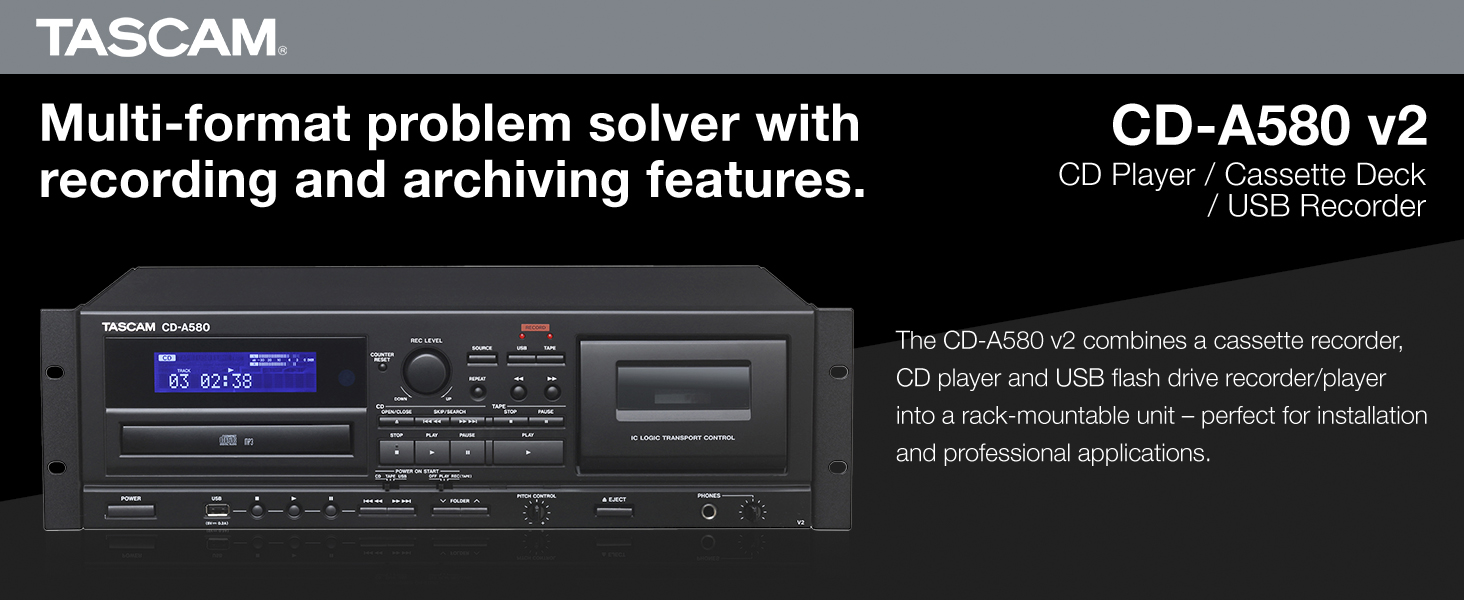
Rycina 1: Przód view of the Tascam CD-A580 unit, highlighting its multi-format capabilities.
Video 1: A product summary video demonstrating the Tascam CD-A580's features and functions.
2. Konfiguracja
2.1 Rozpakowanie
Carefully remove the CD-A580 unit from its packaging. Ensure all components, including the player/recorder unit, power cord, and remote control, are present. Retain the packaging for future transport or storage.
Video 2: This video provides a visual guide to what is included inside the box of the Tascam CD-A580.
2.2 Montaż w stojaku
The CD-A580 is designed for standard 19-inch rack mounting. Secure the unit using appropriate rack screws (not included) through the mounting holes on the side flanges. Ensure adequate ventilation around the unit to prevent overheating.
2.3 Połączenia
Connect the CD-A580 to your audio system using the appropriate input and output jacks on the rear panel. This typically involves RCA audio cables for line input/output. Connect the power cord to a suitable AC outlet.

Figure 2: Rear panel of the Tascam CD-A580, illustrating the various audio input and output connections.
3. Instrukcja obsługi
3.1 Włączanie/wyłączanie zasilania
Naciśnij MOC button on the front panel to turn the unit on or off. The display will illuminate upon power-up.
3.2 Odtwarzanie płyt CD
Aby odtworzyć płytę CD:
- Naciśnij OTWÓRZ/ZAMKNIJ przycisk otwierający szufladę na płytę CD.
- Place a CD (CD-DA, CD-R, CD-RW, or data CD with MP3 files) na tackę etykietą do góry.
- Naciskać OTWÓRZ/ZAMKNIJ ponownie, aby zamknąć tackę. Urządzenie odczyta płytę.
- Naciśnij GRAĆ przycisk, aby rozpocząć odtwarzanie.
- Użyj POMINĄĆ przyciski (◀◀ / ▶▶) do poruszania się pomiędzy utworami.
- Naciskać ZATRZYMYWAĆ SIĘ to halt playback.
3.3 Odtwarzanie kaset
Aby odtworzyć kasetę magnetofonową:
- Naciśnij WYRZUCAĆ przycisk, aby otworzyć drzwiczki kasety.
- Insert a cassette tape into the compartment.
- Zamknij drzwiczki kasety.
- Naciśnij GRAĆ button for the cassette deck.
- Dostosuj KONTROLA POCHYLENIA knob to fine-tune the playback speed (up to ±10%).
- Użyj PRZEWIJAĆ (◀◀) i SZYBKO PRZEWIJAJ (▶▶) buttons to quickly move through the tape.
- Naciskać ZATRZYMYWAĆ SIĘ to halt playback.
3.4 Odtwarzanie plików MP3 przez USB
Aby odtwarzać MP3 filez dysku flash USB:
- Włóż dysk flash USB do portu USB na panelu przednim.
- Select the USB source using the ŹRÓDŁO przycisk.
- Use the navigation buttons to select folders and MP3 files.
- Naciśnij GRAĆ przycisk, aby rozpocząć odtwarzanie.
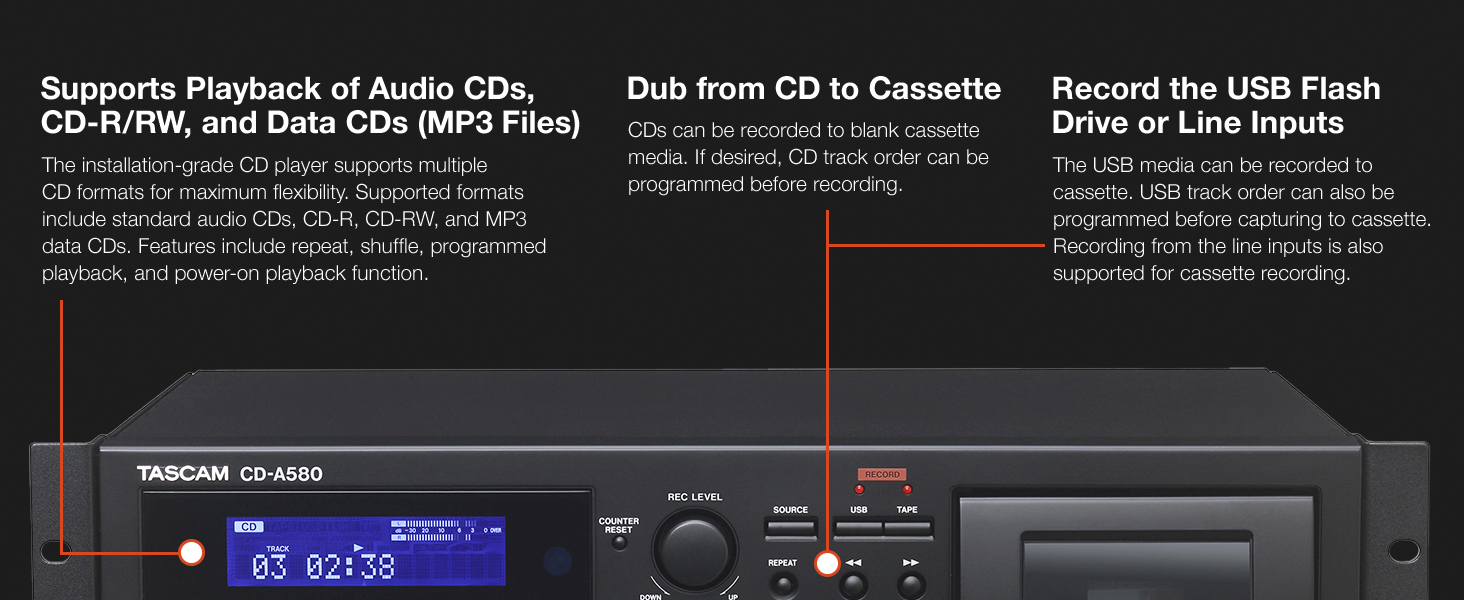
Figure 3: Front panel details of the CD-A580, illustrating controls for CD, USB, and cassette playback.
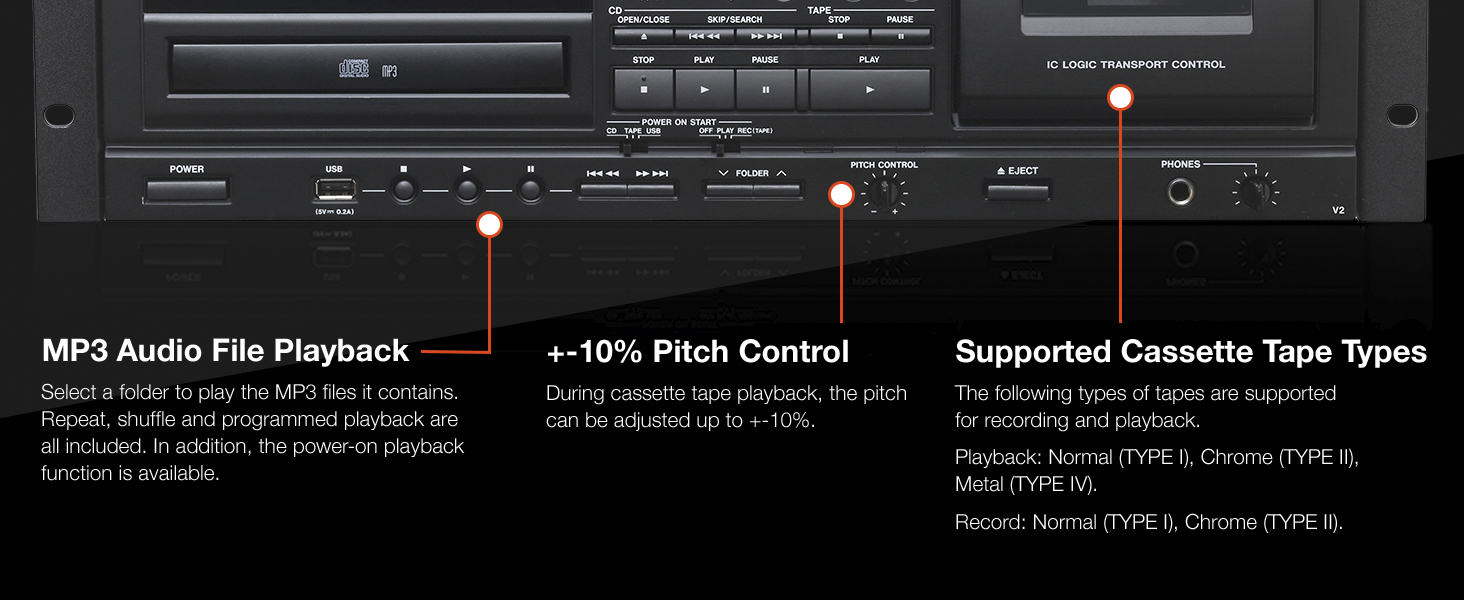
Figure 4: Close-up of the CD-A580's pitch control for cassette playback and information on supported tape types.
3.5 Funkcje nagrywania
The CD-A580 offers several recording options:
- Cassette to USB Recording: Insert a cassette and a USB flash drive. Select the cassette as the source and USB as the recording destination. Press NAGRYWAĆ on the USB section to begin digitizing your cassette collection into MP3 files.
- CD to Cassette Recording: Insert a CD and a blank cassette. Select the CD as the source and cassette as the recording destination. You can program the CD track order before recording. Press NAGRYWAĆ on the cassette section.
- CD/LINE Input to USB Recording: Audio from CDs or external devices connected to the LINE inputs can be recorded directly to a USB flash drive in MP3 format. CDs automatically create track-specific MP3 files, while tape and LINE input recordings can be manually divided.

Figure 5: Section of the CD-A580 front panel detailing the controls for dubbing audio from cassette to USB media.
3.6 Pilot zdalnego sterowania (RC-1329)
The included RC-1329 wireless remote control provides convenient operation of all functions from a distance. Ensure batteries are correctly installed. Refer to the remote control diagram for button layout and functions.

Figure 6: The RC-1329 wireless remote control for the Tascam CD-A580.
Video 3: A closer look at the Tascam CD-A580, demonstrating various operational aspects and features.
4. Konserwacja
4.1 Czyszczenie
Regularly wipe the exterior of the unit with a soft, dry cloth. For stubborn dirt, use a slightly damp cloth and then dry thoroughly. Avoid using abrasive cleaners, solvents, or chemical sprays, as these can damage the finish.
For the CD tray and cassette head, use specialized cleaning kits designed for audio equipment. Refer to the cleaning kit instructions for proper use.
4.2 Przechowywanie
When not in use for extended periods, store the unit in a cool, dry place away from direct sunlight and extreme temperatures. It is recommended to remove any discs or cassettes from the trays/compartments before storage.
5. Rozwiązywanie Problemów
If you encounter issues with your CD-A580, refer to the following common problems and solutions:
| Problem | Możliwa przyczyna | Rozwiązanie |
|---|---|---|
| Urządzenie nie włącza się. | Przewód zasilający nie jest podłączony, gniazdko elektryczne jest uszkodzone. | Check power cord connection, try a different outlet. |
| "NO DISC" error on CD player. | Disc inserted incorrectly, disc is dirty/scratched, disc format not supported. | Reinsert disc correctly, clean disc, try a different disc. |
| Kaseta magnetofonowa nie odtwarza/nie nagrywa. | Tape inserted incorrectly, tape is damaged, recording tabs removed. | Reinsert tape, try a different tape, ensure recording tabs are present for recording. |
| USB recording not working. | USB drive not formatted correctly, insufficient space, USB drive not recognized. | Ensure USB is FAT32 formatted, check available space, try a different USB drive. |
| Brak wyjścia audio. | Incorrect cable connections, volume too low, wrong source selected. | Verify all audio cable connections, increase volume, select correct source. |
If the problem persists after attempting these solutions, please contact Tascam customer support.
6. Specyfikacje
| Funkcja | Szczegół |
|---|---|
| Waga przedmiotu | 15.7 funta |
| Wymiary produktu | 22 x 10 x 15 cala |
| Numer modelu przedmiotu | CDA580 |
| Data pierwszej dostępności | 23 marca 2017 r. |
| Nazwa koloru | Czarny |
| Kompatybilne urządzenia | Głośnik, słuchawki |
| Typ złącza | USB |
| Typ baterii | Manganese (for remote control) |
| Źródło zasilania | Elektryczny przewodowy |
| Cotage | 13 watów |
| Marka | Tascam |
| Nazwa modelu | CD-A580 |
| Technologia łączności | USB |
| Funkcja specjalna | CD-R/RW Compatible |
| Temperatura pracy | 5 do 35 stopni Celsjusza |
7. Gwarancja i wsparcie
7.1 Informacje o gwarancji
This product is covered by a manufacturer's warranty. Please refer to the warranty card included with your product or visit the official Tascam webSzczegółowe warunki gwarancji znajdziesz na stronie. Zachowaj dowód zakupu na wypadek roszczeń gwarancyjnych.
7.2 Obsługa klienta
For technical assistance, troubleshooting, or service inquiries, please contact Tascam customer support. You can find contact information and additional resources on the official Tascam webstrona: www.tascam.com.