
1. Wprowadzenie
Dziękujemy za zakupasing the DEPSTECH WiFi Endoscope. This device is designed for visual inspection in hard-to-reach areas, offering high-definition imaging capabilities via a wireless connection to your smartphone or tablet. Please read this manual thoroughly before use to ensure proper operation and to maximize the lifespan of your device.
2. Informacje dotyczące bezpieczeństwa
Należy przestrzegać następujących środków ostrożności:
- Do not use this device for medical purposes or personal examination.
- Trzymaj urządzenie poza zasięgiem dzieci.
- Do not expose the device to extreme temperatures or corrosive liquids.
- Ensure the camera probe is clean and dry before and after each use, especially if used in wet environments. The camera probe is water repellent, but the main control unit is not.
- Unikaj rozmontowywania urządzenia, gdyż spowoduje to utratę gwarancji i może spowodować uszkodzenia.
- Należy używać wyłącznie dołączonego kabla ładującego lub certyfikowanego odpowiednika.
3. Zawartość opakowania
Sprawdź, czy w przesyłce znajdują się wszystkie elementy:
- DEPSTECH WiFi Endoscope (Control Unit with Camera Cable)
- Kabel ładujący USB
- Accessory Set (Hook, Magnet, Mirror)
- Instrukcja obsługi
4. Koniec produktuview
Familiarize yourself with the components of your DEPSTECH WiFi Endoscope.
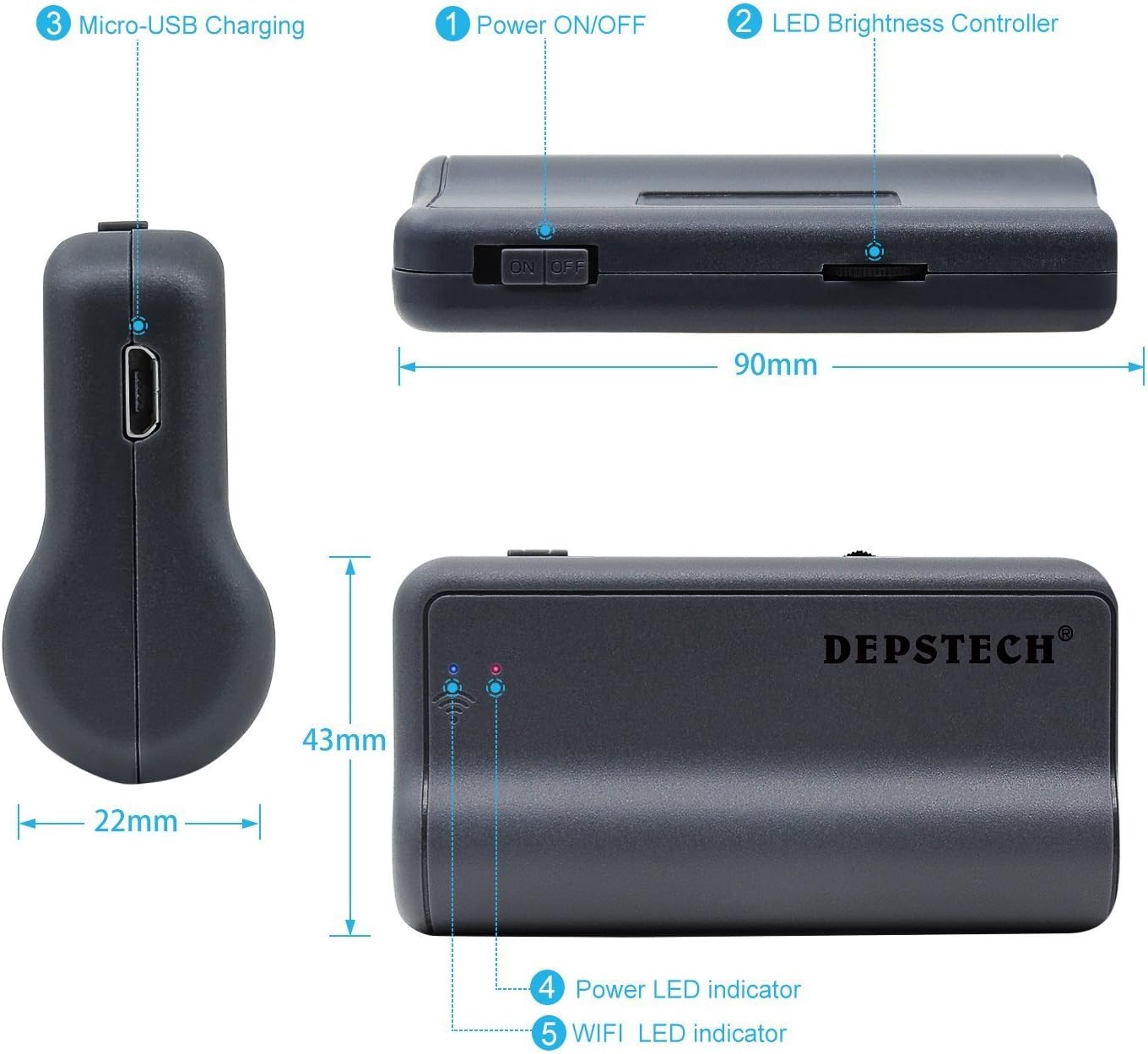
Obraz: Diagram of the DEPSTECH WiFi Endoscope control unit, showing Micro-USB Charging port, Power ON/OFF switch, LED Brightness Controller, Power LED indicator, and WiFi LED indicator. Dimensions are also indicated: 90mm length, 43mm width, and 22mm for the car charger adapter.
- Włącznik/wyłącznik zasilania: Włącza lub wyłącza urządzenie.
- LED Brightness Controller: Adjusts the intensity of the camera's LED lights.
- Port ładowania micro-USB: Do ładowania wewnętrznego akumulatora.
- Wskaźnik LED zasilania: Pokazuje stan zasilania.
- WiFi LED Indicator: Shows the WiFi connection status.

Obraz: Z bliska view of the endoscope camera attachments: Magnet, Hook, and Mirror. A note advises to peel off the protective film from the mirror before use.
- Magnes: Useful for retrieving small metallic objects from inaccessible areas.
- Hak: Can be used to retrieve small non-metallic items or to maneuver objects.
- Lustro: Zapewnia stronę view, allowing inspection of areas at a 90-degree angle to the camera. Remember to remove the protective film before use.
5. Przewodnik konfiguracji
5.1. Ładowanie urządzenia
Before first use, fully charge the endoscope's control unit. Connect the provided USB charging cable to the Micro-USB port (3) on the control unit and to a standard USB power adapter (not included) or computer USB port. The Power LED indicator (4) will show charging status.

Obraz: Wewnętrzny view of the DEPSTECH endoscope control unit showing the high-capacity lithium battery. The image indicates 3-4 hours of working time and an 1800mAh battery capacity.
5.2. Pobieranie aplikacji
Szukaj i pobierz „DEPSTECH-View" or "DEPSTECH" app from the Apple App Store (for iOS devices) or Google Play Store (for Android devices). Alternatively, scan the QR code provided in the quick start guide or on the product packaging.
5.3. Connecting via Wi-Fi
- Turn on the DEPSTECH WiFi Endoscope by sliding the Power ON/OFF switch (1) to the "ON" position. The Power LED indicator (4) will light up.
- Wait for the WiFi LED indicator (5) to start blinking, indicating the device is broadcasting its Wi-Fi signal.
- Na smartfonie lub tablecie przejdź do ustawień Wi-Fi.
- Locate and select the Wi-Fi network named "DEPSTECH_XXXX" (where XXXX is a series of characters).
- Enter the default password, usually "12345678".
- Once connected, open the "DEPSTECH-View" app. The live video feed from the endoscope camera should appear.
- Notatka: If your phone automatically switches to cellular data because the endoscope's Wi-Fi does not provide internet, you may need to temporarily disable cellular data in your phone's settings to maintain the connection to the endoscope.
6. Instrukcja obsługi
6.1. Regulacja jasności diody LED
Use the LED Brightness Controller (2) on the control unit to adjust the intensity of the LED lights around the camera lens. This helps illuminate dark inspection areas and can improve image clarity by reducing glare.

Obraz: Illustration of the endoscope camera head with 6 circled blue tempered LED lights. The image compares the effect of DEPSTECH's blue LED technology versus standard white light, showing reduced image over-exposure and improved color temperature in dark environments.
6.2. Korzystanie z załączników
The included hook, magnet, and mirror attachments can be screwed onto the tip of the camera probe for various applications. Ensure they are securely fastened before use.
6.3. Robienie zdjęć i nagrywanie filmów
Within the "DEPSTECH-View" app, you will find buttons to capture still images and record videos. These files will be saved directly to your connected smartphone or tablet's gallery.
6.4. Optymalny Viewing Odległość
The endoscope camera has a fixed focus. For the clearest images, position the camera approximately 1.2 to 3.9 inches (3 to 10 cm) from the object you are inspecting. Objects outside this range may appear blurry.

Obraz: Diagram illustrating the performance of the 2nd generation chip, showing an improvement from 10fps (first generation) to 30fps (second generation), indicating up to 200% faster capture for clearer and closer views.
6.5. Scenariusze mające zastosowanie
The DEPSTECH WiFi Endoscope is suitable for various inspection tasks, including:
- Kontrola pojazdu (silnik, układ wydechowy, podwozie)
- Plumbing inspection (pipes, drains)
- HVAC inspection (ducts, vents)
- Home inspection (walls, ceilings, behind appliances)

Obraz: Four panels showing different application scenarios for the endoscope: inspecting under a car, checking inside a wall, examining plumbing under a sink, and looking behind a washing machine.

Obraz: Comparison illustrating the semi-rigid cable of the DEPSTECH endoscope (yellow, labeled "flexible") versus a soft cable from "Other brands" (black, labeled "soft"). This highlights the improved maneuverability of the DEPSTECH cable.
7. Konserwacja
- Czyszczenie obiektywu aparatu: Gently wipe the camera lens with a soft, dry cloth. For stubborn dirt, use a small amount of lens cleaner on the cloth. Do not use abrasive materials or harsh chemicals.
- Czyszczenie kabla: The semi-rigid cable can be wiped clean with a damp szmatką. Przed schowaniem upewnij się, że jest całkowicie sucha.
- Składowanie: Store the endoscope and its accessories in a cool, dry place, away from direct sunlight and extreme temperatures. Keep it in its original packaging or a protective case to prevent damage.
- Pielęgnacja baterii: To prolong battery life, avoid fully discharging the battery frequently. If storing for an extended period, charge the device to approximately 50% every three months.
8. Rozwiązywanie Problemów
| Problem | Możliwa przyczyna | Rozwiązanie |
|---|---|---|
| No image on app / Wi-Fi connection fails. |
|
|
| Obraz jest rozmazany. |
|
|
| Device won't charge or turn on. |
|
|
| Aplikacja ulega awarii lub zawiesza się. |
|
|
9. Specyfikacje
| Funkcja | Szczegół |
|---|---|
| Marka | DEPSTECH |
| Model | B06XS8MYVL |
| Technologia łączności | Wi-Fi |
| Rozdzielczość przechwytywania wideo | 1080p |
| Typ czujnika | CMOS |
| Typ fokusu | Stały fokus |
| Optimal Focus Distance | 1.2 - 3.9 cala (3 - 10 cm) |
| Poziom wodoodporności | Water Repellent (camera probe) |
| File Format (Image) | Plik JPEG |
| File Format (wideo) | MP4 |
| Pojemność baterii | 1800mAh |
| Czas pracy | 3-4 godzin |
| Lampa błyskowa aparatu | Built-In LED (adjustable brightness) |
| Typ kabla | Półsztywny |
10. Gwarancja i pomoc techniczna
DEPSTECH products come with a standard manufacturer's warranty. For detailed warranty terms and conditions, please refer to the warranty card included in your package or visit the official DEPSTECH website. If you encounter any issues or have questions regarding your product, please contact DEPSTECH customer support:
- Webstrona: www.depstech.pl
- E-mail: Informacje kontaktowe znajdują się na oficjalnej stronie webwitryny lub opakowania produktu.
Please have your model number (B06XS8MYVL) and purchase date ready when contacting support.