
Wstęp
This manual provides detailed instructions for the setup, operation, and maintenance of your Intex Wi-Fi HD Camera, model IT-101. Please read this manual thoroughly before using the device to ensure proper functionality and safety.
Produkt ponadview
The Intex Wi-Fi HD Camera IT-101 is a compact security camera designed for monitoring. It features HD video resolution, night vision capabilities, and Wi-Fi connectivity for remote access.
Główne cechy:
- Rozdzielczość wideo HD: Captures video at 1280x720 pixels (720p) with a frame rate of 25 frames per second.
- Obiektyw szeroki View: Features a 77-degree lens view angle for broader coverage.
- Widzenie nocne: Equipped with Infrared LED illumination for clear night vision up to 10 meters.
- Obsługa kart SD: Obsługuje karty SD o pojemności do 64 GB do przechowywania danych lokalnych.
- Połączenie bezprzewodowe: Connects via Wi-Fi for remote monitoring through mobile or computer applications.
- Zgodność: Supports Android and iOS operating systems.
Zawartość opakowania:
- Intex Wi-Fi HD Camera IT-101
- Zasilacz (DC 5 V/1 A)
- Instrukcja obsługi (ten dokument)
- Akcesoria montażowe (jeśli są dołączone)
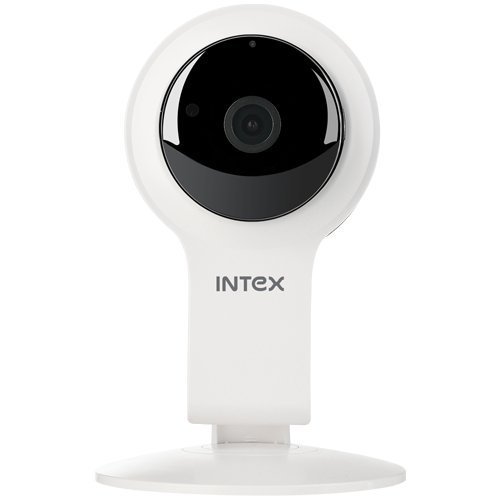
Rycina 1: Przód view of the Intex Wi-Fi HD Camera IT-101. This image shows the camera lens and the main body of the device.
Organizować coś
1. Włączanie kamery:
- Connect the provided DC 5V/1A power adapter to the camera's power input port.
- Podłącz zasilacz do standardowego gniazdka elektrycznego.
- The camera will power on, and an indicator light will illuminate (refer to the camera's physical indicators for specific light behavior).
2. Installing an SD Card (Optional):
To enable local video recording, an SD card (up to 64GB) can be installed.
- Locate the SD card slot on the camera (consult the camera's physical design for exact location).
- Gently insert the SD card into the slot with the contacts facing the correct direction until it clicks into place.
- To remove, press the SD card inward until it springs out.
3. Connecting to Wi-Fi and Mobile App:
The camera requires a mobile application for initial setup and remote viewing. The specific app name is not provided in the product details, please refer to the packaging or a quick start guide for the correct app to download from your device's app store (Android/iOS).
- Download and install the designated mobile application on your smartphone or tablet.
- Open the application and create an account or log in if you already have one.
- Follow the in-app instructions to add a new device. This typically involves scanning a QR code on the camera or manually entering its device ID.
- Połącz kamerę z domową siecią Wi-Fi za pomocą aplikacji. Upewnij się, że Twoja sieć Wi-Fi obsługuje częstotliwość 2.4 GHz, ponieważ sieci 5 GHz mogą nie być obsługiwane.
- Once connected, the camera's indicator light will change (e.g., solid blue), and you should see the live feed in the app.
Instrukcja obsługi
Na żywo View:
Access the live video feed from your camera through the mobile application. This allows real-time monitoring of the camera's view.
Nagranie:
- Nagrywanie ręczne: Most applications offer a manual record button to start and stop video recording directly to your phone or the installed SD card.
- Zaplanowane nagrywanie: Configure recording schedules within the app to automatically record at specific times.
- Nagrywanie z wykrywaniem ruchu: Enable motion detection in the app settings. The camera will automatically record when motion is detected within its field of view.
Odtwarzanie nagranego dźwięku:
Nagrane footage stored on the SD card can be accessed and played back through the mobile application. Navigate to the "Playback" or "History" section within the app.
Widzenie nocne:
The camera automatically switches to night vision mode in low-light conditions. The Infrared LED illuminates the area, allowing for clear black and white video capture up to 10 meters.
Ustawienia:
The mobile application provides various settings to customize your camera's operation, including:
- Video quality adjustment
- Czułość wykrywania ruchu
- Ustawienia powiadomień
- Synchronizacja czasu i daty
- SD card management (formatting, viewing storage)
Konserwacja
- Czyszczenie: Do czyszczenia obiektywu i korpusu aparatu używaj miękkiej, suchej ściereczki. Unikaj stosowania silnych środków chemicznych i materiałów ściernych.
- Aktualizacje oprogramowania układowego: Regularnie sprawdzaj w aplikacji mobilnej dostępne aktualizacje oprogramowania sprzętowego aparatu. Aktualizowanie oprogramowania zapewnia optymalną wydajność i bezpieczeństwo.
- Zarządzanie kartami SD: Regularly back up important recordings from your SD card. Consider formatting the SD card periodically through the app to maintain performance.
- Warunki środowiskowe: Ensure the camera is operated within its specified temperature and humidity ranges. The camera is not water-resistant, so avoid exposure to moisture.
Rozwiązywanie problemów
Kamera nie włącza się:
- Upewnij się, że zasilacz jest prawidłowo podłączony do aparatu i do sprawnego gniazdka elektrycznego.
- Verify that the power adapter is the correct DC 5V/1A model.
Nie można połączyć się z siecią Wi-Fi:
- Confirm your Wi-Fi network is 2.4GHz. The camera may not support 5GHz networks.
- Upewnij się, że kamera znajduje się w zasięgu routera Wi-Fi.
- Sprawdź, czy hasło Wi-Fi wprowadzone w aplikacji jest prawidłowe.
- Uruchom ponownie router Wi-Fi i kamerę, a następnie spróbuj ponownie nawiązać połączenie.
- If issues persist, try resetting the camera to factory defaults (refer to the camera's physical buttons or app for reset option).
Brak transmisji wideo w aplikacji:
- Sprawdź, czy kamera jest włączona i podłączona do sieci Wi-Fi.
- Sprawdź połączenie internetowe na swoim urządzeniu mobilnym.
- Close and reopen the mobile application.
- Ensure the camera's privacy mode (if available) is not activated.
SD Card Not Recording or Recognized:
- Sprawdź, czy karta SD jest prawidłowo włożona.
- Verify the SD card is not full. Format it through the app if necessary (this will erase all data).
- Check if the SD card is damaged. Try a different compatible SD card.
- Confirm that recording settings (manual, scheduled, motion detection) are properly configured in the app.
Specyfikacje
| Funkcja | Szczegół |
|---|---|
| Nazwa modelu | IT-101 |
| Czujnik obrazu | H42 1/4 CMOS Sensor |
| Rozdzielczość przechwytywania wideo | 1280x720 pikseli (HD 720p) |
| Szybkość klatek | 25 klatek na sekundę |
| Obiektyw View Kąt | 77 stopni |
| Typ soczewki | 3.6 mm, Zoom |
| Typ fokusu | Autofokus |
| Odległość widzenia nocnego | 10 meters (Infrared LED Illumination) |
| Tryb dzień/noc | Yes (Automatic switching) |
| Technologia łączności | Bezprzewodowy (Wi-Fi) |
| Obsługa kart SD | Do 64 GB |
| Video Supported Format | H.264, MP4 |
| Obsługiwany format obrazu | Plik JPEG |
| Zgodność z systemem operacyjnym | Android, iOS |
| Zasilacz | Prąd stały 5 V/1 A |
| Masa brutto | 260g |
| Kolor | Biały |
| Poziom wodoodporności | Nie jest wodoodporny |
| Stabilizacja obrazu | NIE |
Gwarancja i wsparcie
For warranty information and technical support, please refer to the documentation included with your purchase or visit the official Intex webZachowaj dowód zakupu na wypadek roszczeń gwarancyjnych.
Producent: Intex
Marka: Intex