
Wstęp
Dziękujemy za zakupasing the Ezonetronics 1DIN Car Stereo, Model RM-CW9601. This unit features a 7-inch retractable touchscreen, Bluetooth connectivity, FM radio, and multimedia playback capabilities. This manual provides essential information for installation, operation, and maintenance to ensure optimal performance and user satisfaction. Please read this manual thoroughly before using the product.
Informacje dotyczące bezpieczeństwa
- Nie używaj urządzenia w sposób rozpraszający Cię podczas jazdy. Zawsze priorytetem jest bezpieczeństwo na drodze.
- Aby zapobiec uszkodzeniu urządzenia lub pojazdu, należy zlecić prawidłową instalację wykwalifikowanemu specjaliście.
- Unikaj wystawiania urządzenia na działanie ekstremalnych temperatur, długotrwałego, bezpośredniego światła słonecznego i wilgoci.
- Nie należy podejmować prób demontażu ani modyfikacji urządzenia. Może to spowodować unieważnienie gwarancji i zagrożenie bezpieczeństwa.
- Utrzymuj głośność na poziomie pozwalającym usłyszeć dźwięki dochodzące z zewnątrz z ruchu ulicznego.
Zawartość opakowania
Sprawdź, czy w opakowaniu znajdują się wszystkie elementy:
- Ezonetronics 1DIN Car Stereo Unit (RM-CW9601)
- Wiązka przewodów zasilających i głośnikowych
- Zdalne sterowanie
- Instrukcja obsługi (ten dokument)
- Akcesoria montażowe (uchwyty, śruby)
- Opcjonalnie: Tyłview Camera (if included in your specific package)
Produkt ponadview
The Ezonetronics RM-CW9601 features a single DIN chassis with a motorized retractable 7-inch touchscreen display. The front panel includes essential controls and ports for easy access.

Rysunek 1: Przód view of the Ezonetronics RM-CW9601 car stereo, illustrating the 7-inch screen in both retracted and extended positions, along with front panel controls and ports.
Elementy sterujące i porty na panelu przednim:
- Przycisk zasilania / trybu: Press to turn on/off, short press to change mode.
- Pokrętło głośności: Obróć, aby dostosować głośność. Naciśnij, aby wyciszyć/wyłączyć wyciszenie.
- Port USB: Do odtwarzania multimediów z dysków USB.
- Gniazdo karty SD: Do odtwarzania multimediów z kart SD.
- Wejście AUX: Gniazdo 3.5 mm do podłączania zewnętrznych urządzeń audio.
- Przycisk resetowania: Small button to reset the unit (requires a pointed object).
- Screen Retract/Extend Button: Controls the motorized screen movement.
Organizować coś
1. Instalacja
The RM-CW9601 is designed for a standard 1DIN car stereo opening. Professional installation is highly recommended. Ensure the vehicle's battery is disconnected before starting installation.
- Wyjmij istniejące radio samochodowe z deski rozdzielczej.
- Connect the wiring harness to the vehicle's wiring.
- Secure the unit into the dashboard using the provided mounting brackets and screws.
- Podłącz ponownie akumulator pojazdu i przetestuj urządzenie.
2. Schemat okablowania (ogólny)
Refer to the detailed wiring diagram included with your product packaging for specific connections. Below are common connections:
- Żółty przewód: Stałe 12 V (akumulator)
- Czerwony przewód: Przełączane 12 V (akcesoria/zapłon)
- Czarny przewód: Grunt
- Pomarańczowy przewód: Illumination (Optional)
- Niebieski przewód: Antena elektryczna / Amplifier Zdalne włączanie
- Przewody głośnikowe: Connect to vehicle speakers (e.g., White/White-Black for Front Left, Grey/Grey-Black for Front Right, Green/Green-Black for Rear Left, Purple/Purple-Black for Rear Right).
- Wejście kamery cofania: Podłącz do tyłuview camera video output and reverse trigger wire.
- Sterowanie z kierownicy: Connect to vehicle's steering wheel control wires (if applicable).

Rysunek 2: Illustration of USB connection points, relevant for media input and smartphone integration.
Instrukcja obsługi
1. Podstawowa obsługa
- Włączanie/wyłączanie: Naciśnij przycisk zasilania na panelu przednim lub pilocie.
- Regulacja głośności: Rotate the volume knob or use the remote control.
- Wybór trybu: Short press the power/mode button to cycle through available modes (Radio, USB, SD, Bluetooth, AUX, CarPlay/Android Auto).
- Sterowanie ekranem: Use the dedicated button to retract or extend the 7-inch display.
2. Funkcja Bluetooth
The unit supports Bluetooth for hands-free calling and wireless audio streaming.
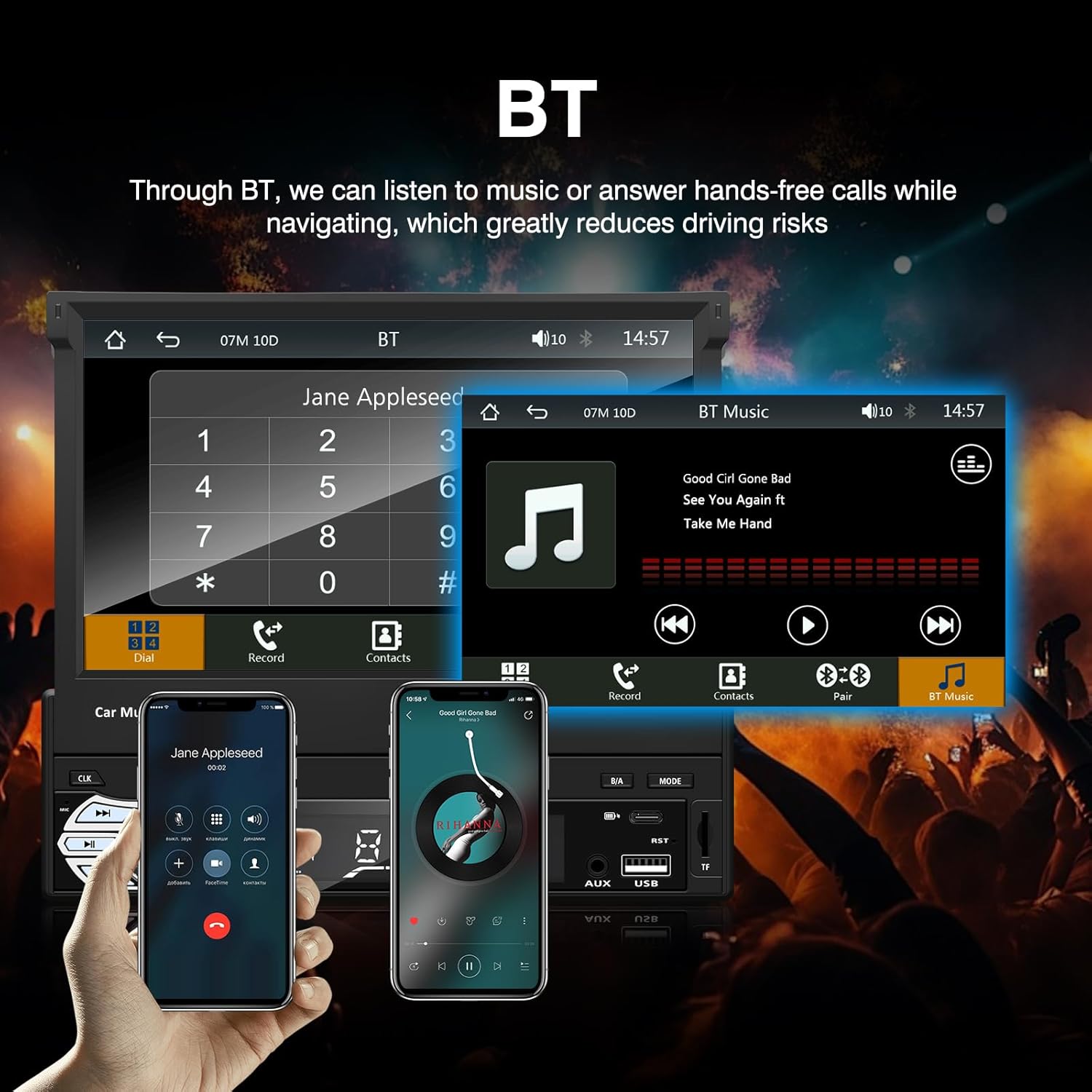
Rysunek 3: Bluetooth interface for hands-free calls and music streaming, showing a dial pad and music controls.
- Łączenie w pary: Włącz Bluetooth w swoim urządzeniu mobilnym. Szukaj available devices and select "Ezonetronics" or similar. Enter PIN "0000" if prompted.
- Rozmowy bez użycia rąk: Once paired, you can make and receive calls directly through the car stereo. Use the touchscreen or remote to dial, answer, or end calls.
- Przesyłanie strumieniowe dźwięku (A2DP): Play music from your paired device wirelessly. Control playback (play/pause, skip) from the car stereo or your device.
3. Odtwarzanie multimediów USB/SD
Insert a USB drive or SD card into the respective slot. The unit will automatically switch to USB/SD mode and begin playing compatible media files.

Rysunek 4: Icons indicating support for Bluetooth, Auxiliary input, TF (SD) Card, and USB connections for media playback.
- Supported formats include RM, RMVB, ASF, MKV, DIVX, MPEG4, AVI, VOB for video, and MP3/MP4 for audio.
- Poruszaj się po folderach i filekorzystając z interfejsu dotykowego.
4.Radio FM
Access the FM radio mode to listen to local broadcasts.

Rysunek 5: FM Radio interface with frequency display and equalizer settings for audio customization.
- Automatyczne skanowanie: Automatically search and save strong stations.
- Strojenie ręczne: Fine-tune frequencies using the touchscreen.
- Ustawienia wstępne: Save your favorite stations for quick access (up to 18 preset stations).
5. Apple CarPlay / Android Auto
Connect your compatible smartphone via USB to access Apple CarPlay or Android Auto features directly on the stereo's display.

Rysunek 6: Wired Apple CarPlay interface, displaying phone applications like navigation, music, and messages on the car stereo screen.

Rysunek 7: Wired Android Auto interface, displaying Android applications like Google Maps, Spotify, and phone calls on the car stereo screen.
- Ensure your phone has CarPlay or Android Auto enabled.
- Use a high-quality USB cable for a stable connection.
- Access navigation, music, messages, and other compatible apps safely while driving.
6. Łącze lustrzane
Mirror Link allows you to display your smartphone's screen content directly onto the car stereo's display via a USB data cable.

Rysunek 8: Mirror Link function demonstrating a smartphone screen being projected onto the car stereo display.
- Connect your smartphone to the USB port using a data cable.
- Follow the on-screen prompts on both the stereo and your phone to establish the connection.
- Note: Functionality may vary depending on your smartphone model and operating system.
7. Tyłview Wejście kamery
Kiedy tyłview camera is connected and the vehicle is shifted into reverse, the stereo automatically displays the camera feed.

Rysunek 9: Reversing display showing the view from a rearview camera with parking assistance lines, providing an intuitive aid for parking.
- Zapewnij tyłview camera is properly installed and connected to the dedicated input.
- Wyświetlacz automatycznie przełączy się na kamerę view when the reverse gear is engaged.
8. Sterowanie z kierownicy
The unit supports connection to your vehicle's existing steering wheel controls for convenient operation. Refer to your vehicle's manual and the stereo's wiring diagram for proper connection and configuration.
Konserwacja
- Czyszczenie ekranu: Delikatnie przetrzyj ekran dotykowy miękką, niepozostawiającą włókien ściereczką. Nie używaj środków czyszczących ani rozpuszczalników o działaniu ściernym.
- Ogólne sprzątanie: Wytrzyj zewnętrzną część urządzenia suchą, miękką ściereczką.
- Unikaj płynów: Nie rozpylać żadnych płynów bezpośrednio na urządzenie.
- Temperatura: Unikaj długotrwałego narażenia na działanie ekstremalnie wysokich lub niskich temperatur, gdyż może to wpłynąć na żywotność urządzenia.
Rozwiązywanie problemów
| Problem | Możliwa przyczyna | Rozwiązanie |
|---|---|---|
| Urządzenie nie włącza się. | Nieprawidłowe okablowanie; Przepalony bezpiecznik; Problem z akumulatorem pojazdu. | Check power connections (Yellow, Red, Black wires). Inspect vehicle fuses. Ensure battery is charged. |
| Brak dźwięku. | Zbyt niski poziom głośności; Wyciszenie włączone; Nieprawidłowe podłączenie głośników. | Zwiększ głośność. Sprawdź, czy wyciszenie jest aktywne. Sprawdź połączenia głośników. |
| Brak połączenia Bluetooth. | Bluetooth not enabled on phone; Incorrect pairing process. | Ensure phone's Bluetooth is on and discoverable. Re-attempt pairing. |
| USB/SD media not playing. | Nieobsługiwane file format; Corrupted media; Drive/card not inserted correctly. | Sprawdzać file formats. Try a different USB drive/SD card. Ensure proper insertion. |
| Tyłview kamera nie wyświetla obrazu. | Kamera nie jest podłączona; Przewód wyzwalacza biegu wstecznego nie jest podłączony. | Verify camera video input and reverse trigger wire connection. |
Jeżeli problem nadal występuje, należy skonsultować się z wykwalifikowanym technikiem lub skontaktować się z działem obsługi klienta.
Specyfikacje
- Marka: EZoneTronics
- Numer modelu: RM-CW9601
- Kolor: Czarny
- Ekran: 7-inch Capacitive Touchscreen, Retractable
- Technologia łączności: Bluetooth, USB, SD, AUX, RCA
- Bluetooth: Integrated Bluetooth 2.0 with A2DP/Hands-free
- Zgodne urządzenia: Smartfon
- Tryb wyjścia audio: Stereofoniczny
- Obsługa kodowania wideo: RM, RMVB, ASF, MKV, DIVX, MPEG4, AVI, VOB
- Obsługa USB/SD: Up to 32GB max.
- Cechy szczególne: Touchscreen, Steering Wheel Control Support, Rear Camera Input, Apple CarPlay, Android Auto, Mirror Link
- Producent: Rhythm Electronics Limited
Gwarancja i wsparcie
This product comes with a limited manufacturer's warranty.
- Gwarancja na jednostkę główną: 12 months for defective items (excluding damaged or misused items after receipt).
- Gwarancja na akcesoria: 3 months for accessories.
W przypadku roszczeń gwarancyjnych lub w celu uzyskania pomocy technicznej prosimy o kontakt bezpośrednio ze sprzedawcą lub producentem. Zachowaj paragon jako dowód zakupu.