
Wstęp
Welcome to the user manual for your Fuvision 16GB 1080P HD Spy Pen Camera Video Recorder. This manual provides detailed instructions on how to set up, operate, and maintain your device. Please read it carefully to ensure proper usage and to maximize the product's functionality.
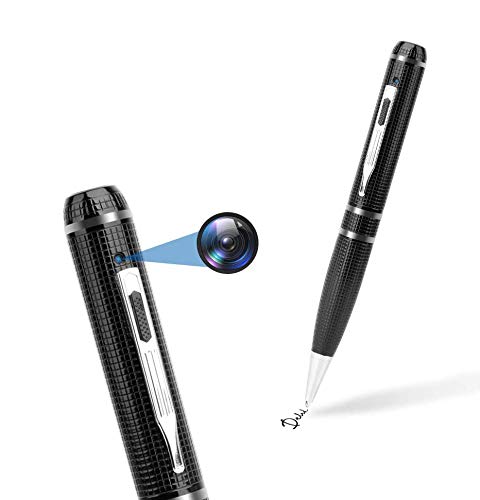
An image showing the Fuvision 16GB 1080P HD Spy Pen Camera, highlighting its discreet design as a functional writing pen.

A person holding the Fuvision Spy Pen Camera, illustrating how its design allows it to be discreetly used as a regular pen.
Zawartość opakowania
Sprawdź, czy w przesyłce znajdują się wszystkie poniższe elementy:
- Fuvision 16GB 1080P HD Spy Pen Camera
- USB Data/Charging Cable
- 3 x Pen Refills
- Instrukcja obsługi (ten dokument)
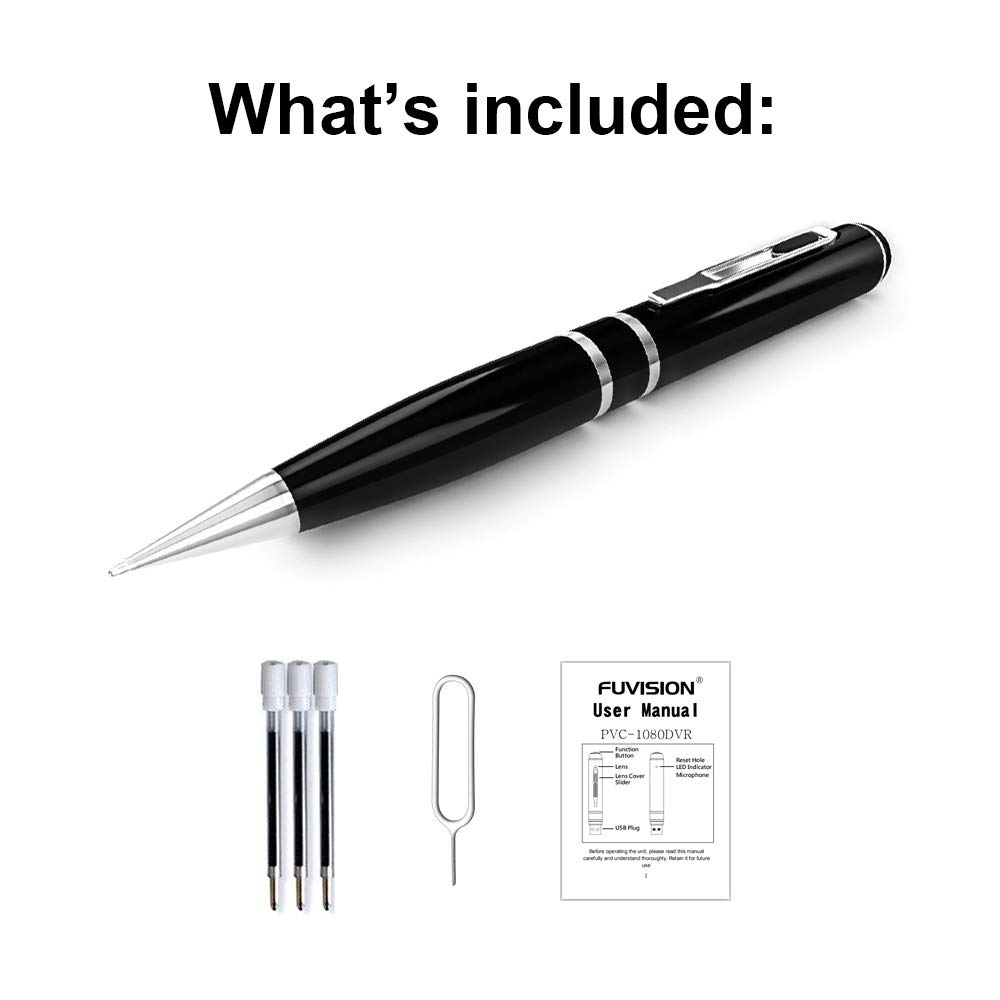
An image displaying all items included in the package: the Fuvision Spy Pen Camera, three ink refills, a USB data/charging cable, and a printed user manual.
Produkt ponadview i komponenty
Familiarize yourself with the various parts of your Fuvision Spy Pen Camera:

A detailed diagram of the Fuvision Spy Pen Camera, pointing out key components such as the Reset Hole, LED Indicator, USB Plug, Function Button, Lens Cover Slider, and the Camera Lens.

Another diagram illustrating the Fuvision Spy Pen Camera's features, including the ON/OFF button, USB port, HD camera location, and the functional ball-point pen tip.
- Przycisk funkcyjny: Used for powering on/off, starting/stopping recording, and switching modes.
- Obiektyw aparatu: The hidden lens for video and photo capture.
- Wskaźnik LED: Provides status feedback (power, recording, photo mode).
- Wtyczka USB: Znajduje się na górze, służy do ładowania i przesyłania danych.
- Zresetuj otwór: For resetting the device if it becomes unresponsive.
- Ball-Point Pen: Fully functional writing pen.
Organizować coś
1. Ładowanie urządzenia
Before first use, fully charge the pen camera. Connect the USB plug of the pen to a computer's USB port or a 5V DC USB wall adapter using the provided USB cable. The charging time is approximately 4 hours. The LED indicator will show charging status (specific LED behavior for charging is not detailed, assume it turns off or changes color when fully charged).
2. Pierwsze włączenie zasilania
After charging, the device is ready for use. The pen has a built-in 16GB memory, so no external memory card installation is required.
Instrukcja obsługi
1. Włączanie i wyłączanie
- Włączanie: Press and hold the Function Button on the top for a few seconds until the LED lights up. It will flash purple a few times, then turn off. This indicates the device has started recording. The LED is off during recording to maintain discretion.
- Aby wyłączyć: Press and hold the Function Button for a few seconds until the LED flashes purple a few times, then turns off completely.
2. Video Recording Mode
- Rozpocznij nagrywanie: When the device is powered on, it automatically begins recording video. The LED will flash purple a few times and then turn off, indicating active recording.
- Zatrzymaj nagrywanie: Press the Function Button once quickly. The recording will stop, and a red LED will turn on, indicating the pen is in STANDBY mode.
- Nagrywanie w pętli: The device supports loop recording, which means it will automatically overwrite the oldest files, gdy pamięć jest pełna.
3. Tryb zdjęć
- Switching to Photo Mode: From STANDBY mode (red LED on), double-click the Function Button. The red LED will change to blue, indicating the device is now in Photo Mode.
- Robić zdjęcie: In Photo Mode (blue LED on), press the Function Button once. The purple light will blink a few times to confirm a photo has been taken.
- Exiting Photo Mode: Double-click the Function Button again. The device will return to STANDBY mode (red LED on).
4. Podłączanie do komputera
To transfer recorded videos and photos, connect the pen camera to your computer using the provided USB cable. The device will appear as a removable disk drive. It is compatible with Windows XP/2003/Windows7/8/10 and Apple Mac OS X - 10.7 operating systems.
Konserwacja
1. Ogólna opieka
- Unikaj upuszczania urządzenia i narażania go na silne uderzenia.
- Trzymaj urządzenie z dala od wody, wilgoci i ekstremalnych temperatur.
- Store the pen in a cool, dry place when not in use.
2. Czyszczenie
Use a soft, dry cloth to clean the exterior of the pen. Do not use liquid cleaners or solvents, as they may damage the device.
Rozwiązywanie problemów
Typowe problemy i rozwiązania:
- Urządzenie nie włącza się: Ensure the battery is fully charged. Connect to a power source and charge for 4 hours.
- Nagrywanie się nie rozpoczyna: Check if the device is powered on correctly (LED flashes purple then turns off). Ensure the battery has sufficient charge.
- Nie można połączyć się z komputerem: Try a different USB port or a different computer. Ensure the USB cable is securely connected.
- Urządzenie nie odpowiada: Locate the Reset Hole (refer to Product Overview) and gently press it with a thin object (like a paperclip) to reset the device.
Specyfikacje
Detailed technical specifications for the Fuvision 16GB 1080P HD Spy Pen Camera:

Pokaz obrazuasing the clear video quality produced by the Fuvision Spy Pen Camera, indicating its 1080P Full HD resolution with still shot functionality.
| Rozdzielczość wideo | 1080P (1920x1080) @ 30fps |
| Rozdzielczość zdjęcia | JPG 4032x3024 |
| Piksel | 2.0 Mega Pixel CMOS |
| Pamięć wewnętrzna | 16 GB |
| Żywotność baterii | Approximately 120 minutes continuous recording |
| Tryby nagrywania | Continuous record, Loop Recording |
| Format wideo | Plik AVI |
| Interfejs USB | 2.0 |
| Objętość ładowaniatage | DC-5V (500mA) |
| Czas ładowania | Około 4 godzin |
| View Kąt | 65° |
| Zgodność z systemem operacyjnym | Windows XP/2003/Windows7/8/10, Apple Mac OS X - 10.7 and above |
| Wymiary | 155 × 14.5 × 14.5 mm (6.1 × 0.57 × 0.57 cala) |
| Waga przedmiotu | 100 g (0.22 funta) |
| Źródło zasilania | Zasilanie bateryjne (w zestawie 1 bateria litowo-jonowa) |
| Zalecane zastosowania | Motion Detection (feature mentioned in product details, but not detailed in operation) |
Ważne informacje dotyczące bezpieczeństwa
- Nie próbuj demontować ani modyfikować urządzenia.
- Przechowywać w miejscu niedostępnym dla dzieci.
- Zutylizuj baterię zgodnie z lokalnymi przepisami.
- Do ładowania i przesyłania danych należy używać wyłącznie dołączonego kabla USB.