Wstęp
Thank you for choosing the Remax RB-T8 Bluetooth Headset. This headset is designed to provide clear, low-noise sound for your communication and audio needs. It is portable, easy to operate, and features Bluetooth 4.1 connectivity with noise-cancelling microphone for HD voice calls.
Główne cechy obejmują:
- Bluetooth 4.1 zapewniający stabilne i wydajne połączenie bezprzewodowe.
- Integrated Noise Cancelling Mic for clear conversations.
- Portable and user-friendly design.

Obraz: przód i tył view of the Remax RB-T8 Bluetooth Headset, showcasing its sleek design in black and gold/silver finishes.
Przewodnik po konfiguracji
1. Ładowanie zestawu słuchawkowego
Before first use, fully charge the headset. The Remax RB-T8 uses a Micro USB input for charging.
- Connect the Micro USB cable to the headset's charging port.
- Podłącz drugi koniec kabla do źródła zasilania USB (np. komputera, zasilacza ściennego).
- Pełne naładowanie trwa zazwyczaj około 2 godzin.
- The indicator light will change to indicate charging status (refer to specific light behavior in your product's quick start guide if available).
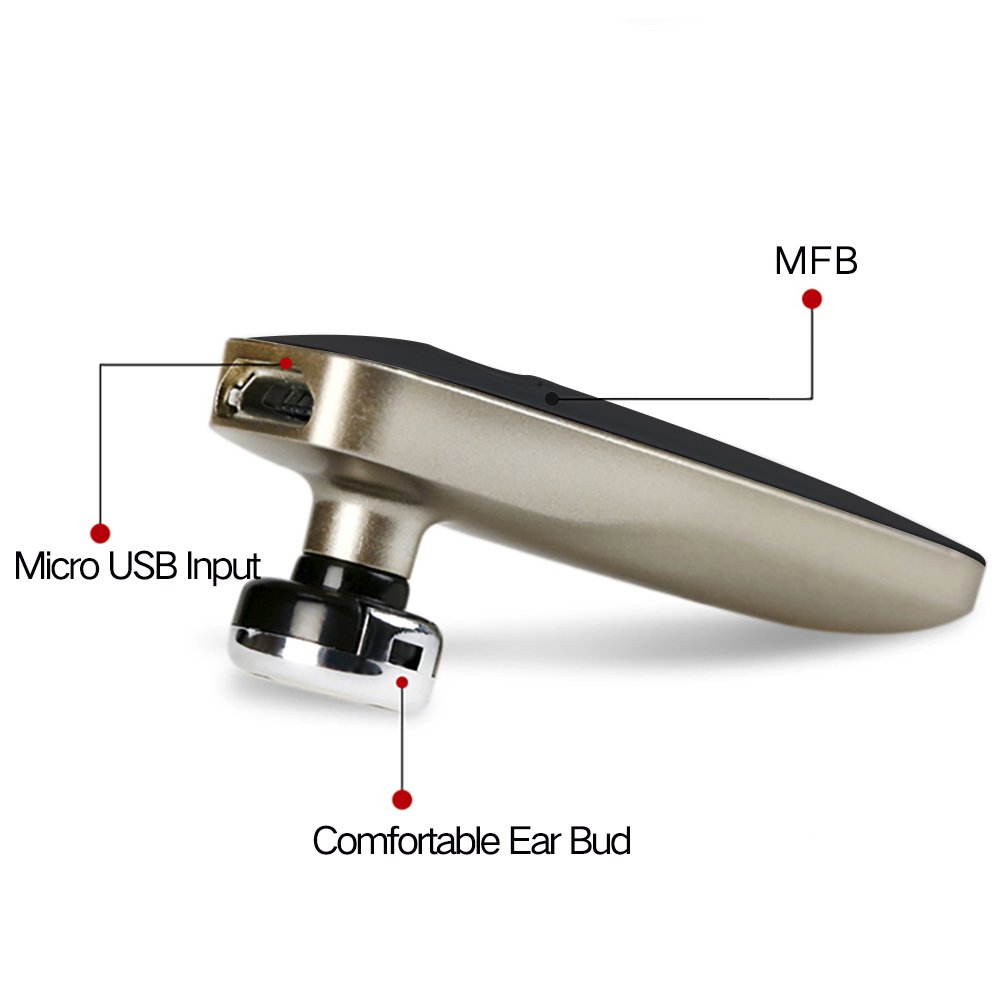
Obraz: Szczegółowy view of the Remax RB-T8 headset highlighting the Micro USB Input for charging, the Multi-Function Button (MFB), and the comfortable ear bud.

Image: Infographic detailing the battery performance of the Remax RB-T8 headset, showing approximately 2 hours charge time, over 55 hours standby time, about 4 hours talk time, and about 4 hours music playing time.
2. Parowanie z urządzeniem
Zestaw słuchawkowy wykorzystuje technologię Bluetooth 4.1 do połączenia bezprzewodowego.
- Sprawdź, czy zestaw słuchawkowy jest naładowany i wyłączony.
- Press and hold the Multi-Function Button (MFB) on the headset until the indicator light flashes red and blue alternately, indicating it is in pairing mode.
- Na swoim smartfonie lub urządzeniu z włączoną funkcją Bluetooth przejdź do ustawień Bluetooth i włącz Bluetooth.
- Szukaj available devices. You should see "RB-T8" or a similar name appear in the list.
- Select "RB-T8" to connect. If prompted for a password, enter "0000" (four zeros).
- Once successfully paired, the indicator light will typically flash blue slowly or turn off, and you may hear a confirmation tone.
The headset is capable of connecting to two devices simultaneously.

Image: Illustration demonstrating the Remax RB-T8 headset's ability to connect to two different smartphones at the same time, indicated by wireless signal icons.
Instrukcja obsługi
Włączanie/wyłączanie zasilania
- Włączanie: Naciśnij i przytrzymaj przycisk MFB przez około 3 sekundy, aż niebieska lampka kontrolna zacznie migać.
- Wyłączone: Naciśnij i przytrzymaj przycisk MFB przez około 5 sekund, aż czerwona lampka kontrolna zacznie migać, a następnie zgaśnie.
Zarządzanie połączeniami
- Odbierz połączenie: Short press the MFB when a call comes in.
- Zakończ połączenie: Naciśnij krótko przycisk MFB podczas połączenia.
- Odrzuć połączenie: W przypadku połączenia przychodzącego naciśnij i przytrzymaj przycisk MFB przez 2 sekundy.
- Ponowne wybieranie ostatniego numeru: Naciśnij dwukrotnie przycisk MFB, gdy zestaw słuchawkowy jest bezczynny.
Odtwarzanie muzyki
- Odtwórz/Pauza: Naciśnij krótko przycisk MFB podczas odtwarzania muzyki.
- Następny utwór: (Functionality may vary, typically a long press on volume up or specific button if available. The RB-T8 has a single MFB, so this might be controlled via the connected device.)
- Poprzedni utwór: (Functionality may vary, typically a long press on volume down or specific button if available.)
Kontrola głośności
Volume is primarily controlled via the connected device. The RB-T8 headset itself does not have dedicated volume buttons, relying on the connected smartphone's volume controls.
Battery Capacity Display on iPhone
For iPhone users, the headset supports displaying its battery capacity directly on the iPhone's screen, usually next to the Bluetooth icon in the status bar or within the Bluetooth settings menu.

Image: An iPhone screen displaying the Bluetooth settings, with a battery icon indicating the charge level of the connected Remax RB-T8 headset.
Konserwacja
- Czyszczenie: Use a soft, dry cloth to wipe the headset. Do not use harsh chemicals or abrasive cleaners.
- Składowanie: Przechowuj zestaw słuchawkowy w chłodnym, suchym miejscu, z dala od bezpośredniego światła słonecznego i ekstremalnych temperatur.
- Pielęgnacja baterii: Aby przedłużyć żywotność baterii, unikaj częstego całkowitego rozładowywania baterii. Regularnie ładuj zestaw słuchawkowy, nawet jeśli nie jest używany przez dłuższy czas.
- Poduszki nauszne: The headset comes with ear cushions. Ensure they are clean and properly fitted for optimal comfort and sound quality.
Rozwiązywanie problemów
Cannot Pair the Headset
- Ensure the headset is in pairing mode (red and blue lights flashing alternately).
- Upewnij się, że w Twoim urządzeniu włączony jest Bluetooth i że znajduje się ono w zasięgu (zazwyczaj 10 metrów).
- Turn off and on both the headset and your device, then try pairing again.
- Jeśli zestaw słuchawkowy został wcześniej sparowany, spróbuj „zapomnieć” go lub „odłączyć” od listy Bluetooth w urządzeniu, a następnie sparuj go ponownie.
- Sprawdź, czy zestaw słuchawkowy jest naładowany.
Brak dźwięku lub niska głośność
- Check the volume level on both the headset (if applicable, though RB-T8 relies on device volume) and your connected device.
- Sprawdź, czy zestaw słuchawkowy jest prawidłowo podłączony do urządzenia.
- Spróbuj odtworzyć dźwięk z innej aplikacji lub źródła.
- Ponownie sparuj zestaw słuchawkowy z urządzeniem.
Problemy z ładowaniem
- Upewnij się, że kabel ładujący jest prawidłowo podłączony do zestawu słuchawkowego i źródła zasilania.
- Wypróbuj inny port USB lub zasilacz.
- Sprawdź, czy kabel ładujący nie jest uszkodzony.
Dane techniczne
| Marka | REMAX |
| Model | RB-T8 (T8-Black) |
| Technologia łączności | Bluetooth 4.1 |
| Funkcja specjalna | Redukcja szumów |
| Typ sterowania | Voice Control, Touch (MFB) |
| Kompatybilne urządzenia | iPhone (and other Bluetooth-enabled smartphones) |
| Tworzywo | Plastikowy |
| Waga przedmiotu | 100 g (0.1 kilograma) |
| Wymiary produktu | Wymiary 18 x 8 x 4 cm |
| Zawarte komponenty | Poduszki na uszy |
| Producent | REMAX |
Informacje o gwarancji
This Remax RB-T8 Bluetooth Headset typically comes with a 6-miesięczna gwarancja from the date of purchase. Please retain your purchase receipt as proof of purchase for any warranty claims.
The warranty covers manufacturing defects. It does not cover damage caused by misuse, accidents, unauthorized modifications, or normal wear and tear.
Wsparcie
For further assistance, technical support, or warranty claims, please contact your retailer or visit the official REMAX store online:
Visit the REMAX Store on Amazon
Please have your product model number (RB-T8) and purchase details ready when contacting support.