
Casio HR-200RCE-W-EC
Instrukcja obsługi kalkulatora biurkowego Casio HR-200RCE-W-EC
Model: HR-200RCE-W-EC
Wstęp
The Casio HR-200RCE-W-EC is a versatile and portable printing desktop calculator designed for efficient numerical operations. It features a large 12-digit LC display and offers functions such as tax calculations, cost-sell-margin analysis, and currency conversions. This manual provides essential information for setting up, operating, maintaining, and troubleshooting your calculator to ensure optimal performance.
Organizować coś
Rozpakowywanie
Ostrożnie wyjmij wszystkie elementy z opakowania. Pudełko powinno zawierać:
- Casio HR-200RCE-W-EC Printing Desktop Calculator
- 4 baterie AA
- Small paper roll for initial use
Note: The power adapter (AD-A60024) is not included and must be purchased separately if mains power is desired.
Instalacja źródła zasilania
Your calculator can be powered by batteries or an optional AC adapter.
- Montaż baterii: Open the battery compartment cover on the underside of the calculator. Insert the four (4) AA batteries, ensuring correct polarity (+/-). Close the cover securely.
- Zasilacz sieciowy (opcjonalnie): If using the AD-A60024 AC adapter, plug it into the DC IN jack on the side of the calculator and then into a standard electrical outlet.
Instalacja rolki papieru
The calculator uses 58mm wide paper rolls for printing. Follow these steps to install a new roll:
- Open the paper roll cover at the top rear of the calculator.
- Place the new paper roll into the compartment, ensuring the paper feeds from the bottom of the roll.
- Wsuń przednią krawędź papieru do gniazda drukarki, aż będzie on wysunięty od góry.
- Zamknij pokrywę rolki papieru.

Image: The Casio HR-200RCE-W-EC calculator showing the paper roll installed and a printed receipt.
Instrukcja obsługi
This section covers the basic and advanced functions of your Casio HR-200RCE-W-EC calculator.
Podstawowe obliczenia
Perform standard arithmetic operations using the numeric keypad and function keys:
- Dodatek (+): Wprowadź pierwszą liczbę, naciśnij +, wprowadź drugą liczbę, naciśnij =.
- Odejmowanie (-): Wprowadź pierwszą liczbę, naciśnij -, wprowadź drugą liczbę, naciśnij =.
- Mnożenie (x): Wprowadź pierwszą liczbę, naciśnij x, wprowadź drugą liczbę, naciśnij =.
- Division (•): Wprowadź pierwszą liczbę, naciśnij •, wprowadź drugą liczbę, naciśnij =.
- Wyczyść (C): Czyści ostatnio wprowadzoną liczbę.
- Wszystko w porządku (AC): Usuwa wszystkie wpisy i resetuje kalkulator.
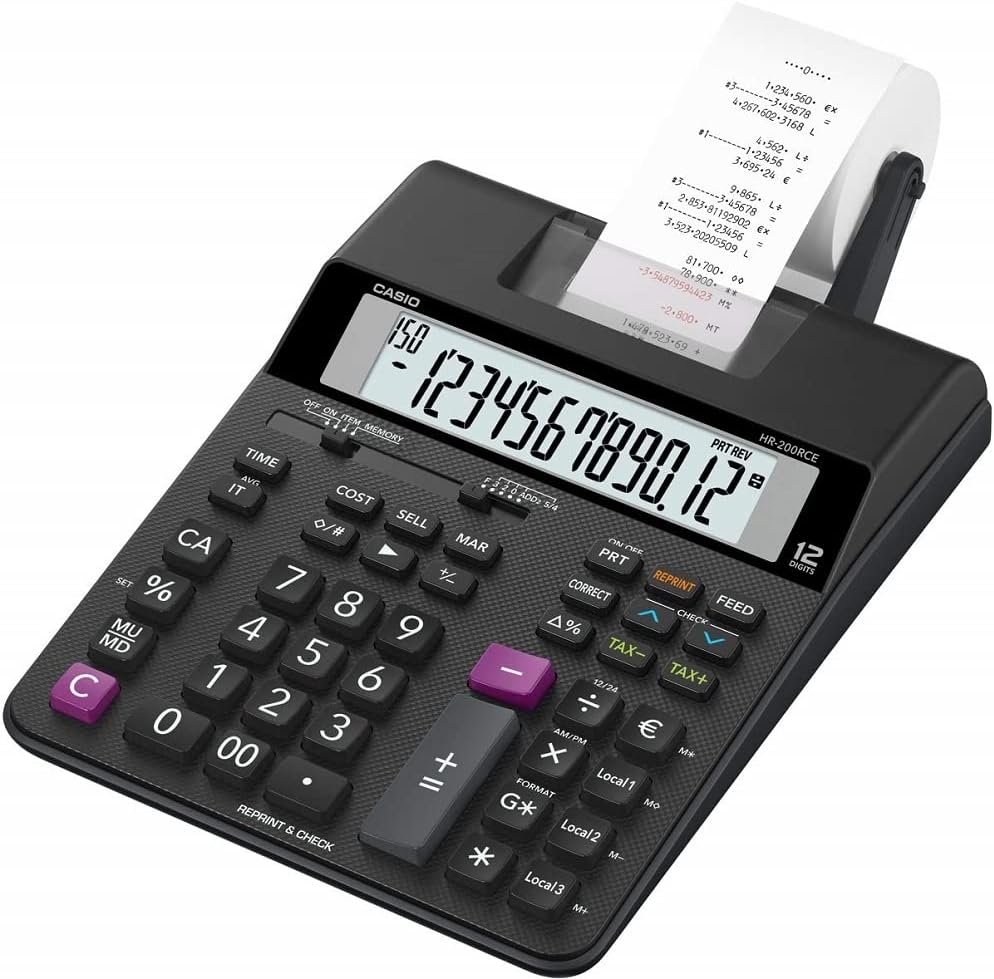
Obraz: kątowy view of the Casio HR-200RCE-W-EC calculator, highlighting the full keyboard layout.
Funkcje specjalne
The HR-200RCE-W-EC includes several advanced functions for business and financial calculations:
- Tax Calculations (TAX+, TAX-): Use these keys to add or subtract a pre-set tax rate. Refer to the full manual for setting the tax rate.
- Cost, Sell, Margin (COST, SELL, MAR): These keys allow for quick calculation of cost, selling price, or profit margin when two of the three values are known.
- Currency Conversions (Local 1, Local 2, Local 3): Configure up to three local currency exchange rates for quick conversions.
- 2-Color Print (IR-40T): The calculator supports two-color printing (black and red) for clear differentiation of positive and negative values on the paper roll.
- Check & Correct (CHECK, CORRECT): Ta funkcja umożliwia ponowneview and correct previous entries on the printout.

Obraz: Zbliżenie view of the 'CHECK' and 'CORRECT' buttons on the Casio HR-200RCE-W-EC calculator.
Konserwacja
Proper maintenance ensures the longevity and reliable operation of your calculator.
Czyszczenie
- Przetrzyj zewnętrzną część kalkulatora miękką, suchą ściereczką.
- W przypadku uporczywych zabrudzeń, delikatnieampNamocz szmatkę w wodzie z dodatkiem łagodnego detergentu, a następnie natychmiast wytrzyj do sucha.
- Nie należy używać środków czyszczących o właściwościach ściernych ani rozpuszczalników, ani spryskiwać kalkulator bezpośrednio.
Ink Roller Replacement (IR-40T)
When printouts become faint or incomplete, it's time to replace the ink roller.
- Upewnij się, że kalkulator jest wyłączony.
- Otwórz pokrywę drukarki.
- Carefully remove the old ink roller.
- Insert a new Casio IR-40T ink roller, ensuring it clicks into place.
- Zamknij pokrywę drukarki.
Wymiana rolki papieru
Replace the paper roll when it runs out, following the instructions in the "Paper Roll Installation" section under Setup.
Rozwiązywanie problemów
If you encounter issues with your calculator, refer to the table below for common problems and their solutions.
| Problem | Możliwa przyczyna | Rozwiązanie |
|---|---|---|
| Brak wyświetlacza lub słaby wyświetlacz | Low or dead batteries; AC adapter not connected or faulty. | Replace batteries; Check AC adapter connection or try new adapter. |
| No printing or faint printing | Paper roll empty or incorrectly installed; Ink roller dry or incorrectly installed. | Install new paper roll correctly; Replace ink roller (IR-40T). |
| Nieprawidłowe wyniki obliczeń | Incorrect data entry; Incorrect mode setting. | Re-enter calculation carefully; Check mode settings (e.g., decimal selector). |
| Calculator freezes or becomes unresponsive | Temporary system error. | Remove batteries for a few minutes, then reinsert. If using AC adapter, unplug and replug. |
Specyfikacje
| Funkcja | Szczegół |
|---|---|
| Model | HR-200RCE-W-EC |
| Wyświetlacz | 12-Digits LC-Display |
| Prędkość drukowania | 2.0 linii/sek. |
| Drukuj Kolor | 2-Colour Print (Black/Red) |
| Ink Roller | IR-40T |
| Rozmiar papieru | 58 mm (Outer Roll “Roll 57mm”) |
| Źródło zasilania | Batteries (4 x AA Included) or Optional AC Adapter (AD-A60024) |
| Skład ogniw baterii | Alkaliczny |
| Wymiary (dł. x szer. x wys.) | Wymiary 31.3 x 19.5 x 6.5 cm |
| Waga | 670 gram |
| Typ materiału | Plastikowy |
| Cechy specjalne | Simple algebraic logic, Two-tone print, Tax calculations, Cost Sell Margin, Currency Conversions |
Gwarancja i wsparcie
Gwarancja producenta
The Casio HR-200RCE-W-EC Printing Desktop Calculator comes with a 2-letnia gwarancja producenta od daty zakupu. Niniejsza gwarancja obejmuje wady materiałowe i wykonawcze wynikające z normalnego użytkowania. Prosimy zachować dowód zakupu na wypadek roszczeń gwarancyjnych.
Obsługa klienta
For further assistance, technical support, or warranty inquiries, please visit the official Casio website or contact their customer service department. Refer to your product packaging or the Casio website for the most current contact information in your region.
Ask a question about this manual
Ask about setup, troubleshooting, compatibility, parts, safety, or missing instructions. Manuals+ will review the question and use this page’s manual context to help answer it.