
Biconic Bluetooth Tough Weatherproof Portable Wireless Speaker User Manual
Model: ABC-AU-BS-103-BK
Marka: Bytech
1. Koniec produktuview
The Biconic Bluetooth Tough Weatherproof Portable Wireless Speaker is designed for robust outdoor and indoor use, providing enhanced bass and clear audio. Its wireless capabilities allow for easy connection to various devices, and its durable, weatherproof construction ensures reliable performance in diverse environments.

Rycina 1.1: Przód view of the Biconic Bluetooth Speaker, showcasindzięki solidnej konstrukcji i osłonie głośnika.
Główne cechy:
- Połączenie bezprzewodowe: Seamless Bluetooth pairing with smartphones, tablets, and other compatible devices.
- Odporna na warunki atmosferyczne konstrukcja: IPX6 water resistance protects against strong jets of water, making it suitable for outdoor use.
- Ulepszony bas: Delivers rich, deep bass for a superior audio experience.
- Przenośny: Compact design with a durable strap for easy transport.
- Długi czas odtwarzania: Do 4 godzin ciągłego odtwarzania dźwięku na jednym ładowaniu.
2. Informacje dotyczące bezpieczeństwa
Przed użyciem produktu należy uważnie przeczytać wszystkie ostrzeżenia i instrukcje dotyczące bezpieczeństwa, aby zapewnić bezpieczną eksploatację i zapobiec uszkodzeniom.
- Nie wystawiaj głośnika na działanie ekstremalnych temperatur (wysokich lub niskich).
- Do not immerse the speaker in water. While it is IPX6 water resistant, it is not designed for submersion.
- Keep the speaker away from direct heat sources, open flames, and flammable liquids.
- Use only the provided charging cable and a compatible power adapter (5V/1A recommended) to charge the device.
- Nie próbuj demontować, naprawiać ani modyfikować głośnika. Spowoduje to unieważnienie gwarancji i może spowodować uszkodzenie.
- Przechowywać w miejscu niedostępnym dla dzieci.
- Czyść głośnik miękką, suchą ściereczką. Nie używaj środków czyszczących o właściwościach ściernych ani rozpuszczalników.
3. Zawartość opakowania
Sprawdź, czy po rozpakowaniu w opakowaniu znajdują się wszystkie elementy:
- Biconic Bluetooth Tough Weatherproof Portable Wireless Speaker
- Kabel ładujący USB
- Instrukcja obsługi (ten dokument)
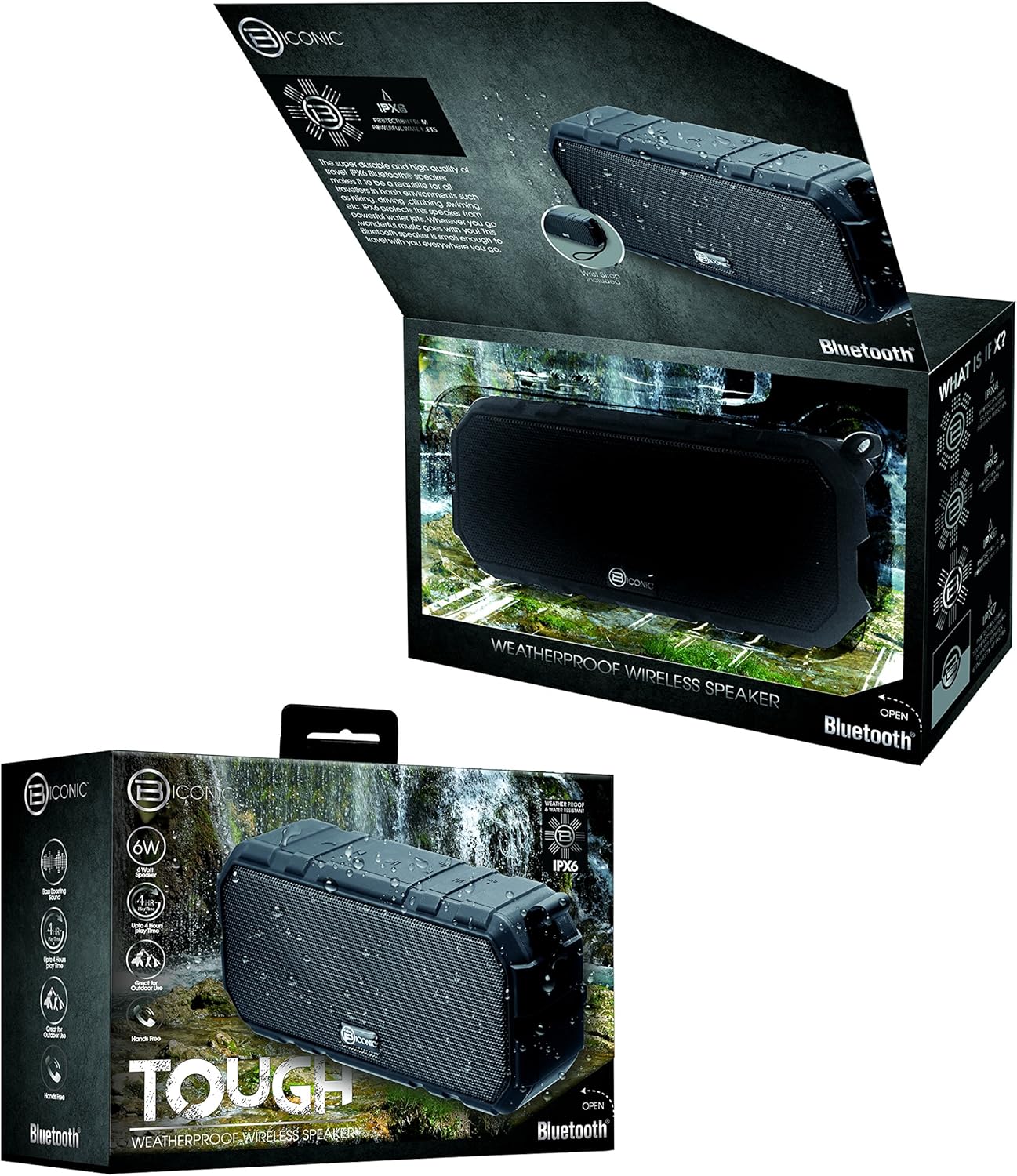
Figure 3.1: The Biconic Bluetooth Speaker shown with its retail packaging, indicating typical package contents.
4. Konfiguracja
4.1 Ładowanie głośnika
- Locate the charging port on the side of the speaker. This port is typically protected by a rubber flap to maintain water resistance.
- Otwórz gumową klapkę.
- Podłącz mniejszy koniec dołączonego kabla ładującego USB do portu ładowania głośnika.
- Podłącz większy koniec kabla USB do źródła zasilania USB (np. portu USB komputera, zasilacza ściennego USB).
- Zaświeci się kontrolka ładowania (zazwyczaj na czerwono), co oznacza, że głośnik jest ładowany.
- Once fully charged (approximately 2-3 hours), the indicator light will change color (e.g., turn off or turn blue/green). Disconnect the charging cable and close the rubber flap securely to maintain water resistance.
4.2 Włączanie/wyłączanie
- Włączanie: Press and hold the Power button (usually marked with a power symbol) for a few seconds until you hear an audible tone or see an indicator light illuminate.
- Aby wyłączyć: Press and hold the Power button again for a few seconds until you hear an audible tone or the indicator light turns off.
5. Instrukcja obsługi
5.1 parowanie Bluetooth
Before first use, you need to pair the speaker with your Bluetooth-enabled device.
- Ensure the speaker is fully charged and powered on. It will automatically enter pairing mode, indicated by a flashing blue LED light.
- On your smartphone, tablet, or other Bluetooth device, go to the Bluetooth settings menu.
- Włącz Bluetooth, jeśli nie jest jeszcze włączony.
- Scan for available devices. You should see "Biconic Speaker" or a similar name appear in the list.
- Select "Biconic Speaker" to connect. Once successfully paired, you will hear a confirmation tone, and the blue LED light on the speaker will stop flashing and remain solid.
- Jeśli zostaniesz poproszony o podanie hasła, wpisz „0000”.
- Głośnik automatycznie połączy się ponownie z ostatnio sparowanym urządzeniem po włączeniu, jeżeli urządzenie znajduje się w zasięgu, a Bluetooth jest włączony.
5.2 Odtwarzanie muzyki
Once paired, you can control music playback directly from your connected device or using the speaker's controls.
- Odtwórz/Pauza: Press the Play/Pause button (often marked with a triangle or || symbol) once to play or pause music.
- Zwiększenie głośności: Naciśnij przycisk zwiększania głośności (+), aby zwiększyć głośność.
- Ściszanie: Naciśnij przycisk zmniejszania głośności (-), aby zmniejszyć głośność.
- Następny utwór: Press and hold the Volume Up button (+) for a few seconds to skip to the next track.
- Poprzedni utwór: Press and hold the Volume Down button (-) for a few seconds to go to the previous track.

Rysunek 5.1: Góra view of the Biconic Bluetooth Speaker, highlighting the control buttons for power, volume, and playback.
5.3 Answering Calls (Hands-Free Function)
The speaker supports hands-free calling when connected to a smartphone.
- Odbierz połączenie: Kiedy ktoś zadzwoni, naciśnij przycisk Odtwórz/Pauza raz, aby odebrać.
- Zakończ połączenie: Podczas połączenia naciśnij przycisk Odtwórz/Pauza jeden raz, aby zakończyć połączenie.
- Odrzuć połączenie: Aby odrzucić połączenie przychodzące, naciśnij i przytrzymaj przycisk Odtwórz/Pauza przez kilka sekund.
6. Konserwacja
Właściwa konserwacja gwarantuje długowieczność i optymalną wydajność głośnika.
- Czyszczenie: Przetrzyj głośnik miękką, damp cloth. Do not use harsh chemicals, solvents, or abrasive cleaners. Ensure the charging port flap is closed before cleaning with a damp płótno.
- Składowanie: Przechowuj głośnik w chłodnym, suchym miejscu, z dala od bezpośredniego światła słonecznego i ekstremalnych temperatur, jeśli nie będziesz go używać przez dłuższy czas.
- Pielęgnacja baterii: To preserve battery life, fully charge the speaker before storing it for long periods. Recharge every 3-6 months if not used regularly.
- Wodoodporność: Always ensure the rubber flap covering the charging port is securely closed to maintain the IPX6 water resistance rating.

Figure 6.1: The Biconic Bluetooth Speaker demonstrating its water-resistant capabilities, highlighting the importance of proper sealing for maintenance.
7. Rozwiązywanie Problemów
| Problem | Możliwa przyczyna | Rozwiązanie |
|---|---|---|
| Głośnik nie włącza się. | Bateria jest rozładowana. | Naładuj głośnik całkowicie. |
| Nie można sparować z urządzeniem Bluetooth. | Bluetooth is off on your device; speaker is not in pairing mode; device is too far. | Ensure Bluetooth is enabled on your device. Power off and on the speaker to re-enter pairing mode. Move device closer to the speaker (within 10 meters). Forget the device on your phone and try pairing again. |
| Brak dźwięku lub niski poziom głośności. | Zbyt niski poziom głośności głośnika lub urządzenia; głośnik nie jest podłączony. | Increase volume on both the speaker and your connected device. Ensure the speaker is properly paired and connected. |
| Zniekształcenie dźwięku. | Zbyt wysoki poziom głośności, zakłócenia, słaba bateria. | Zmniejsz głośność. Odsuń głośnik od innych urządzeń elektronicznych. Naładuj głośnik. |
8. Specyfikacje
| Funkcja | Szczegół |
|---|---|
| Numer modelu | ABC-AU-BS-103-BK |
| Marka | Bytech |
| Technologia łączności | Bluetooth |
| Maksymalna moc wyjściowa głośnika | 3 watów |
| Tryb wyjścia audio | Stereofoniczny |
| Ocena odporności na wodę | IPX6 (Water resistant, not submersible) |
| Typ baterii | 1 bateria litowo-jonowa (wymagana) |
| Czas na zabawę | Do 4 godzin |
| Wymiary produktu | Wymiary 2.54 x 2.54 x 2.54 cm |
| Waga przedmiotu | 522 gramów |
| Typ montażu | Blat stołu |
9. Gwarancja i wsparcie
For warranty information and technical support, please contact Bytech customer service. Details are typically provided on the product packaging or the official Bytech webstrona.
Proszę zachować dowód zakupu na wypadek ewentualnych roszczeń gwarancyjnych.
Uwaga: Warunki gwarancji mogą się różnić w zależności od regionu.