
1. Wprowadzenie
This manual provides essential instructions for the installation, operation, maintenance, and troubleshooting of your APC Smart-UPS SRT 3000VA RM 230V (SRT3000RMXLI). This Uninterruptible Power Supply (UPS) is designed to provide high-density, true double-conversion online power protection for critical electronic equipment, including servers, voice/data networks, medical labs, and light industrial applications. Please read this manual thoroughly before installing or operating the UPS to ensure proper and safe usage.
2. Informacje dotyczące bezpieczeństwa
Observe all warnings and operating instructions in this manual. Failure to do so may result in injury or equipment damage. This UPS contains hazardous voltages. Do not attempt to disassemble the unit. There are no user-serviceable parts inside.
Bezpieczeństwo ogólne
- Ten UPS przeznaczony jest wyłącznie do użytku wewnątrz pomieszczeń.
- Nie należy używać UPS-a w bezpośrednim świetle słonecznym, w miejscach, w których występuje kontakt z płynami lub w których występuje nadmierne zapylenie lub wilgotność.
- Ensure the ventilation openings on the UPS are not blocked. Maintain adequate clearance around the unit for proper airflow.
- Connect the UPS power cable directly to a grounded wall outlet. Do not use extension cords or surge suppressors.
Bezpieczeństwo baterii
- Batteries are heavy. Remove the battery module before installing the UPS in a rack or tower configuration.
- Battery service should be performed or supervised by personnel knowledgeable of batteries and the required precautions.
- Nie wrzucaj baterii do ognia. Baterie mogą eksplodować.
- Nie otwieraj ani nie niszcz baterii. Uwolniony elektrolit jest szkodliwy dla skóry i oczu. Może być toksyczny.
- Wymień baterie na baterie tego samego typu i tej samej liczby, jakie zostały pierwotnie zainstalowane.
3. Zawartość opakowania
Ostrożnie rozpakuj urządzenie i sprawdź, czy nie uległo uszkodzeniu podczas transportu. W przypadku stwierdzenia jakichkolwiek uszkodzeń, powiadom przewoźnika i sprzedawcę. Opakowanie powinno zawierać następujące elementy:
- APC Smart-UPS SRT 3000VA RM 230V (SRT3000RMXLI) unit
- Battery module (may be pre-installed or separate)
- Rack-mounting hardware (rails, brackets)
- Tower stand (for tower configuration)
- Kabel komunikacyjny USB
- Kabel komunikacji szeregowej
- Płyta CD z dokumentacją
- Safety information and warranty guide
4. Koniec produktuview
The APC Smart-UPS SRT 3000VA RM 230V is a high-performance Uninterruptible Power Supply designed to protect your critical equipment from power disturbances. It features a rack/tower convertible form factor for flexible deployment.
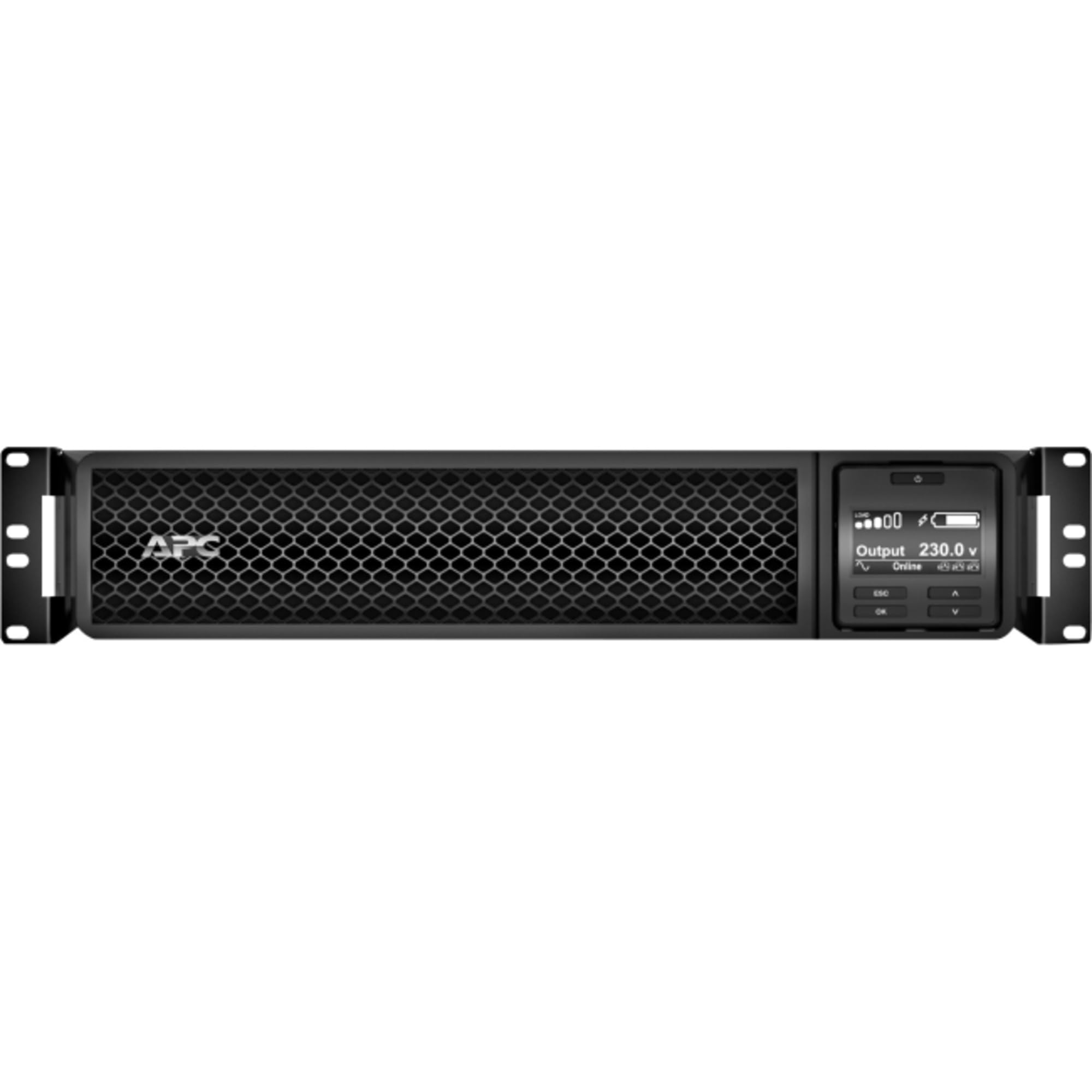
Rycina 1: Przód view of the APC Smart-UPS SRT 3000VA RM 230V. This image displays the front panel with the LCD display, control buttons, and ventilation grilles.
Kluczowe komponenty
- Front Panel LCD Display: Provides real-time status information, configuration options, and alarm notifications.
- Przyciski sterujące: Used to navigate the LCD menu, power on/off the UPS, and perform self-tests.
- Moduł akumulatorowy: Provides backup power during outages. Hot-swappable for easy replacement.
- Złącze zasilania wejściowego: Łączy UPS z siecią energetyczną.
- Output Receptacles (IEC 320): Provide protected power to connected equipment.
- Communication Ports (USB, Serial): For connecting to a computer or network management card for monitoring and control.
- Port EPO (wyłączenie awaryjne): Umożliwia zdalne awaryjne wyłączenie UPS-a.
5. Konfiguracja
Follow these steps for initial setup of your UPS.
Krok 1: Wybierz lokalizację
- Place the UPS on a sturdy, level surface or install it in a standard 19-inch rack.
- Upewnij się, że temperatura otoczenia mieści się w zakresie od 0°C do 40°C (od 32°F do 104°F).
- Maintain at least 10 cm (4 inches) of clearance at the front and rear of the unit for proper ventilation.
Step 2: Install the Battery Module
If the battery module is not pre-installed, slide it into the battery bay until it clicks into place. Connect the battery cables as indicated by the labels.
Step 3: Connect to Utility Power
- Podłącz przewód zasilający UPS do uziemionego gniazda prądu zmiennego 230 V.
- The UPS will perform a self-test and the LCD display will illuminate.
Krok 4: Podłącz sprzęt
- Connect your critical equipment (servers, network devices, etc.) to the output receptacles on the rear of the UPS.
- Ensure the total load does not exceed the UPS capacity (3000VA / 2700W).
Step 5: Connect Communication Cables (Optional)
- Podłącz kabel USB lub szeregowy do UPS-a i komputera lub serwera, aby umożliwić monitorowanie i bezpieczne wyłączanie.
- Install the PowerChute software (available from APC website) on your computer for advanced management.
6. Obsługa UPS-a
Włączanie UPS
Press and hold the power button on the front panel until you hear a beep. The UPS will start up and provide power to connected equipment.
Powering Off the UPS
Press and hold the power button until the UPS shuts down. Ensure all connected equipment is safely shut down before powering off the UPS.
Wyświetlacz LCD i nawigacja
The LCD display provides detailed information about the UPS status, battery charge, load level, and various settings. Use the navigation buttons (up, down, enter, escape) to browse through the menus and adjust settings.
Autotest
Regularly perform a self-test to ensure the UPS battery and internal components are functioning correctly. This can typically be initiated via the LCD menu or PowerChute software.
7. Konserwacja
Wymiana baterii
The UPS batteries have a typical lifespan of 3-5 years. The UPS will indicate when the batteries need replacement. Refer to the safety information before attempting battery replacement. Use only APC-approved replacement battery modules (APCRBC152).
Czyszczenie
Wyczyść zewnętrzną część UPS-a miękką szmatką.amp cloth. Do not use solvents or abrasive cleaners. Ensure ventilation openings are free from dust and debris.
Zagadnienia środowiskowe
Store the UPS in a cool, dry place when not in use. Avoid extreme temperatures and humidity, which can shorten battery life.
8. Rozwiązywanie Problemów
W tej sekcji znajdziesz rozwiązania typowych problemów, jakie możesz napotkać podczas korzystania z zasilacza UPS.
| Problem | Możliwa przyczyna | Rozwiązanie |
|---|---|---|
| UPS się nie włącza | No utility power; Battery not connected; UPS fault | Check power outlet; Ensure battery cables are connected; Contact APC support if fault persists. |
| UPS wydaje ciągły sygnał dźwiękowy | On battery power; Overload; Low battery | Check utility power; Reduce connected load; Allow battery to recharge. |
| Bateria się nie ładuje | Battery disconnected; Battery fault; Internal fault | Verify battery connection; Replace battery if faulty; Contact APC support. |
| Podłączony sprzęt traci moc | UPS overload; Battery depleted; UPS fault | Reduce load; Allow battery to recharge; Contact APC support. |
9. Specyfikacje
Detailed technical specifications for the APC Smart-UPS SRT 3000VA RM 230V (SRT3000RMXLI).
| Funkcja | Szczegół |
|---|---|
| Numer modelu | SRT3000RMXLI |
| Marka | APC |
| Pojemność | 3000 VA / 2700 W |
| Wejście Voltage | 230 wolty |
| Objętość wyjściatage | 230 wolty |
| Współczynnik kształtu | Rack/Tower Convertible (2U) |
| Typ baterii | Kwas ołowiowy |
| Typical Runtime (Full Load) | Około 4 minut |
| Liczba gniazdek | 8 x IEC 320 C13, 2 x IEC 320 C19 |
| Porty komunikacyjne | USB, Serial (RJ45), SmartSlot |
| Wymiary (wys. x szer. x gł.) | 8.5 cm x 43.2 cm x 63.5 cm (3.35 cala x 17.0 cala x 25.0 cala) |
| Waga | 31.3 kg (69 funta) |
| Kolor | Czarny |
10. Gwarancja i wsparcie
Informacje o gwarancji
APC provides a standard warranty for this product. Please refer to the warranty card included in your package or visit the official APC webSzczegółowe warunki gwarancji obowiązujące w Twoim regionie znajdziesz na stronie internetowej. Zachowaj dowód zakupu na wypadek roszczeń gwarancyjnych.
Wsparcie techniczne
For technical assistance, troubleshooting beyond this manual, or to inquire about replacement parts, please contact APC customer support. Support contact information can typically be found on the APC website or in the documentation provided with your unit. When contacting support, please have your model number (SRT3000RMXLI) and serial number ready.