
1. Wprowadzenie
This manual provides essential information for the safe and efficient operation of your Argox OX-330 Barcode Monochrome Printer. Please read this manual thoroughly before using the printer and retain it for future reference. The Argox OX-330 is designed for direct thermal and thermal transfer printing, offering a resolution of 203 dpi for clear and precise label output.
2. Informacje dotyczące bezpieczeństwa
- Zasilanie: Use only the power adapter supplied with the printer. Ensure the power outlet matches the voltagi wymagania.
- Umieszczenie: Place the printer on a stable, level surface. Avoid locations with excessive dust, humidity, or direct sunlight.
- Wentylacja: Nie blokuj otworów wentylacyjnych. Zapewnij odpowiedni przepływ powietrza wokół drukarki.
- Obsługiwanie: Unikaj dotykania głowicy drukującej bezpośrednio po drukowaniu, gdyż może być gorąca.
- Czyszczenie: Disconnect the power cord before cleaning the printer. Use a soft, dry cloth. Do not use liquid or aerosol cleaners.
- Remont: Do not attempt to repair the printer yourself. Refer all servicing to qualified service personnel.
3. Koniec produktuview
The Argox OX-330 is a compact desktop thermal label printer capable of both direct thermal and thermal transfer printing. It features 8MB DRAM (5MB user available) and 4MB Flash ROM (2MB user available) for efficient data processing and storage.
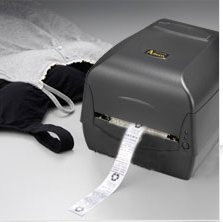
Rysunek 3.1: Argox OX-330 Barcode Monochrome Printer. This image shows the printer actively producing a label, demonstrating its primary function.
Kluczowe komponenty:
- Głowica drukująca: Responsible for transferring the image onto the label.
- Media Guides: Ensure proper alignment of labels.
- Panel sterowania: Includes buttons and indicator lights for printer status and basic operations.
- Port zasilania: Do podłączenia zasilacza.
- Porty danych: For connecting to a computer (e.g., USB, Wi-Fi).
- Media Compartment: Where label rolls and ribbons (for thermal transfer) are loaded.
4. Konfiguracja
4.1 Rozpakowanie
- Ostrożnie wyjmij drukarkę i wszystkie akcesoria z opakowania.
- Sprawdź, czy wszystkie elementy wymienione w opakowaniu są obecne.
- Remove any protective films or packing materials from the printer.
4.2 Podłączanie zasilania
- Podłącz zasilacz do portu zasilania drukarki.
- Podłącz przewód zasilający do odpowiedniego gniazdka elektrycznego.
- Do not power on the printer until all other connections are made.
4.3 Podłączanie do komputera
The Argox OX-330 supports Wi-Fi connectivity for seamless integration with your PC.
- Połączenie Wi-Fi: Refer to the separate Wi-Fi setup guide for detailed instructions on connecting your printer to a wireless network. This typically involves installing the printer driver and utility software on your PC.
- USB Connection (if applicable): If using a USB cable, connect one end to the printer and the other to an available USB port on your PC.
4.4 Ładowanie etykiet i taśmy
The OX-330 supports both Direct Thermal and Thermal Transfer printing methods. The loading procedure varies slightly depending on the method.
- Otwórz górną pokrywę drukarki.
- Dopasuj prowadnice nośnika do szerokości rolki etykiet.
- Place the label roll onto the media spindle, ensuring the labels feed correctly.
- Dla Termotransfer printing, also load the ribbon according to the diagrams inside the printer's media compartment. Ensure the ribbon is taut and correctly threaded.
- Zamknij górną pokrywę.
5. Instrukcja obsługi
5.1 Włączanie/wyłączanie
- Włączanie: Press the power button located on the printer. The indicator light will illuminate.
- Aby wyłączyć: Naciśnij i przytrzymaj przycisk zasilania, aż drukarka się wyłączy.
5.2 Instalacja sterowników i oprogramowania
Before printing, install the appropriate printer drivers and label design software on your PC. These are typically provided on a CD with the printer or available for download from the Argox official webwitrynę. Postępuj zgodnie z instrukcjami wyświetlanymi na ekranie, aby przeprowadzić instalację.
5.3 Drukowanie etykiety
- Ensure the printer is powered on and connected to your PC (via Wi-Fi or USB).
- Open your label design software or application from which you wish to print.
- Utwórz lub otwórz projekt etykiety.
- Go to the 'Print' option in your software.
- Select the Argox OX-330 as your printer.
- Configure print settings such as label size, print quantity, and printing method (Direct Thermal or Thermal Transfer) if applicable. The printer supports a resolution of 203 dpi.
- Click 'Print'. The printer will begin printing your labels.
6. Konserwacja
Regular maintenance ensures optimal performance and extends the life of your Argox OX-330 printer.
6.1 Czyszczenie głowicy drukującej
The print head is a critical component and should be cleaned regularly, especially if print quality degrades.
- Wyłącz drukarkę i odłącz przewód zasilający.
- Aby uzyskać dostęp do głowicy drukującej, należy otworzyć górną pokrywę.
- Using a lint-free cloth moistened with isopropyl alcohol (99% pure), gently wipe the print head surface.
- Przed zamknięciem pokrywy i ponownym podłączeniem zasilania należy odczekać, aż głowica drukująca całkowicie wyschnie.
6.2 Ogólne czyszczenie
- Przetrzyj zewnętrzną część drukarki miękką, suchą ściereczką.
- Use a soft brush or compressed air to remove dust and debris from inside the media compartment.
7. Rozwiązywanie Problemów
This section addresses common issues you might encounter with your Argox OX-330 printer.
7.1 Brak zasilania
- Sprawdź, czy przewód zasilający jest prawidłowo podłączony do drukarki i gniazdka elektrycznego.
- Sprawdź, czy gniazdko elektryczne działa prawidłowo, podłączając do niego inne urządzenie.
7.2 Słaba jakość wydruku
- Wyczyść głowicę drukującą zgodnie z opisem w rozdziale 6.1.
- Ensure you are using the correct type of labels for your printing method (Direct Thermal or Thermal Transfer).
- Check if the ribbon (for thermal transfer) is correctly loaded and not depleted.
- Adjust print darkness settings in your printer driver.
7.3 Drukarka nie odpowiada
- Check the connection between the printer and your PC (Wi-Fi or USB).
- Uruchom ponownie drukarkę i komputer.
- Sprawdź, czy zainstalowano właściwy sterownik drukarki i czy jest on zaktualizowany.
- Check the printer's status indicator lights for error messages.
7.4 Etykiety nie są podawane prawidłowo
- Ensure labels are loaded correctly and the media guides are adjusted to the label width.
- Sprawdź, czy na ścieżce przesyłu danych nie ma żadnych przeszkód.
- Calibrate the printer for the label size if necessary (refer to printer utility software).
8. Specyfikacje
| Funkcja | Specyfikacja |
|---|---|
| Marka | Argoks |
| Nazwa modelu | OX-330 |
| Technologia druku | Thermal (Direct Thermal & Thermal Transfer) |
| Rozdzielczość drukowania | 203 dpi |
| Wyjście drukarki | Monochromia |
| Technologia łączności | Wi-Fi |
| Pamięć | 8MB DRAM (5MB user available), 4MB Flash ROM (2MB user available) |
| Kompatybilne urządzenia | PC |
| Printing Media Type | Etykiety |
| Waga przedmiotu | 1800 gram |
| Wymiary produktu (Gł. x Szer. x Wys.) | 16D x 6W x 10H centymetrów |
| Funkcja specjalna | Kompaktowy |
| Drukowanie dwustronne | Tak |
| Dupleks | Automatyczny |
9. Gwarancja i wsparcie
9.1 Informacje o gwarancji
The Argox OX-330 Barcode Monochrome Printer comes with a 1-letnia gwarancja from the date of purchase. This warranty covers manufacturing defects under normal use. It does not cover damage caused by misuse, accidents, unauthorized repairs, or consumables.
9.2 Wsparcie techniczne
For technical assistance, troubleshooting beyond this manual, or warranty claims, please contact Argox customer support. Refer to the Argox official website or your purchase documentation for contact details and support resources.