
1. Wprowadzenie
The TechniSat DIGITRADIO 300 BR Home Edition is a versatile digital radio designed for high-quality audio reception. It supports both DAB+ and FM radio bands, offering a wide range of stations. This manual provides essential information for the safe and efficient operation of your device, covering setup, features, and troubleshooting.
2. Informacje dotyczące bezpieczeństwa
Przed użyciem urządzenia należy uważnie przeczytać niniejszą instrukcję bezpieczeństwa. Zachowaj instrukcję do wykorzystania w przyszłości.
- Zasilanie: Use only the provided internal power supply. Ensure the voltage odpowiada wymaganiom określonym na urządzeniu.
- Wentylacja: Do not block any ventilation openings. Allow adequate space around the device for proper airflow.
- Woda i wilgoć: Nie wystawiaj urządzenia na działanie deszczu, wilgoci ani kapiących/rozpryskujących się płynów. Nie stawiaj na urządzeniu przedmiotów wypełnionych płynami, takich jak wazony.
- Ciepło: Trzymaj urządzenie z dala od źródeł ciepła, takich jak grzejniki, kratki wentylacyjne, piece lub inne urządzenia (w tym amp(lifiers) wytwarzające ciepło.
- Czyszczenie: Unplug the device from the power outlet before cleaning. Use a soft, dry cloth only. Do not use liquid cleaners or aerosol cleaners.
- Serwisowanie: Nie próbuj samodzielnie naprawiać tego produktu. Wszelkie czynności serwisowe należy powierzyć wykwalifikowanemu personelowi serwisowemu.
3. Zawartość opakowania
Sprawdź, czy w opakowaniu znajdują się wszystkie elementy:
- TechniSat DIGITRADIO 300 BR Home Edition (White)
- DAB+/FM Telescopic Antenna
- Zasilanie wewnętrzne
- Instrukcja obsługi
4. Koniec produktuview
The DIGITRADIO 300 BR Home Edition features a user-friendly design with essential controls and connectivity options.
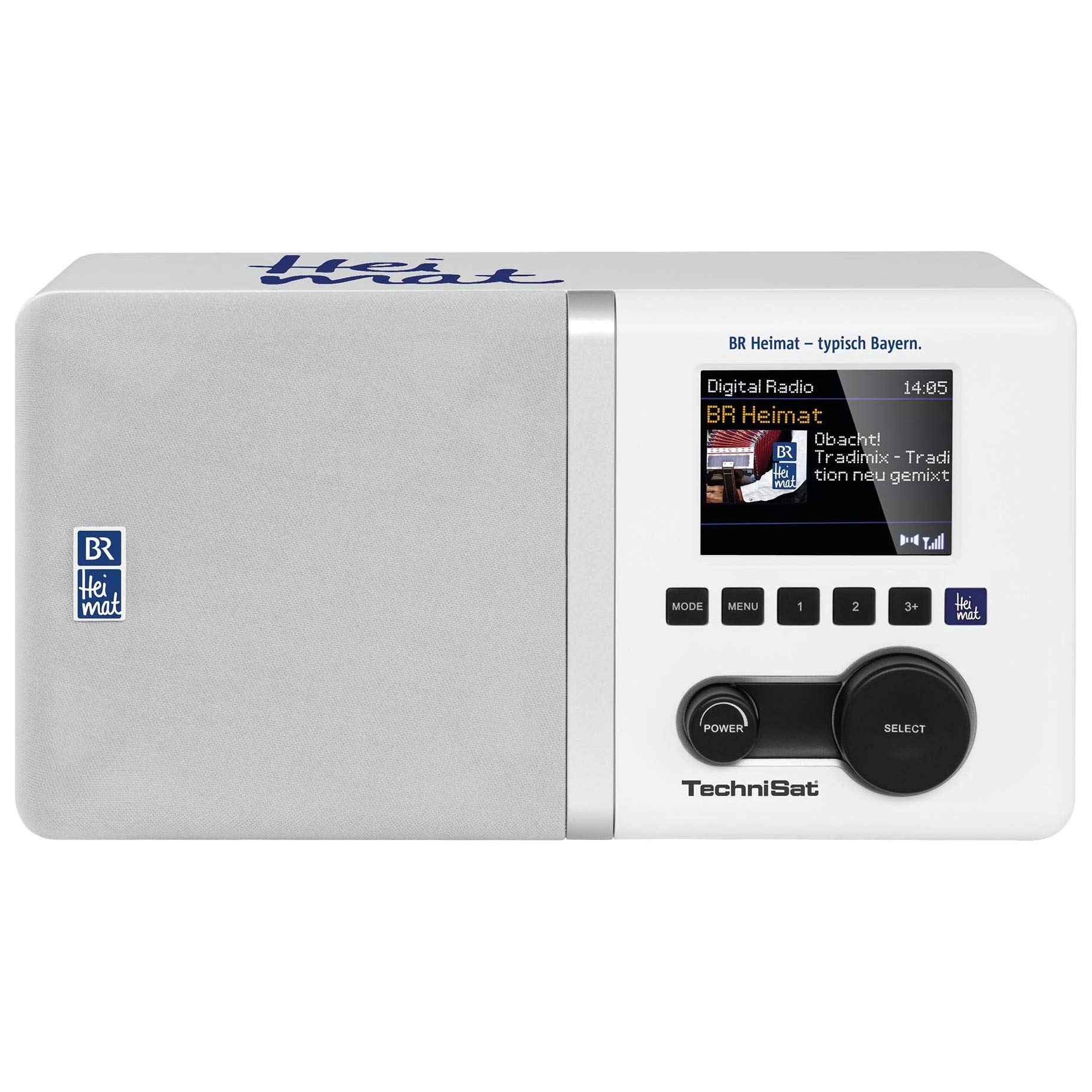
Obraz 1: Przód view of the TechniSat DIGITRADIO 300 BR Home Edition, showing the display, control buttons, and speaker grille.
Główne cechy:
- DAB+ and FM Radio Reception (with RDS and PLL)
- Direct Selection Button for BR Heimat (DAB+)
- 2.8-inch Dimmable Color TFT Display with Slideshow Function
- Integrated Equalizer for Treble and Bass Adjustment
- Bass-Reflex Tube for Enhanced Audio
- 5W Mono Speaker
- Alarm Clock with Two Adjustable Alarm Times, Snooze, and Sleep Timer
- Favorite Memory (10 for DAB+, 10 for FM)
- Wyświetlanie czasu i daty
- Connections: AUX (auxiliary) input, Audio Output (Cinch, L/R), 3.5 mm Headphone Jack
5. Konfiguracja
5.1 Połączenie zasilania
- Ensure the radio is placed on a stable, flat surface.
- Connect the power cable to the radio's power input.
- Plug the power adapter into a suitable wall outlet. The radio will power on or enter standby mode.
5.2 Konfiguracja anteny
Extend the telescopic antenna fully for optimal DAB+ and FM reception. Adjust its position to achieve the best signal quality.
5.3 Skanowanie początkowe (DAB+)
Upon first power-on, the radio may automatically perform a scan for available DAB+ stations. If not, navigate to the DAB+ menu and select the 'Full Scan' option to find and store all available digital radio stations.
6. Instrukcja obsługi
6.1 Włączanie/wyłączanie zasilania
Naciśnij Moc button to turn the radio on or off (standby mode).
6.2 Mode Selection (DAB+/FM/AUX)
Użyj Tryb button to switch between DAB+ radio, FM radio, and AUX input modes.
6.3 Obsługa radia DAB+
- In DAB+ mode, use the Dostrój/Wybierz knob to browse through available stations.
- Naciśnij Dostrój/Wybierz naciśnij pokrętło, aby potwierdzić wybór.
- Naciśnij dedykowany BR Heimat button for direct access to the BR Heimat DAB+ station, if available in your reception area.
- To perform a full scan for new stations, navigate to the DAB+ menu and select 'Full Scan'.
6.4 Obsługa radia FM
- W trybie FM użyj Dostrój/Wybierz pokrętło do ręcznego dostrojenia częstotliwości.
- Naciśnij i przytrzymaj Dostrój/Wybierz pokrętło, aby automatycznie wyszukać następną dostępną stację.
- The radio supports RDS (Radio Data System) for displaying station information where available.
6.5 Setting Favorites
To save a station as a favorite (10 for DAB+, 10 for FM):
- Dostrój się do żądanej stacji.
- Naciśnij i przytrzymaj Ustawienie wstępne przycisk.
- Użyj Dostrój/Wybierz pokrętło umożliwiające wybór numeru ustawienia wstępnego (1-10).
- Naciśnij Dostrój/Wybierz pokrętło do potwierdzenia i zapisania.
Aby przywołać ulubioną stację, naciśnij krótko przycisk Ustawienie wstępne przycisk i użyj Dostrój/Wybierz knob to select the desired preset.
6.6 Funkcja budzika
The radio features two independent alarm times. To set an alarm:
- Access the alarm settings through the menu.
- Wybierz Alarm 1 lub Alarm 2.
- Set the desired alarm time, source (buzzer, DAB+, or FM), and volume.
- Włącz alarm.
Gdy zabrzmi alarm, naciśnij Drzemka button to temporarily silence it. Press the Moc przycisk, aby wyłączyć alarm.
6.7 Wyłącznik czasowy
The sleep timer allows the radio to turn off automatically after a set period. Access the sleep timer function in the menu and select the desired duration (e.g., 15, 30, 60 minutes).
6.8 Regulacja korektora
Access the equalizer settings through the menu to adjust treble and bass levels according to your preference. This allows for personalized sound output.
6.9 Wejście AUX
Podłącz zewnętrzne urządzenie audio (np. smartfon, odtwarzacz MP3) do AUX In port using a 3.5 mm audio cable. Switch the radio to AUX mode to play audio from the connected device.
6.10 Wyjście słuchawkowe
Connect headphones to the 3.5 mm headphone jack for private listening. The internal speaker will be muted automatically.
7. Konserwacja
7.1 Czyszczenie
To clean the radio, unplug it from the power source. Use a soft, dry, lint-free cloth to wipe the surfaces. Do not use abrasive cleaners, waxes, or solvents as they may damage the finish.
7.2 Przechowywanie
If the device will not be used for an extended period, unplug it from the power outlet and store it in a cool, dry place.
8. Rozwiązywanie Problemów
If you encounter issues with your DIGITRADIO 300 BR Home Edition, refer to the following common problems and solutions:
| Problem | Możliwa przyczyna | Rozwiązanie |
|---|---|---|
| Brak zasilania | Kabel zasilający nie jest podłączony lub gniazdko elektryczne jest uszkodzone. | Ensure the power cable is securely connected to the radio and the wall outlet. Test the outlet with another device. |
| No DAB+ or FM reception / Poor signal | Antena nie jest wysunięta lub sygnał jest słaby. | Fully extend the telescopic antenna. Reposition the radio to a location with better reception. Perform a full scan for DAB+ stations. |
| Brak dźwięku | Volume too low, mute activated, or incorrect input mode. | Increase the volume. Check if headphones are connected. Ensure the correct input mode (DAB+, FM, AUX) is selected. |
| Alarm nie włącza się | Alarm not set or disabled. | Verify that the alarm time is correctly set and the alarm is enabled in the settings. |
9. Specyfikacje
- Marka: TechniSat
- Numer modelu: 0001/4993
- Kolor: Biały
- Rozmiar ekranu: 2.8 cali
- Technologia łączności: Pomocniczy
- Cechy szczególne: DAB+ digital radio, FM radio (with RDS and PLL), 10 DAB+ and 10 FM favorite memories, 2.8" TFT color display, BR Heimat direct selection button, time and date display, two radio timers, sleep function, equalizer function.
- Zgodne urządzenia: Słuchawki
- Akumulator: NIE
- Wymiary produktu (dł. x szer. x wys.): Wymiary: 25 cm x 13 cm x 13.5 cm
- Technologia strojenia: DAB+/DAB, FM
- Obsługiwane pasma radiowe: DAB+/FM
- Źródło zasilania: Zasilanie wewnętrzne
10. Gwarancja i wsparcie
Warranty information for the TechniSat DIGITRADIO 300 BR Home Edition is typically provided with the product at the time of purchase or can be found on the official TechniSat website. For technical support, service, or inquiries regarding spare parts, please refer to the contact information provided in your product packaging or visit the manufacturer's official support channels.