
Podstawy Amazona K001575
Amazon Basics LCD Computer Monitor Stand Riser User Manual
Model: K001575 | Brand: Amazon Basics
1. Wprowadzenie
This user manual provides comprehensive instructions for the assembly, operation, maintenance, and troubleshooting of your Amazon Basics LCD Computer Monitor Free-Standing Desk Stand Riser. Designed to enhance your ergonomic workspace, this stand allows for flexible adjustment of your monitor to achieve optimal viewkąty i komfort.

Rycina 1.1: Przód view of the Amazon Basics LCD Computer Monitor Stand Riser.
2. Funkcje
- Regulacja wysokości: Set the height of your LCD for a comfortable computing experience.
- Multi-directional Movement: With fingertip effort, raise or lower your display, pan left/right, tilt, and rotate.
- Nośność: Supports monitors weighing between 6-16 pounds.
- Kompatybilność rozmiaru ekranu: Designed for screens up to 24 inches.
- Vertical Height Adjustment: Offers 5 inches of monitor height adjustability.
- Obrót: Monitor can be used in portrait or landscape orientation (360° rotation).
- Zakres przechyłu: +25/-5 degree tilt capability.
- Zakres panoramy: 270° right/left pan from the base.
- Zgodność z VESA: Supports VESA 100 x 100 mm and 75 x 75 mm mounting patterns.
- Zarządzanie kablami: Integrated cable pass-through channel near the base keeps cables organized.
3. Zawartość opakowania
Przed rozpoczęciem montażu należy upewnić się, że wszystkie elementy są obecne:
- Monitor Stand Base and Arm Assembly
- Płyta montażowa VESA
- Mounting Screws (various sizes for VESA 75x75mm and 100x100mm)
- Allen Key (for adjustments and assembly)

Figure 3.1: Typical components included with the monitor stand.
4. Instrukcje konfiguracji
- Przygotuj stoisko: Place the monitor stand base on a stable, flat surface. Ensure the Allen key is accessible, often stored at the bottom of the base.
- Zamontuj płytkę VESA do monitora: Carefully lay your monitor face down on a soft, clean surface to prevent scratches. Align the VESA mounting plate with the screw holes on the back of your monitor. Use the appropriate mounting screws (M4 or M5, depending on your monitor) to secure the plate to the monitor. Do not overtighten.
- Mount Monitor to Stand: With the VESA plate attached to your monitor, carefully lift the monitor and slide the VESA plate onto the arm of the stand. Ensure it clicks securely into place.
- Adjust Tension (if necessary): If the monitor sags or is too stiff to adjust, use the included Allen key to adjust the tension screws on the arm. These are typically located near the VESA plate attachment point or along the arm's pivot points. Turn clockwise to increase tension (stiffer movement) and counter-clockwise to decrease tension (looser movement).
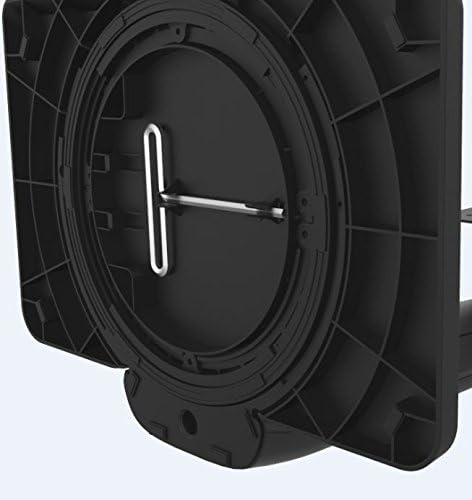
Figure 4.1: Allen key storage on the underside of the stand base.
5. Instrukcja obsługi
The Amazon Basics LCD Monitor Riser offers a range of adjustments for optimal viewkomfort:
- Regulacja wysokości: Gently push or pull the monitor up or down to your desired height. The stand is designed to hold its position once released.
- Regulacja nachylenia: Grasp the top and bottom edges of your monitor and gently tilt it forward or backward to achieve the perfect viewkąt.
- Regulacja panoramy: Rotate the entire stand base left or right on your desk for horizontal viewwprowadzanie korekt.
- Rotation (Portrait/Landscape): Rotate the monitor 360 degrees to switch between landscape and portrait orientations. Ensure no cables are tangled during rotation.

Figure 5.1: Monitor on stand in landscape orientation.

Figure 5.2: Monitor on stand in portrait orientation, side view.
5.1. Oficjalny film o produkcie
Video 5.1: An official product video demonstrating the features and adjustments of the Amazon Basics LCD Monitor Stand Adjustable Riser.
6. Konserwacja
- Czyszczenie: Do przecierania podstawki użyj miękkiej, suchej ściereczki. W przypadku uporczywych zabrudzeń, delikatnie przetrzyjamp Można użyć ściereczki zwilżonej łagodnym mydłem, a następnie wysuszyć. Unikać środków czyszczących o działaniu ściernym i rozpuszczalników.
- Regularne kontrole: Periodically check all screws and connections to ensure they are secure. Retighten if necessary using the provided Allen key.
- Zarządzanie kablami: Ensure cables are routed neatly through the cable pass-through channel to prevent strain or damage.
7. Rozwiązywanie Problemów
- Monitor opada lub nie utrzymuje się na swoim miejscu:
This indicates that the tension on the arm is too loose. Use the Allen key to tighten the tension screws on the arm until the monitor holds its position securely. Refer to Section 4, Step 4 for guidance.
- Monitor is Too Stiff to Adjust:
The tension on the arm may be too tight. Use the Allen key to loosen the tension screws slightly until movement is smooth but still holds position.
- Monitor chwieje się:
Ensure the stand is placed on a stable, flat surface. Check that all assembly screws are tightened securely, including those attaching the VESA plate to the monitor and the monitor to the stand.
- Cables are Tangled:
Utilize the integrated cable pass-through channel at the base of the stand to route cables neatly. This prevents tangling and keeps your workspace tidy.
8. Specyfikacje
| Atrybut | Wartość |
|---|---|
| Numer modelu | K001575 |
| Marka | Podstawy Amazon |
| Tworzywo | Aluminium |
| Kolor | Czarny |
| Waga przedmiotu | 5 funtów (2.27 kg) |
| Wymiary produktu (dł. x szer. x wys.) | 12 x 10.2 x 15.8 cala (30.5 x 25.9 x 40.1 cm) |
| Maksymalny obsługiwany rozmiar ekranu | 24 cali |
| Weight Adjustable Range | 6-16 pounds (2.7-7.2 kg) |
| Regulacja wysokości | 5 cali (12.7 cm) |
| Kąt nachylenia | +25/-5 stopni |
| Pan Angle | 270 degrees (right/left from base) |
| Obrót | 360 degrees (portrait/landscape) |
| Zgodność ze standardem VESA | 75x75mm, 100x100mm |
9. Gwarancja i wsparcie
This product is backed by an Amazon Basics 1-Year Limited Warranty. For detailed warranty information or technical support, please refer to the official Amazon Basics webodwiedź witrynę lub skontaktuj się bezpośrednio z obsługą klienta Amazon.
Wsparcie online: Odwiedzać Obsługa klienta Amazon