
1. Wprowadzenie i koniecview
This manual provides essential information for the installation, operation, and maintenance of your EVGA GeForce GTX 1080 SC GAMING ACX 3.0 graphics card. The EVGA GeForce GTX 1080 features NVIDIA's "Pascal" graphics processor, designed for high-performance gaming and immersive virtual reality experiences. This model incorporates EVGA's ACX 3.0 cooling technology, which includes optimized fan blades, double ball bearings, and an extreme low power motor for efficient cooling and quiet operation.

Image 1.1: EVGA GeForce GTX 1080 SC GAMING ACX 3.0 graphics card and packaging.
2. Zawartość opakowania
Please verify that all items listed below are included in your product package. If any items are missing or damaged, please contact EVGA customer support.
- EVGA GTX 1080 SC GAMING ACX 3.0 Graphics Card
- Sterowniki na CD
- Instrukcja instalacji
- 6-Pin (x2) to 8-Pin Power Adapter
- EVGA Gaming Poster
- Powered by EVGA Case Badge
- EVGA Enthusiast Built Sticker

Image 2.1: Included accessories and documentation.
3. Funkcje produktu
The EVGA GeForce GTX 1080 SC GAMING ACX 3.0 graphics card offers a range of features designed to enhance your computing and gaming experience:
- Wysoka wydajność: Real Base Clock of 1708 MHz and Real Boost Clock of 1847 MHz.
- Advanced Memory: 8192MB GDDR5X memory for demanding applications and games.
- Wydajne chłodzenie: EVGA ACX 3.0 cooling technology for optimal thermal performance and quiet operation.
- Obsługa DirectX 12: Full support for DirectX 12 with OSD (On-Screen Display) via EVGA Precision XOC software.
- Zgodność z systemem operacyjnym: Supports Windows 10 (32/64bit), Windows 8 (32/64bit), and Windows 7 (32/64bit).
- Gotowy na VR: Designed to deliver immersive virtual reality experiences.
- Łączność wyświetlacza: Multiple output options including DVI, DisplayPort, and HDMI.
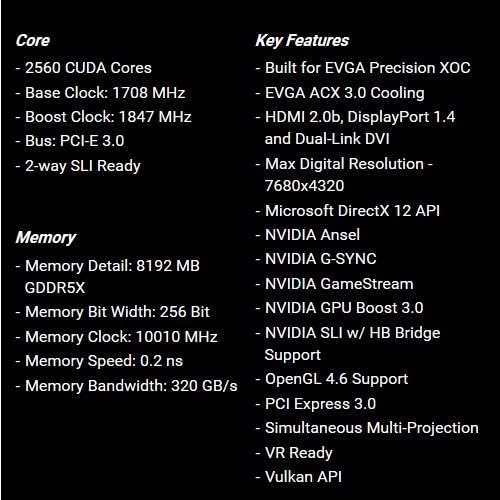
Image 3.1: Core and memory specifications, along with key features.
4. Przewodnik instalacji (konfiguracja)
Follow these steps to properly install your EVGA GeForce GTX 1080 SC GAMING ACX 3.0 graphics card into your computer system. Ensure your system meets the minimum requirements before proceeding.
- Przygotuj swój system: Power off your computer and unplug all cables from the power outlet. Open your computer case.
- Zlokalizuj gniazdo PCIe: Identify an available PCI Express x16 slot on your motherboard. This is typically the longest slot.
- Zdejmij osłony gniazd: Remove the metal slot covers from the back of your computer case corresponding to the PCIe slot you will use.
- Włóż kartę graficzną: Ostrożnie dopasuj kartę graficzną do gniazda PCIe i mocno dociśnij, aż zostanie pewnie osadzona. Powinieneś usłyszeć kliknięcie zatrzasku gniazda.
- Karta bezpieczna: Use screws to secure the graphics card to the computer case at the back panel.
- Podłącz zasilanie: Connect the required 8-pin PCIe power connector(s) from your power supply to the graphics card. If your power supply only has 6-pin connectors, use the included 6-pin to 8-pin adapter. Ensure all power connections are firm.
- Zamknij sprawę: Close your computer case and reconnect all external cables.
- Zainstaluj sterowniki: Power on your computer. Once the operating system loads, install the latest graphics drivers from the included Driver CD or download them from the official EVGA webStrona (www.evga.com/drivers).

Obraz 4.1: Przód view of the graphics card.

Image 4.2: Rear I/O ports (DVI, DisplayPort, HDMI).
5. Instrukcja obsługi
After successful installation and driver setup, your graphics card is ready for use.
- Wyświetl połączenie: Connect your monitor(s) to the appropriate display outputs on the graphics card (DVI, DisplayPort, or HDMI).
- Aktualizacje sterowników: Regularly check for and install the latest graphics drivers from the NVIDIA or EVGA website to ensure optimal performance and compatibility with new games and applications.
- EVGA Precision XOC: For advanced control, monitoring, and overclocking, install the EVGA Precision XOC software. This utility allows you to adjust fan curves, monitor temperatures, and customize RGB LED lighting (if applicable to your specific model).
- Wymagania systemowe: Ensure your system meets the recommended power supply wattage and other hardware requirements for stable operation.
6. Konserwacja
Proper maintenance can extend the lifespan and ensure consistent performance of your graphics card.
- Usuwanie kurzu: Okresowo czyść wentylatory karty graficznej i radiator sprężonym powietrzem z kurzu. Przed czyszczeniem upewnij się, że komputer jest wyłączony i odłączony od zasilania.
- Przepływ powietrza: Maintain good airflow within your computer case to prevent heat buildup. Ensure case fans are functioning correctly and cables are managed to avoid obstructing airflow.
- Aktualizacje sterowników: Keep your graphics drivers updated. New drivers often include performance optimizations and bug fixes.
7. Rozwiązywanie Problemów
Jeśli masz problemy z kartą graficzną, zapoznaj się z poniższymi typowymi procedurami rozwiązywania problemów:
- Brak wyjścia wyświetlacza:
- Upewnij się, że kabel monitora jest solidnie podłączony zarówno do karty graficznej, jak i do monitora.
- Sprawdź, czy karta graficzna jest całkowicie osadzona w gnieździe PCIe.
- Check that all required PCIe power connectors are securely attached to the graphics card.
- Jeżeli to możliwe, przetestuj urządzenie przy użyciu innego kabla wyświetlacza lub monitora.
- Problemy ze sterownikiem:
- Wykonaj czystą instalację najnowszych sterowników graficznych. Odinstaluj istniejące sterowniki przed zainstalowaniem nowych.
- Jeśli problem nadal występuje, wypróbuj starszą, stabilną wersję sterownika.
- Przegrzanie:
- Zapewnij właściwy przepływ powietrza w obudowie komputera.
- Wyczyść wentylatory i radiator karty graficznej z kurzu.
- Monitor temperatures using EVGA Precision XOC or similar software.
- Niestabilność/awarie systemu:
- Sprawdź, czy Twój zasilacz (PSU) spełnia zalecane parametry mocy.tage for your system, including the graphics card.
- Ensure the graphics card is not excessively overclocked. Reset to default settings if necessary.
- Check for system memory (RAM) issues.
For further assistance, refer to the official EVGA support webstronie internetowej lub skontaktuj się z zespołem pomocy technicznej.
8. Specyfikacje
| Funkcja | Szczegół |
|---|---|
| Numer modelu | 08G-P4-6183-KR |
| Procesor graficzny | NVIDIA GeForce GTX 1080 |
| Rdzenie CUDA | 2560 |
| Zegar bazowy | 1708MHz |
| Zegar Boost | 1847MHz |
| Typ pamięci | 8 GB pamięci GDDR5X |
| Memory Bit Width | 256-bit |
| Zegar pamięci | 10010MHz |
| Szerokość pasma pamięci | 320 GB/s |
| Maksymalna rozdzielczość cyfrowa | 7680x4320 |
| Interfejs wyjścia wideo | DVI, DisplayPort, HDMI |
| Interfejs magistrali | PCI Express 3.0 |
| Rozwiązanie chłodzące | EVGA ACX 3.0 |
| Wymiary (dł. x szer. x wys.) | 10.5 x 1.5 x 4.38 cala |
| Waga przedmiotu | 3 funta |
| Wsparcie systemu operacyjnego | Windows 10/8/7 (32/64bit) |

Obraz 8.1: Pod kątem view of the graphics card, highlighting its cooling design.

Obraz 8.2: Tył view of the graphics card, showing the backplate.
9. Gwarancja i wsparcie
For detailed warranty information, please refer to the official EVGA website or the documentation included with your product. EVGA provides customer support and resources for their products.
- Oficjalna instrukcja obsługi (PDF): Aby uzyskać kompleksowy przewodnik, możesz pobrać oficjalną instrukcję obsługi Tutaj.
- EVGA Support: Visit the EVGA support page for drivers, FAQs, and contact information: www.evga.com/support.