
Casio GG-1000-1A
Casio G-Shock GG-1000-1ADR Instruction Manual
Model: GG-1000-1A
Wstęp
This manual provides detailed instructions for the proper use, setup, and maintenance of your Casio G-Shock GG-1000-1ADR watch. Please read this manual thoroughly to ensure optimal performance and longevity of your timepiece. This watch is designed for durability and functionality, featuring analog-digital display, twin sensor capabilities, and robust construction.

Rycina 1: Przód view of the Casio G-Shock GG-1000-1ADR watch, showcasing its black dial, analog and digital displays, and robust casing.
Organizować coś
Początkowe ustawienie czasu
Upon first use or after battery replacement, it is necessary to set the current time and date. The GG-1000-1ADR features both analog and digital time displays. Ensure both are synchronized for accurate timekeeping.
- Wejście w tryb pomiaru czasu: Naciśnij TRYB button repeatedly until the timekeeping mode is displayed.
- Dostosuj ustawienia: Przytrzymaj REGULOWAĆ button until the city code starts flashing, indicating the setting mode.
- Wybierz kod miasta: Użyj SZUKAJ I KOMP buttons to select your home city code. This will automatically set the correct time zone.
- Set Daylight Saving Time (DST): Naciśnij TRYB button to cycle through settings. When DST is flashing, use the SZUKAJ button to toggle between ON and OFF.
- Ustaw godzinę i datę: Kontynuuj naciskanie TRYB button to navigate through hour, minute, year, month, and day settings. Use the SZUKAJ I KOMP przyciski do regulacji wartości.
- Wyjście z trybu ustawień: Naciśnij REGULOWAĆ przycisk, aby zapisać ustawienia i wyjść.
Analogowe ustawienie dłoni
If the analog hands do not match the digital time, manual adjustment may be required.
- W trybie pomiaru czasu przytrzymaj REGULOWAĆ Naciskaj przycisk, aż kod miasta zacznie migać.
- Naciśnij TRYB button repeatedly until "0:00" appears and the minute hand starts flashing.
- Użyj SZUKAJ button to advance the minute hand. Hold it down for rapid movement.
- Once the hands are aligned to 12 o'clock, press the REGULOWAĆ przycisk, aby zapisać.
Instrukcja obsługi
Nawigacja w trybie
Ten TRYB button (bottom left) cycles through the watch's various functions:
- Tryb pomiaru czasu: Wyświetla aktualną godzinę, datę i dzień.
- Tryb kompasu: Activates the digital compass.
- Tryb termometru: Wyświetla temperaturę otoczenia.
- Tryb czasu światowego: Shows time in various global cities.
- Tryb stopera: Pomiar czasu, który upłynął.
- Tryb licznika odliczania: Odliczanie od ustawionego czasu.
- Tryb alarmu: Ustawia codzienne alarmy.
Korzystanie z kompasu
To use the digital compass, press the KOMP button (top right). The second hand will point north, and the digital display will show the direction and bearing angle.
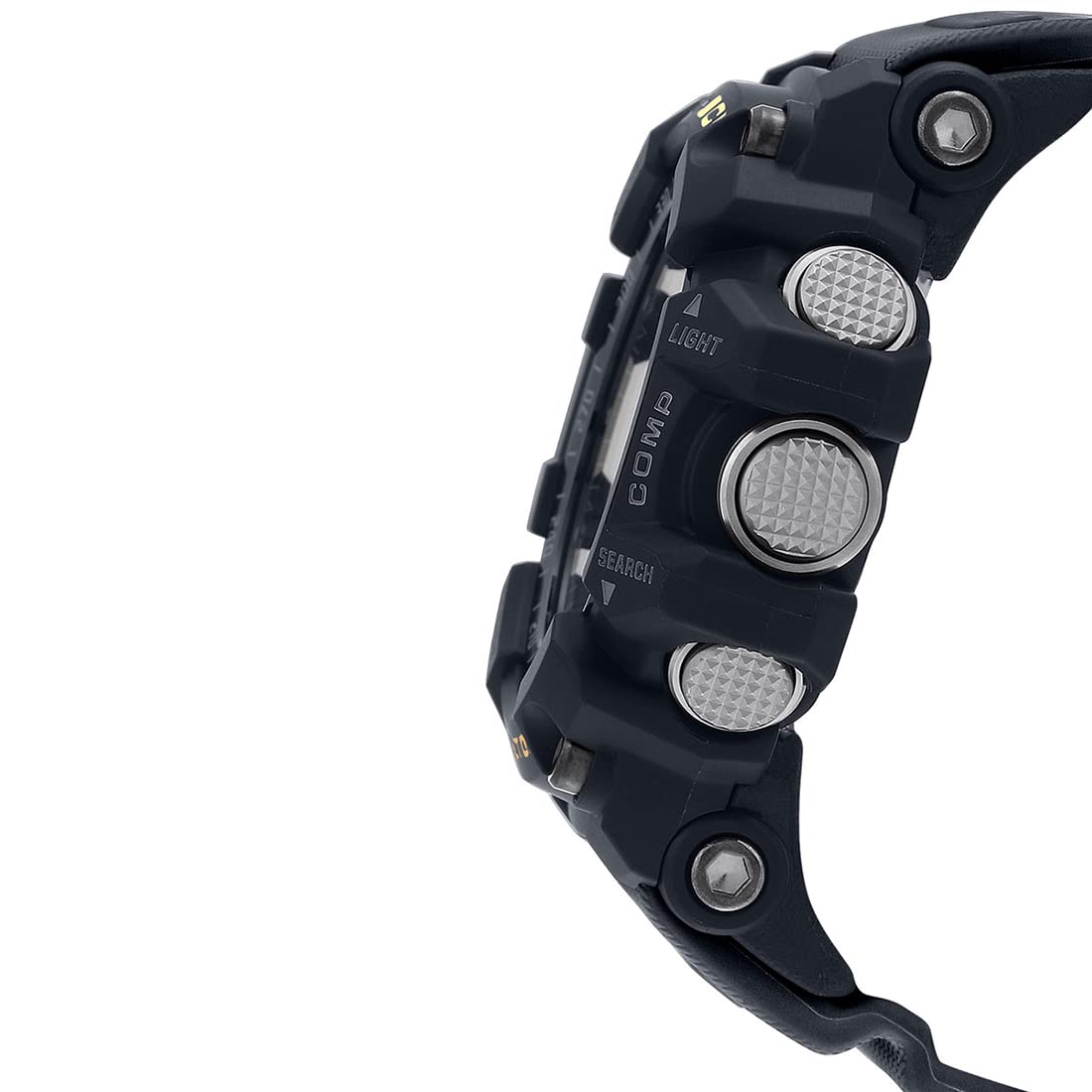
Rysunek 2: Strona view of the watch, highlighting the prominent buttons for various functions like LIGHT, COMP, and SEARCH.
For accurate readings, ensure the watch is held level. Magnetic interference can affect readings; avoid using near strong magnetic fields.
Pomiar temperatury
The watch can measure temperature from -10°C to 60°C (14°F to 140°F). To activate, navigate to Thermometer Mode using the TRYB button. For accurate ambient temperature readings, remove the watch from your wrist for at least 20-30 minutes to avoid body heat influence.
Oświetlenie
Naciśnij ŚWIATŁO button (top left) to illuminate the watch face for visibility in low-light conditions. The illumination duration can be adjusted in settings.
Konserwacja
Czyszczenie
Regular cleaning helps maintain the appearance and functionality of your watch. Wipe the watch with a soft, dry cloth. For stubborn dirt, use a soft cloth dampSpłukać wodą z łagodnym, neutralnym detergentem, a następnie wytrzeć do sucha. Unikać stosowania substancji lotnych, takich jak rozcieńczalnik czy benzyna, ponieważ mogą one uszkodzić składniki żywicy.
Odporność na wodę
This watch is water resistant to 200 meters (20 BAR). This means it is suitable for recreational scuba diving. Do not operate buttons while the watch is wet or submerged to prevent water ingress.
Wymiana baterii
The watch is powered by 1 Lithium Metal battery. When the display becomes dim or functions become erratic, it indicates low battery power. Battery replacement should be performed by a qualified technician to ensure proper sealing and water resistance is maintained.

Rysunek 3: Tył view of the watch, showing the stainless steel case back with water resistance and model engravings.
Rozwiązywanie problemów
- Problem: Wskazówki analogowe nie odpowiadają czasowi cyfrowemu.
Rozwiązanie: Perform analog hand alignment as described in the "Setup" section. Strong impacts or magnetic fields can sometimes cause misalignment.
- Problem: Odczyty temperatury są niedokładne.
Rozwiązanie: Ensure the watch has been off your wrist for at least 20-30 minutes to allow it to acclimate to ambient temperature. Body heat significantly affects readings.
- Problem: Compass readings are inconsistent or incorrect.
Rozwiązanie: Calibrate the compass if available (refer to full manual for specific calibration steps, not detailed here). Avoid strong magnetic fields (e.g., speakers, large metal objects) when taking readings. Ensure the watch is held level.
- Problem: Wyświetlacz jest ciemny lub pusty.
Rozwiązanie: This typically indicates a low battery. Replace the battery at an authorized service center. If the issue persists after battery replacement, contact customer support.
Specyfikacje
| Numer modelu | GG-1000-1A |
| Typ wyświetlacza | Analog-Digital |
| Typ ruchu | Kwarc |
| Materiał obudowy | Żywica |
| Materiał paska | Żywica |
| Głębokość wodoodporności | 200 metrów (20 BAR) |
| Wymiary obudowy (dł. x szer. x wys.) | 5.62 x 5.53 x 1.73 cm (56.2 x 55.3 x 17.3 mm) |
| Waga przedmiotu | 94 gramów |
| Typ baterii | 1 bateria litowo-metalowa (w zestawie) |
| Zakres wyświetlania temperatury | -10 do 60°C (14 do 140°F) |
| Countdown Timer Range | 1 minuta do 60 minut (w krokach co 1 minuta) |
| Kraj pochodzenia | Chiny |

Figure 4: Visual representation of the watch dimensions (56.2 mm length) compared to a standard credit card (54 mm width).
Gwarancja i wsparcie
Your Casio G-Shock GG-1000-1ADR watch comes with a limited warranty. Please refer to the warranty card included with your purchase for specific terms and conditions, including coverage duration and what is covered. Typically, the warranty covers manufacturing defects.
For technical support, repairs, or warranty claims, please contact an authorized Casio service center. Do not attempt to open or repair the watch yourself, as this may void the warranty and cause further damage.
Manufacturer: Casio India Co Pvt Ltd, A-41, 1st Floor, MCIE, Mathura Road, New Delhi-110044
Importer: Imported By - Casio India Co Pvt Ltd, A-41, 1st Floor, MCIE, Mathura Road, New Delhi-110044
Ask a question about this manual
Ask about setup, troubleshooting, compatibility, parts, safety, or missing instructions. Manuals+ will review the question and use this page’s manual context to help answer it.