
Wstęp
This manual provides detailed instructions for the setup, operation, maintenance, and troubleshooting of your EZCAP284 HD 1080P Capture HDMI YPbPr Recorder. Please read this manual thoroughly before using the device to ensure proper functionality and to prevent damage.
Informacje dotyczące bezpieczeństwa
- Nie wystawiaj urządzenia na działanie wilgoci, deszczu i ekstremalnych temperatur.
- Unikaj upuszczania i narażania urządzenia na silne uderzenia.
- Używaj wyłącznie wskazanego zasilacza.
- Nie należy podejmować prób demontażu ani modyfikacji urządzenia. Spowoduje to unieważnienie gwarancji.
- Trzymaj urządzenie poza zasięgiem dzieci.
Zawartość opakowania
Sprawdź, czy w przesyłce znajdują się wszystkie elementy:
- EZCAP284 HD 1080P Capture Device
- Zdalne sterowanie
- Zasilacz (nie wymieniony wprost, ale konieczny do działania)
- Instrukcja obsługi (ten dokument)
Produkt ponadview
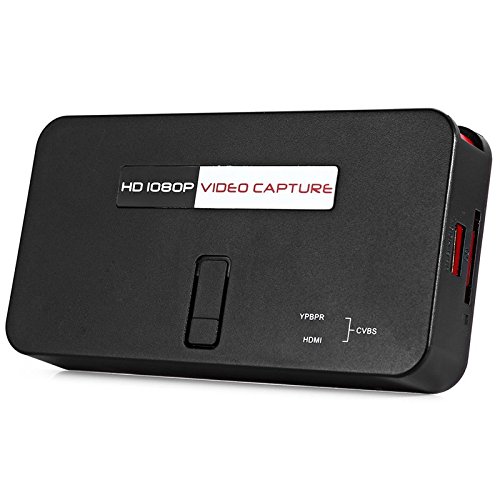
The EZCAP284 is a standalone HD video capture device designed for recording gameplay and other HDMI/YPbPr sources directly to a USB storage device without the need for a PC. It features HDMI pass-through for real-time viewing.

Rysunek 1: Góra view of the EZCAP284 device, featuring a prominent record button.

Rysunek 2: Szczegółowy view of the input and output ports on the EZCAP284.
Rysunek 3: Dół view of the EZCAP284 device, indicating model and certification information.
Organizować coś
- Podłącz źródło wideo: Connect your game console (e.g., PS3) or other video source to the HDMI IN or YPbPr IN port on the EZCAP284 using the appropriate cables.
- Podłącz wyświetlacz: Podłącz telewizor lub monitor do Wyjście HDMI port on the EZCAP284. This allows you to view your gameplay in real-time while recording.
- Podłącz pamięć USB: Włóż dysk flash USB lub zewnętrzny dysk twardy (sformatowany w systemie plików FAT32 lub NTFS) do USB 2.0 port on the EZCAP284. This is where your recordings will be saved.
- Podłącz zasilanie: Connect the power adapter to the DC IN port on the EZCAP284 and then plug it into a power outlet. The device will power on.
- Optional Audio Input: If you wish to record live commentary, connect a microphone to the Wejście audio 3.5 mm port.
Instrukcja obsługi
Recording Gameplay
- Sprawdź, czy wszystkie połączenia są bezpieczne, zgodnie z opisem w sekcji Konfiguracja.
- Turn on your video source (e.g., game console) and your display.
- Naciśnij REK button on the EZCAP284 device or the remote control to start recording. The indicator light will change to show recording is in progress.
- Naciśnij REK button again to stop recording. The indicator light will revert to its standby state.
- Your recorded video file will be saved to the connected USB storage device.
Adding Live Commentary
To record your voice along with the gameplay:
- Podłącz mikrofon do Wejście audio 3.5 mm port before starting your recording.
- The device will automatically mix the microphone audio with the video source audio during recording.
Odtwarzanie nagranego dźwięku
Do view your recorded videos, safely remove the USB storage device from the EZCAP284 and connect it to a computer or a media player that supports the recorded video format.
Konserwacja
- Czyszczenie: Do czyszczenia zewnętrznej części urządzenia należy używać miękkiej, suchej ściereczki. Nie należy używać płynnych środków czyszczących ani rozpuszczalników.
- Składowanie: Przechowuj urządzenie w chłodnym, suchym miejscu, z dala od bezpośredniego światła słonecznego i ekstremalnych temperatur, gdy nie jest używane.
- Oprogramowanie sprzętowe: Sprawdź producenta webOdwiedzaj witrynę okresowo, aby zapoznać się z aktualizacjami oprogramowania sprzętowego, które mogą poprawić wydajność lub dodać nowe funkcje.
Rozwiązywanie problemów
| Problem | Możliwa przyczyna | Rozwiązanie |
|---|---|---|
| Brak wyjścia wideo na wyświetlaczu. | Incorrect cable connection; input source not active; display input not selected. | Check HDMI/YPbPr connections. Ensure video source is on. Select correct input on your TV/monitor. |
| Recording fails or stops unexpectedly. | USB storage full; USB drive not compatible; power interruption. | Ensure USB drive has sufficient space. Try a different USB drive (FAT32/NTFS). Check power connection. |
| No audio in recording. | Audio cables not connected; source audio muted; microphone not connected or faulty. | Verify audio connections from source. Ensure source audio is not muted. Check microphone connection and functionality. |
| Pilot nie działa. | Batteries low or inserted incorrectly; IR sensor blocked. | Replace batteries. Ensure line of sight to the device's IR sensor. |
Specyfikacje
| Funkcja | Opis |
|---|---|
| Model | EZCAP284 |
| Typ | Adapter / Video Capture Device |
| Tworzywo | Miedź (elementy wewnętrzne) |
| Interfejsy | 3.5mm Audio In, HDMI In, HDMI Out, YPbPr In, USB 2.0 |
| Rozdzielczość przechwytywania wideo | Do 1080p |
| Zgodność platformy | PlayStation (and other HDMI/YPbPr sources) |
| Zawarte komponenty | Zdalne sterowanie |
| Kolor | Czarny |
| Wymiary (dł. x szer. x wys.) | 14.00 x 7.40 x 2.00 cm (w przybliżeniu) |
| Waga | 0.463 kg (przybliżona waga paczki) |
Gwarancja i wsparcie
Aby uzyskać informacje dotyczące gwarancji i wsparcia technicznego, zapoznaj się z dokumentacją dołączoną do produktu lub skontaktuj się bezpośrednio ze sprzedawcą/producentem. Zachowaj dowód zakupu na wypadek roszczeń gwarancyjnych.