
1. Wprowadzenie
Dziękujemy za zakupasing the Silverlit Xion FPV Camera Drone 84765. This drone is designed for outdoor use and offers an exciting First-Person View (FPV) flying experience with its integrated camera. Please read this manual thoroughly before operating the drone to ensure safe and optimal performance. Keep this manual for future reference.

Image 1.1: The Silverlit Xion FPV Camera Drone 84765.
2. Informacje dotyczące bezpieczeństwa
OSTRZEŻENIE: Nieprzestrzeganie tych instrukcji może spowodować obrażenia ciała lub uszkodzenie produktu.
- Always operate the drone in open, clear areas, away from people, animals, buildings, and power lines.
- Nie lataj przy silnym wietrze lub niesprzyjających warunkach pogodowych.
- Trzymaj ręce, twarz i luźne ubrania z dala od obracających się śmigieł.
- Przed każdym lotem upewnij się, że akumulator drona i akumulatory pilota są w pełni naładowane.
- Nigdy nie pozostawiaj ładujących się akumulatorów bez nadzoru.
- This product is intended for children. Adult supervision is recommended.
- Nie modyfikuj ani nie rozmontowuj drona ani jego podzespołów.
- Always turn off the drone and remote control when not in use.
3. Zawartość opakowania
Sprawdź, czy w opakowaniu znajdują się wszystkie elementy:
- Silverlit Xion FPV Camera Drone 84765
- Zdalne sterowanie
- Gogle FPV
- Rechargeable Drone Battery
- Kabel ładujący USB (do akumulatora drona)
- Zapasowe śmigła
- Instrukcja obsługi

Image 3.1: The Silverlit Xion FPV Drone product box, showing the drone and FPV goggles.
4. Konfiguracja
4.1. Instalacja baterii w pilocie zdalnego sterowania
- Otwórz komorę baterii znajdującą się z tyłu pilota.
- Insert the required batteries (not included) according to the polarity indicators.
- Dokładnie zamknij komorę baterii.
4.2. Montaż akumulatora drona
- Upewnij się, że dron jest wyłączony.
- Znajdź komorę baterii w dronie.
- Carefully insert the charged drone battery, ensuring it is properly seated and connected.
- Zamknij pokrywę komory baterii.
4.3. Montaż śmigła (jeśli wymagany)
If propellers are not pre-installed, attach them according to the markings (e.g., A and B) on the propellers and motor shafts. Ensure they are securely fastened.
4.4. Remote Control and Drone Pairing
- Umieść drona na płaskiej, poziomej powierzchni.
- Włącz drona. Kontrolki zaczną migać.
- Włącz pilota.
- Move the left joystick (throttle) fully up, then fully down. The drone's indicator lights will become solid, indicating successful pairing.
4.5. FPV Goggle Setup
Connect the FPV goggles to your smartphone (if applicable) or power them on as per their specific instructions. Ensure a stable connection for live video feed.

Image 4.1: The remote control and FPV goggles for the Silverlit Xion Drone.
5. Ładowanie akumulatora drona
The drone's battery requires charging before use. A USB charging cable is included, but a compatible USB power adapter (not included) is required.
- Podłącz kabel ładujący USB do akumulatora drona.
- Plug the other end of the USB cable into a suitable USB power adapter (e.g., a smartphone charger or computer USB port).
- The charging indicator light will show the charging status (refer to the cable's specific instructions for light behavior).
- Charging typically takes 80-100 minutes for a full charge.
- After a flight, allow the battery to cool down for 10-15 minutes before recharging to prolong battery life.
Note: A fully charged battery provides approximately 4-5 minutes of flight time.
6. Obsługa drona
6.1. Lista kontrolna przed lotem
- Sprawdź, czy baterie drona i pilota są w pełni naładowane.
- Sprawdź, czy śmigła są solidnie zamocowane i nieuszkodzone.
- Verify the flight area is clear of obstacles, people, and animals.
- Confirm successful pairing between the drone and remote control.
6.2. Start i lądowanie
- Umieść drona na płaskiej, poziomej powierzchni.
- Powoli przesuwaj lewy drążek sterowy (przepustnicę) w górę, aby dron wzniósł się.
- To land, slowly pull the left joystick (throttle) downwards until the drone gently touches the ground.
6.3. Podstawowe sterowanie lotem
- Lewy joystick (przepustnica): Up/Down for altitude control.
- Left Joystick (Yaw): Left/Right for rotating the drone horizontally.
- Prawy joystick (pochylenie/przechylenie): Up/Down for moving forward/backward; Left/Right for moving left/right (sideways).
6.4. Obsługa kamery i FPV
The drone features a 1080p video recording capability and 0.3 MP effective still resolution. Refer to the remote control diagram for specific camera buttons.
- Nagrywanie wideo: Press the designated video button on the remote control to start/stop recording.
- Ujęcie: Press the designated photo button to take a still image.
- Transmisja na żywo FPV: Once the FPV goggles are set up and connected, you will see the live video feed from the drone's camera, enhancing your flying experience.
7. Konserwacja
- Czyszczenie: Do czyszczenia drona i pilota używaj miękkiej, suchej ściereczki. Nie używaj silnych środków chemicznych ani rozpuszczalników.
- Kontrola śmigła: Regularly check propellers for cracks, bends, or damage. Replace any damaged propellers with spare parts provided.
- Składowanie: Store the drone and its components in a cool, dry place, away from direct sunlight and extreme temperatures. Remove batteries from the remote control if storing for extended periods.
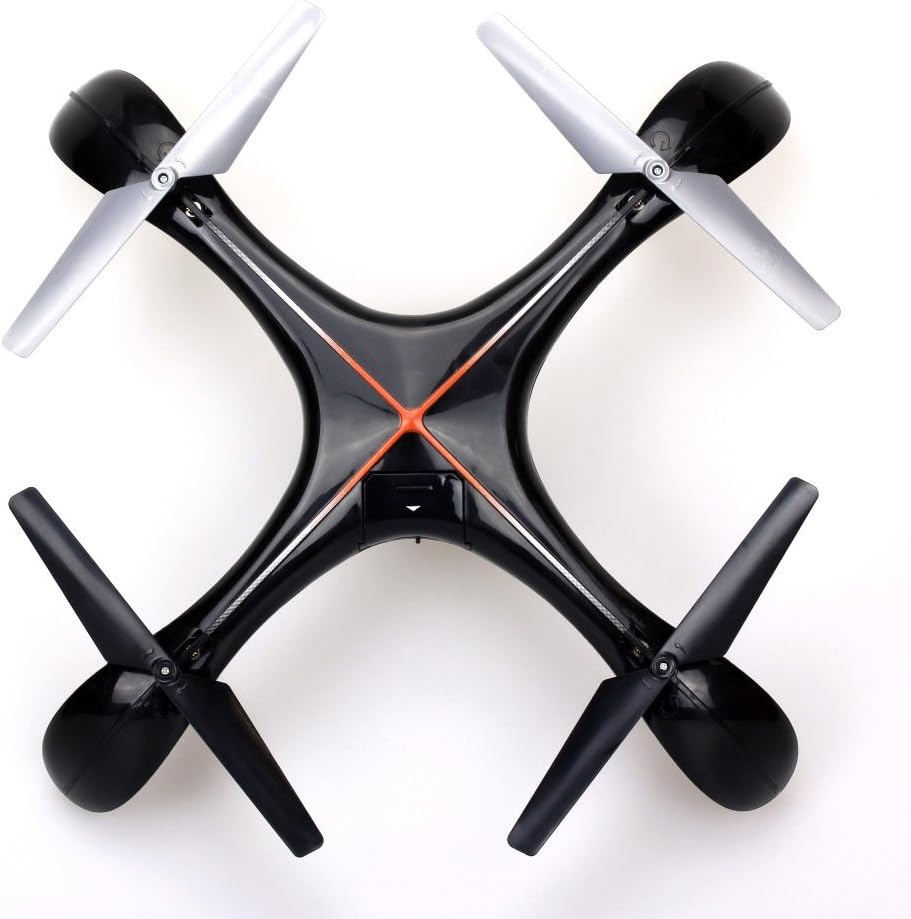
Obraz 7.1: Góra view of the Silverlit Xion FPV Drone, showing propeller orientation.
8. Rozwiązywanie Problemów
| Problem | Możliwa przyczyna | Rozwiązanie |
|---|---|---|
| Dron nie reaguje na zdalne sterowanie. | Low battery in drone or remote; not paired correctly. | Charge drone battery, replace remote control batteries, re-attempt pairing process. |
| Dron lata nieregularnie lub dryfuje. | Drone not calibrated on a flat surface; damaged propeller. | Ensure drone is placed on a level surface during pairing/initialization. Check and replace damaged propellers. Refer to manual for calibration steps if available. |
| Poor video quality or no FPV feed. | Weak signal; FPV goggles not connected properly. | Ensure drone is within range. Check FPV goggle connection and battery. |
| Krótki czas lotu. | Akumulator nie jest w pełni naładowany; akumulator jest stary. | Ensure battery is fully charged (80-100 minutes). Consider replacing the battery if it's old and performance has degraded. |
9. Specyfikacje
- Marka: Silverlit
- Nazwa modelu: 84765
- Przedział wiekowy: Dziecko
- Rozdzielczość nagrywania wideo: 1080p
- Efektywna rozdzielczość zdjęć: 0.3 MP
- Poziom umiejętności: Professional (Note: This may refer to advanced features, but basic operation is suitable for children with supervision)
- Typ sterowania: Zdalne sterowanie
- Baterie w zestawie: No (for remote control)
- Pilot w zestawie: Tak
- Waga produktu: 1.5 kilograma
10. Gwarancja i wsparcie
For warranty information or technical support, please refer to the documentation provided with your purchase or contact Silverlit customer service. Keep your proof of purchase for any warranty claims.