
Wstęp
Dziękujemy za zakupasing the VILTROX JY-680Ch Flash Speedlite. This high-performance flash unit is designed for Canon DSLR cameras, offering advanced features such as High-Speed Sync (HSS), ETTL/TTL automatic flash, and a powerful Guide Number of GN58. This manual provides detailed instructions for proper setup, operation, maintenance, and troubleshooting to ensure optimal performance and longevity of your device.
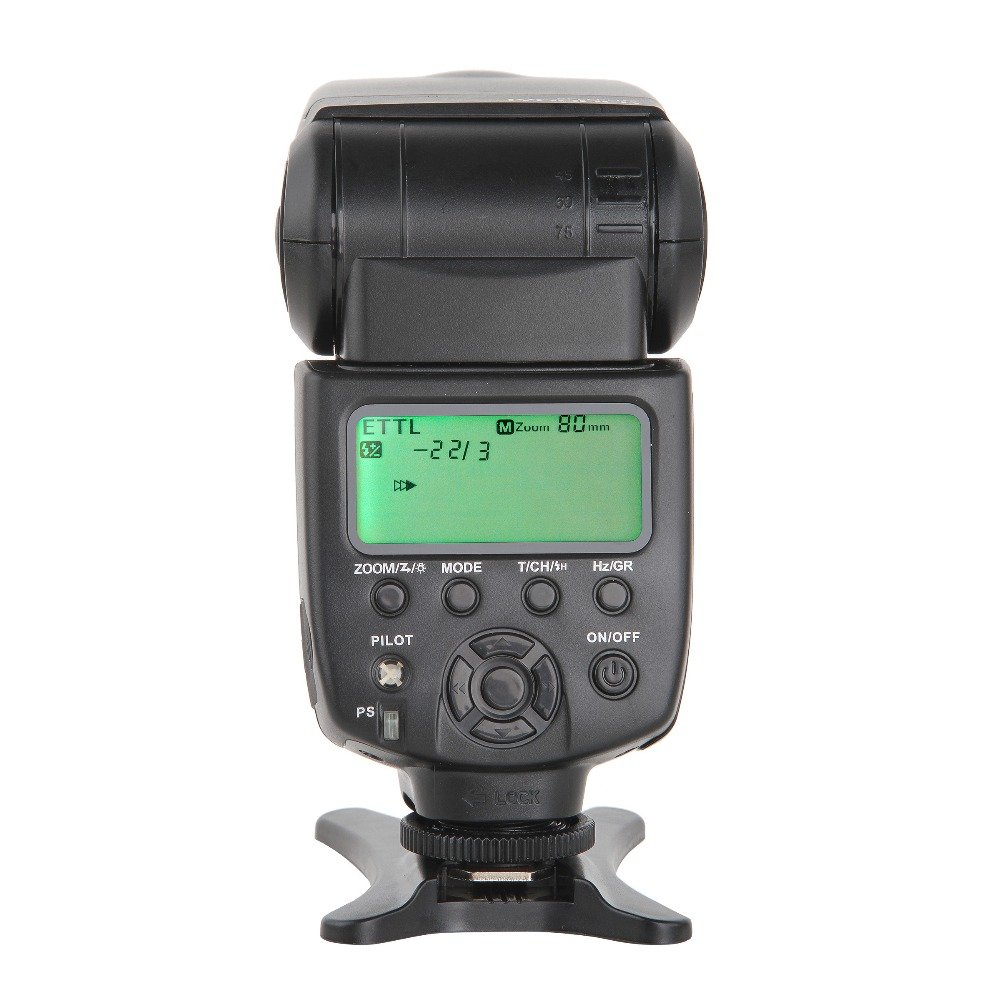
Figure 1: VILTROX JY-680Ch Flash Speedlite main unit.
1. Konfiguracja
1.1 Instalacja baterii
The VILTROX JY-680Ch Flash Speedlite requires 4 AA batteries (not included).
- Znajdź komorę baterii znajdującą się z boku lampy błyskowej.
- Otwórz pokrywę komory baterii.
- Włóż 4 baterie AA, zwracając uwagę na prawidłową biegunowość (+/-), zgodnie ze wskazaniami wewnątrz komory.
- Dokładnie zamknij pokrywę komory baterii.
1.2 Montaż do kamery
The flash unit features a hot shoe mount for secure attachment to your Canon DSLR camera.
- Upewnij się, że aparat i lampa błyskowa są wyłączone.
- Slide the flash's hot shoe foot into the camera's hot shoe slot.
- Rotate the locking ring on the flash unit clockwise until it is securely tightened. Do not overtighten.

Figure 2: Flash unit mounted on a Canon DSLR camera.

Figure 3: Detail of the hot shoe mount and locking ring.
1.3 Pierwsze włączenie zasilania
After mounting the flash and installing batteries, power on the unit.
- Naciśnij i przytrzymaj WŁ./WYŁ. button on the flash unit until the LCD screen illuminates.
- The flash will perform a self-test and display the current settings.
2. Instrukcja obsługi
2.1 Panel sterowania ponadview
The control panel features an LCD screen and several buttons for adjusting flash settings.

Figure 4: Control panel with LCD and function buttons.
- ZOOM/Z/☀: Adjusts zoom level or enters zoom setting.
- TRYB: Cycles through flash modes (TTL, M, Multi).
- T/CH/★: Sets wireless channel/group or enters custom function settings.
- Hz/GR: Sets stroboscopic frequency (Hz) in Multi mode or group in wireless mode.
- PILOT: Test flash button.
- WŁ./WYŁ.: Power on/off button.
- PS: Power Save switch.
- Pad kierunkowy: Navigates menus and adjusts values.
2.2 tryby błysku
Naciśnij TRYB button to switch between the following flash modes:
- ETTL/TTL Mode: Automatic flash exposure control. The flash output is automatically adjusted based on the camera's metering system.
- Manual (M) Mode: Allows manual control over flash output power (1/1 to 1/128). Use the directional pad to adjust power levels.
- Tryb wielokrotny (stroboskopowy): Fires a series of rapid flashes during a single exposure, ideal for capturing multiple movements of a subject. Adjust frequency (Hz) and number of flashes using the Hz/GR button and directional pad.
2.3 Synchronizacja z dużą prędkością (HSS)
The JY-680Ch supports High-Speed Sync (HSS) up to 1/8000 second, allowing you to use flash at shutter speeds faster than your camera's native sync speed. This is useful for freezing fast action or using wide apertures in bright conditions.
- Enable HSS through your camera's flash control menu or the flash unit's custom functions, if applicable. Refer to your camera's manual for specific instructions.
2.4 Auto/Manual Zooming
The flash head can automatically or manually adjust its zoom position to match the focal length of your lens, optimizing light coverage.
- Automatyczne powiększanie: In TTL mode, the flash will automatically adjust its zoom position (24-105mm) to match the lens's focal length.
- Ręczny zoom: Naciśnij ZOOM/Z/☀ button and use the directional pad to manually set the zoom position (e.g., 24mm, 35mm, 50mm, 70mm, 80mm, 105mm).
2.5 Wireless Flash System (Master/Slave)
The JY-680Ch supports Canon's optical wireless flash system, allowing it to function as both a master and slave unit.
- Tryb mistrzowski: When mounted on a camera, the flash can control other compatible slave flash units. Use the T/CH/★ I Hz/GR buttons to set groups and channels.
- Tryb niewolnika: The flash can be triggered wirelessly by a master flash or camera's built-in flash. Set the flash to slave mode and match the channel/group settings with the master unit.
2.6 PC Synchronous Interface
The flash unit includes a 2.5mm PC synchronous interface for connecting to cameras or external triggers that support PC sync.
- Connect a 2.5mm PC sync cable (not included) from the flash unit to your camera's PC sync terminal or an external trigger.
- This allows for synchronized flash firing, especially useful in studio setups or with older camera models.
2.7 Exposure Lock (FEL)
The flash supports Flash Exposure Lock (FEL) for both on-camera and wireless TTL modes. This feature allows you to lock the flash exposure for a specific part of your scene, then recompose and shoot.
- Refer to your Canon camera's manual for instructions on how to activate FEL. Typically, this involves pressing a dedicated FEL button on your camera.
3. Konserwacja
3.1 Czyszczenie
- Use a soft, dry cloth to clean the flash unit's exterior.
- W przypadku uporczywych zabrudzeń, delikatnieampNatrzyj szmatkę wodą lub łagodnym środkiem czyszczącym, a następnie natychmiast wytrzyj do sucha.
- Do not use strong solvents or abrasive cleaners.
- Keep the hot shoe contacts clean and free of debris.
3.2 Przechowywanie
- Jeśli lampa błyskowa nie będzie używana przez dłuższy czas, wyjmij baterie, aby zapobiec wyciekowi.
- Przechowuj lampę błyskową w chłodnym i suchym miejscu, z dala od bezpośredniego światła słonecznego i ekstremalnych temperatur.
- Use the included mini stand or a protective case to prevent damage.
3.3 Pielęgnacja baterii
- Zawsze używaj nowych, wysokiej jakości baterii AA.
- Nie mieszaj starych i nowych baterii ani różnych typów baterii.
- Zużytych baterii należy pozbywać się w sposób odpowiedzialny, zgodnie z lokalnymi przepisami.
4. Rozwiązywanie Problemów
| Problem | Możliwa przyczyna | Rozwiązanie |
|---|---|---|
| Lampa błyskowa się nie włącza. |
|
|
| Lampa błyskowa się nie uruchamia. |
|
|
| Ekspozycja lampy błyskowej jest nieprawidłowa. |
|
|
| Bezprzewodowa lampa błyskowa nie działa. |
|
|
Note: The flash unit features a temperature test (high-temperature alarm) to prevent overheating. If the alarm activates, allow the flash to cool down before further use.
5. Specyfikacje
| Funkcja | Szczegół |
|---|---|
| Model | JY-680Ch |
| Numer przewodni | GN58 (ISO 100, 105 mm) |
| Tryby Flash | ETTL/TTL, Manual (M), Multi (Stroboscopic) |
| Synchronizacja z dużą prędkością (HSS) | Do 1/8000 sekundy |
| Zakres powiększenia | Auto and Manual (24-105mm) |
| Funkcja bezprzewodowa | Canon optical wireless system (Master/Slave) |
| PC Sync Port | 2.5mm |
| Źródło zasilania | 4 baterie AA (brak w zestawie) |
| Wymiary (dł. x szer. x wys.) | 21.6 x 8.6 x 7.1 cm (w przybliżeniu) |
| Waga | 363 g (bez baterii) |
| Kompatybilne mocowania | Canon Hot Shoe |
6. Gwarancja i wsparcie
VILTROX products are designed for reliability and performance. This product is covered by a limited warranty against defects in materials and workmanship. Please refer to the warranty card included with your purchase for specific terms and conditions, including the warranty period and coverage details.
For technical support, service, or inquiries regarding your VILTROX JY-680Ch Flash Speedlite, please contact VILTROX customer service through their official webwitrynę lub sprzedawcę, u którego kupiłeś produkt.
Zasoby internetowe: For the latest information, firmware updates, and additional support, visit the official VILTROX webstrona: www.viltrox.com