
1. Wprowadzenie
This manual provides detailed instructions for the operation and maintenance of your Supersonic SC-1495BT Bluetooth AM/FM Boombox. Please read this manual thoroughly before using the device to ensure proper function and to maximize your listening experience.
2. Informacje dotyczące bezpieczeństwa
- Aby uniknąć pożaru lub porażenia prądem, nie wystawiaj urządzenia na działanie deszczu i wilgoci.
- Nie blokuj otworów wentylacyjnych. Zapewnij odpowiednią ilość miejsca wokół urządzenia, aby zapewnić prawidłowy przepływ powietrza.
- Unikaj umieszczania urządzenia w pobliżu źródeł ciepła, takich jak grzejniki, kratki wentylacyjne, piece lub inne urządzenia (w tym amp(lifiers) wytwarzające ciepło.
- Używaj wyłącznie dodatków/akcesoriów wskazanych przez producenta.
- Odłączaj urządzenie od zasilania podczas burzy z piorunami lub jeśli nie jest używane przez dłuższy czas.
- Wszelkie czynności serwisowe należy powierzyć wykwalifikowanemu personelowi serwisowemu. Serwis jest wymagany, gdy urządzenie zostało w jakikolwiek sposób uszkodzone.
3. Zawartość opakowania
Po rozpakowaniu upewnij się, że znajdują się w nim wszystkie wymienione poniżej przedmioty:
- Supersonic SC-1495BT Bluetooth AM/FM Boombox
- Przewód zasilający AC
4. Funkcje produktu
The Supersonic SC-1495BT Boombox offers a variety of features for versatile audio playback:
- Bluetooth Version 3.0 for wireless music streaming
- Built-in USB input for media playback
- Built-in SD card and Micro SD card slot for media playback
- 3.5 mm Line-in (AUX) jack for external audio devices
- Four-band radio: AM, FM, SW1, SW2
- Integrated rechargeable battery for portable use
- Wyraźny wyświetlacz LCD
- Fast forward and rewind functions for media playback
- 360-degree rod antenna for enhanced radio reception
- Obrotowa regulacja głośności
- Gniazdo słuchawkowe do prywatnego słuchania
- AC/DC operation for flexible power options
5. Sterowanie i połączenia
Familiarize yourself with the various controls and connection ports on your boombox.
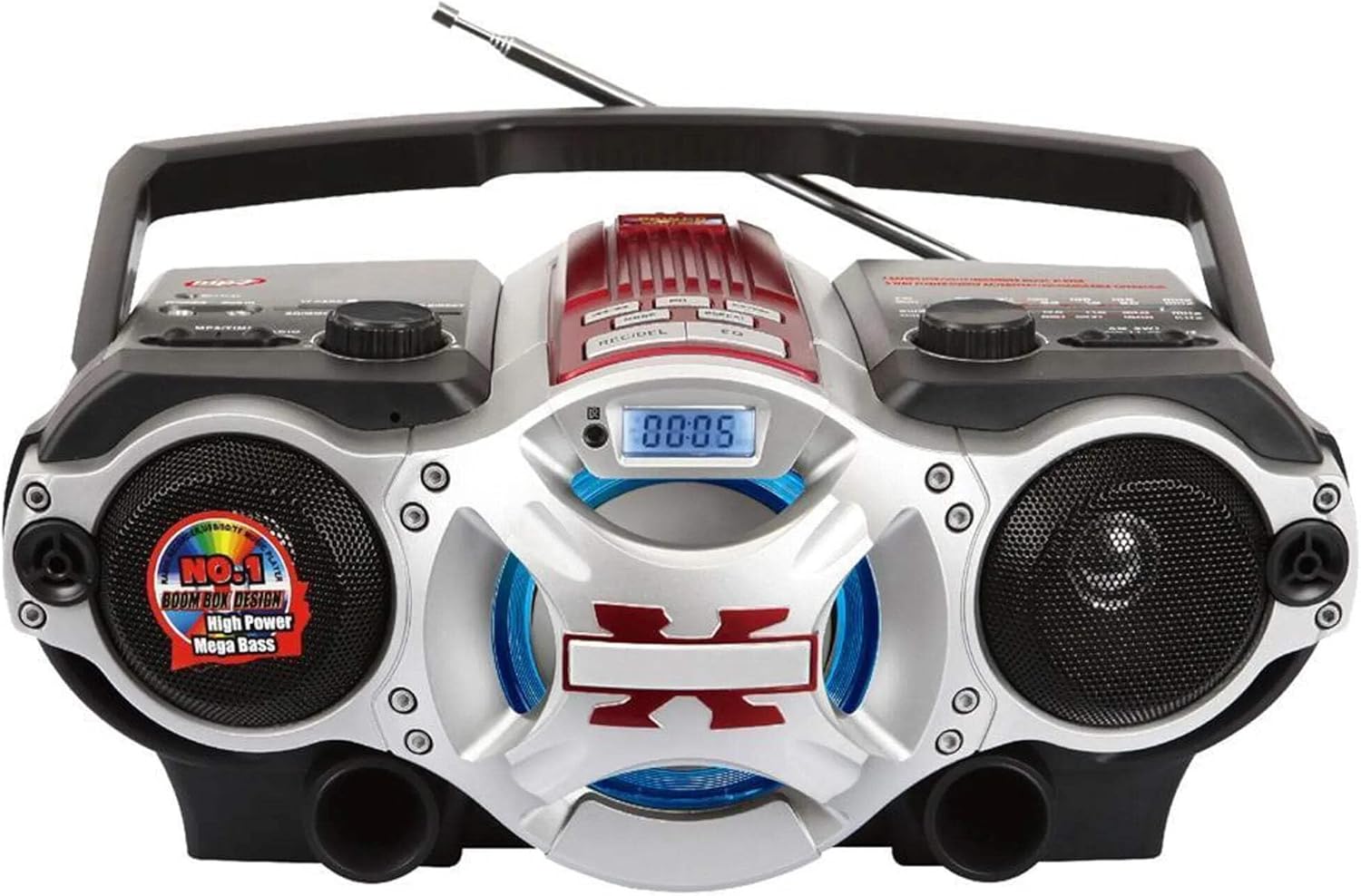
Rysunek 1: Przód view of the Supersonic SC-1495BT Boombox, showing the speakers, central display, and main control area.

Rysunek 2: Left side controls, including USB input, SD/Micro SD card slot, AUX IN, PHONES jack, BT/MP3/RADIO mode switch, and Rotary Volume control.

Rysunek 3: Right side controls, featuring the AM/FM/SW1/SW2 band selector, TUNING knob, and playback control buttons (Play/Pause, Skip, Mode, Clock, EQ).
6. Konfiguracja
6.1 Połączenie zasilania
- Zasilanie prądem zmiennym: Connect the included AC power cord to the AC input on the back of the boombox and then plug it into a standard wall outlet. The internal rechargeable battery will begin charging.
- Zasilanie prądem stałym (bateria): The boombox has a built-in rechargeable battery. Ensure it is charged before portable use. The unit can also operate on DC power from the internal battery when not connected to AC.
6.2 Regulacja anteny
Extend the 360-degree rod antenna for optimal radio reception, especially for FM and SW bands. Adjust its position for the clearest signal.
7. Instrukcja obsługi
7.1 Włączanie/wyłączanie i wybór trybu
- To power on the unit, slide the BT/MP3/RADIO switch to the desired mode (BT, MP3, or RADIO).
- Aby wyłączyć urządzenie, przesuń przełącznik do pozycji OFF.
7.2 Obsługa Bluetooth
- Przesuń przełącznik trybu na BT (Bluetooth). The LCD display will indicate Bluetooth mode, and the unit will enter pairing mode.
- Na urządzeniu z włączoną funkcją Bluetooth (smartfonie, tablecie itp.) włącz Bluetooth i wyszukaj dostępne urządzenia.
- Select "SC-1495BT" from the list of devices. Once paired, the unit will emit a confirmation sound.
- You can now play audio from your device through the boombox. Use your device or the boombox's playback controls (Play/Pause, Skip) to manage music.
7.3 Radio Operation (AM/FM/SW1/SW2)
- Przesuń przełącznik trybu na RADIO.
- Select the desired band (AM, FM, SW1, or SW2) using the band selector switch.
- Extend and adjust the rod antenna for optimal reception.
- Obróć STROJENIE knob to scan for radio stations. The frequency will be displayed on the LCD.
7.4 Odtwarzanie z USB/karty SD
- Przesuń przełącznik trybu na MP3.
- Insert a USB flash drive into the USB input or an SD/Micro SD card into the corresponding slot. Ensure the card is inserted correctly.
- The unit will automatically detect and begin playing MP3 audio filez włożonego nośnika.
- Use the playback control buttons (Play/Pause, Skip, Fast Forward, Rewind) to navigate tracks.
7.5 Wejście pomocnicze (AUX)
- Przesuń przełącznik trybu na MP3.
- Podłącz zewnętrzne urządzenie audio (np. odtwarzacz MP3, smartfon) do AUX IN gniazdo za pomocą kabla audio 3.5 mm (brak w zestawie).
- Play audio from your external device. The sound will be routed through the boombox speakers. Control playback from your external device.
7.6 Regulacja głośności
Obróć TOM Obróć pokrętło zgodnie z ruchem wskazówek zegara, aby zwiększyć głośność, a przeciwnie do ruchu wskazówek zegara, aby ją zmniejszyć.
7.7 Gniazdo słuchawkowe
For private listening, plug standard 3.5mm earphones (not included) into the TELEFONY jack. The main speakers will be muted.
8. Konserwacja
- Czyszczenie: Do czyszczenia zewnętrznej części urządzenia należy używać miękkiej, suchej ściereczki. Nie należy używać środków czyszczących o właściwościach ściernych ani rozpuszczalników.
- Składowanie: Jeśli radioodtwarzacz nie będzie używany przez dłuższy czas, należy go przechowywać w chłodnym, suchym miejscu, z dala od bezpośredniego światła słonecznego i ekstremalnych temperatur.
- Pielęgnacja baterii: To prolong the life of the built-in rechargeable battery, avoid fully discharging it frequently. Charge the unit regularly, even if not in use.
9. Rozwiązywanie Problemów
Jeśli masz problemy z boomboxem, zapoznaj się z poniższymi typowymi problemami i ich rozwiązaniami:
| Problem | Możliwa przyczyna | Rozwiązanie |
|---|---|---|
| Brak zasilania | AC cord not connected; Battery discharged; Power switch off | Ensure AC cord is securely plugged in; Charge the battery; Slide power switch to ON/BT/MP3/RADIO. |
| Brak dźwięku | Volume too low; Mute activated (if applicable); Incorrect mode selected; Earphones connected | Increase volume; Ensure correct mode (BT, MP3, RADIO) is selected; Disconnect earphones. |
| Bluetooth nie łączy się | Boombox not in pairing mode; Device Bluetooth off; Too far from boombox | Ensure boombox is in BT mode; Enable Bluetooth on your device; Move device closer (within 30 feet/10 meters); Try re-pairing. |
| Słaby odbiór radia | Antenna not extended/adjusted; Weak signal area | Fully extend and adjust the rod antenna; Try moving the unit to a different location. |
| Karta USB/SD nie jest odtwarzana | Błędny file format; Karta/napęd nieprawidłowo włożony; Uszkodzony files | Zapewnić files are MP3 format; Re-insert card/drive; Try a different USB drive or SD card. |
10. Specyfikacje
- Model: SC-1495BT
- Marka: Naddźwiękowy
- Łączność: Bluetooth (Ver. 3.0), USB, SD/Micro SD, 3.5mm AUX
- Zespoły radiowe: AM, FM, SW1, SW2
- Obsługiwane formaty audio: MP3
- Źródło zasilania: AC 110-220V, Built-in Rechargeable Battery
- Prelegenci: 2 (stereo)
- Wymiary (dł. x szer. x wys.): 15 x 10 x 12 cala
- Waga: 4.3 funtów
- Producent: Firma sprzedaży Capitol
- Kod UPC: 639131814950
11. Gwarancja
This product comes with a 1-year limited warranty. Please retain your proof of purchase for warranty claims. For specific warranty terms and conditions, refer to the documentation included with your purchase or contact Supersonic customer support.
12. Wsparcie
For further assistance, technical support, or inquiries regarding your Supersonic SC-1495BT Boombox, please visit the official Supersonic weblub skontaktuj się z działem obsługi klienta. Dane kontaktowe zazwyczaj można znaleźć na stronie producenta. webwitryny lub opakowania produktu.