
Vivolink VL120007
Instrukcja obsługi zestawu przedłużacza sygnału HDMI Vivolink HDBaseT VL120007 70 m 4K
Model: VL120007
1. Wprowadzenie
This user manual provides detailed instructions for the installation, operation, and maintenance of the Vivolink HDBaseT VL120007 70m 4K HDMI Extender Kit. This kit is designed to extend 4K HDMI signals up to 70 meters over a single Cat5e/6 cable, supporting bi-directional IR and CEC.
The Vivolink VL120007 is a premium quality product, ensuring reliable and high-performance signal transmission for various professional and home theater applications.
2. Koniec produktuview
The Vivolink VL120007 kit consists of a Transmitter unit and a Receiver unit. Both units are compact and designed for easy integration into existing setups.
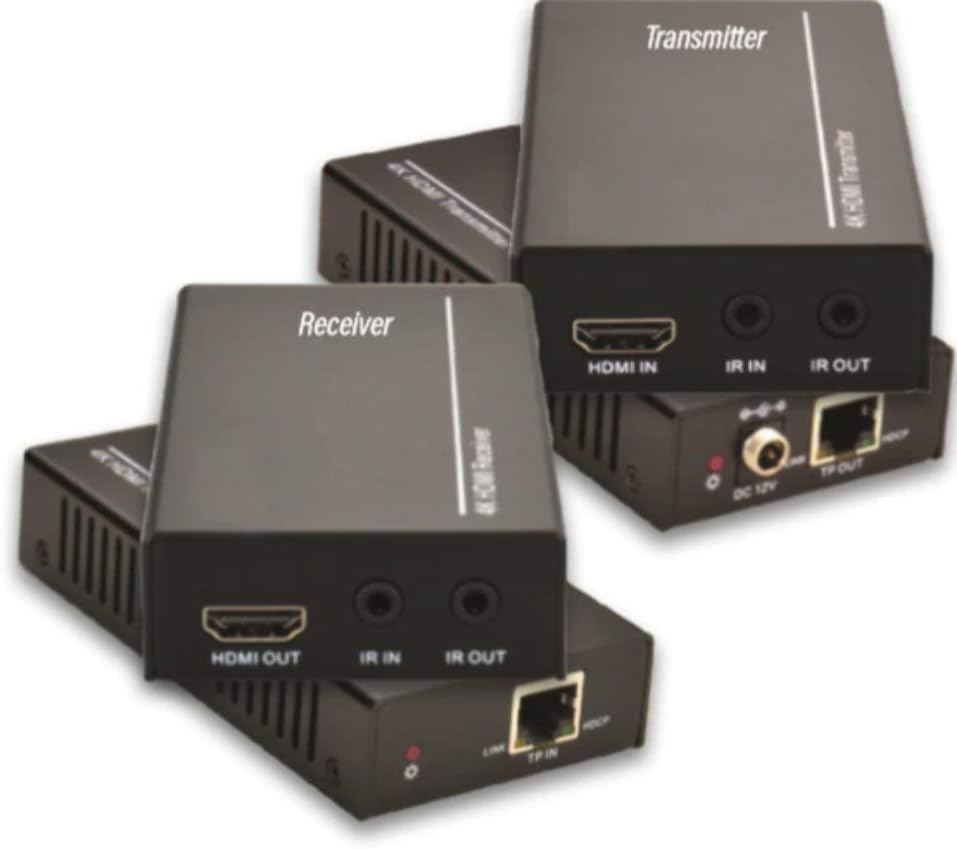
Figure 2.1: Vivolink HDBaseT VL120007 Transmitter (top) and Receiver (bottom) units. The Transmitter unit features HDMI IN, IR IN, IR OUT, DC 12V power input, and TP-OUT (HDBaseT) ports. The Receiver unit features HDMI OUT, IR IN, IR OUT, and TP-IN (HDBaseT) ports.
2.1. Główne cechy
- Extends 4K HDMI signals up to 70 meters (230 feet) over a single Cat5e/6 cable.
- Supports HDMI 1.4 and HDCP 2.2 compliant.
- Bi-directional IR pass-through for controlling source or display devices.
- Supports CEC (Consumer Electronics Control) functionality.
- Kompaktowa konstrukcja ułatwiająca instalację.
- Includes one Power Supply Unit (PSU).
3. Zawartość opakowania
Please verify that all items are present and in good condition upon opening the package. If any items are missing or damaged, please contact your vendor.
- 1x Vivolink HDBaseT Transmitter Unit (VL120007-TX)
- 1x Vivolink HDBaseT Receiver Unit (VL120007-RX)
- 1x 12V DC Power Supply Unit
- 1x kabel IR Blaster
- Kabel odbiornika podczerwieni 1x
- 1x Instrukcja obsługi (ten dokument)
4. Konfiguracja i instalacja
Before beginning installation, ensure all devices are powered off and disconnected from their power sources.
4.1. Schemat połączeń
The following diagram illustrates a typical connection setup for the Vivolink VL120007 extender kit.
(A detailed connection diagram would typically be placed here. For illustration, imagine a diagram showing Source -> Transmitter -> Cat Cable -> Receiver -> Display.)
4.2. Kroki instalacji
- Connect an HDMI cable from your source device (e.g., Blu-ray player, media streamer) to the HDMI IN port na Nadajnik jednostka.
- Connect a single Cat5e/6 cable (recommended Cat6 for optimal performance) from the TP-OUT port na Nadajnik jednostka do TP-IN port na Odbiornik unit. Ensure the cable is properly terminated with RJ45 connectors following TIA/EIA-568B wiring standards.
- Podłącz kabel HDMI do Wyjście HDMI port na Odbiornik unit to your display device (e.g., TV, projector).
- For IR control, connect the IR Blaster cable to the Wyjście IR port on the unit that will send the IR signal (e.g., Transmitter for controlling source, Receiver for controlling display). Position the IR emitter head directly over the IR sensor of the device to be controlled.
- Podłącz kabel odbiornika podczerwieni do IR W port on the unit that will receive the IR signal. Position the IR receiver head in a location where it can receive signals from your remote control.
- Connect the included 12V DC Power Supply Unit to the Prąd stały 12 V port on either the Transmitter or Receiver unit. The system supports Power over Cable (PoC), meaning only one power supply is needed for both units.
- Power on all connected devices (source, display, and extender units).
5. Instrukcja obsługi
Once all connections are made and power is supplied, the Vivolink VL120007 extender kit should automatically establish a connection and transmit the HDMI signal.
5.1. Wskaźniki LED
Both the Transmitter and Receiver units feature LED indicators to show their status:
- Dioda LED zasilania: Świeci się, gdy urządzenie jest zasilane.
- Dioda połączenia: Illuminates when a stable HDBaseT link is established between the Transmitter and Receiver units.
- Dioda danych: May flash to indicate active HDMI data transmission.
5.2. Sterowanie na podczerwień
The bi-directional IR pass-through allows you to control your source device from the display location or your display device from the source location. Ensure the IR Blaster and IR Receiver cables are correctly positioned.
5.3. CEC Functionality
The extender kit supports CEC (Consumer Electronics Control), allowing compatible devices to communicate and control each other over the HDMI connection. This feature typically works automatically if supported by your source and display devices.
6. Konserwacja
The Vivolink VL120007 extender kit requires minimal maintenance.
- Przechowywać urządzenia w chłodnym i suchym miejscu, z dala od bezpośredniego światła słonecznego, źródeł ciepła i nadmiernej wilgoci.
- Czyść urządzenia miękką, suchą ściereczką. Nie używaj środków czyszczących w płynie ani aerozolu.
- Aby zapobiec przegrzaniu, należy zapewnić odpowiednią wentylację wokół urządzeń.
- Regularnie sprawdzaj połączenia kablowe, aby mieć pewność, że są bezpieczne.
7. Rozwiązywanie Problemów
If you encounter issues with your Vivolink VL120007 extender kit, please refer to the following common troubleshooting steps:
| Problem | Możliwa przyczyna | Rozwiązanie |
|---|---|---|
| No video/audio output. |
|
|
| IR control not working. |
|
|
| Intermittent signal or flickering. |
|
|
If the problem persists after trying these steps, please contact Vivolink customer support for further assistance.
8. Specyfikacje
| Funkcja | Szczegół |
|---|---|
| Numer modelu | VL120007 |
| Marka | Żywotność |
| Zgodność z HDMI | HDMI 1.4 |
| Zgodność z HDCP | HDCP2.2 jest standardem, który umożliwia: |
| Obsługa maksymalnej rozdzielczości | 4K (UHD) |
| Odległość transmisji | Up to 70 meters (230 feet) for 4K over Cat5e/6 |
| Wymagania dotyczące kabla | Single Cat5e/6/7 cable |
| Przepuszczanie podczerwieni | Dwukierunkowy |
| Wsparcie CEC | Tak |
| Zasilacz | 12V DC (PoC supported) |
| Waga przedmiotu | 1.21 kilograma (ok. 2.67 funty) |
| Producent | Żywotność |
9. Informacje o gwarancji
Specific warranty details are not provided in the product information. Please refer to the warranty card included with your product or contact your point of purchase for detailed warranty terms and conditions.
10. Obsługa klienta
For technical support, troubleshooting assistance beyond this manual, or warranty inquiries, please contact Vivolink customer support or your authorized dealer.
Please have your model number (VL120007) and purchase information ready when contacting support.
Ask a question about this manual
Ask about setup, troubleshooting, compatibility, parts, safety, or missing instructions. Manuals+ will review the question and use this page’s manual context to help answer it.