
Monitor Audio Apex AW-12-BK
Instrukcja obsługi subwoofera Monitor Audio Apex AW-12
Model: Apex AW-12-BK
Wstęp
Thank you for choosing the Monitor Audio Apex AW-12 Subwoofer. This compact, high-performance subwoofer is designed to deliver powerful and precise bass, enhancing your home audio experience. Featuring a 12-inch C-CAM driver, a 500-watt Class D amplifier, and a high-efficiency switched-mode power supply, the Apex AW-12 integrates seamlessly into any compatible A/V system. This manual provides essential information for safe installation, optimal operation, and proper maintenance of your subwoofer.
Informacje dotyczące bezpieczeństwa
Please read all safety instructions before operating the subwoofer. Keep this manual for future reference.
- Źródło zasilania: Podłącz subwoofer wyłącznie do źródła zasilania prądem zmiennym, zgodnie ze wskazówkami na urządzeniu.
- Wentylacja: Zapewnij odpowiednią wentylację wokół urządzenia. Nie blokuj otworów wentylacyjnych.
- Woda i wilgoć: Nie wystawiaj urządzenia na działanie deszczu, wilgoci ani nadmiernej wilgotności.
- Ciepło: Trzymaj urządzenie z dala od źródeł ciepła, takich jak grzejniki, kratki wentylacyjne, piece i inne urządzenia wytwarzające ciepło.
- Serwisowanie: Nie próbuj samodzielnie naprawiać tego produktu. Wszelkie czynności serwisowe należy powierzyć wykwalifikowanemu personelowi serwisowemu.
- Czyszczenie: Przed czyszczeniem odłącz od zasilania. Użyj miękkiej, suchej ściereczki.
Produkt ponadview
The Monitor Audio Apex AW-12 Subwoofer is designed for robust audio performance and aesthetic integration.

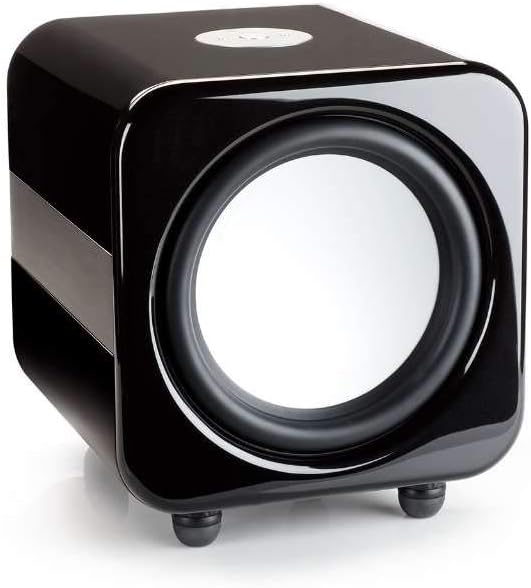

Organizować coś
1. Umieszczenie
The Apex AW-12 is designed as a floor-standing subwoofer. For optimal performance, place the subwoofer on a solid, level surface. Experiment with different positions in your room to find the best bass response, typically in a corner or along a wall.
2. Połączenia
Ensure all audio equipment is turned off before making connections.
- Wejście audio: Connect the subwoofer to your A/V receiver or processor's subwoofer output (LFE) using a high-quality RCA cable.
- Wejście wyzwalacza 12 V: If your A/V receiver or processor has a 12V trigger output, connect it to the subwoofer's 12V trigger input. This allows for automatic power activation/deactivation with your main system.
- Podłączenie zasilania: Po wykonaniu wszystkich połączeń audio podłącz dołączony przewód zasilający do gniazda zasilania subwoofera, a następnie do odpowiedniego gniazdka ściennego.
Operacyjny
Włączanie/wyłączanie
If using the 12V trigger input, the subwoofer will power on automatically when your connected A/V receiver or processor is turned on. Otherwise, locate the power switch on the subwoofer and set it to the 'ON' position.
Volume and EQ Controls
The Apex AW-12 features top-mounted controls for volume and EQ settings. Adjust the volume to blend seamlessly with your main speakers. The EQ settings allow you to fine-tune the bass response to suit your room acoustics and personal preference. Refer to your A/V receiver's manual for initial setup and calibration of subwoofer levels.
Konserwacja
To ensure the longevity and optimal performance of your Monitor Audio Apex AW-12 Subwoofer, follow these maintenance guidelines:
- Czyszczenie: Regularly wipe the cabinet with a soft, dry, lint-free cloth. Avoid using abrasive cleaners, waxes, or solvents, as these can damage the finish.
- Pył: Use a soft brush or a vacuum cleaner with a brush attachment to gently remove dust from the driver and ventilation areas.
- Środowisko: Keep the subwoofer in a stable environment, away from direct sunlight, extreme temperatures, and high humidity.
- Inspekcje: Okresowo sprawdzaj wszystkie połączenia kablowe, aby mieć pewność, że są bezpieczne.
Rozwiązywanie problemów
If you experience issues with your Apex AW-12 Subwoofer, consult the following table for common problems and solutions.
| Problem | Możliwa przyczyna | Rozwiązanie |
|---|---|---|
| Brak dźwięku z subwoofera | Zasilanie nie jest podłączone lub włączone Luźny lub uszkodzony kabel audio Nieprawidłowe ustawienia odbiornika/procesora | Sprawdź przewód zasilający i wyłącznik zasilania Ensure audio cable is securely connected at both ends; try a different cable Verify subwoofer output is enabled and volume is up on your receiver/processor |
| Zniekształcony lub słaby bas | Subwoofer volume too high/low Nieprawidłowe ustawienia korektora Złe umiejscowienie | Adjust subwoofer volume on the unit and/or receiver Experiment with EQ settings Try repositioning the subwoofer in the room |
| Subwoofer does not turn on with receiver (12V trigger) | 12V trigger cable loose or faulty Receiver's 12V trigger output not active | Check 12V trigger cable connection Consult your receiver's manual to ensure 12V trigger output is enabled |
If the problem persists after trying these solutions, please contact Monitor Audio customer support.
Specyfikacje
Key technical specifications for the Monitor Audio Apex AW-12 Subwoofer:
| Funkcja | Specyfikacja |
|---|---|
| Model | Apex AW-12-BK |
| Typ głośnika | Subwoofer |
| Średnica subwoofera | 12 cali (30.48 cm) |
| AmpTyp lifier | Klasa D |
| Cotage / Max Output Power | 500 watów |
| Źródło zasilania | AC |
| Tworzywo | Metaliczny |
| Kolor | Czarny metalik |
| Wymiary (gł. x szer. x wys.) | 49.5 cm x 47.5 cm x 47.2 cm (19.5 cala x 18.7 cala x 18.6 cala) |
| Typ montażu | Stały podłogowe |
Informacje o gwarancji
Monitor Audio products are manufactured to the highest quality standards. For detailed warranty terms and conditions, please refer to the warranty card included with your product or visit the official Monitor Audio webZachowaj dowód zakupu na wypadek roszczeń gwarancyjnych.
Obsługa klienta
If you require further assistance or have questions not covered in this manual, please contact Monitor Audio customer support or your authorized dealer. Contact information can typically be found on the official Monitor Audio webstronie internetowej lub na opakowaniu produktu.
Ask a question about this manual
Ask about setup, troubleshooting, compatibility, parts, safety, or missing instructions. Manuals+ will review the question and use this page’s manual context to help answer it.