
Wstęp
The GOXT 23685 Bluetooth Visor Mount Speaker provides a hands-free solution for communication while driving. This device allows you to make and receive calls, and stream audio from your smartphone, enhancing safety by keeping your hands on the steering wheel. It mounts conveniently to your vehicle's sun visor and connects wirelessly via Bluetooth to compatible smartphones.
Zawartość opakowania
Sprawdź, czy w przesyłce znajdują się wszystkie elementy:
- GOXT 23685 Bluetooth Visor Mount Speaker
- Kabel ładujący USB
- Instrukcja obsługi (ten dokument)

Image: The GOXT 23685 Bluetooth Visor Mount Speaker in its retail packaging, showing the device and its key features.
Organizować coś
1. Ładowanie urządzenia
Before initial use, fully charge the GOXT 23685 speaker. Connect the provided USB charging cable to the speaker's charging port and the other end to a USB power source (e.g., car charger, computer USB port). The charging indicator light will illuminate during charging and turn off when fully charged. A full charge provides approximately 12 hours of talk time.
2. Montaż głośnika
The speaker is designed to clip onto your vehicle's sun visor. Position the speaker on the visor so that the microphone is directed towards you for optimal voice pickup. Ensure it does not obstruct your view or interfere with the visor's operation.
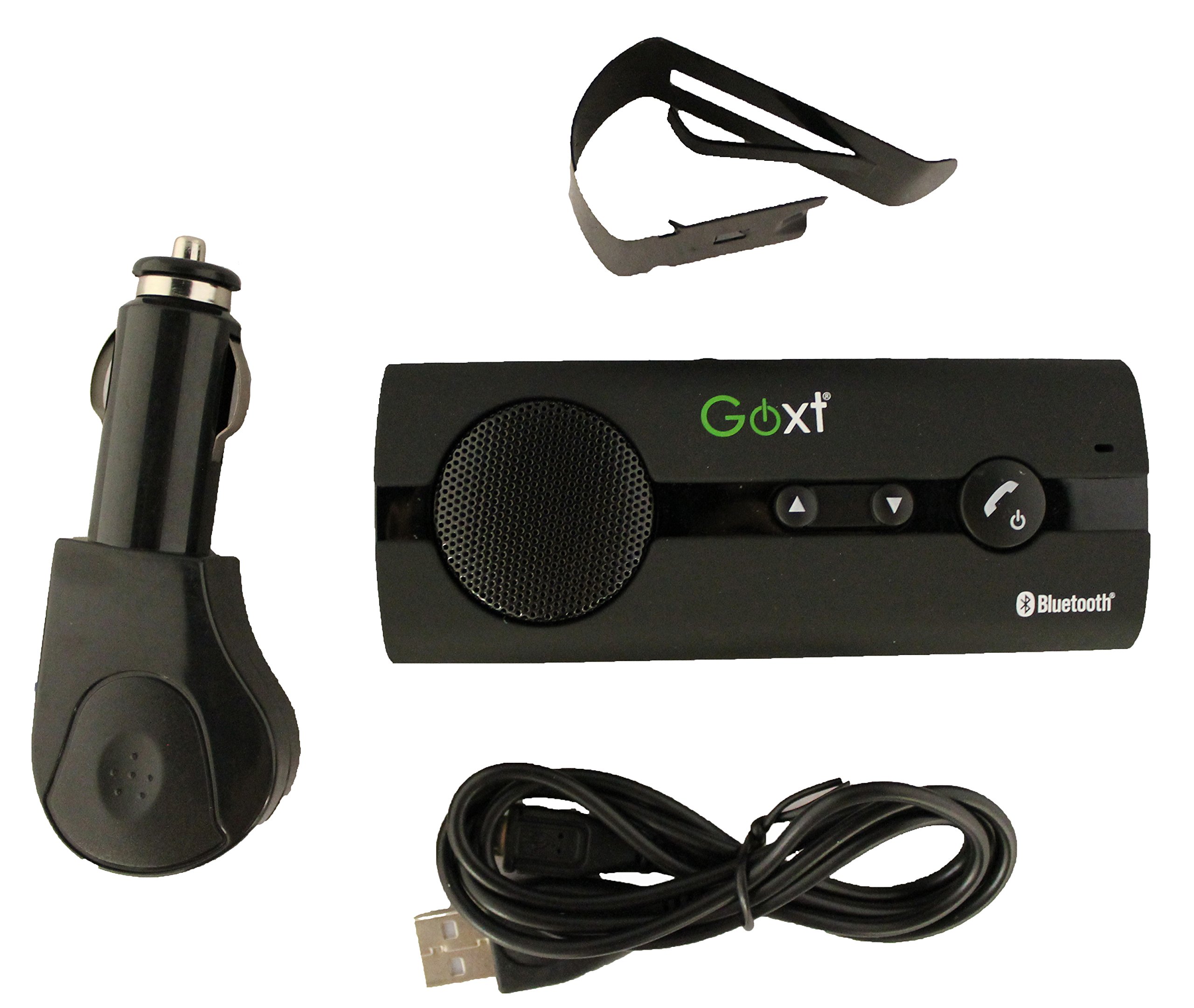
Image: The GOXT 23685 Bluetooth Visor Mount Speaker securely clipped onto a car's sun visor, demonstrating its intended mounting position.
3. Włączanie/wyłączanie zasilania
To power on the device, press and hold the Power button until the indicator light illuminates. To power off, press and hold the Power button again until the indicator light turns off.
Instrukcja obsługi
1. Parowanie Bluetooth
- Ensure the GOXT 23685 speaker is powered on and within pairing mode (indicator light flashing).
- On your smartphone, navigate to the Bluetooth settings menu.
- Włącz Bluetooth i wyszukaj dostępne urządzenia.
- Select "GOXT 23685" (or similar name) from the list of found devices.
- Jeśli zostaniesz poproszony o podanie hasła, wpisz „0000” (cztery zera).
- Once paired, the speaker's indicator light will change, and your phone will confirm the connection.
- The device supports connecting to two phones simultaneously.
2. Wykonywanie i odbieranie połączeń
- Odbieranie połączenia: When a call comes in, press the Answer/End Call button once.
- Zakończenie połączenia: During a call, press the Answer/End Call button once.
- Odrzucenie połączenia: When a call comes in, press and hold the Answer/End Call button for approximately 2 seconds.
- Nawiązywanie połączenia: Initiate a call from your smartphone. The audio will automatically transfer to the GOXT speaker.
- Voice Recognition Dialing: The device supports voice recognition dialing. Refer to your smartphone's manual for specific instructions on activating voice commands.
3. Strumieniowe przesyłanie dźwięku
Once paired, the GOXT 23685 speaker can stream audio from your smartphone, including GPS navigation instructions and music. Ensure your phone's media audio is routed through Bluetooth.
Konserwacja
- Czyszczenie: Do czyszczenia zewnętrznej części głośnika należy używać miękkiej, suchej ściereczki. Nie należy używać środków czyszczących o właściwościach ściernych ani rozpuszczalników.
- Pielęgnacja baterii: To prolong battery life, avoid fully discharging the battery frequently. Recharge the device when the low battery indicator appears.
- Składowanie: Przechowywać urządzenie w chłodnym i suchym miejscu, z dala od bezpośredniego światła słonecznego i ekstremalnych temperatur.
Rozwiązywanie problemów
| Problem | Możliwa przyczyna | Rozwiązanie |
|---|---|---|
| Urządzenie nie włącza się. | Akumulator jest rozładowany. | Naładuj urządzenie za pomocą dostarczonego kabla USB. |
| Nie można sparować ze smartfonem. | Bluetooth is off on phone; device not in pairing mode; too far apart. | Ensure Bluetooth is enabled on your phone. Put the GOXT speaker into pairing mode. Keep devices within 1 meter during pairing. Restart both devices. |
| No audio during calls/streaming. | Volume too low; incorrect audio output selected on phone. | Increase volume on both the speaker and your smartphone. Check your phone's Bluetooth settings to ensure audio is routed to the GOXT speaker. |
| Słaba jakość połączeń. | Speaker position; environmental noise; weak signal. | Adjust speaker position for better microphone pickup. Reduce background noise if possible. Ensure strong Bluetooth connection. |
Specyfikacje
- Model: 23685
- Technologia łączności: Bluetooth
- Źródło zasilania: Zasilany bateryjnie
- Średnia żywotność baterii: 12 godzin (czas rozmów)
- Metoda sterowania: Głos
- Zgodne urządzenia: Smartfon, Tablet
- Cechy szczególne: Supports Voice Recognition Dialing, Noise Cancelling Technology, Connects 2 Phones
- Montowanie: Klips do wizjera
Gwarancja i wsparcie
This product is covered by a limited warranty. For specific warranty terms and conditions, please refer to the documentation included with your purchase or contact Custom Accessories customer support. For technical assistance or further inquiries, please visit the Custom Accessories official webodwiedź witrynę lub skontaktuj się z ich kanałami wsparcia.