
VINABTY BN59-01179A
VINABTY BN59-01179A Replacement Remote Control Instruction Manual
For Samsung LED TVs
1. Wprowadzenie
This manual provides instructions for the VINABTY BN59-01179A replacement remote control, designed for use with various Samsung LED TV models. This remote offers full functionality without requiring complex setup procedures.
2. Konfiguracja i instalacja baterii
The VINABTY BN59-01179A remote control is designed for immediate use. No programming or pairing is required. Simply install the batteries to begin operation.
2.1 Instalacja baterii
- Znajdź komorę baterii z tyłu pilota.
- Przesuń pokrywę komory baterii w dół, aby ją otworzyć.
- Włóż dwie (2) baterie AAA, upewniając się, że bieguny dodatni (+) i ujemny (-) są prawidłowo ustawione względem oznaczeń wewnątrz komory.
- Przesuń pokrywę komory baterii z powrotem na miejsce, aż zatrzaśnie się pewnie.
Notatka: Zawsze wymieniaj obie baterie jednocześnie. Nie mieszaj starych i nowych baterii ani różnych typów baterii.

Obraz 1: Tył view pilota zdalnego sterowania, z zaznaczeniem komory baterii.
3. Obsługa pilota
This remote control provides standard functions for navigating your Samsung LED TV. Point the remote directly at the TV's infrared sensor for optimal performance.
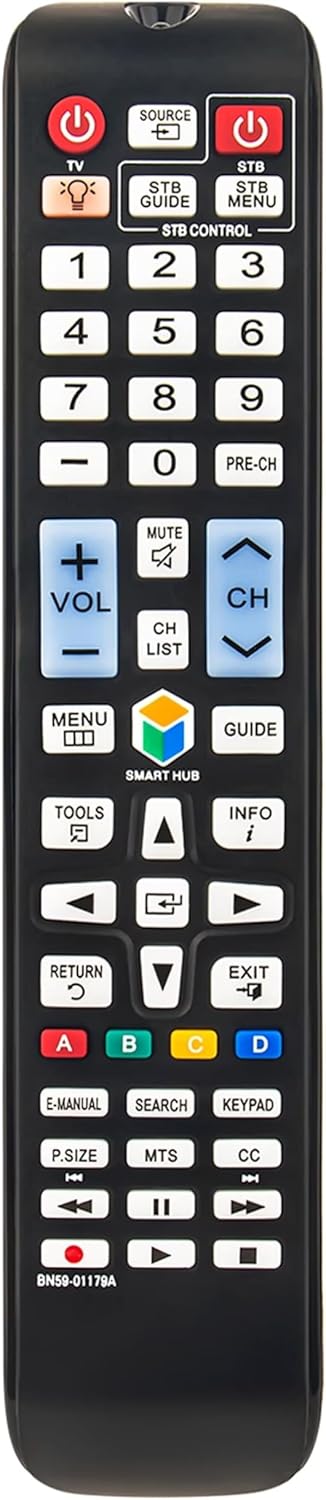
Obraz 2: Przód view of the remote control, displaying all buttons.
3.1 Kluczowe funkcje
- Power (TV): Włącza lub wyłącza telewizor.
- Źródło: Wybiera źródła wejściowe (HDMI, AV itp.).
- STB Power / STB Menu / STB Guide: Controls a connected Set-Top Box (if applicable).
- Przyciski numeryczne (0-9): Bezpośredni wybór kanału.
- Głośność (+/-): Regulacja głośności telewizora.
- Niemy: Wycisza lub wyłącza wyciszenie dźwięku telewizora.
- Kanał (CH +/-): Zmienia kanały telewizyjne.
- Menu: Dostęp do głównego menu telewizora.
- Inteligentny Hub: Opens the Smart Hub interface for smart TV features.
- Przewodnik: Wyświetla elektroniczny przewodnik po programach.
- Panel nawigacyjny (góra, dół, lewo, prawo, Enter): Umożliwia poruszanie się po menu i wybieranie opcji.
- Powrót: Powrót do poprzedniego ekranu lub menu.
- Wyjście: Wychodzi z bieżącego menu lub aplikacji.
- Przyciski kolorów (A, B, C, D): Functionality varies by TV model and application.
- Play/Pause, Stop, Rewind, Fast Forward: Sterowanie odtwarzaniem multimediów.
4. Kompatybilne modele telewizorów Samsung
This remote control is compatible with a wide range of Samsung LED TV models, including but not limited to:
- UN110S9, UN110S9VF, UN110S9VFXZA
- UN32H5500, UN32H5500AF, UN32H5500AFXZA
- UN32H6350, UN32H6350AF, UN32H6350AFXZA
- UN39H5204, UN39H5204AF, UN39H5204AFXZA
- UN40H5500, UN40H5500AF, UN40H5500AFXZA
- UN40H6350, UN40H6350AF, UN40H6350AFXZA
- UN48H5500, UN48H5500AF, UN48H5500AFXZA
- UN48H6350, UN48H6350AF, UN48H6350AFXZA
- UN50H5500, UN50H5500AF, UN50H5500AFXZA
- UN50H6350, UN50H6350AF, UN50H6350AFXZA
- UN55H6300, UN55H6300AF, UN55H6300AFXZA
- UN55H6350, UN55H6350AF, UN55H6350AFXZA
- UN60H6300, UN60H6300AF, UN60H6300AFXZA
- UN60H6350, UN60H6350AF, UN60H6350AFXZA
- UN65H6350AF
- UN75H6300, UN75H6300AF, UN75H6300AFXZA
- UN75H6350, UN75H6350AF, UN75H6350AFXZA
- UN65H6203BFXZA, UN58H5202AFXZA, UN58H5202AFXZC
- UN40H5201AFXZALT24H310SNDXZA, UN55H6203AF/XZA, UN50H6203AFXZA
- UN46H6203AFXZA, UN40H5203AFXZA, UN40H6203AFXZA
- UN65H6203AFXZA, UN50H5203AFXZA, UN60H6203AFXZA, UN46H5203AFXZA

Image 3: Remote control in use with a television.
5. Specyfikacje
| Numer modelu | BN59-01179A |
| Marka | WINNY |
| Kompatybilne urządzenia | Samsung LED Televisions |
| Źródło zasilania | Baterie 2 x AAA (brak w zestawie) |
| Wymiary produktu | 5 x 1.9 x 0.5 cala (około 12.7 x 4.8 x 1.3 cm) |
| Waga przedmiotu | 2.7 uncji (około 76.5 gramów) |
| Kolor | Czarny |
| Funkcja specjalna | Ergonomiczna konstrukcja |

Image 4: Remote control with approximate dimensions.
6. Rozwiązywanie Problemów
If you experience issues with your remote control, please refer to the following common solutions:
- Pilot nie odpowiada:
- Sprawdź, czy baterie zostały włożone prawidłowo, z zachowaniem właściwej polaryzacji (+/-).
- Wymień stare baterie na nowe baterie AAA.
- Sprawdź, czy między pilotem zdalnego sterowania a czujnikiem podczerwieni telewizora nie znajdują się żadne przeszkody.
- Ensure you are within the effective range of the TV's sensor.
- Niektóre przyciski nie działają:
- Clean the remote control buttons and surface with a soft, dry cloth to remove any dirt or debris.
- If only certain buttons are unresponsive, it might indicate a hardware issue.
- Działanie przerywane:
- Weak batteries can cause intermittent functionality. Replace them.
- Ensure there are no strong light sources (like direct sunlight or bright fluorescent lights) interfering with the infrared signal.
7. Gwarancja i wsparcie
Specific warranty information for this product is not provided in the available documentation. For support or warranty inquiries, please contact the retailer or manufacturer directly.