
1. Wprowadzenie
The GAMDIAS Hermes GKB3000 is a mechanical gaming keyboard designed for enhanced durability and performance. It features GAMDIAS Certified Blue Switches with a 50 million actuation lifecycle, a 7-color spectrum backlight with 14 lighting effects, and various functional keys for an optimized gaming and typing experience. This manual provides instructions for setting up, operating, and maintaining your keyboard.
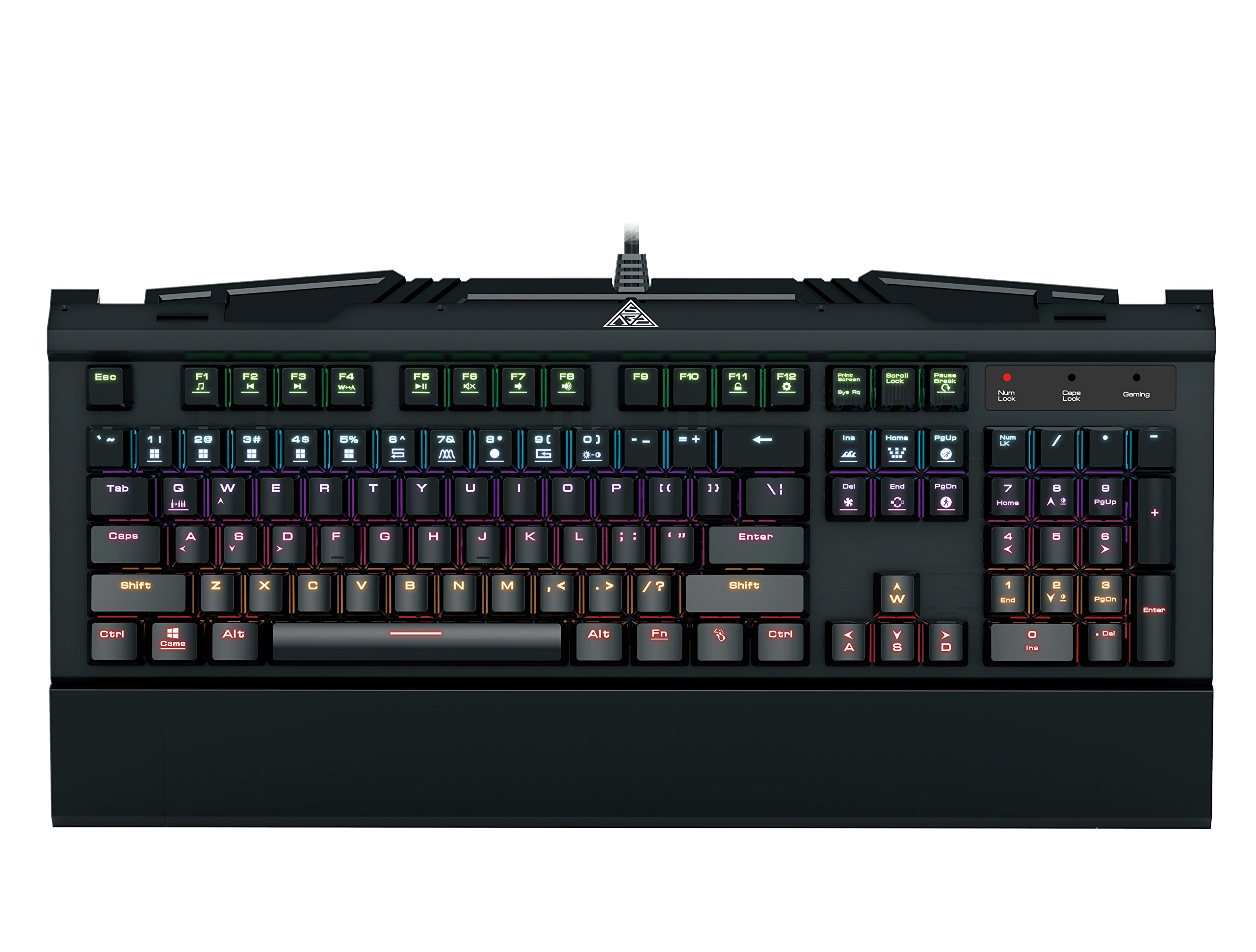
Image 1.1: The GAMDIAS Hermes GKB3000 Mechanical Gaming Keyboard. This image displays the full keyboard with its key layout and design, highlighting its compact yet robust build.
2. Zawartość opakowania
Po rozpakowaniu należy sprawdzić zawartość opakowania, aby upewnić się, że wszystkie elementy są obecne i nieuszkodzone.
- GAMDIAS Hermes GKB3000 Mechanical Gaming Keyboard
- Instrukcja obsługi (ten dokument)
3. Konfiguracja
Follow these steps to set up your GAMDIAS Hermes GKB3000 keyboard:
- Rozpakuj klawiaturę: Ostrożnie wyjmij klawiaturę z opakowania.
- Połącz z komputerem: Plug the USB-A connector of the keyboard cable into an available USB port on your computer.
- Instalacja sterownika: The keyboard is plug-and-play. Your operating system (e.g., Windows) will automatically detect and install the necessary drivers. No additional software installation is typically required for basic functionality.
- Umieszczenie: Place the keyboard on a stable, flat surface for comfortable use.
4. Instrukcja obsługi
4.1. Efekty świetlne
The Hermes GKB3000 features a 7-color spectrum backlight with 14 sets of lighting effects. These include 9 preset effects and 5 customizable patterns.
- Efekty przełączania: Use the dedicated function keys (often combined with the Fn key) to cycle through the preset lighting effects. Refer to the keyboard's keycap legends for specific combinations.
- Dostosowywanie efektów: The keyboard supports 5 customizable lighting patterns. Instructions for programming these patterns are typically found in the full software suite available for download from the GAMDIAS website, if applicable.
- Regulacja jasności: Adjust backlight brightness using designated function key combinations.
4.2. Klawisze sterowania multimediami
Access multimedia functions quickly using the dedicated multimedia control keys, often activated by holding the Fn key in combination with the F-keys (F1-F12).
- Regulacja głośności: Increase, decrease, or mute audio.
- Odtwarzanie multimediów: Play/pause, stop, previous track, next track.
- Inne funkcje: May include opening default browser, email client, or calculator.
4.3. Special Gaming Functions
- WASD-Arrow Key Swap: This feature allows you to swap the functionality of the WASD keys with the arrow keys. This is useful for certain games or user preferences. Activate this function using a specific Fn key combination (e.g., Fn + W).
- Consecutive Attack Mode: This mode enhances rapid key input for gaming. Refer to the keyboard's specific documentation or GAMDIAS software for activation and configuration details.
- Blokada klawiatury: Temporarily disable the keyboard input to prevent accidental presses. Activate using a Fn kombinacja klawiszy.
- Windows Key Disable: Prevent accidental presses of the Windows key during gaming, which can minimize your game. Activate using a Fn key combination (e.g., Fn + Win key).
- Najazd na klawisz N: The GKB3000 supports N-key rollover, meaning multiple keys can be pressed simultaneously without ghosting or missed inputs. This ensures accurate and responsive commands during intense gaming sessions.
5. Konserwacja
Właściwa konserwacja zapewnia długowieczność i optymalną wydajność klawiatury.
- Czyszczenie:
- Przed czyszczeniem odłącz klawiaturę od komputera.
- Użyj miękkiej, niestrzępiącej się ściereczki, lekko wyczyśćampprzetrzeć powierzchnię wodą lub łagodnym środkiem czyszczącym.
- Do usuwania kurzu i zanieczyszczeń spomiędzy klawiszy należy użyć sprężonego powietrza.
- Unikaj stosowania silnych środków chemicznych, ściernych środków czyszczących i rozpuszczalników.
- Składowanie: Przechowuj klawiaturę w chłodnym, suchym miejscu, z dala od bezpośredniego światła słonecznego i ekstremalnych temperatur, jeśli nie używasz jej przez dłuższy czas.
- Obsługiwanie: Avoid dropping the keyboard or exposing it to excessive force, as this can damage the mechanical switches or internal components.
6. Rozwiązywanie Problemów
If you encounter issues with your GAMDIAS Hermes GKB3000 keyboard, refer to the following common solutions:
| Problem | Możliwe rozwiązanie |
|---|---|
| Klawiatura nie odpowiada. |
|
| Podświetlenie nie działa lub jest słabe. |
|
| Niektóre klawisze nie działają. |
|
| WASD keys are acting as arrow keys. |
|
If the problem persists after trying these solutions, please contact GAMDIAS customer support for further assistance.
7. Specyfikacje
The following are the technical specifications for the GAMDIAS Hermes GKB3000 Mechanical Gaming Keyboard:
| Funkcja | Szczegół |
|---|---|
| Marka | GAMDIAS |
| Numer modelu | GKB3000 |
| Typ przełącznika | GAMDIAS Certified Mechanical Blue Switches |
| Actuation Lifecycle | 50 milionów naciśnięć klawiszy |
| Podświetlenie | 7-Color Spectrum, 14 Lighting Effects (9 preset, 5 customizable) |
| Anty-ghosting | N-Key Rollover |
| Łączność | USB-A |
| System operacyjny | Okna |
| Waga przedmiotu | 2.42 funta (ok. 1.1 kg) |
| Wymiary produktu (dł. x szer. x wys.) | 18.8 x 10.5 x 2 cala (ok. 47.75 x 26.67 x 5.08 cm) |
| Tworzywo | Plastic with Elegant Metal Plate Design |
8. Gwarancja i wsparcie
GAMDIAS products are manufactured to the highest quality standards. For information regarding warranty coverage, terms, and conditions, please refer to the warranty card included with your product or visit the official GAMDIAS webstrona.
For technical support, troubleshooting assistance, or any product-related inquiries, please contact GAMDIAS customer support through their official webstronę internetową lub dane kontaktowe znajdujące się na opakowaniu produktu.
Oficjalny GAMDIAS Webstrona: www.gamdias.com