
1. Wprowadzenie
Dziękujemy za zakupasing the Caliber HPG415BT/B Portable Bluetooth Speaker. This manual provides important information regarding the safe and efficient operation of your device. Please read it thoroughly before use and retain it for future reference.
Zawartość opakowania
- Caliber HPG415BT/B Portable Bluetooth Speaker
- USB to Mini USB Charging Cable
- Kabel audio 3.5 mm
- Zdalne sterowanie
- Instrukcja obsługi
2. Informacje dotyczące bezpieczeństwa
Aby zapewnić bezpieczną obsługę i zapobiec uszkodzeniom, należy przestrzegać następujących wskazówek bezpieczeństwa:
- Nie wystawiaj urządzenia na działanie deszczu, wilgoci ani ekstremalnych temperatur.
- Unikaj umieszczania głośnika w pobliżu źródeł ciepła, takich jak grzejniki, piece i inne urządzenia wytwarzające ciepło.
- Nie rozmontowuj, nie naprawiaj ani nie modyfikuj urządzenia samodzielnie. Wszelkie prace serwisowe zleć wykwalifikowanemu personelowi.
- Use only the specified charging cable and power adapter (5V USB) to charge the battery.
- Trzymaj urządzenie z dala od silnych pól magnetycznych.
- Clean the device only with a dry, soft cloth. Do not use liquid cleaners.
3. Funkcje produktu
The Caliber HPG415BT/B speaker offers a range of features for versatile audio playback:
- Bezprzewodowa technologia Bluetooth: Connect wirelessly to compatible devices within a 10-meter range (Bluetooth version 2.1, supports A2DP and AVRCP profileS).
- Wiele opcji odtwarzania: Play audio from USB drives and SD cards (up to 32GB).
- Radio FM: Enjoy your favorite radio stations with automatic search and storage functions.
- Wyświetlacz LED: Provides clear information on current mode and status.
- High Power Sound: Equipped with 2x 3W speakers for a total of 6W RMS output.
- Zintegrowany akumulator: Offers up to 5 hours of continuous playback.
- Intuicyjne sterowanie: Features buttons for previous/next track, play/pause, mode selection, EQ adjustment, and volume control.
- Wejście audio 3.5 mm: Connect external audio devices via the included audio cable.
- Zdalne sterowanie: Conveniently operate the speaker from a distance.
4. Sterowanie i połączenia
Zapoznaj się z elementami sterującymi i portami połączeniowymi głośnika:
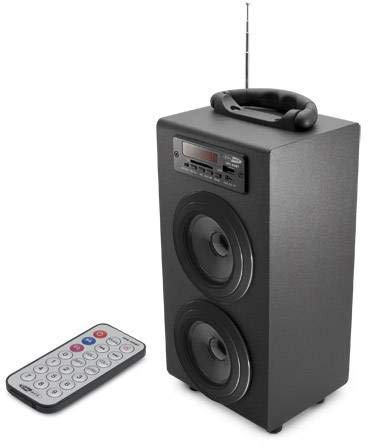
Image 1: Caliber HPG415BT/B Portable Bluetooth Speaker. This image shows the overall design of the speaker, featuring a tubular shape, front-facing speakers, and a control panel on the top or front.
Control Panel (Typical Layout)
- Przycisk TRYB: Switches between Bluetooth, FM Radio, USB, SD, and AUX modes.
- Przycisk ODTWARZANIA/PAUZY: Rozpoczyna lub wstrzymuje odtwarzanie.
- PREVIOUS/NEXT Buttons: Skips tracks in media modes or changes radio stations in FM mode.
- Przyciski GŁOŚNOŚCI +/-: Reguluje poziom wyjściowy audio.
- Przycisk korektora: Przełącza między ustawieniami korektora.
- Włącznik/wyłącznik zasilania: Located typically on the rear or side.
Connection Ports (Typical Layout)
- Port USB: Do podłączania dysków flash USB.
- Gniazdo karty SD: Do wkładania kart pamięci SD.
- Wejście AUX (3.5 mm): Do podłączania zewnętrznych urządzeń audio za pomocą kabla.
- Mini port ładowania USB: Do podłączenia kabla ładującego.
5. Konfiguracja
5.1 Pierwsze ładowanie
- Przed pierwszym użyciem należy całkowicie naładować wewnętrzną baterię głośnika.
- Connect the supplied Mini USB cable to the speaker's charging port.
- Connect the other end of the USB cable to a 5V USB power source (e.g., a computer USB port or a USB wall adapter, not included).
- The LED indicator will show charging status. Once fully charged, the indicator may change color or turn off.
5.2 Włączanie/wyłączanie
- To power on, slide the Power ON/OFF switch to the 'ON' position. The LED display will light up.
- Aby wyłączyć urządzenie, przesuń przełącznik zasilania ON/OFF do pozycji „OFF”.
6. Instrukcja obsługi
6.1 Tryb Bluetooth
- Power on the speaker. It will automatically enter Bluetooth pairing mode, indicated by a flashing Bluetooth icon on the LED display.
- Włącz Bluetooth w swoim smartfonie, tablecie lub innym urządzeniu obsługującym technologię Bluetooth.
- Szukaj available Bluetooth devices and select "HPG415BT" from the list.
- Po sparowaniu głośnik wyemituje dźwięk potwierdzający, a ikona Bluetooth na wyświetlaczu przestanie migać.
- You can now play audio from your connected device through the speaker. Use the PLAY/PAUSE and PREVIOUS/NEXT buttons on the speaker or remote to control playback.
Tryb radia FM 6.2
- Naciśnij TRYB button repeatedly until "FM" appears on the LED display.
- To perform an automatic station scan, press and hold the ODTWÓRZ/PAUZA button. The speaker will scan and save available FM stations.
- Użyj POPRZEDNIE NASTĘPNE przyciski umożliwiające nawigację pomiędzy zapisanymi stacjami.
6.3 Odtwarzanie z USB/karty SD
- Włóż dysk flash USB do portu USB lub kartę SD do gniazda karty SD.
- Głośnik automatycznie przełączy się na tryb USB lub SD i rozpocznie odtwarzanie dźwięku files. Jeśli nie, naciśnij TRYB przycisk, aby wybrać właściwe źródło.
- Użyj ODTWÓRZ/PAUZA I POPRZEDNIE NASTĘPNE przyciski do sterowania odtwarzaniem.
6.4 Tryb wejścia AUX
- Connect one end of the supplied 3.5mm audio cable to the speaker's AUX input port.
- Podłącz drugi koniec kabla do gniazda słuchawkowego lub wyjścia audio w zewnętrznym urządzeniu audio.
- Naciśnij TRYB button repeatedly until "AUX" appears on the LED display.
- Control playback and volume directly from your external audio device.
7. Ładowanie akumulatora
When the battery is low, the speaker may emit an audible warning or the LED indicator will show a low battery status. To charge:
- Connect the Mini USB charging cable to the speaker's charging port.
- Connect the USB end to a 5V USB power source.
- The charging indicator will illuminate. Charging typically takes several hours.
- Once fully charged, the indicator will change or turn off. Disconnect the charging cable.
8. Konserwacja
- Czyszczenie: Use a soft, dry cloth to wipe the exterior of the speaker. Do not use abrasive cleaners, waxes, or solvents.
- Składowanie: Jeśli głośnik nie będzie używany przez dłuższy czas, należy przechowywać go w chłodnym i suchym miejscu, z dala od bezpośredniego światła słonecznego i ekstremalnych temperatur.
- Pielęgnacja baterii: Aby przedłużyć żywotność baterii, unikaj częstego całkowitego rozładowywania. Ładuj ją regularnie, nawet jeśli nie jest używana.
9. Rozwiązywanie Problemów
| Problem | Możliwa przyczyna | Rozwiązanie |
|---|---|---|
| Brak zasilania | Battery is discharged; Power switch is OFF. | Charge the battery; Slide the power switch to ON. |
| Brak dźwięku | Głośność jest zbyt niska; Wybrano niewłaściwy tryb; Urządzenie nie jest prawidłowo podłączone. | Increase volume; Press MODE to select correct source; Reconnect device. |
| Bluetooth nie łączy się | Głośnik nie jest w trybie parowania; Bluetooth urządzenia jest wyłączony; Głośnik jest zbyt daleko od urządzenia. | Ensure speaker is in Bluetooth mode and flashing; Enable Bluetooth on your device; Move devices closer (within 10m). |
| Szum radia FM | Słaby sygnał; zakłócenia. | Relocate the speaker for better reception; Perform an auto-scan again. |
10. Specyfikacje
- Model: HPG415BT/B
- Moc wyjściowa: 6 W RMS (2x 3 W)
- Wersja Bluetooth: 2.1
- Zasięg działania Bluetooth: Do 10 metrów
- Łączność: Bluetooth, USB, SD Card, 3.5mm AUX Input
- Obsługiwane nośniki: USB drives, SD cards (up to 32GB)
- Radio FM: Yes, with auto-scan
- Wyświetlacz: PROWADZONY
- Typ baterii: Integrated Rechargeable
- Czas pracy baterii: Do 5 godzin
- Ładowanie: USB 5V
- Wymiary (dł. x szer. x wys.): Wymiary: 140 x 120 x 280 mm
- Waga: Około 1.04 kg (2.29 funty)
- Typ sterowania: Buttons, Remote Control
11. Gwarancja i wsparcie
Caliber products are designed and manufactured to the highest quality standards. For warranty information or technical support, please refer to the warranty card included with your product or visit the official Caliber webstrona dla danych kontaktowych.