
1. Wprowadzenie
The AVerMedia AW330 Wireless Voice Amplifier is a portable audio system designed to enhance vocal clarity and projection in various settings such as classrooms, training sessions, meetings, and public speaking events. Its lightweight design, wireless microphone, and powerful speaker ensure your voice is heard clearly and effortlessly.
Główne cechy:
- Przenośna konstrukcja: Lightweight and compact for easy transport and use.
- Mikrofon bezprzewodowy: 2.4 GHz wireless lavalier microphone for stable 360° transmission.
- Potężny dźwięk: Built-in 20W speaker delivers loud, clear audio.
- Długa żywotność baterii: Rechargeable lithium polymer battery provides 4 to 5 hours of use, or up to 8 hours of continuous use (depending on volume and usage).
- Łączność multimedialna: Audio input port for connecting smartphones, tablets, or laptops.
- Quick Smart Pairing: Automatic microphone-to-speaker pairing for simple setup.
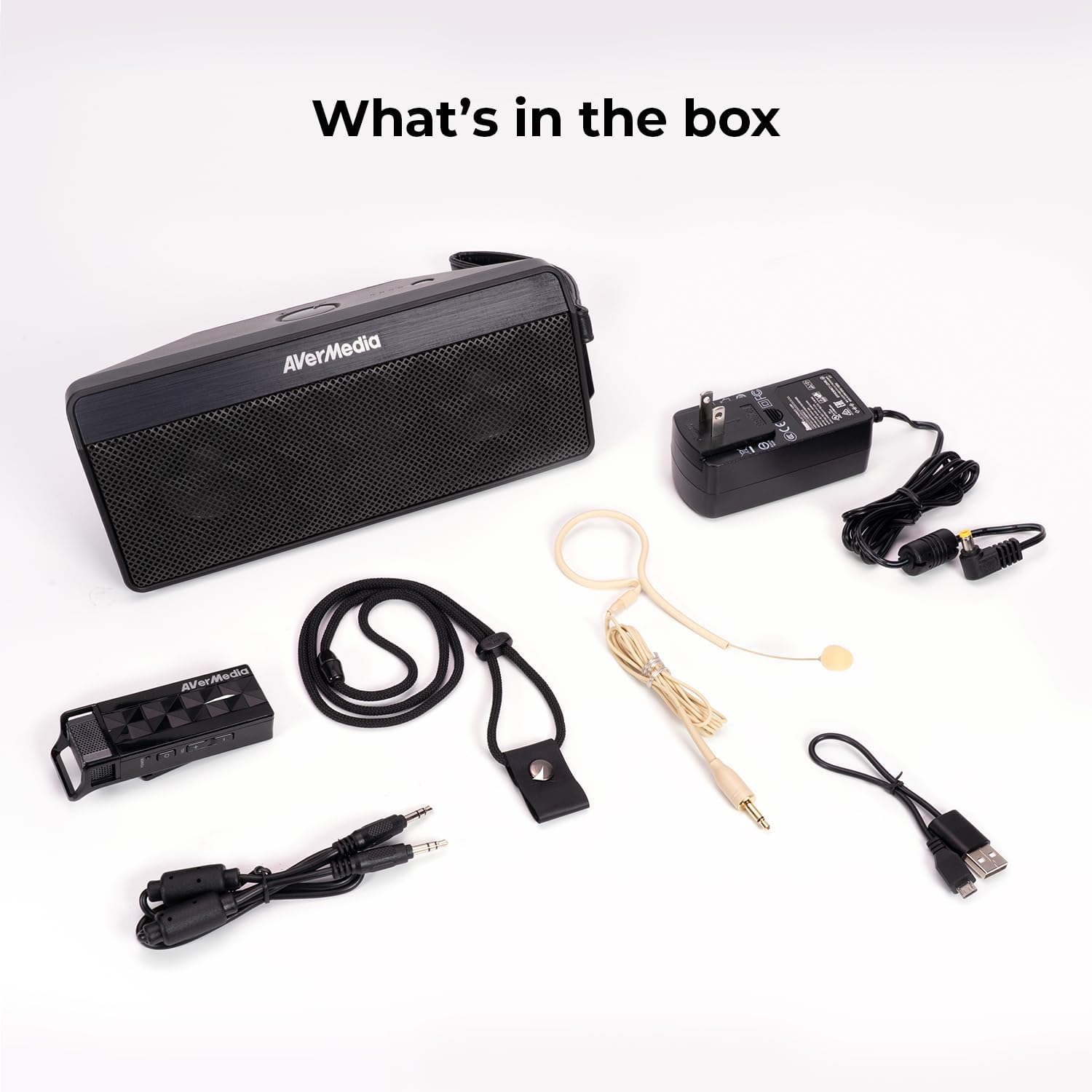
2. Co znajduje się w pudełku
- Microphone & Headset Mic
- Głośnik
- AC Power Adapter & USB Power Cable
- Kabel audio 3.5 mm
- Lanyard & Buckle
3. Koniec produktuview
Jednostka głośnikowa

The main speaker unit features a power button, volume controls, and an audio input port for connecting external devices. It also includes a clip for attaching to clothing or a strap.
Mikrofon bezprzewodowy
The wireless microphone includes a flexible gooseneck boom with a windscreen, volume controls, and a power button. It can be worn as a headset or clipped onto clothing.

4. Konfiguracja
- Ładowanie urządzeń: Before first use, fully charge both the speaker unit and the wireless microphone using the provided AC power adapter and USB power cable. The microphone uses a USB-C connection.
- Podłącz mikrofon: Plug the headset microphone into the wireless microphone unit.
- Włączanie: Turn on the speaker unit by pressing its power button. Turn on the wireless microphone unit by pressing its power button.
- Łączenie w pary: The speaker microphone system features automatic microphone-to-speaker pairing for hassle-free setup. They should pair automatically upon powering on.
- Dostosuj głośność: Adjust the volume on both the speaker and the microphone to your desired level.
5. Instrukcja obsługi
- Głos Amplifikacja: Once paired, speak into the microphone. Your voice will be amplified through the speaker. Adjust volume as needed.
- Zewnętrzne wejście audio: To play multimedia audio alongside your voice, connect your smartphone, tablet, or laptop to the speaker unit's Audio In port using the 3.5 mm audio cable.
- Możliwości noszenia: Utilize the clip on the speaker to attach it to your clothing, or use the lanyard and buckle for hands-free operation. The microphone can be worn as a headset or clipped directly.
- Oszczędzanie energii: If the microphone is turned off, the speaker will automatically turn off after five minutes to conserve battery.

6. Konserwacja
- Czyszczenie: Use a soft, dry cloth to clean the surfaces of the speaker and microphone. Do not use liquid cleaners or aerosols.
- Składowanie: Przechowywać urządzenie w chłodnym i suchym miejscu, z dala od bezpośredniego światła słonecznego i ekstremalnych temperatur.
- Pielęgnacja baterii: Aby przedłużyć żywotność baterii, unikaj częstego całkowitego rozładowywania baterii. Regularnie ładuj urządzenie, nawet jeśli nie jest używane przez dłuższy czas.
- Unikaj wody: Urządzenie nie jest wodoodporne. Trzymaj je z dala od wody i wilgoci.
7. Rozwiązywanie Problemów
- Brak dźwięku:
- Ensure both the speaker and microphone are powered on and fully charged.
- Check that the microphone and speaker are successfully paired.
- Increase the volume on both the speaker and the microphone.
- Feedback/Squealing Sound:
- Reduce the volume on the speaker or microphone.
- Zwiększ odległość między mikrofonem a głośnikiem.
- Ensure the microphone is not pointing directly at the speaker.
- Słaba jakość dźwięku:
- Check for obstructions between the microphone and speaker.
- Upewnij się, że mikrofon jest umieszczony prawidłowo przy ustach.
- Verify that the microphone windscreen is properly attached.
- Urządzenie się nie ładuje:
- Ensure the charging cables are securely connected to both the device and the power source.
- Spróbuj użyć innego gniazdka zasilania lub portu USB.
8. Specyfikacje
| Funkcja | Specyfikacja |
|---|---|
| Marka | AVerMedia |
| Numer modelu | AW330 |
| Maksymalna moc wyjściowa głośnika | 20 watów |
| Technologia łączności | Bluetooth, WiFi |
| Tryb wyjścia audio | Mononukleoza |
| Typ montażu | Uchwyt na blat |
| Dodatkowe funkcje | Kontrola głośności |
| Typ kontrolera | Zasilany bateryjnie |
| Średnia żywotność baterii | 4 Hours (up to 8 hours continuous use) |
| Maksymalny zasięg | 60 stóp |
| Metoda kontroli | Dotykać |
| Waga przedmiotu | 2.6 funtów |
| Konkretne zastosowania produktu | Educational/Classroom |
9. Gwarancja i wsparcie
The AVerMedia AW330 Wireless Voice Amplifier jest dostarczany z 3-letnia gwarancja producenta. For technical support, troubleshooting, or warranty claims, please contact AVerMedia customer service.
10. Filmy produktowe
Bezprzewodowy system audio do klas AVerMedia AW330
Video: An official product video from AVerMedia showcasing the AW330 Wireless Classroom Audio System. It highlights its features and benefits in a classroom environment, demonstrating how teachers can use it to project their voice clearly and effectively to students.