
1. Wprowadzenie
Dziękujemy za zakupasing the GPO Bermuda Classic Turntable USB. This manual provides essential information for the safe and correct operation of your new record player. Please read it thoroughly before use and retain it for future reference.
2. Zawartość opakowania
Ostrożnie rozpakuj wszystkie przedmioty i upewnij się, że otrzymałeś następujące rzeczy:
- GPO Bermuda Classic Turntable Unit
- Removable Legs (4 pieces)
- 45-RPM Adaptor
- Pamięć USB
- Zasilacz
- Instrukcja obsługi (ten dokument)
3. Funkcje produktu
The GPO Bermuda Classic Turntable USB combines vintage aesthetics with modern functionality. Key features include:
- Łączność Bluetooth: Stream music wirelessly from your compatible devices.
- Nagrywanie USB: Convert your vinyl records directly to digital MP3 fileprzez USB.
- Multi-Speed Playback: Obsługuje płyty 33, 45 i 78 RPM.
- Wbudowane głośniki stereo: Enjoy audio directly from the unit.
- Auto-Stop / Auto-Return: Automatically stops playback and returns the tone arm at the end of a record.
- Zdejmowane nogi: Allows for versatile placement as a standalone unit or tabletop player.
- Gniazdo AUX-in: Podłącz zewnętrzne źródła dźwięku.
- Wyjście liniowe RCA: Połącz z zewnętrznym amplifiers lub aktywne głośniki.
- Wyjście słuchawkowe: Do prywatnego słuchania.
4. Konfiguracja
4.1 Mocowanie nóg
If you wish to use the turntable as a freestanding unit, attach the four removable legs to the designated sockets on the underside of the unit. Ensure they are securely tightened.
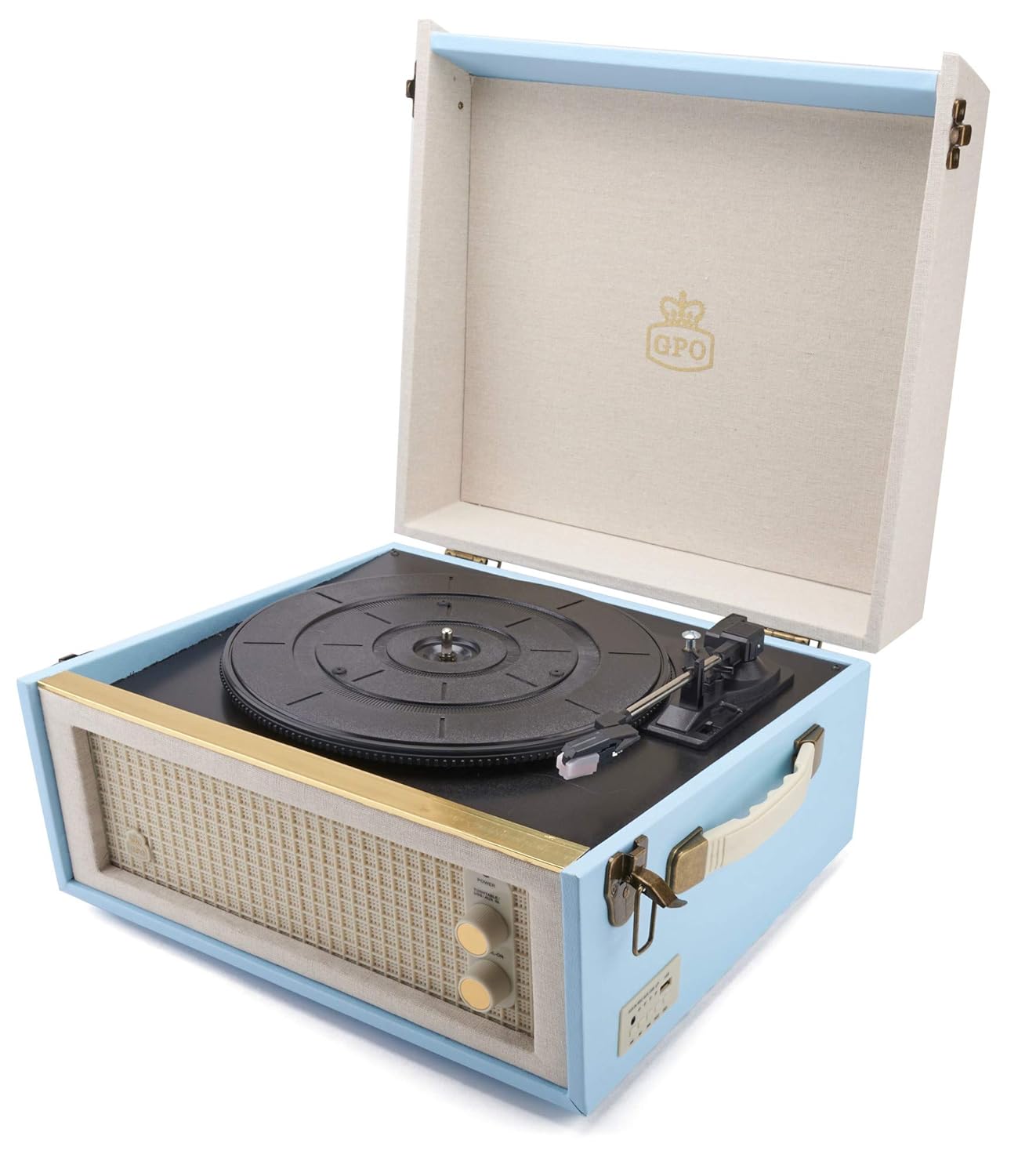
Image: The GPO Bermuda Classic Turntable shown with its four removable legs attached, illustrating the overall dimensions of the unit (34cm width, 38cm depth, 21cm height for the unit, 44cm for the legs, total height 64cm).
4.2 Połączenie zasilania
Connect the provided power adaptor to the 9V-DC-IN port on the rear of the turntable and then plug it into a wall outlet. The unit will power on when connected.
4.3 Połączenia audio (opcjonalnie)
Głośniki zewnętrzne: Aby połączyć się z zewnętrznym amplifier or powered speakers, use RCA cables (not included) to connect the WYJŚCIE ports on the rear of the turntable to the corresponding input on your audio system.
Słuchawki: For private listening, plug 3.5mm headphones into the WYLOT UCHA gniazdo na tylnym panelu.
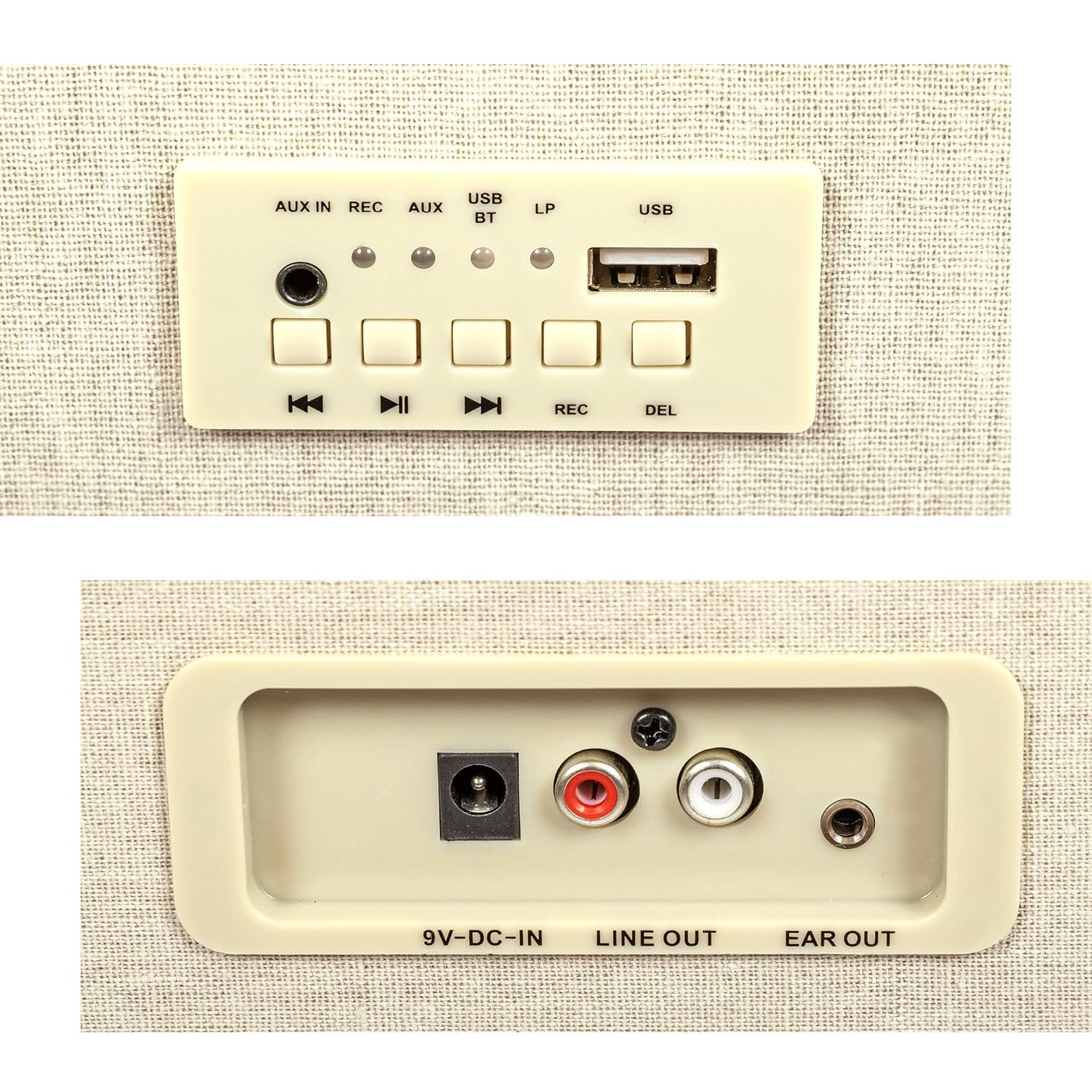
Obraz: szczegółowy view of the rear connection panel, showing the 9V-DC-IN power input, LINE OUT (RCA) ports for external audio, and the EAR OUT (headphone) jack.
5. Instrukcja obsługi
5.1 Basic Record Playback
- Otwórz pokrywę gramofonu.
- Place a record on the platter. For 7-inch singles with a large center hole, use the 45-RPM adaptor.
- Select the appropriate speed (33, 45, or 78 RPM) using the speed selector switch located near the tone arm base.
- Release the tone arm from its rest by gently pushing the arm locking clip to the side.
- Use the tone arm lever to raise the tone arm.
- Ostrożnie umieść igłę nad wybranym rowkiem początkowym płyty.
- Lower the tone arm gently onto the record using the tone arm lever. Playback will begin.
- Adjust the volume using the control knob on the front panel.
- At the end of the record, the auto-stop feature will stop the platter rotation. Use the tone arm lever to raise the arm and return it to its rest, then secure it with the arm locking clip.

Image: The GPO Bermuda Classic Turntable with its lid open, revealing the record platter, tone arm, and stylus, ready for record playback.

Obraz: Zbliżenie view of the tone arm mechanism, highlighting the arm locking clip, the tone arm lever for raising and lowering the arm, and the switch for selecting playback speeds (33, 45, 78 RPM).
5.2 parowanie Bluetooth
- Upewnij się, że gramofon jest włączony.
- Press the 'BT' button on the control panel to switch to Bluetooth mode. The Bluetooth indicator light will flash.
- Na urządzeniu z włączoną funkcją Bluetooth (smartfonie, tablecie itp.) włącz Bluetooth i wyszukaj dostępne urządzenia.
- Select 'GPO Bermuda' from the list of devices.
- Once paired, the Bluetooth indicator light on the turntable will stop flashing and remain solid. You can now stream audio from your device to the turntable's speakers.
5.3 Nagrywanie USB
The GPO Bermuda allows you to record your vinyl records directly to a USB stick as MP3 files.
- Insert the provided USB stick into the USB port na panelu sterowania.
- Place a record on the platter and prepare it for playback as described in section 5.1.
- Press the 'REC' button on the control panel. The recording indicator light will illuminate.
- Start playing your record. The turntable will begin recording the audio to the USB stick.
- To stop recording, press the 'REC' button again. The recording indicator light will turn off.
- To delete the last recorded track, press the 'DEL' button.

Obraz: szczegółowy view of the control panel, featuring the AUX IN jack, REC (record) button, AUX mode button, USB/BT (Bluetooth) indicator lights, LP indicator, USB port, and playback control buttons (previous, play/pause, next, REC, DEL).
5.4 AUX-in Function
Podłącz zewnętrzne urządzenie audio (np. odtwarzacz MP3, smartfon) do AUX IN jack on the control panel using a 3.5mm audio cable (not included). Press the 'AUX' button to switch to AUX input mode. Audio from the connected device will play through the turntable's speakers.
6. Konserwacja
6.1 Czyszczenie urządzenia
Wipe the turntable's exterior with a soft, dry cloth. Do not use abrasive cleaners or solvents, as they may damage the finish.
6.2 Pielęgnacja rysika
The stylus (needle) is a delicate component. Handle it with care. Clean the stylus periodically using a soft brush designed for stylus cleaning, brushing gently from back to front. A worn or damaged stylus can harm your records and degrade sound quality. Replace the stylus when necessary.

Obraz: Powiększony view of the turntable's stylus, highlighting its robust construction as it rests on a vinyl record groove.
7. Rozwiązywanie Problemów
If you encounter issues with your GPO Bermuda Classic Turntable, please refer to the following common problems and solutions:
- Brak zasilania:
- Ensure the power adaptor is securely connected to the unit and a working wall outlet.
- Check if the wall outlet is functioning correctly. - Brak dźwięku:
- Check the volume level on the turntable and any connected external audio system.
- Ensure the correct input source (Phono, Bluetooth, AUX) is selected.
- If using external speakers, verify connections to the LINE OUT ports.
- Ensure the stylus guard is removed and the stylus is properly seated. - Przeskakujący lub zniekształcony dźwięk:
- Ensure the record is clean and free of dust or debris.
- Check the stylus for damage or wear; replace if necessary.
- Ensure the turntable is placed on a stable, level surface.
- Clean the stylus gently. - Brak połączenia Bluetooth:
- Ensure the turntable is in Bluetooth mode (BT indicator flashing).
- Make sure your device's Bluetooth is enabled and within range.
- Spróbuj rozparować i ponownie sparować urządzenie.
- Ensure no other devices are currently connected to the turntable via Bluetooth. - USB Recording Not Working:
- Ensure the USB stick is properly inserted.
- Check if the USB stick has sufficient free space.
- Ensure the 'REC' button was pressed to start recording.
8. Specyfikacje
| Nazwa modelu | Bermuda Classic |
| Numer modelu przedmiotu | GPO Bermuda Blue |
| Marka | Obiekt GPO |
| Wymiary produktu | 15.04 x 14.49 x 8.46 cala (38.2 x 36.8 x 21.5 cm) |
| Waga przedmiotu | 19.84 funta (9 kilograma) |
| Tworzywo | Plastikowy |
| Prędkości odtwarzania | 33, 45, 78 obr./min. |
| Cechy specjalne | Removable Legs, USB Recording, Bluetooth, Auto-Stop / Auto-Return, Built-In Speakers |
| Zawarte komponenty | 45-RPM adaptor, USB stick |
| Typ silnika | Silnik prądu stałego |
| Pobór mocy | 5 watów |