
1. Wprowadzenie i koniecview
The PXN 6603 is a wireless Bluetooth gamepad designed to enhance your gaming experience on various devices. This MFi (Made for iPhone/iPad/iPod) certified controller offers precise control and broad compatibility, primarily with Apple iOS devices, but also supports Windows and Android TV platforms. This manual provides essential information for setting up, operating, and maintaining your gamepad.

Image 1.1: PXN 6603 Wireless Bluetooth Gamepad, highlighting compatibility with iPod, iPhone, and iPad, supporting iOS 7.0+ devices.
2. Zawartość opakowania
Sprawdź, czy w przesyłce znajdują się wszystkie elementy wymienione poniżej:
- PXN 6603 Wireless Bluetooth Gamepad
- Kabel ładujący USB
- Adapter Micro USB
- Instrukcja obsługi
- Thumb Grips (2 pieces)

Image 2.1: Contents of the PXN 6603 package, showing the gamepad, detachable phone clamp, USB charging cable, user manual, and two thumb grips.
3. Funkcje produktu
The PXN 6603 Gamepad incorporates several features for an optimized gaming experience:
- Łączność bezprzewodowa Bluetooth: Provides a stable and responsive connection to your devices.
- Certyfikat MFi: Ensures full compatibility and optimal performance with Apple iOS devices.
- Akumulator: Equipped with a 500mAh lithium-polymer battery, offering over 30 hours of play time on a 2-3 hour charge.
- Podwójne analogowe joysticki: Features 360-degree rotation for precise control.
- Responsive Trigger Buttons: Includes fast-response R1/R2 and L1/L2 trigger buttons.
- 8-Direction D-Pad: For accurate directional input.
- Durable ABXY Buttons: Designed for comfort and longevity.
- Regulowany telefon Clamp: An extendable stand that can hold phones up to 6 inches, with an adjustable angle from 90 to 160 degrees.
- Pressure-Sensitive Buttons: Offers precise control and accurate response in supported games.

Image 3.1: 360-degree rotation joystick.

Image 3.2: Fast response trigger buttons.

Image 3.3: 8-direction D-Pad.

Image 3.4: Comfortable and durable ABXY buttons.

Image 3.5: Adjustable and extendable phone clamp.

Ilustracja 3.6: Szczegóły dotyczące żywotności baterii i ładowania.
4. Konfiguracja
4.1. Ładowanie gamepada
Before first use, fully charge the gamepad. Connect the provided USB charging cable to the gamepad's USB interface and plug the other end into a USB power source (e.g., computer USB port, USB wall adapter). The charging indicator light will illuminate during charging and turn off when fully charged. A full charge typically takes 2-3 hours.
4.2. Parowanie z urządzeniami iOS
- Ensure your iOS device (iPhone, iPad, iPod Touch, Apple TV) has Bluetooth enabled. You can do this through the device's Settings menu.
- Press and hold the Power Key on the PXN 6603 Gamepad until the Bluetooth indicator light begins to flash, indicating it is in pairing mode.
- On your iOS device, navigate to the Bluetooth settings and search for available devices.
- Select "PXN 6603" from the list of found devices to initiate the pairing process.
- Once successfully paired, the Bluetooth indicator light on the gamepad will become solid.
For Apple TV, ensure the Apple TV is updated to the latest software version for optimal compatibility.
5. Instrukcja obsługi
5.1. Układ przycisków i funkcje
Zapoznaj się z układem przycisków gamepada:
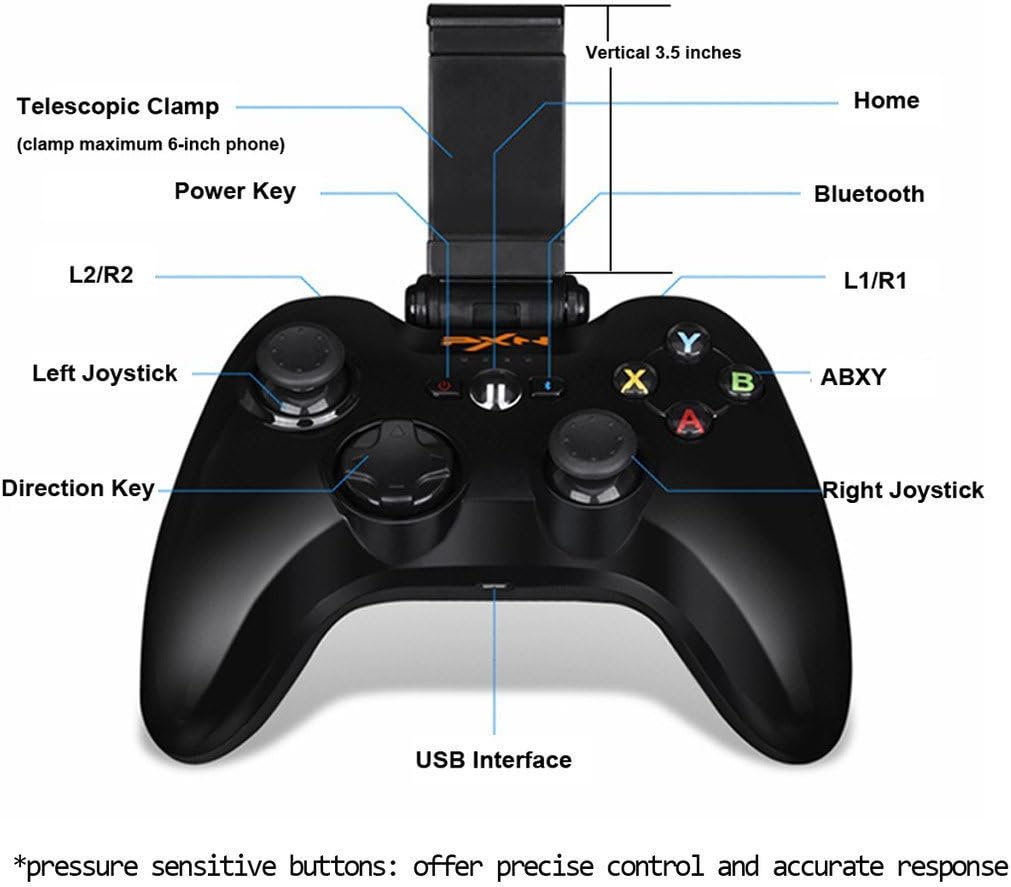
Image 5.1: PXN 6603 Gamepad button layout with labels.
- Przycisk zasilania: Włącza/wyłącza gamepad.
- Przycisk Home: Returns to the home screen on connected devices.
- Wskaźnik Bluetooth: Pokazuje stan połączenia.
- Przyciski L1/R1: Przyciski na lewym i prawym ramieniu.
- Wyzwalacze L2/R2: Lewy i prawy spust analogowy.
- Lewy joystick: Analog stick for movement and camera control.
- Prawy joystick: Analog stick for movement and camera control.
- Direction Key (D-Pad): Cyfrowe wejście kierunkowe.
- Przyciski ABXY: Action buttons, typically color-coded.
- Interfejs USB: Do ładowania gamepada.
- Telescopic Clamp: Holds mobile devices.
5.2. Using the Phone Clamp
The PXN 6603 includes an integrated telescopic clamp to securely hold your smartphone, transforming your device into a portable gaming console. To use:
- Gently pull the top part of the clamp upwards to extend it.
- Ostrożnie umieść smartfon w schowku.amp, ensuring it is centered and securely held. The clamp can accommodate phones up to 6 inches in size.
- Dostosuj kąt klamp dla optymalnego viewinż. clamp allows for angle adjustments between 90 and 160 degrees.

Image 5.2: Gamepad with the phone clamp rozszerzony.
6. Zgodność
The PXN 6603 Gamepad is designed for broad compatibility:
- Urządzenia iOS: Fully compatible with iPhone, iPad, iPod Touch, and Apple TV running iOS 7.0 or above.
- Okna: Supports Windows XP, Windows 7, and Windows 8.
- Android: Compatible with Android TV boxes and Android TVs.
For optimal performance, ensure your device's operating system is up to date. Game compatibility may vary; check individual game requirements for controller support.

Image 6.1: The PXN 6603 supports all Apple devices running iOS 7.0 and above.
7. Konserwacja
To ensure the longevity and optimal performance of your PXN 6603 Gamepad, follow these maintenance guidelines:
- Czyszczenie: Use a soft, dry cloth to clean the gamepad. Avoid using harsh chemicals, solvents, or abrasive materials.
- Składowanie: Przechowuj gamepad w chłodnym, suchym miejscu, z dala od bezpośredniego światła słonecznego i ekstremalnych temperatur.
- Pielęgnacja baterii: Charge the battery regularly, even if not in frequent use, to prevent deep discharge. Avoid leaving the battery completely depleted for extended periods.
- Unikaj uderzenia: Nie upuszczaj gamepada ani nie narażaj go na silne uderzenia, gdyż może to spowodować uszkodzenie podzespołów wewnętrznych.
- Ekspozycja na płyny: Keep the gamepad away from water and other liquids to prevent electrical damage.
8. Rozwiązywanie Problemów
If you encounter issues with your PXN 6603 Gamepad, refer to the following common troubleshooting steps:
- Gamepad does not turn on: Upewnij się, że bateria jest naładowana. Podłącz gamepad do źródła zasilania za pomocą kabla USB i spróbuj ponownie.
- Nie można sparować z urządzeniem:
- Sprawdź, czy w urządzeniu jest włączona funkcja Bluetooth.
- Ensure the gamepad is in pairing mode (Bluetooth indicator flashing).
- Move the gamepad closer to your device.
- Restart both the gamepad and your device, then attempt pairing again.
- Check if the gamepad is already paired with another device. Disconnect it if necessary.
- Buttons are unresponsive or lag:
- Sprawdź poziom naładowania baterii i naładuj, jeśli jest niski.
- Ensure the gamepad is within the effective range of your device's Bluetooth connection.
- Ponownie sparuj gamepad ze swoim urządzeniem.
- Zaktualizuj system operacyjny swojego urządzenia do najnowszej wersji.
- Gamepad często się rozłącza:
- Upewnij się, że w pobliżu nie ma silnych zakłóceń elektromagnetycznych.
- Keep the gamepad and device close to each other.
- Recharge the gamepad's battery.
9. Specyfikacje
| Marka | PXN |
| Numer modelu | PXN-6603 |
| Technologia łączności | Bluetooth |
| Kompatybilne systemy operacyjne | iOS 7.0+, Windows XP/7/8, Android TV |
| Typ baterii | Litowo-polimerowy |
| Pojemność baterii | 500 mAh |
| Czas ładowania | 2-3 godzin |
| Czas na zabawę | 30+ godzin |
| Liczba przycisków | 16 |
| Tworzywo | Plastikowy |
| Waga przedmiotu | 1.09 funta (ok. 494 g) |
10. Gwarancja i wsparcie
Specific warranty information for the PXN 6603 Gamepad is not provided in this manual. For details regarding warranty coverage, returns, or technical support, please refer to the official PXN webOdwiedź witrynę lub skontaktuj się ze sprzedawcą. Zachowaj paragon jako dowód zakupu na wypadek roszczeń gwarancyjnych.