
1. Wprowadzenie
This manual provides essential information for the safe installation, operation, and maintenance of your CCEI Piccolo PIMT series power supply for pool projectors. The Piccolo PIMT series includes models such as PIMT31 (100W), PIMT33 (300W), and PIMT37 (600W), all operating at 230/12V. This device is designed to power pool projectors safely and efficiently.
Przed instalacją i użyciem należy dokładnie przeczytać tę instrukcję, aby zagwarantować prawidłowe działanie urządzenia i zapobiec potencjalnym zagrożeniom.
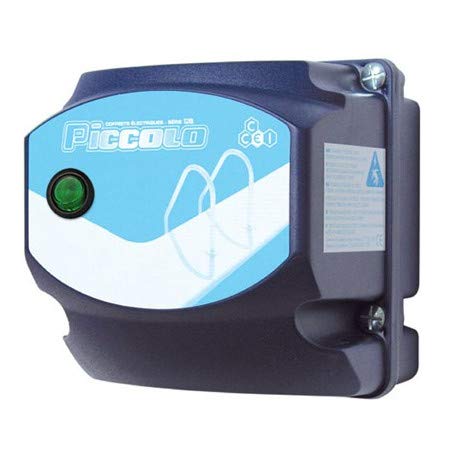
Figure 1: CCEI Piccolo PIMT Power Supply Unit, top view. This image shows the compact design and the rotary switch for operation.
2. Instrukcje bezpieczeństwa
OSTRZEŻENIE: Instalację elektryczną musi wykonać wykwalifikowany elektryk, zgodnie ze wszystkimi lokalnymi i krajowymi przepisami dotyczącymi instalacji elektrycznych.
- Przed przystąpieniem do prac instalacyjnych, konserwacyjnych lub rozwiązywania problemów należy zawsze odłączyć zasilanie.
- Ensure the power supply is installed in a dry, well-ventilated area, away from direct sunlight and excessive heat.
- The device is equipped with a waterproof on/off switch, but the main unit should not be submerged or exposed to direct water spray.
- The safety transformer complies with the NF EN61558 standard, ensuring safe operation when installed correctly.
- Nie przekraczać maksymalnej mocytage rating of the specific model (e.g., 100W for PIMT31, 300W for PIMT33, 600W for PIMT37).
- Use only original CCEI parts and accessories for replacement or repair.
3. Konfiguracja i instalacja
The CCEI Piccolo PIMT power supply is designed for easy installation. Follow these steps carefully:
- Montowanie: Select a suitable location for mounting the power supply unit. Use the provided mounting screws and plugs to securely attach the unit to a vertical surface. Ensure the location allows for adequate ventilation and access for wiring.
- Power Connection (230V AC Input):
- Upewnij się, że główne zasilanie jest WYŁĄCZONE na wyłączniku automatycznym.
- Connect the 230V AC input power cable to the designated terminals on the power supply unit. Refer to the wiring diagram inside the unit cover for correct polarity.
- Dokładnie zabezpiecz wszystkie połączenia.
- Projector Connection (12V AC Output):
- Connect the 12V AC output cables from the power supply to your pool projector(s).
- Utilize the provided cable glands to ensure a watertight seal where cables enter and exit the unit.
- Sprawdź, czy całkowita wartość wattage of all connected projectors does not exceed the maximum capacity of your Piccolo PIMT model.
- Kontrole końcowe: Double-check all wiring connections for security and correctness. Ensure all covers are properly closed and sealed.

Figure 2: CCEI Piccolo PIMT Power Supply, showing connection points. This view highlights the input/output terminals and the waterproof switch.
4. Instrukcja obsługi
Once the power supply is correctly installed and wired, operating it is straightforward:
- Włączanie: Restore power to the unit at the main circuit breaker.
- Activate Projectors: Use the waterproof on/off switch located on the unit to turn your pool projectors ON or OFF. Rotate the switch to the 'ON' position to activate the projectors.
- Wyłączone: To turn off the projectors, rotate the switch to the 'OFF' position. For extended periods of non-use or maintenance, it is recommended to disconnect power at the main circuit breaker.
5. Konserwacja
Regular maintenance ensures the longevity and safe operation of your CCEI Piccolo PIMT power supply.
- Czyszczenie: Okresowo czyść zewnętrzną część urządzenia miękką,amp Ściereczką. Nie używaj środków czyszczących ani rozpuszczalników o działaniu ściernym. Przed czyszczeniem upewnij się, że urządzenie jest wyłączone.
- Inspekcje: Annually inspect all wiring connections for tightness and signs of corrosion or damage. Check cable glands for proper sealing.
- Wentylacja: Ensure that the ventilation openings (if any) are clear of debris to prevent overheating.
- Kontrola profesjonalna: It is recommended to have a qualified electrician inspect the unit and its connections every few years.
6. Rozwiązywanie Problemów
If you encounter issues with your CCEI Piccolo PIMT power supply, refer to the following table:
| Problem | Możliwa przyczyna | Rozwiązanie |
|---|---|---|
| Projectors do not turn ON. |
|
|
| Urządzenie wydaje nietypowe dźwięki lub czuć zapach spalenizny. |
|
|
| Intermittent projector operation. |
|
|
If the problem persists after attempting these solutions, contact CCEI customer support or a qualified electrician.
7. Specyfikacje
| Funkcja | Szczegół |
|---|---|
| Producent | CCEI |
| Seria modeli | Piccolo PIMT (PIMT31, PIMT33, PIMT37) |
| Wejście Voltage | 230 V prądu zmiennego |
| Objętość wyjściatage | 12 V prądu zmiennego |
| Power Output (PIMT31) | 100 W |
| Power Output (PIMT33) | 300 W |
| Power Output (PIMT37) | 600 W |
| Norma bezpieczeństwa | NF EN61558 |
| Cechy | Waterproof On/Off Switch, Cable Glands, Mounting Screws |
| Waga przedmiotu | 1.5 kilogramów |
| ASIN | B019YDRZ38 |
| Pierwsza dostępna data | 21 lutego 2020 r. |
8. Gwarancja i wsparcie
CCEI products are manufactured to high-quality standards. For specific warranty information, please refer to the warranty card included with your product or visit the official CCEI webZachowaj dowód zakupu na wypadek roszczeń gwarancyjnych.
For technical support, spare parts, or service inquiries, please contact your authorized CCEI dealer or visit the CCEI official webstrona dla danych kontaktowych.
