
Protmex PPM-AM001
Protmex MS6252A Portable Digital Anemometer
Instrukcja obsługi użytkownika
Wstęp
Thank you for choosing the Protmex MS6252A Portable Digital Anemometer. This device is designed for accurate measurement of wind speed, air volume, and air velocity. It is a versatile tool suitable for various applications, including HVAC system testing, outdoor sports, environmental monitoring, and industrial use. This manual provides detailed instructions for the safe and effective operation, maintenance, and troubleshooting of your anemometer.

Rycina 1: Przód view of the Protmex MS6252A Portable Digital Anemometer.
Informacje dotyczące bezpieczeństwa
Przed użyciem tego urządzenia należy przeczytać i zrozumieć wszystkie ostrzeżenia dotyczące bezpieczeństwa oraz instrukcję obsługi. Nieprzestrzeganie tych zaleceń może spowodować obrażenia ciała lub uszkodzenie urządzenia.
- Nie podejmuj prób naprawy ani modyfikacji urządzenia. Wszelkie prace serwisowe powierzaj wykwalifikowanemu personelowi.
- Trzymaj urządzenie z dala od wody i środowisk o wysokiej wilgotności.
- Unikaj wystawiania urządzenia na działanie ekstremalnych temperatur lub bezpośredniego światła słonecznego przez dłuższy czas.
- Handle the fan blades with care to prevent damage.
- Aby zapobiec wyciekowi baterii, wyjmij je, jeśli urządzenie nie będzie używane przez dłuższy czas.
Produkt ponadview
Familiarize yourself with the components and controls of your anemometer.

Figure 2: Labeled components of the Protmex MS6252A.
- Wentylator: Obraca się, aby zmierzyć prędkość wiatru.
- Wyświetlacz LCD: Pokazuje odczyty pomiarów, jednostki i wskaźniki.
- Power Switch Button (①): Włącza lub wyłącza urządzenie.
- Przycisk przełączania funkcji (FUNC): Toggles between different measurement modes (e.g., wind speed, air volume).
- Hold Display / Temperature Mode Switch Button (HOLD): Freezes the current reading on the display or switches temperature units.
- Max / Min Button (MAX/MIN): Displays maximum or minimum recorded values.
- Unit Switching Button (UNIT): Changes the measurement units (e.g., m/s, km/h, ft/m).
- Backlight Button (☀): Włącza lub wyłącza podświetlenie wyświetlacza.
Specyfikacje
Key technical specifications of the Protmex MS6252A Anemometer:
| Funkcja | Specyfikacja |
|---|---|
| Marka | Protmex |
| Numer modelu | PPM-AM001 (MS6252A) |
| Tworzywo | Plastikowy |
| Wymiary (dł. x szer. x wys.) | 16.5 x 8.5 x 3.8 centymetrów |
| Waga przedmiotu | 240 gram |
| Źródło zasilania | 1 x akumulator 9 V (w zestawie) |
| Wyświetlacz | LCD z podświetleniem |
The device supports multiple measurement units for wind speed and air volume:
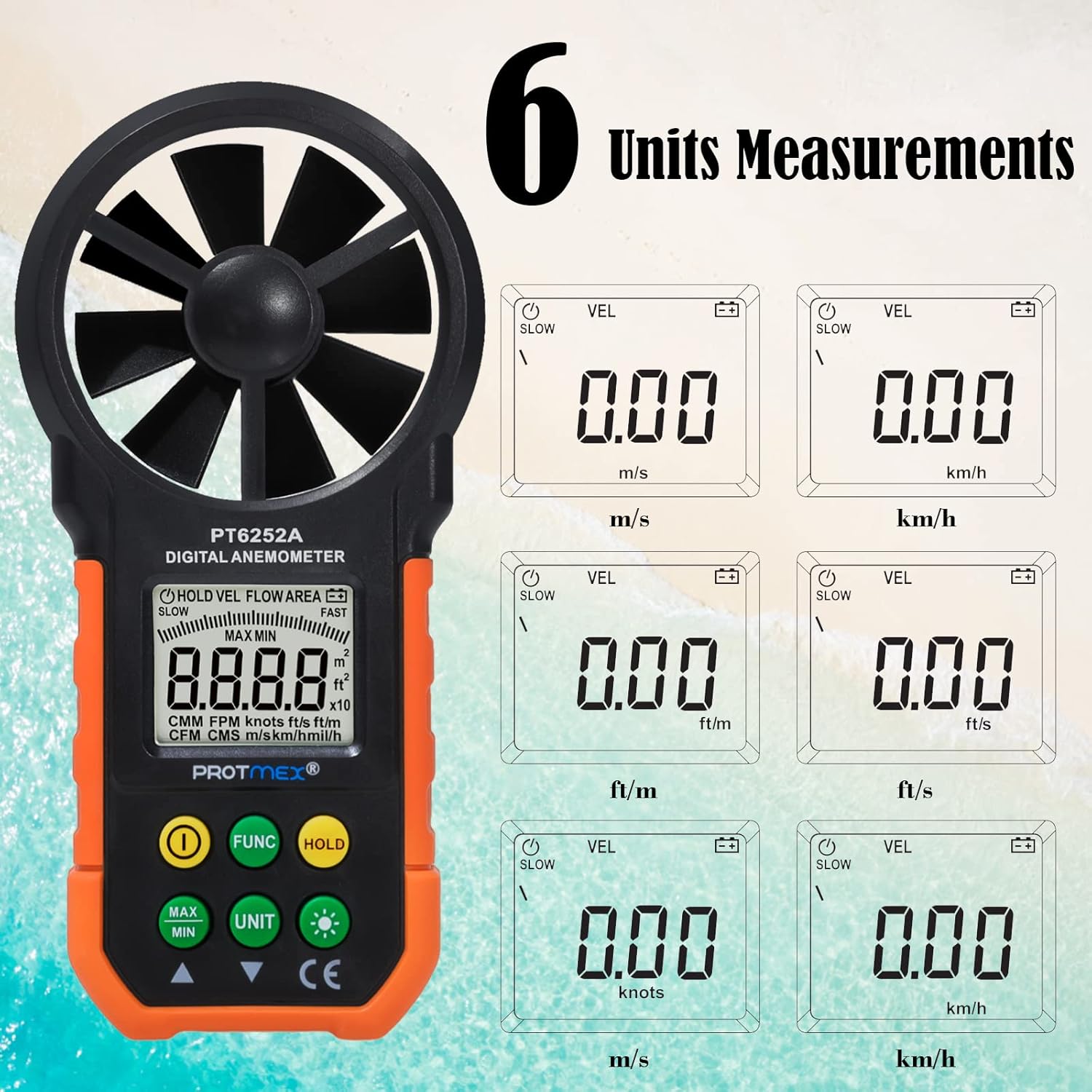
Figure 3: Available measurement units for wind speed and air volume.
- Wind Speed Units: m/s, km/h, ft/m, ft/s, knots, mph
- Air Volume Units: CMM, CFM
Organizować coś
Instalacja baterii
The Protmex MS6252A requires one 9V battery for operation.
- Znajdź pokrywę komory baterii z tyłu urządzenia.
- Aby otworzyć komorę, przesuń lub odepnij pokrywę.
- Włóż nową baterię 9 V, zwracając uwagę na prawidłową biegunowość (+ i -).
- Dokładnie zamknij pokrywę komory baterii.
Działanie
Włączanie/wyłączanie zasilania
- To turn on the device, press the ① (Power Switch) button.
- To turn off the device, press and hold the ① (Power Switch) button for a few seconds until the display turns off.
Measurement Modes (FUNC Button)
Naciśnij FUNC button to cycle through different measurement modes, such as wind speed (VEL) and air volume (FLOW AREA).
Unit Selection (UNIT Button)
While in a measurement mode, press the JEDNOSTKA button to change the measurement units. For example, in wind speed mode, you can switch between m/s, km/h, ft/m, ft/s, knots, and mph.
Data Hold (HOLD Button)
- Naciśnij TRZYMAĆ button once to freeze the current reading on the display. The "HOLD" indicator will appear.
- Naciśnij TRZYMAĆ naciśnij przycisk ponownie, aby zwolnić wstrzymane dane i wznowić pomiary na żywo.
MAX/MIN Measurement (MAX/MIN Button)
- Naciśnij MAKS./MIN. button once to display the maximum recorded value. "MAX" will appear on the display.
- Naciśnij MAKS./MIN. button again to display the minimum recorded value. "MIN" will appear on the display.
- Naciśnij MAKS./MIN. button a third time to exit MAX/MIN mode and return to live measurement.
Backlight Function (☀ Button)
The device features a bright LCD display with a backlight for visibility in low-light conditions.

Figure 4: The bright LCD display with backlight function.
- Press the ☀ (Backlight) button once to turn on the backlight.
- Press the ☀ (Backlight) button again to turn off the backlight.
Konserwacja
Czyszczenie
- Przetrzyj urządzenie miękką, suchą ściereczką.
- Nie należy używać środków czyszczących o właściwościach ściernych ani rozpuszczalników.
- Ensure the fan blades are free from dust and debris for accurate readings. Use a soft brush if necessary.
Składowanie
- Przechowuj urządzenie w chłodnym, suchym miejscu, gdy nie jest używane.
- Remove the battery if storing for an extended period to prevent battery leakage and damage to the device.
Wymiana baterii
When the battery indicator appears on the LCD, replace the 9V battery following the steps in the "Battery Installation" section.
Rozwiązywanie problemów
| Problem | Możliwa przyczyna | Rozwiązanie |
|---|---|---|
| Urządzenie nie włącza się. | Niski poziom naładowania baterii lub rozładowana bateria; nieprawidłowa instalacja baterii. | Wymień baterię, zwracając uwagę na prawidłową biegunowość. |
| Niedokładne odczyty. | Fan blades obstructed or damaged; device not held correctly in airflow. | Clean fan blades; ensure clear path for airflow; hold device perpendicular to airflow. |
| Wyświetlacz jest przyciemniony lub migocze. | Niski poziom naładowania baterii. | Wymień baterię. |
| Przyciski nie reagują. | Urządzenie zawieszone; słaba bateria. | Wyjmij i ponownie włóż baterię; wymień baterię. |
Gwarancja i wsparcie
Protmex products are manufactured to high quality standards. For warranty information or technical support, please refer to the warranty card included with your purchase or contact Protmex customer service through their official webwitryny lub autoryzowanych dystrybutorów.
Proszę zachować paragon jako dowód zakupu na wypadek reklamacji.
Powiązane dokumentyPPM-AM001


Ask a question about this manual
Ask about setup, troubleshooting, compatibility, parts, safety, or missing instructions. Manuals+ will review the question and use this page’s manual context to help answer it.