
1. Wprowadzenie
Dziękujemy za zakupasing the ipega PG-9057 Wireless Game Controller. This manual provides detailed instructions for setting up, operating, and maintaining your device. Please read this manual carefully before use to ensure optimal performance and longevity of your controller.
2. Funkcje produktu
- Połączenie bezprzewodowe: Enjoy gaming freedom with wireless connection technology.
- Zgodność z wieloma platformami: Supports Android devices (smartphones, tablets, TV boxes) and Windows PCs.
- High Durability Buttons: Equipped with high-quality, durable buttons for extended gaming sessions.
- Precyzyjne sterowanie: Features a D-pad with pressure sensitivity and a 360-degree joystick with no dead zone for accurate input.
- Ergonomiczna konstrukcja: Designed for comfortable grip and prolonged use.
- Zintegrowany uchwyt na telefon: Conveniently mount your smartphone for mobile gaming.
3. Zawartość opakowania
Proszę sprawdzić zawartość opakowania po rozpakowaniu:
- Bezprzewodowy kontroler do gier ipega PG-9057
- Kabel ładujący USB
- Instrukcja obsługi (w tym wersja japońska)
4. Konfiguracja
4.1. Ładowanie kontrolera
Before first use, fully charge the controller using the provided USB cable. Connect the small end of the USB cable to the controller's charging port and the other end to a USB power source (e.g., PC, USB wall adapter).
4.2. Device Compatibility Overview
The ipega PG-9057 controller supports various devices and connection methods as shown below:

This image displays the ipega PG-9057 Wireless Game Controller, highlighting its compatibility with various devices including smartphones, tablets, personal computers, and VR headsets.
4.3. Connection Methods and System Environment
The controller offers multiple connection options depending on your device and operating system. Refer to the table below for detailed compatibility.

This table outlines the system requirements and connection methods for the ipega PG-9057 controller, detailing compatibility with Android smartphones, tablets, and TV boxes via Bluetooth 4.0 or USB, and PCs via USB.
4.3.1. Bluetooth Connection (Android Devices)
- Sprawdź, czy kontroler jest naładowany.
- Naciśnij i przytrzymaj DOM przycisk i A button simultaneously until the indicator light flashes rapidly. This puts the controller into pairing mode.
- Na urządzeniu z systemem Android przejdź do ustawień Bluetooth i włącz Bluetooth.
- Szukaj available devices and select "ipega PG-9057" (or similar name) from the list.
- Po sparowaniu kontrolka na kontrolerze zacznie świecić światłem ciągłym.
4.3.2. USB Wired Connection (Windows PC / Android Devices)
- Connect the controller to your Windows PC or Android device using the USB cable.
- The device should automatically recognize the controller. No special drivers are usually required for basic functionality.
5. Instrukcja obsługi
5.1. Podstawowe sterowanie
The ipega PG-9057 features standard gamepad controls for intuitive gaming.

Szczegółowy view of the ipega PG-9057 controller's D-pad, joystick, and A/B/X/Y buttons, illustrating their high sensitivity and precise input capabilities.
- Pad kierunkowy: For directional input, offering pressure sensitivity.
- Joysticki lewy/prawy: 360-degree movement with no dead zone for precise control.
- Przyciski A/B/X/Y: Standard action buttons with zero delay response.
- L1/R1, L2/R2 Triggers: Przyciski na ramionach i spusty umożliwiające wykonywanie różnych akcji w grze.
- Przyciski WYBIERZ/START: Do nawigacji po menu gry i wykonywania akcji.
- Przycisk DOMOWY: To power on/off the controller or return to the main menu.
5.2. Using with a Smartphone
The controller includes an integrated holder for smartphones, allowing for a portable gaming experience.
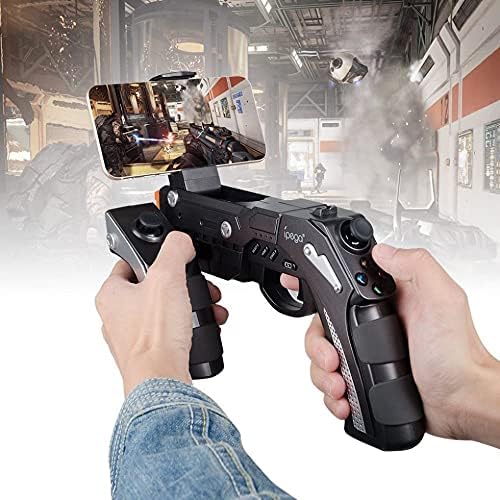
A user is shown holding the ipega PG-9057 Wireless Game Controller with a smartphone securely attached, actively engaged in mobile gaming.
- Extend the phone holder located on the top of the controller.
- Carefully place your smartphone into the holder, ensuring it is securely gripped.
- Connect the controller to your smartphone via Bluetooth as described in Section 4.3.1.
- Launch your desired game and configure controller settings if necessary.
6. Konserwacja
To ensure the longevity and optimal performance of your ipega PG-9057 controller, follow these maintenance guidelines:
- Czyszczenie: Do czyszczenia powierzchni kontrolera należy używać miękkiej, suchej ściereczki. Nie należy używać silnych środków chemicznych ani ściernych środków czyszczących.
- Składowanie: Przechowuj kontroler w chłodnym, suchym miejscu, z dala od bezpośredniego światła słonecznego i ekstremalnych temperatur.
- Unikaj kropli: Protect the controller from drops and impacts, as this can damage internal components.
- Ładowanie: Do not overcharge the battery. Disconnect the charging cable once the controller is fully charged.

The ipega PG-9057 Wireless Game Controller is shown, emphasizing its construction from high-quality, durable ABS material.
7. Rozwiązywanie Problemów
If you encounter issues with your controller, please refer to the following common solutions:
- Kontroler nie łączy się:
- Sprawdź, czy kontroler jest całkowicie naładowany.
- Sprawdź, czy Bluetooth jest włączony w Twoim urządzeniu i czy kontroler jest w trybie parowania.
- Spróbuj ponownie uruchomić kontroler i urządzenie.
- If using USB, ensure the cable is securely connected and try a different USB port.
- Przyciski lub joysticki nie reagują:
- Sprawdź czy kontroler jest prawidłowo podłączony do urządzenia.
- Uruchom ponownie kontroler i podłącz ponownie.
- Upewnij się, że gra, w którą grasz, obsługuje kontrolery zewnętrzne.
- Opóźnienie lub opóźnienie wejściowe:
- Ensure there are no obstructions or excessive distance between the controller and your device.
- Zminimalizuj zakłócenia ze strony innych urządzeń bezprzewodowych.
- For critical gaming, consider using a wired USB connection if supported by your device.
8. Specyfikacje
| Specyfikacja | Wartość |
|---|---|
| Marka | ipega |
| Model | PG-9057 |
| Kompatybilne urządzenia | Android, Windows |
| Typ kontrolera | Game Pad |
| Technologia połączenia | Bezprzewodowy |
| Cechy | Bezprzewodowy |
| Kompatybilne elementy | Android, Windows |
| Metoda połączenia | Bezprzewodowy |
| Cechy specjalne | Bezprzewodowy |
| Platforma sprzętowa | Dekoder telewizji kablowej |
| Źródło zasilania | Zasilany bateryjnie |
| Number of Package Items | 1 |
| UPC | 602747571722 |
| ASIN | B018TSBFE4 |
| GTIN | 602747571722 |
9. Gwarancja i wsparcie
For warranty information and customer support, please refer to the documentation provided with your purchase or visit the official ipega webZachowaj dowód zakupu na wypadek roszczeń gwarancyjnych.


