
Wstęp
The Reflexion PS07BT is a versatile mobile karaoke system designed for portable entertainment. This unit combines powerful audio output with various connectivity options, including Bluetooth, USB, and AUX-in, along with microphone and guitar inputs. It features integrated light effects and a rechargeable battery, making it suitable for both indoor and outdoor use. This manual provides essential information for the safe and effective operation of your PS07BT system.
Informacje dotyczące bezpieczeństwa
Przed użyciem urządzenia należy uważnie przeczytać wszystkie instrukcje bezpieczeństwa. Zachowaj tę instrukcję do wykorzystania w przyszłości.
- Nie wystawiaj urządzenia na działanie deszczu, wilgoci ani ekstremalnych temperatur.
- Unikaj umieszczania urządzenia w pobliżu źródeł ciepła, takich jak grzejniki, piece i inne urządzenia wytwarzające ciepło.
- Używaj wyłącznie zasilacza dostarczonego wraz z urządzeniem.
- Nie otwierać casing. Wszelkie prace serwisowe powierzaj wykwalifikowanemu personelowi.
- Trzymaj urządzenie z dala od silnych pól magnetycznych.
- Zapewnij odpowiednią wentylację i nie blokuj żadnych otworów wentylacyjnych.
- Handle the microphone and cables with care to prevent damage.
Zawartość opakowania
Sprawdź, czy w opakowaniu znajdują się wszystkie elementy:
- Reflexion PS07BT Mobile Karaoke System
- Mikrofon
- Instrukcja obsługi
- Power Adapter (not explicitly listed but implied for charging)
Produkt ponadview
Familiarize yourself with the components and controls of your Reflexion PS07BT system.

Rycina 1: Przód view of the Reflexion PS07BT Mobile Karaoke System, showcasing the speaker grille and blue LED light effects.

Rysunek 2: Koniecview of the PS07BT system, highlighting its dimensions (49cm height, 20cm width), LCD display, and karaoke function.
Panel sterowania
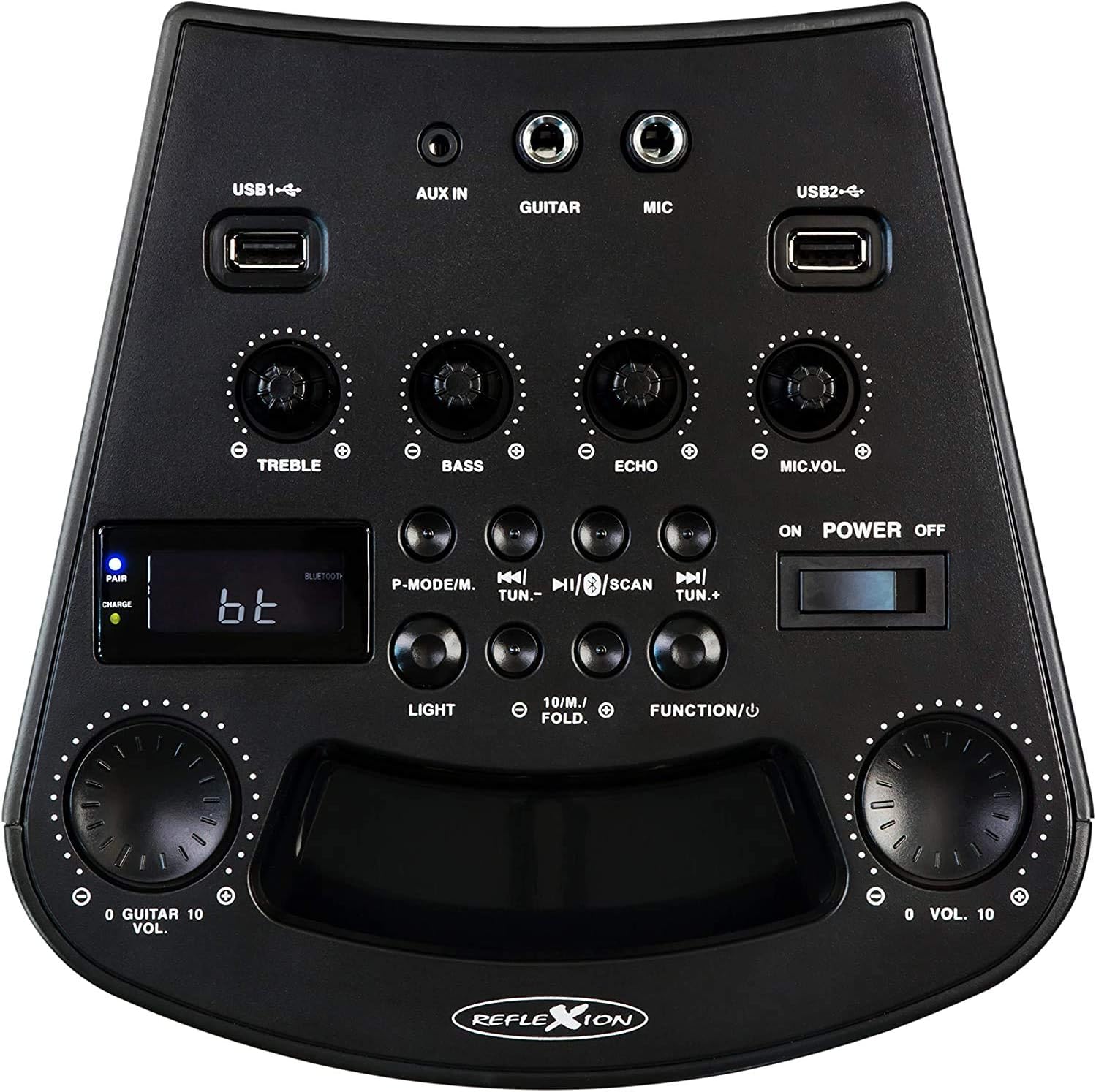
Rysunek 3: Szczegółowy view of the PS07BT control panel, showing input ports, sound adjustment knobs, and function buttons.
- Porty USB1 / USB2: Do odtwarzania dźwięku z urządzeń pamięci masowej USB.
- WEJŚCIE AUX: Wejście 3.5 mm dla zewnętrznych źródeł dźwięku.
- GITARA: Wejście 6.3 mm do podłączenia gitary.
- MIKROFON: 6.3mm input for connecting the microphone.
- Pokrętło TREBLE: Dostosowuje dźwięki o wysokiej częstotliwości.
- Pokrętło basowe: Dostosowuje dźwięki o niskiej częstotliwości.
- Pokrętło ECHO: Dostosowuje efekt echa dla sygnału wejściowego z mikrofonu.
- Pokrętło MIC.VOL: Reguluje głośność mikrofonu.
- P-MODE/M Button: Program mode / Mode selection.
- TUN.- / TUN.+ Buttons: Tune down / Tune up for FM radio.
- Przycisk SKANUJ: Skanuje stacje radiowe FM.
- Przycisk ŚWIATŁA: Controls the LED light effects.
- FUNCTION/U Button: Przełącza między trybami wejściowymi (Bluetooth, USB, AUX, FM).
- VOL. Knob: Główna regulacja głośności.
- Przełącznik WŁ./WYŁ. ZASILANIA: Włącza lub wyłącza urządzenie.
- Wyświetlacz LCD: Pokazuje aktualny tryb, informacje o utworze lub częstotliwość FM.
- PAIR/CHARGE Indicators: Bluetooth pairing status and battery charging status.
Panel tylny

Figure 4: Rear panel of the PS07BT, displaying the AC power input and product information label.
- Wejście zasilania prądem zmiennym: Connect the power adapter here for charging and operation.
- Etykieta produktu: Zawiera numer modelu, numer seryjny i specyfikację elektryczną.
Organizować coś
Ładowanie akumulatora
The PS07BT features a built-in rechargeable battery. Before first use, fully charge the unit.
- Connect the supplied power adapter to the AC power input on the rear of the unit.
- Podłącz zasilacz do gniazdka ściennego.
- The CHARGE indicator light will illuminate during charging.
- A full charge takes approximately 4 hours. The CHARGE indicator may change or turn off once fully charged (refer to specific indicator behavior in the quick start guide if available).
W pełni naładowany akumulator umożliwia do 4 godzin odtwarzania.
Connecting Microphone and Guitar
To use the karaoke or instrument features:
- Insert the microphone cable into the MIKROFON input on the control panel.
- If connecting a guitar, insert its cable into the GITARA wejście.
- Dostosuj GŁOŚNOŚĆ MIKROF I ECHO knobs as desired during operation.
Instrukcja obsługi
Włączanie/wyłączanie zasilania
Przesuń WŁĄCZANIE/WYŁĄCZANIE ZASILANIA switch to the 'ON' position to turn on the unit. Slide it to 'OFF' to power down.
Wybór trybu wprowadzania
Naciśnij FUNCTION/U button repeatedly to cycle through available input modes: Bluetooth (bt), USB, AUX, and FM Radio.
Połączenie Bluetooth
- Turn on the PS07BT and select 'bt' mode using the FUNCTION/U button. The 'PAIR' indicator will flash, indicating it's ready for pairing.
- Włącz Bluetooth w swoim urządzeniu mobilnym (smartfonie, tablecie itp.).
- Szukaj available devices and select 'Reflexion PS07BT' from the list.
- Once connected, the 'PAIR' indicator will stop flashing and remain solid. You can now play audio from your device through the PS07BT.
Odtwarzanie USB
- Włóż urządzenie pamięci masowej USB (np. dysk flash USB) zawierające dźwięk files do albo do USB1 or USB2 port.
- Wybierz tryb „USB” za pomocą FUNCTION/U przycisk.
- Urządzenie automatycznie rozpocznie odtwarzanie dźwięku files from the USB device. Use the track control buttons (usually combined with TUN.-/TUN.+) to navigate tracks.
AUX-In Connection
- Connect an external audio source (e.g., MP3 player, laptop) to the AUX IN portu za pomocą kabla audio 3.5 mm.
- Wybierz tryb „AUX” za pomocą FUNCTION/U przycisk.
- Play audio from your external device. The volume can be controlled via both the external device and the PS07BT's master volume knob.
Obsługa radia FM
- Wybierz tryb „FM” za pomocą FUNCTION/U przycisk.
- Naciśnij SKANDOWAĆ button to automatically scan and save available FM radio stations.
- Użyj KADŹ.- I TUN.+ buttons to manually tune to stations or select saved stations.
Funkcja karaoke
With a microphone connected to the MIKROFON input, you can sing along to music playing from any source (Bluetooth, USB, AUX, FM). Adjust the GŁOŚNOŚĆ MIKROF knob to control your voice volume and the ECHO knob for an echo effect.
Efekty świetlne
Naciśnij ŚWIATŁO button to activate or change the integrated blue LED light effects, which can synchronize with the music beat.
Regulacja głośności i dźwięku
- Głośność: Użyj dużego TOM. knob to adjust the overall sound output level.
- Tony wysokie/basy: Użyj POTROIĆ I BASS knobs to fine-tune the audio's high and low frequencies.
Konserwacja
Czyszczenie
Wipe the unit with a soft, dry cloth. Do not use abrasive cleaners, waxes, or solvents as they may damage the finish. Ensure the unit is powered off and unplugged before cleaning.
Składowanie
When not in use for extended periods, store the unit in a cool, dry place, away from direct sunlight and extreme temperatures. It is recommended to fully charge the battery before storing and to recharge it every few months to maintain battery health.
Rozwiązywanie problemów
If you encounter issues with your PS07BT, refer to the following common problems and solutions:
| Problem | Możliwe rozwiązanie |
|---|---|
| Brak zasilania | Ensure the power adapter is securely connected and plugged into a working outlet. Check if the battery is charged. Slide the POWER switch to ON. |
| Brak dźwięku | Increase the master VOL. knob. Check the volume on your connected audio source (e.g., phone). Ensure the correct input mode (Bluetooth, USB, AUX, FM) is selected. Check all cable connections. |
| Bluetooth nie łączy się | Ensure the unit is in 'bt' mode and the 'PAIR' indicator is flashing. Turn off and on Bluetooth on your device. Move your device closer to the PS07BT. Forget the device from your phone's Bluetooth list and try pairing again. |
| Mikrofon nie działa | Ensure the microphone is securely plugged into the MIC input. Increase the MIC.VOL knob. Check if the microphone has its own ON/OFF switch and is turned on. |
| Problemy z odtwarzaniem przez USB | Ensure the USB device is formatted correctly (FAT32 recommended) and contains compatible audio files. Spróbuj użyć innego urządzenia USB. |
Specyfikacje
Technical details for the Reflexion PS07BT Mobile Karaoke System:
- Nazwa modelu: PS07BT
- Wymiary (dł. x szer. x wys.): Wymiary 20.2 x 49 x 20.1 cm
- Waga: 2 kilograma
- Maksymalna moc wyjściowa głośnika: 320 watów
- Technologia łączności: Bluetooth
- Tryb wyjścia audio: Stereofoniczny
- Tworzywo: Plastikowy
- Typ głośnika: Subwoofer
- Cechy szczególne: Bluetooth, USB Port
- Średni czas pracy baterii: 4 godziny
- Czas ładowania: 4 godziny
- Metoda sterowania: Touch (referring to buttons/knobs)
- Total USB 2.0 Ports: 2
- Kolor: Czarny
- Źródło zasilania: Elektryczny przewodowy / akumulatorowy

Figure 5: The PS07BT's integrated handle allows for easy portability.
Gwarancja i wsparcie
The Reflexion PS07BT comes with a spare parts availability period of 1 year. For technical support or warranty inquiries, please contact your retailer or the manufacturer's customer service. Keep your proof of purchase for warranty claims.