
1. Koniec produktuview
The Grandstream GXP1630 is a powerful Gigabit IP phone designed for small businesses. This Linux-based, 3-line IP Phone model includes 8 BLF keys and 4-way conferencing. It features a 132x64 backlit LCD screen for clear display, dual HD audio, multi-language support, integrated Power over Ethernet (PoE), and 3 XML programmable soft keys. The GXP1630 incorporates state-of-the-art security encryption technology (SRTP and TLS) and supports various automated provisioning options for easy mass deployment.
Główne cechy:
- 3 SIP accounts, 3 line keys, 4-way conferencing
- 3 XML programmable context-sensitive soft keys
- HD audio on speakerphone and handset
- Up to 1000 contacts, call history up to 200 records
- Dual-switched Gigabit ports, integrated PoE
- 8 dual-colored BLF/speed dial keys
- EHS support for Plantronics headsets
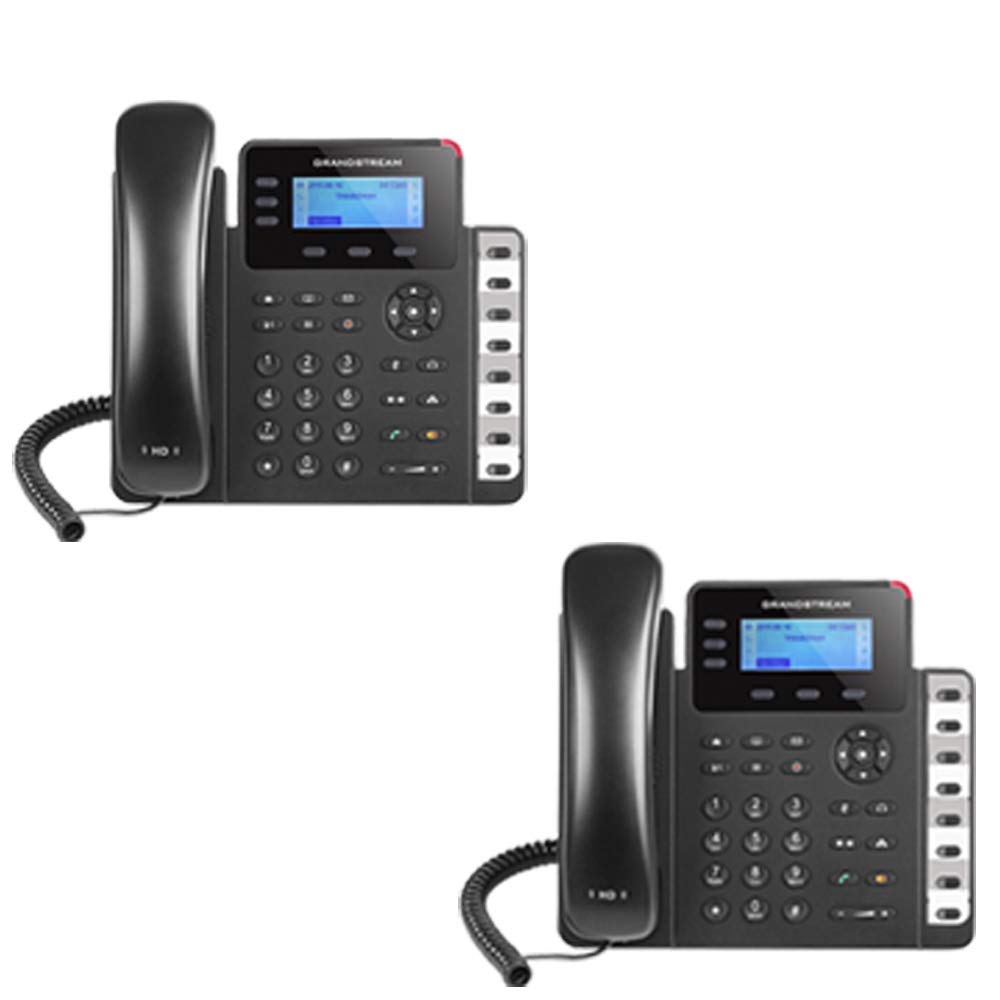
Figure 1: Grandstream GXP1630 Gigabit IP Phone
2. Konfiguracja i instalacja
2.1 Zawartość opakowania
Sprawdź, czy wszystkie komponenty są obecne:
- Grandstream GXP1630 IP Phone unit
- Słuchawka i przewód spiralny
- Kabel Ethernetowy
- Zasilacz (jeśli nie używasz PoE)
- Stojak na telefon
2.2 Podłączanie telefonu
- Connect the coiled cord to the handset and the handset port on the phone base.
- Connect the Ethernet cable from your network switch (with PoE) or router to the LAN port on the phone. If not using PoE, connect the power adapter to the phone and a power outlet.
- Optionally, connect a headset to the headset port.
- Attach the phone stand to the base unit.
2.3 Początkowe uruchomienie i przygotowanie
Once connected, the phone will power on and begin the boot-up sequence. The LCD screen will display status information. The GXP1630 supports automated provisioning options, including zero-configuration with Grandstream’s UCM series IP PBXs, encrypted XML files, and TR-069, to facilitate easy mass deployment and configuration.
3. Korzystanie z telefonu
3.1 Using the Headset or Speaker
- To turn the speaker on or off during a call, press the Głośnik przycisk.
- To use a connected headset, press the Zestaw słuchawkowy przycisk.
Wideo 1: Ponadview of using headset and speaker functions on Grandstream GXP1600 series IP phones.
3.2 Nawiązywanie połączenia
There are three primary ways to initiate a call:
- Handset/Headset: Podnieś słuchawkę lub naciśnij Zestaw słuchawkowy przycisk.
- Zestaw głośnomówiący: Naciśnij Głośnik przycisk.
- Line Key Selection: Press an available line key.
Once you hear a dial tone (the corresponding line key will turn green), enter the phone number using the keypad. Then, press the Wysłać przycisk lub # key to place the call. To use a different SIP account, simply press a different line key before dialing.
3.3 Redialing a Number
Aby ponownie wybrać ostatnio wybierany numer:
- Podnieś słuchawkę lub naciśnij Głośnik przycisk.
- Naciśnij Wysłać przycisk lub Ponowne wybieranie soft key displayed on the phone screen.
The phone will redial using the same SIP account as the previous call.
3.4 Odbieranie połączenia
When an incoming call rings:
- Pojedyncze połączenie przychodzące: Lift the handset, press the Głośnik button, or press the corresponding flashing line key.
- Multiple Incoming Calls (Call Waiting): If you are on an active call and another call comes in, you will hear a call waiting tone. The new incoming call's line key will flash red. Press the flashing red line key to answer the new call. Your current call will be placed on hold. You can toggle between calls by pressing the line key corresponding to each call.
3.5 Kończenie połączenia
Aby zakończyć aktywne połączenie:
- Odłóż słuchawkę.
- Naciśnij Zakończ połączenie soft key on the phone screen.
3.6 Hold and Resume a Call
- Aby zawiesić aktywne połączenie, naciśnij Trzymać button. The line key will typically flash.
- To resume a call that was placed on hold, press the corresponding blinking line key.
3.7 Volume Adjustment and Mute
- Gdy telefon jest bezczynny, użyj Tom przycisk do regulacji głośności dzwonka.
- Podczas aktywnego połączenia naciśnij Tom button to adjust the call volume for the handset, headset, or speaker.
- To mute or unmute your microphone during a call, press the Niemy przycisk.
4. Konserwacja
To ensure optimal performance and longevity of your Grandstream GXP1630 IP Phone, consider the following maintenance tips:
- Czyszczenie: Do czyszczenia powierzchni telefonu używaj miękkiej, suchej ściereczki. Unikaj środków czyszczących o działaniu ściernym i rozpuszczalników.
- Aktualizacje oprogramowania układowego: Regularly check for and apply firmware updates provided by Grandstream. Keeping the firmware up to date can improve performance, add new features, and address security vulnerabilities.
- Warunki środowiskowe: Operate the phone within recommended temperature and humidity ranges to prevent damage.
5. Rozwiązywanie Problemów
If you encounter issues with your GXP1630 IP Phone, try the following basic troubleshooting steps:
- Brak sygnału wybierania/Nie można wykonywać połączeń: Check all cable connections (Ethernet, handset, power). Ensure the phone is properly registered with your SIP server.
- Brak zasilania: Verify the power adapter is securely connected to both the phone and a working power outlet, or that your network switch is providing Power over Ethernet (PoE).
- Słaba jakość dźwięku: Check network connectivity. Ensure the handset/headset cord is properly connected. Adjust the call volume using the volume buttons.
- Phone Unresponsive: As with any electronic device, occasional reboots can resolve minor issues. Disconnect the power for a few seconds and then reconnect it.
- Problemy z wyświetlaniem: If the screen is blank or frozen, try rebooting the phone.
For more advanced issues, consult your IT administrator or Grandstream's official support resources.
6. Specyfikacje
| Funkcja | Opis |
|---|---|
| Konta SIP | 3 |
| Klawisze linii | 3 |
| Konferencje | 4-drożny |
| BLF/Speed Dial Keys | 8 dual-colored |
| Audio | HD audio on speakerphone and handset |
| Interfejs sieciowy | Dual-switched Gigabit ports |
| PoE | Integrated Power over Ethernet |
| Wyświetlacz | 132x64 backlit LCD |
| Wymiary | 8 x 12 x 6 cala |
| Waga | 6 funtów |
| Kolor | Czarny |
| Tworzywo | Plastikowy |
| Kompatybilne urządzenia | Grandstream IP phones, Plantronics headsets with EHS feature, devices supporting TR-069 and XML config files |
7. Gwarancja i wsparcie
7.1 Gwarancja producenta
The Grandstream GXP1630 IP Phone comes with a 1-letnia gwarancja producenta. Zachowaj dowód zakupu na wypadek roszczeń gwarancyjnych.
7.2 Wsparcie techniczne
For technical assistance, product registration, or to access additional resources, please visit the official Grandstream website or contact your product vendor. Support resources often include FAQs, knowledge bases, and community forums.