
Showlite LB-4390 LED
Showlite LB-4390 LED Light System
Instrukcja obsługi
Model: LB-4390 LED | Brand: Showlite
1. Wprowadzenie
The Showlite LB-4390 LED Light System is a comprehensive lighting solution designed for various applications, from small stages and events to clubs. This versatile system features four Tri-LED PAR spots and four white strobe spots, offering a wide range of lighting effects and full RGB color mixing. With multiple control options including DMX512, a wireless footswitch, and built-in automatic and sound-activated programs, the LB-4390 provides flexible operation for both professional users and solo entertainers. This manual provides detailed instructions for setup, operation, maintenance, and troubleshooting to ensure optimal performance and longevity of your device.

Figure 1.1: Showlite LB-4390 LED Light System
2. Instrukcje bezpieczeństwa
2.1 Ogólne zasady bezpieczeństwa
- Przed przystąpieniem do użytkowania urządzenia należy uważnie przeczytać wszystkie instrukcje.
- Trzymaj urządzenie z dala od wody, wilgoci i wysokiej wilgotności powietrza.
- Nie otwieraj obudowy. Wewnątrz nie ma żadnych części, które mogłyby zostać naprawione przez użytkownika. Wszelkie prace serwisowe zlecaj wykwalifikowanemu personelowi.
- Use only the specified power supply (100-240V, 50/60Hz).
- Aby zapobiec przegrzaniu, należy zapewnić odpowiednią wentylację wokół urządzenia.
- Unikaj bezpośredniego narażenia oczu na działanie źródła światła, gdyż może to spowodować ich uszkodzenie.
- Securely mount the unit to prevent accidental falls.
- Disconnect the device from the power supply before cleaning or performing any maintenance.
3. Zawartość opakowania
3.1 Co jest zawarte
Po otrzymaniu przesyłki sprawdź jej zawartość, aby upewnić się, że wszystkie przedmioty są obecne i nieuszkodzone:
- Showlite LB-4390 LED Light System (T-Bar with integrated PAR spots and strobe spots)
- Bezprzewodowy przełącznik nożny
- Adjustable Lighting Stand
- Kabel zasilający
- Mounting Material for fixed installation (brackets, screws)
- 2 Transport Bags (one for the T-Bar, one for the stand)
- Instrukcja obsługi


Rysunek 3.1: Dołączone komponenty i akcesoria
4. Konfiguracja
4.1 Montaż
- Carefully unpack all components from their packaging.
- Extend the tripod stand legs to a stable position and adjust the height to your desired level, ensuring the stand is firmly planted.
- Mount the T-Bar with the integrated lights onto the top pole of the stand. Secure it tightly using the provided locking knob.
- Adjust the angle of the individual PAR spots and strobe spots on the T-Bar as needed for optimal light coverage.
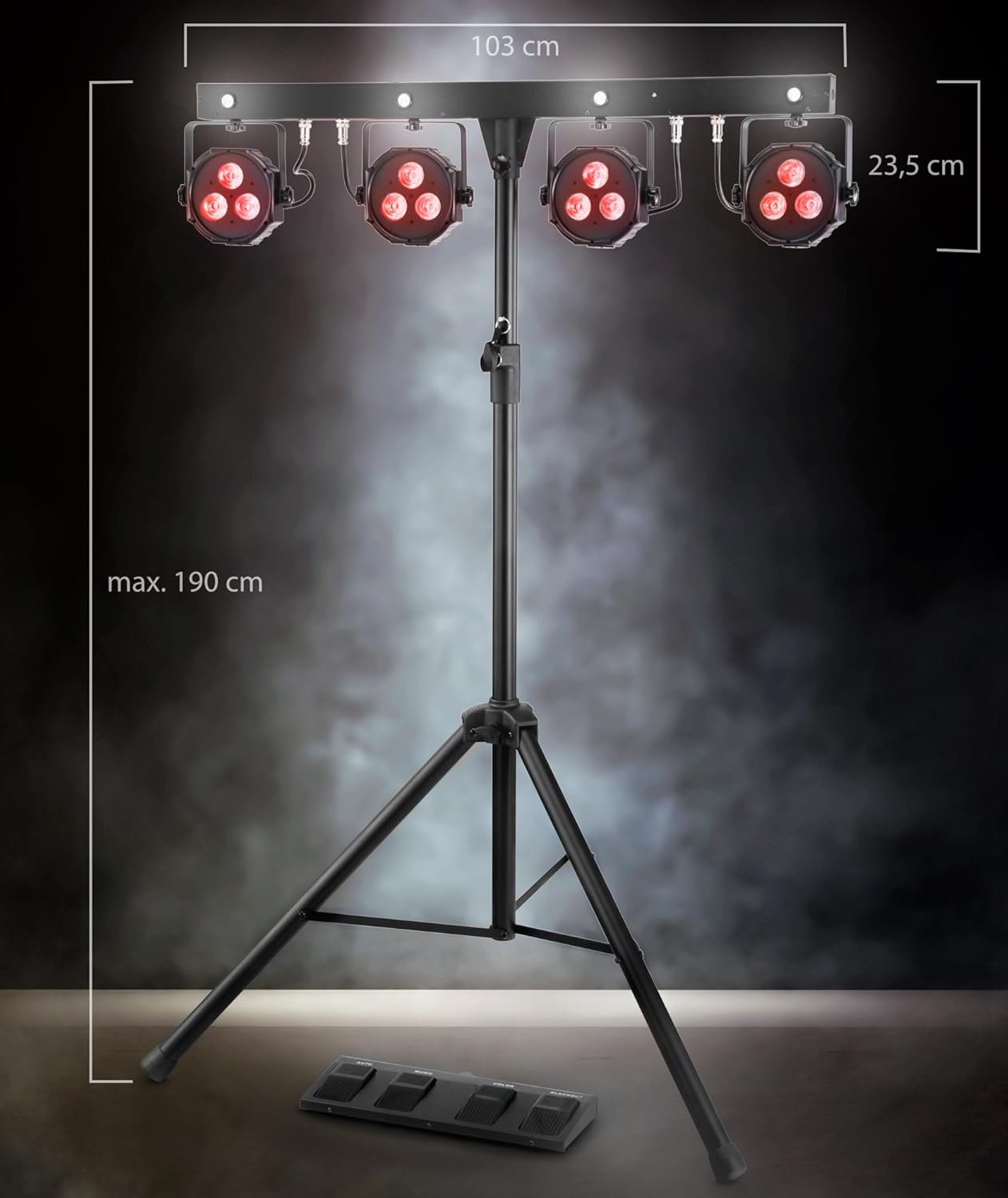
Rysunek 4.1: Wymiary produktu i montażview
4.2 Połączenia
- Connect the provided power cable to the power input on the rear of the T-Bar unit. Then, plug the other end into a suitable power outlet (100-240V, 50/60Hz).
- For DMX control, connect a DMX cable from your DMX controller to the 'DMX IN' port on the unit. If chaining multiple DMX devices, connect from 'DMX OUT' to the next device's 'DMX IN'.

Rysunek 4.2: Połączenia na panelu tylnym
5. Tryby pracy
5.1 Panel sterowania ponadview
The main control panel is located on the rear of the T-Bar unit and features an LCD display, navigation buttons (MENU, UP, DOWN, ENTER), a built-in microphone, DMX input/output, and a USB port.

Rysunek 5.1: Panel sterowania
5.2 Sterowanie DMX
The LB-4390 can be controlled via DMX512 protocol. Set the DMX address using the control panel's LCD display and navigation buttons. The unit supports various DMX channel modes: 03CH, 05CH, 12CH, 12CF (with Flash LED), and 24CH. Refer to the detailed DMX parameter lists in the full manual for specific channel functions.
5.3 Wireless Footswitch Operation
The included wireless footswitch provides convenient remote control over the light system. Ensure the footswitch is powered on and properly paired with the main unit. The footswitch features four buttons:
- AUTOMATYCZNY: Activates the built-in automatic programs, cycling through various light sequences.
- MUZYKA: Engages the sound-activated mode, where the lights react to ambient sound picked up by the unit's built-in microphone.
- KOLOR: Cycles through a selection of static color presets.
- ZACIEMNIENIE: Turns off all lights instantly.

Figure 5.2: Wireless Footswitch (Top View)

Figure 5.3: Wireless Footswitch (Side View)
5.4 Tryb ręczny
Use the MENU, UP, DOWN, and ENTER buttons on the control panel to manually select specific colors, programs, or adjust settings without a DMX controller or footswitch.
5.5 Tryb aktywacji dźwiękiem
In this mode, the light system reacts to sound via its built-in microphone. You can adjust the microphone sensitivity via the control panel to fine-tune the response to music or ambient sounds.
5.6 trybów kolorów
This mode allows you to select and mix colors manually, creating custom static color scenes.
6. Konserwacja
6.1 Czyszczenie
To maintain the performance and appearance of your light system:
- Przed czyszczeniem należy zawsze odłączyć urządzenie od zasilania.
- Do przecierania powierzchni zewnętrznych należy używać miękkiej, suchej i niepozostawiającej włókien ściereczki.
- Nie należy używać środków czyszczących o działaniu ściernym, rozpuszczalników ani silnych środków chemicznych, gdyż mogą one uszkodzić wykończenie i wewnętrzne elementy.
- Periodically check the lenses for dust or smudges and gently clean them to ensure optimal light output.
6.2 Przechowywanie
When not in use, store the light system in a cool, dry place, away from direct sunlight and extreme temperatures. Utilize the provided transport bags to protect the T-Bar and stand from dust and physical damage during storage and transport.
7. Rozwiązywanie Problemów
7.1 Typowe problemy
| Problem | Możliwa przyczyna | Rozwiązanie |
|---|---|---|
| Brak zasilania urządzenia. | Odłączony kabel zasilający, uszkodzone gniazdko, przepalony bezpiecznik. | Check power cable connection. Test outlet with another device. Check and replace fuse (T1, 6A) if necessary. |
| Oświetlenie nie reaguje na sygnał DMX. | Nieprawidłowy adres DMX, uszkodzony kabel DMX, problem ze sterownikiem DMX. | Verify DMX address on the unit matches controller. Check DMX cable for damage. Ensure DMX controller is functioning correctly. |
| Wireless footswitch not working. | Footswitch not powered on, out of range, interference. | Ensure footswitch is switched on. Move closer to the main unit. Reduce potential sources of wireless interference. |
| Sound-activated mode not reacting. | Microphone sensitivity too low, no sound input. | Increase microphone sensitivity via the control panel. Ensure there is sufficient sound for the unit to detect. |
8. Specyfikacje
8.1 Dane techniczne
| Parametr | Wartość |
|---|---|
| Numer modelu | LB-4390 LED |
| Diody LED | 4 x Tri-LED PAR-Spots (3x 9W 3-in-1 LEDs), 4 x white Strobe-Spots (1W LEDs) |
| Kąt wiązki | 15° |
| Opcje sterowania | DMX512, Wireless Footswitch, Manual, Sound-Activated, Color Mode |
| Kanały DMX | 03CH, 05CH, 12CH, 12CF (with Flash LED), 24CH |
| Wyświetlacz | LCD |
| Mikrofon | Built-in with sensitivity control |
| Pobór mocy | 84 waty |
| Wejście Voltage | 100-240 V, 50/60 Hz |
| Bezpiecznik | T1, 6A (250V) |
| Wymiary (wys. x szer. x gł.) | Wymiary: 235 x 1032 x 71 mm |
| Waga jednostkowa | 10.2 kilogramów |
| Waga w opakowaniu | 11.8 kilogramów |
| Podstawka | Rozszerzalny |
9. Gwarancja i wsparcie
9.1 Informacje o gwarancji
This Showlite product comes with a standard manufacturer's warranty. Please refer to your purchase documentation or contact your retailer for specific terms, conditions, and duration of the warranty applicable to your region.
9.2 Obsługa klienta
For technical assistance, spare parts, or service inquiries regarding your Showlite LB-4390 LED Light System, please contact Showlite customer support or your authorized dealer. Have your model number and purchase information ready when contacting support.
Ask a question about this manual
Ask about setup, troubleshooting, compatibility, parts, safety, or missing instructions. Manuals+ will review the question and use this page’s manual context to help answer it.