
1. Wprowadzenie
This manual provides essential information for the proper installation, operation, and maintenance of your Edimax EW-7438AC Smart AC750 Dual-Band Wi-Fi Extender. Please read this manual thoroughly before using the device to ensure optimal performance and to prevent damage.
2. Koniec produktuview
The Edimax EW-7438AC is a versatile 11AC high-speed Wi-Fi device designed to enhance your wireless network. It features a compact design with a built-in power adapter for direct wall outlet connection. This device supports three operating modes: Wi-Fi Extender, Access Point, and Wi-Fi Bridge, offering flexibility for various networking needs.
Główne cechy:
- Wyeliminuj martwe strefy Wi-Fi: Extends the range of existing 802.11b/g/n Wi-Fi networks.
- Smart 3-in-1 Modes: Functions as a Wi-Fi Extender, Access Point, or Wi-Fi Bridge.
- Smart IQ Setup: Easy configuration via smartphone, tablet, or web browser, no CD or computer required.
- Smart App Control & Analytics: Free EdiRange app for Wi-Fi analytics, scheduling, and guest network management.
- Technologia Cross-Band: Optimizes speed by transmitting data on one band and receiving on the other.
Elementy urządzenia:
Familiarize yourself with the physical components of the EW-7438AC:

Obraz: Przód view of the Edimax EW-7438AC Wi-Fi Extender, highlighting its LEDs (5GHz, 2.4GHz, Signal Indicator, Power, WPS, LAN), WPS button, LAN port, and a slide switch for adjusting Wi-Fi power (Normal Mode, Green Mode, Power Off).
3. Konfiguracja
The EW-7438AC features Smart IQ Setup for quick and easy configuration. You can set up the device using a smartphone, tablet, or web browser without needing a computer or installation CD.
Początkowe kroki konfiguracji:
- Włączanie: Plug the EW-7438AC directly into an electrical outlet. Wait for the power LED to stabilize.
- Łączyć: Use a Wi-Fi enabled device (smartphone, tablet, or computer) to connect to the extender's default Wi-Fi network (SSID usually printed on the device).
- Konfiguracja dostępu: Otwórz web browser and navigate to the setup page (refer to the Quick Installation Guide for the specific address, typically edimaxext.setup lub adres IP).
- Postępuj zgodnie z instrukcjami wyświetlanymi na ekranie: The Smart IQ Setup wizard will guide you through selecting your desired operating mode (Extender, Access Point, or Bridge) and configuring network settings, including connecting to your existing Wi-Fi network.
WPS (Wi-Fi Protected Setup) Configuration:
For a quick connection to your existing Wi-Fi network, you can use the WPS button:
- Plug the EW-7438AC into an electrical outlet near your main router.
- Naciśnij przycisk WPS na głównym routerze.
- Within two minutes, press the WPS button on the EW-7438AC.
- The WPS LED on the extender will indicate a successful connection. You can then relocate the extender to a suitable location within your Wi-Fi coverage area.

Obraz: A visual representation of the Edimax EW-7438AC establishing a connection with a main router and extending its reach to other devices, symbolizing easy setup and network integration.
4. Tryby pracy
The EW-7438AC offers three distinct operating modes to suit various networking requirements:
4.1. Wi-Fi Extender Mode
In this mode, the device extends the coverage of your existing Wi-Fi network, eliminating dead zones and improving signal strength in areas with weak reception. It connects wirelessly to your main router and broadcasts an extended Wi-Fi signal.
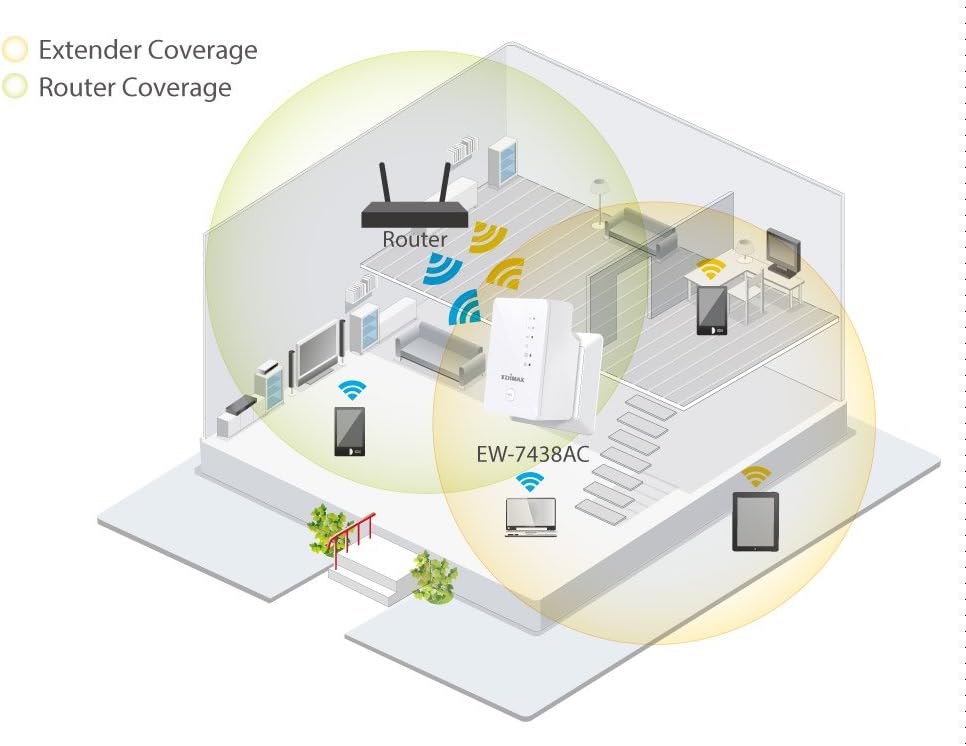
Obraz: A diagram showing a house layout with a router and the EW-7438AC extender. It visually demonstrates how the extender expands the Wi-Fi coverage area, reaching previously uncovered sections of the home.
4.2. Tryb punktu dostępowego (AP)
When configured as an Access Point, the EW-7438AC connects to your wired network via an Ethernet cable and creates a new wireless network. This is useful for adding Wi-Fi capabilities to a wired-only network or for creating a separate Wi-Fi network.
4.3. Wi-Fi Bridge Mode
In Wi-Fi Bridge mode, the device connects wirelessly to your existing Wi-Fi network and provides an Ethernet port for connecting a wired-only device (e.g., a smart TV, gaming console, or desktop PC) to the wireless network. This allows wired devices to access the internet without needing a direct cable run to the main router.
5. EdiRange App Control
The free EdiRange smartphone app provides advanced control and monitoring capabilities for your EW-7438AC. The app is available for both Android and iOS devices.
Funkcje aplikacji:
- Wi-Fi Analytics: Analyze your local Wi-Fi environment to identify optimal placement and performance.
- Wi-Fi Scheduling: Set schedules for when your Wi-Fi network is active, conserving energy and managing network access.
- Zarządzanie siecią gościnną: Easily create and manage separate guest networks for visitors, enhancing security.

Obraz: A smartphone display showing the Edimax app icon, indicating the availability of the EdiRange application for download and use.
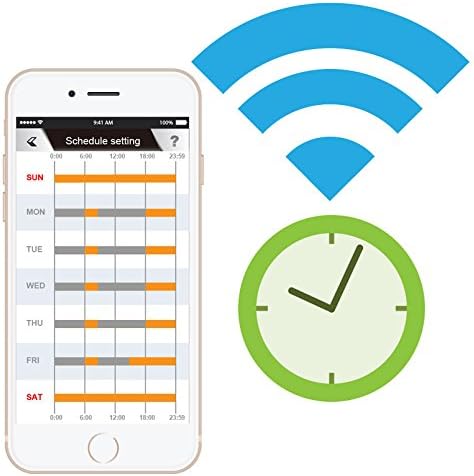
Obraz: A smartphone screen showing the Wi-Fi scheduling interface within the EdiRange app, allowing users to set specific times for Wi-Fi activity throughout the week.
6. Konserwacja
To ensure the longevity and optimal performance of your Edimax EW-7438AC, follow these maintenance guidelines:
- Zachowaj czystosc: Regularnie przecieraj urządzenie miękką, suchą ściereczką. Unikaj stosowania płynów czyszczących i aerozoli.
- Wentylacja: Upewnij się, że urządzenie znajduje się w miejscu z odpowiednim przepływem powietrza, aby zapobiec przegrzaniu. Nie blokuj otworów wentylacyjnych.
- Aktualizacje oprogramowania układowego: Periodically check the Edimax webStrona z aktualizacjami oprogramowania sprzętowego. Regularne aktualizowanie oprogramowania sprzętowego może poprawić wydajność, dodać nowe funkcje i zwiększyć bezpieczeństwo.
- Warunki środowiskowe: Operate the device within its specified temperature and humidity ranges. Avoid extreme conditions.
7. Rozwiązywanie Problemów
If you encounter issues with your EW-7438AC, try the following troubleshooting steps:
- Brak zasilania: Ensure the device is securely plugged into a working electrical outlet. Check if the power LED is illuminated.
- Brak sygnału Wi-Fi: Verify that the extender is within range of your main router. Check the signal indicator LEDs on the device. If the signal is weak or absent, try relocating the extender closer to the router.
- Nie można uzyskać dostępu do strony konfiguracji: Ensure your device is connected to the extender's Wi-Fi network. Try restarting both the extender and your connecting device. Verify the correct setup URL lub adres IP.
- Niska prędkość połączenia: Ensure the extender is placed optimally between your router and client devices. Consider potential interference from other electronic devices. Check your main internet connection speed.
- Urządzenie nie odpowiada: Unplug the extender from the power outlet, wait 10 seconds, and plug it back in.
- Przywrócenie ustawień fabrycznych: If issues persist, you may need to perform a factory reset. Locate the reset button (often a small pinhole) on the device, press and hold it for 5-10 seconds until the LEDs flash, then release. This will restore the device to its default factory settings, requiring re-configuration.
8. Specyfikacje
| Marka | Edimax |
| Model | EW-7438AC |
| Standard komunikacji bezprzewodowej | 802.11a/b/g/n, 802.11ac |
| Szybkość przesyłu danych | 750 Megabits Per Second (300Mbps on 2.4GHz + 433Mbps on 5GHz) |
| Klasa pasma częstotliwości | Dwuzakresowy |
| Cechy specjalne | Access Point Mode, Dual Band |
| Kolor | Biały |
| Waga przedmiotu | 3.8 uncji |
| Kompatybilne urządzenia | Smartfon, Tablet |
| Typ złącza | RJ45 (Ethernet) |
| UPC | 649659025189 |
9. Gwarancja i wsparcie
For detailed warranty information, technical support, and additional resources, please refer to the documentation included with your product or visit the official Edimax website. The manufacturer provides support and warranty services according to regional regulations and product-specific terms.
Edimax Official Webstrona: www.edimax.pl