
1. Wprowadzenie
This manual provides detailed instructions for the installation, operation, and maintenance of your Zmodo ZM-KW1001-O4-1TB HD Camera System. Please read this manual thoroughly before using the product to ensure proper setup and functionality. Keep this manual for future reference.
2. Koniec produktuview
2.1 Główne cechy
- 720p HD video for clear and sharp images.
- Smartlink wireless configuration for quick setup.
- Motion detection alerts to notify you of activity.
- IP66 rated outdoor cameras for weather resistance.
- Infrared night vision for surveillance in low-light conditions.
- Integrated 1TB hard drive for local video storage.
2.2 Komponenty systemu
The Zmodo ZM-KW1001-O4-1TB system typically includes the following components:
- Wireless Network Video Recorder (NVR) with 1TB HDD
- HD Wireless Cameras (quantity may vary, typically 4)
- Zasilacze do rejestratorów NVR i kamer
- Kabel Ethernet
- Śruby montażowe i kotwy
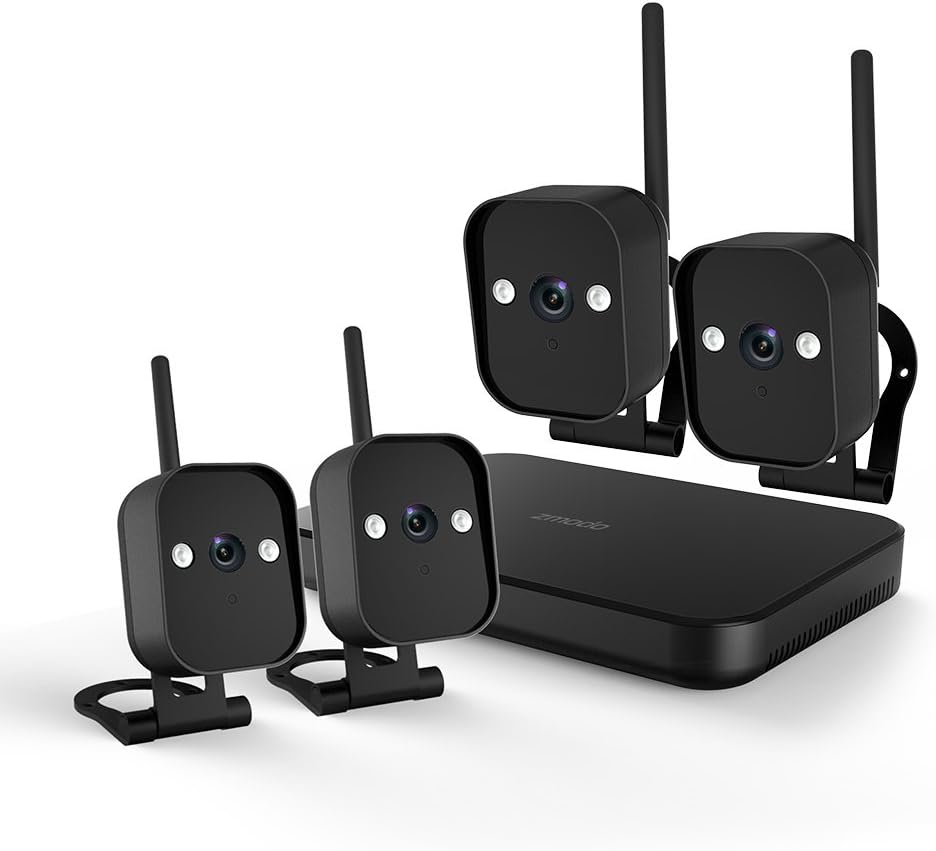
Rysunek 1: Nadview of the Zmodo ZM-KW1001-O4-1TB HD Camera System, showing the NVR unit and four wireless cameras.
3. Instrukcje konfiguracji
3.1 Rozpakowanie i wstępna inspekcja
Carefully unpack all components and verify that all items listed in Section 2.2 are present and undamaged. If any items are missing or damaged, contact customer support.
3.2 Połączenie NVR
- Podłącz rejestrator NVR do gniazdka elektrycznego za pomocą dołączonego zasilacza.
- For initial setup and optimal performance, connect the NVR to your router using the supplied Ethernet cable.
- Connect the NVR to a monitor via HDMI or VGA cable (not included) if local viewjest pożądane.

Rysunek 2: The Zmodo Network Video Recorder (NVR) unit, which stores recordings and manages camera connections.
3.3 Instalacja i parowanie kamery
The cameras are designed for both indoor and outdoor use with an IP66 weather-resistant rating. Ensure cameras are placed within range of the NVR's wireless signal.
- Włącz kamery: Podłącz każdą kamerę do odpowiedniego zasilacza i podłącz ją do gniazdka elektrycznego.
- Smartlink Pairing: The cameras should automatically attempt to pair with the NVR. Follow the on-screen prompts on the connected monitor or use the Zmodo app for Smartlink setup. If pairing fails, refer to the troubleshooting section.
- Montowanie: Choose suitable locations for your cameras. Use the provided screws and anchors to securely mount the cameras. Ensure a clear line of sight and optimal viewkąt.

Rysunek 3: A Zmodo wireless camera shown with its wall-mounting bracket, suitable for outdoor installation.

Rysunek 4: A Zmodo wireless camera shown with its stand mount, ideal for indoor placement on flat surfaces.
3.4 Konfiguracja aplikacji mobilnej
- Download the Zmodo app from the App Store (iOS) or Google Play Store (Android).
- Załóż nowe konto lub zaloguj się na istniejące.
- Follow the in-app instructions to add your Zmodo NVR system. This typically involves scanning a QR code on the NVR or manually entering device details.
- Po dodaniu powinieneś móc view transmisje na żywo z Twoich kamer.
4. Instrukcja obsługi
4.1 Na żywo View
Access the Zmodo app or the NVR's local interface to view live video streams from your cameras. You can typically select individual cameras or view wiele kanałów jednocześnie.
4.2 Detekcja ruchu i alerty
The system is equipped with motion detection capabilities. When motion is detected, the system can record footage and send alerts to your mobile device.
- Konfiguracja: In the Zmodo app or NVR settings, navigate to the motion detection section. You can customize detection zones, sensitivity levels, and alert schedules.
- Alerty: Ensure push notifications are enabled for the Zmodo app on your mobile device to receive timely alerts.
4.3 Nagrywanie i odtwarzanie
The NVR includes a 1TB hard drive for continuous or motion-activated recording.
- Ustawienia nagrywania: Configure recording modes (continuous, scheduled, motion-activated) via the NVR's local interface or the Zmodo app.
- Odtwarzanie nagranego dźwięku: Aby ponownieview nagrano footage, access the playback feature in the Zmodo app or directly on the NVR. Select the desired date and time to view wydarzenia.
4.4 Widzenie nocne
The cameras feature infrared night vision, allowing them to capture clear video in low-light or complete darkness. The system automatically switches to night vision mode when ambient light levels are insufficient.
5. Konserwacja
- Czyszczenie aparatu: Okresowo czyść obiektywy aparatu miękką,amp ściereczką, aby zapewnić wysoką jakość obrazu. Unikaj środków czyszczących o działaniu ściernym.
- Aktualizacje oprogramowania układowego: Check the Zmodo app or website regularly for firmware updates. Keeping your system updated ensures optimal performance and security.
- Zarządzanie dyskiem twardym: Dysk twardy o pojemności 1 TB automatycznie nadpisze najstarsze plikitage when full. If you need to preserve specific recordings, back them up to an external device before they are overwritten.
- Zasilanie: Sprawdź, czy wszystkie zasilacze są solidnie podłączone i nieuszkodzone.
6. Rozwiązywanie Problemów
- Brak transmisji wideo:
- Check if the NVR and cameras are powered on.
- Verify network connectivity for the NVR.
- Upewnij się, że kamery znajdują się w zasięgu sieci bezprzewodowej NVR.
- Re-pair cameras if they have lost connection.
- Nie otrzymano alertów ruchu:
- Sprawdź, czy wykrywanie ruchu jest włączone w ustawieniach aplikacji.
- Check motion detection zones and sensitivity.
- Ensure push notifications are enabled for the Zmodo app on your mobile device.
- Słaba jakość obrazu:
- Wyczyść obiektyw aparatu.
- Upewnij się, że w polu widzenia kamery nie ma żadnych przeszkód. view.
- Check for strong interference if using wireless connection.
- Cameras Not Connecting to Wi-Fi:
- Ensure the NVR's Wi-Fi is enabled and functioning.
- Move cameras closer to the NVR to improve signal strength.
- Reset cameras and attempt Smartlink pairing again.
7. Specyfikacje
| Funkcja | Specyfikacja |
|---|---|
| Numer modelu | ZM-KW1001-O4-1TB |
| Rozdzielczość wideo | Rozdzielczość 720p HD |
| Technologia łączności | Bezprzewodowy |
| Liczba kanałów | 4 |
| Pojemność magazynowa | 1 TB (terabajt) |
| Cechy specjalne | Wireless, Motion Detection, Night Vision, IP66 Weatherproof |
| Zgodność z systemem operacyjnym | Android, iOS |
| Źródło zasilania | Wireless (Power Adapters for components) |
| Kolor | Czarny |
| Wymiary opakowania | Wymiary 26.8 x 20 x 16 cm |
| Waga przedmiotu | 1.5 kilograma |
8. Gwarancja i wsparcie
Aby uzyskać informacje dotyczące gwarancji i pomocy technicznej, zapoznaj się z oficjalną stroną Zmodo website or contact Zmodo customer service directly. Details regarding warranty periods and service procedures are typically available on the manufacturer's support pages.
Wsparcie online: Visit the Zmodo official webwitryna z często zadawanymi pytaniami, przewodnikami rozwiązywania problemów i informacjami kontaktowymi.
Skontaktuj się z pomocą techniczną: If you require further assistance, please have your product model number (ZM-KW1001-O4-1TB) and purchase details ready when contacting support.