
1. Wprowadzenie
This manual provides essential instructions for the installation, operation, and maintenance of your VTech VM302 Accessory Baby Video Camera. The VM302 is designed to expand your existing VTech VM312 series baby monitor system, allowing you to monitor multiple rooms or angles. Please read this manual thoroughly before using the camera.
2. Ważne instrukcje bezpieczeństwa
- Ryzyko uduszenia: Keep the adapter cord out of reach of children. Never place the camera or cords within 3 feet (1 meter) of the crib or playpen.
- Woda i wilgoć: Do not expose the product to water or moisture. Do not use near water, such as a bathtub, sink, or swimming pool.
- Źródła ciepła: Keep the product away from heat sources such as radiators, heat registers, stoves, or other appliances that produce heat.
- Zasilacze: Use only the power adapter supplied with the product. Using an incorrect adapter may damage the camera and void the warranty.
- Wentylacja: Do not block any ventilation openings. Ensure proper airflow around the camera.
- Czyszczenie: Czyścić wyłącznie suchą szmatką.
- Serwisowanie: Nie próbuj samodzielnie naprawiać tego produktu. Wszelkie naprawy zlecaj wykwalifikowanemu personelowi serwisowemu.
3. Co znajduje się w pudełku
Your VTech VM302 package contains the following items:
- One (1) VM302 Accessory Baby Video Camera
- One (1) Power Adapter for the camera
- Szybki przewodnik (nie jest zawarty w niniejszej instrukcji cyfrowej)
Notatka: This is an accessory camera and requires a VTech VM312 series parent unit to operate. The parent unit is not included with this accessory camera.
4. Konfiguracja
4.1 kamera ponadview

Obraz 1: Przód view of the VTech VM302 camera. This image highlights the main controls including the power button, volume controls, and the pairing button, along with the camera lens and power indicator light.
Familiarize yourself with the camera's components before proceeding with setup. The front of the camera features the lens, infrared LEDs for night vision, a power indicator light, a power button, volume control buttons, and a PAIR button.
4.2 Podłączanie aparatu
- Place the camera in a suitable location in your baby's room, ensuring it is at least 3 feet (1 meter) away from the crib.
- Connect the small end of the power adapter to the DC IN jack on the side of the camera.
- Plug the large end of the power adapter into a wall outlet. The power indicator light on the camera will illuminate.
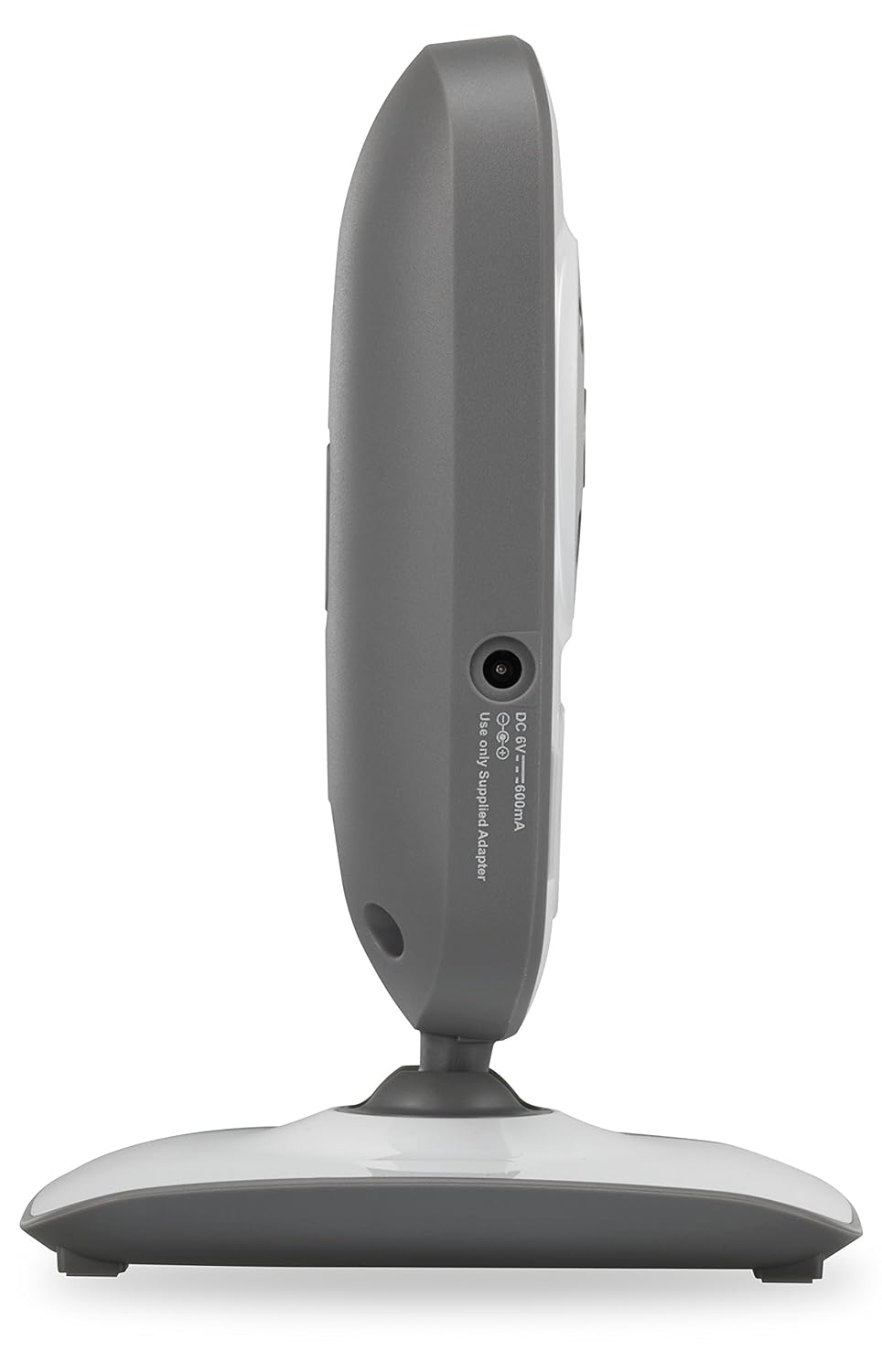
Obraz 2: Strona view of the VTech VM302 camera. This image shows the location of the DC IN port where the power adapter connects.
4.3 Wall Mounting the Camera
The VM302 camera can be wall-mounted for optimal viewing angles. No additional bracket is needed as the camera base includes mounting holes.
- Choose a wall location that provides a clear view of the baby and is out of reach of children.
- Mark two screw holes on the wall, approximately 0.6 inches (1.5 cm) apart, corresponding to the mounting holes on the camera base.
- Drill pilot holes if necessary and insert screws (not included) into the wall, leaving about 1/4 inch (6mm) exposed.
- Align the camera's mounting holes with the screws and slide the camera down to secure it.
- W razie potrzeby dostosuj kąt kamery.
4.4 Pairing the Accessory Camera
To use the VM302 camera, it must be paired with your VTech VM312 series parent unit. Refer to your VM312 series parent unit manual for specific pairing instructions. Generally, the process involves:
- Ensure both the parent unit and the accessory camera are powered on.
- On the parent unit, navigate to the camera pairing menu (consult your parent unit manual for exact steps).
- When prompted by the parent unit, press and hold the PARA button on the side of the VM302 camera until the power indicator light flashes.
- The parent unit will confirm successful pairing.
Ważny: The VM302 camera is designed to work with the VTech VM312 series. Compatibility with other VTech models or brands is not guaranteed.
5. Działanie
5.1 Podstawowe monitorowanie
Once paired, the video feed from the VM302 camera will be displayed on your VM312 series parent unit. You can switch between multiple paired cameras using the parent unit's controls.
- Wyświetlanie wideo: The camera transmits clear, dynamic video at up to 22 frames per second to the parent unit.
- Widzenie nocne: The camera features eight infrared LEDs that automatically detect dim light conditions, providing clear black-and-white video even in dark rooms.
- Monitorowanie dźwięku: The camera captures audio from the baby's room. The parent unit typically has a 5-level sound indicator to visually monitor noise levels, even when muted.
5.2 Rozmowa dwukierunkowa
The VM302 camera supports two-way talk, allowing you to comfort your baby from another room using the parent unit's built-in intercom function.
- On your VM312 series parent unit, press and hold the Talk button (refer to your parent unit manual for its location).
- Speak clearly into the microphone on the parent unit. Your voice will be transmitted through the VM302 camera's speaker.
- Puść przycisk Mowa, aby ponownie usłyszeć swoje dziecko.
6. Konserwacja
6.1 Czyszczenie aparatu
- Ensure the camera is unplugged before cleaning.
- Use a soft, dry cloth to wipe the surfaces of the camera.
- Nie używaj sprayów czyszczących ani płynnych środków czyszczących.
- For the camera lens, use a soft, lint-free cloth specifically designed for optics.
6.2 Przechowywanie
If you will not be using the camera for an extended period, unplug it from the power outlet and store it in a cool, dry place away from direct sunlight.
7. Rozwiązywanie Problemów
| Problem | Możliwa przyczyna | Rozwiązanie |
|---|---|---|
| No video/audio from camera on parent unit. | Camera is not powered on or not paired. | Ensure the camera is plugged in and the power indicator is on. Re-pair the camera with the parent unit (see Section 4.4). |
| "Out of Range" message on parent unit. | Camera is too far from the parent unit or there are obstructions. | Move the camera closer to the parent unit. Reduce obstructions like thick walls or electronic devices. The system has a range of up to 1,000 feet in open spaces. |
| Słaba jakość obrazu lub migotanie. | Interference from other 2.4GHz devices or weak signal. | Move the camera or parent unit away from other wireless devices (Wi-Fi routers, microwaves, cordless phones). Ensure a clear line of sight. |
| Dwustronna komunikacja nie działa. | Talk button not pressed or microphone/speaker issues. | Ensure you are pressing and holding the Talk button on the parent unit. Check parent unit volume. |
If you continue to experience issues, please refer to the full user manual for your VTech VM312 series monitor or contact VTech customer support.
8. Specyfikacje
- Model: VM302
- Łączność: 2.4GHz FHSS wireless technology
- Rozdzielczość wideo: 720p
- Widzenie nocne: Infrared LEDs, automatic activation
- Rozmowa dwukierunkowa: Tak
- Typ mocowania: Możliwość montażu na ścianie
- Power Source (Camera): AC Power Adapter (DC 6V, 500mA)
- Zasięg działania: Do 1,000 stóp (w linii wzroku)
- Waga: Około 8 uncji (227 gramów)
- Kolor: Biały/Szary
9. Gwarancja i obsługa klienta
For warranty information and detailed customer support, please refer to the documentation included with your VTech VM312 series baby monitor or visit the official VTech webstrona:
Odpowiedzi na często zadawane pytania i dodatkowe materiały znajdziesz również na stronach pomocy technicznej.