
Wstęp
This manual provides detailed instructions for the Inateck Bluetooth 4.1 Sport Headset, Model P20 (BH1001). Please read this guide thoroughly before using the product to ensure proper operation and to maximize your listening experience. This headset is designed for active lifestyles, offering wireless audio with a secure fit and integrated microphone.
1. Konfiguracja
1.1 Zawartość opakowania
Sprawdź, czy w opakowaniu znajdują się wszystkie elementy:
- Inateck Bluetooth Sport Headset (P20 / BH1001)
- Kabel ładujący USB
- Multiple pairs of silicone ear tips (various sizes)
- Torba transportowa
- Instrukcja obsługi (ten dokument)
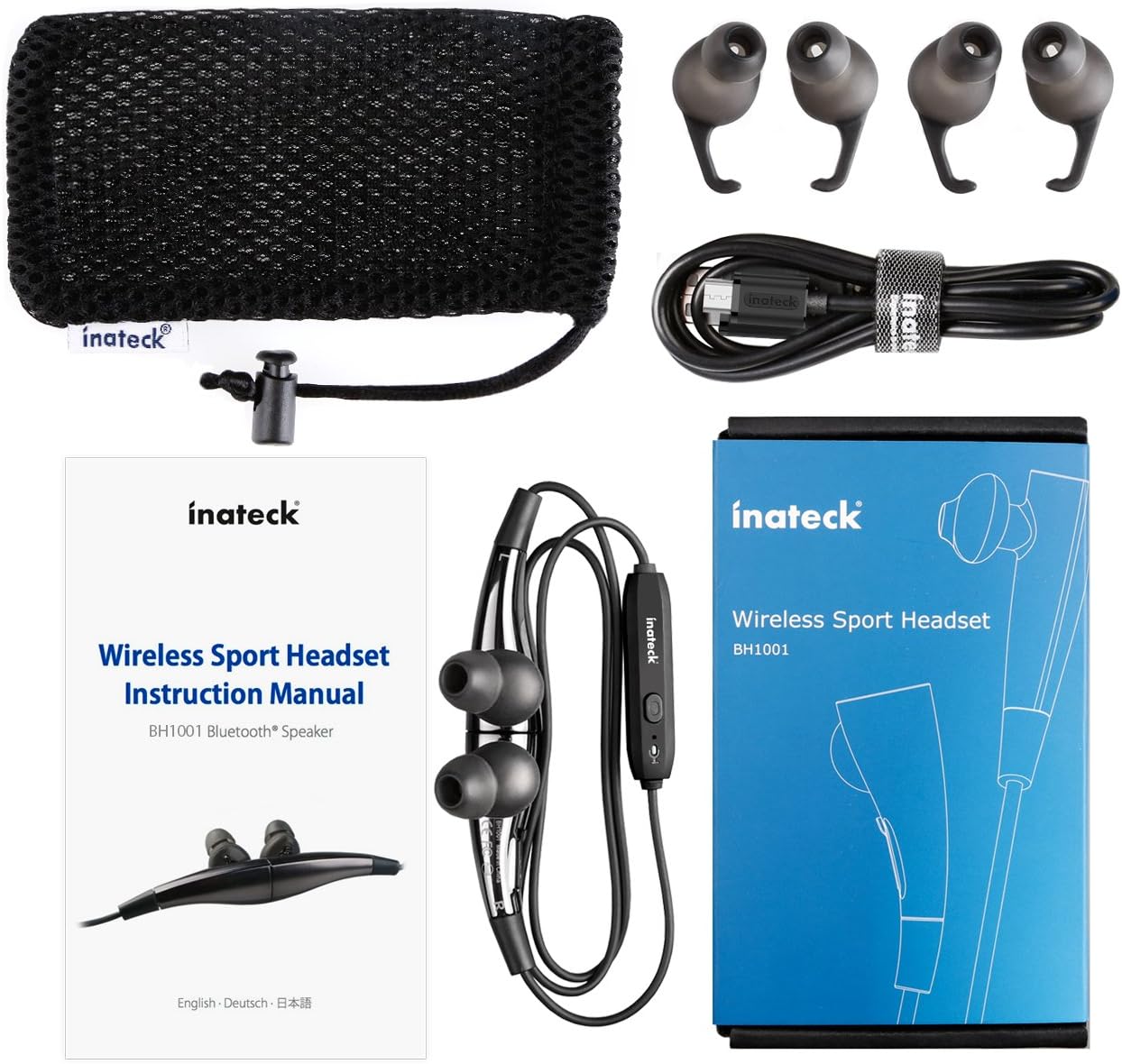
Rysunek 1.1: Contents of the Inateck Bluetooth Sport Headset package.
1.2 Ładowanie zestawu słuchawkowego
Before first use, fully charge the headset. A full charge takes approximately 3 hours and provides at least 8 hours of music playback.
- Locate the Micro USB charging port on the headset.
- Connect the small end of the provided USB charging cable to the headset's Micro USB port.
- Podłącz większy koniec kabla USB do źródła zasilania USB (np. portu USB komputera, zasilacza ściennego USB).
- The status indicator light will illuminate during charging. It will change color or turn off once charging is complete.

Rysunek 1.2: Charging the Inateck Bluetooth Sport Headset via Micro USB.
1.3 Parowanie z urządzeniem Bluetooth
Aby podłączyć zestaw słuchawkowy do smartfona lub innego urządzenia obsługującego technologię Bluetooth:
- Upewnij się, że zestaw słuchawkowy jest wyłączony.
- Press and hold the Multifunction Key (MFB) on the inline control unit for approximately 5-7 seconds until the status indicator light flashes red and blue alternately. This indicates pairing mode.
- On your Bluetooth device, enable Bluetooth and search for new devices.
- Select "Inateck BH1001" or "Inateck P20" from the list of available devices.
- Once paired, the status indicator light on the headset will flash blue slowly, and you may hear an audible confirmation.
- The headset will automatically attempt to reconnect to the last paired device when turned on.

Rysunek 1.3: Inateck Headset paired with a mobile device for music playback.
2. Instrukcja obsługi
2.1 Sterowanie zestawem słuchawkowym
The inline control unit provides easy access to various functions:

Rysunek 2.1: Nadview of the Inateck Headset control unit.
- Multifunction Key (MFB):
- Naciśnij i przytrzymaj (5–7 s): Włącz/wyłącz, przejdź do trybu parowania
- Krótkie naciśnięcie: odtwarzanie/wstrzymywanie muzyki, odbieranie/kończenie połączeń
- Long press (during incoming call): Reject call
- Zwiększ głośność (+) / Następny utwór:
- Krótkie naciśnięcie: Zwiększenie głośności
- Długie naciśnięcie: Przejdź do następnego utworu
- Zmniejszenie głośności (-) / Poprzedni utwór:
- Krótkie naciśnięcie: Zmniejszenie głośności
- Long press: Go to previous track
- Port micro USB: Do ładowania zestawu słuchawkowego.
- Wskaźnik statusu: Wyświetla stan zasilania, parowania i ładowania.
- Mikrofon: Do połączeń bez użycia rąk.
2.2. Noszenie zestawu słuchawkowego
Select the ear tips that provide the most comfortable and secure fit for your ears. The headset is designed to be worn with the cable behind your neck, ensuring stability during physical activity.

Rysunek 2.2: Proper wearing of the Inateck Sport Headset for active use.
2.3 Magnetic Earbuds Feature
The earbuds feature integrated magnets. When not in use, you can connect the two earbuds together, forming a necklace around your neck. This action automatically pauses music playback and prevents the headset from falling off.

Rysunek 2.3: Magnetic earbuds feature for secure wearing around the neck.

Rysunek 2.4: Headset worn as a necklace using the magnetic feature.
3. Konserwacja
- Czyszczenie: Przetrzyj zestaw słuchawkowy miękką, suchą ściereczką. Nie używaj środków czyszczących o właściwościach ściernych ani rozpuszczalników.
- Końcówki douszne: Regularnie zdejmuj i czyść silikonowe nakładki douszne łagodnym mydłem i wodą. Upewnij się, że są całkowicie suche przed ponownym założeniem.
- Składowanie: When not in use, store the headset in the provided carrying pouch to protect it from dust and damage. Avoid extreme temperatures.
- Wodoodporność: The headset is designed to be water-resistant for sports and exercise (e.g., sweat, light rain). Do not submerge it in water or expose it to heavy rain.
4. Rozwiązywanie Problemów
4.1 Nie można włączyć
Ensure the headset is fully charged. Connect it to a power source using the USB cable and allow it to charge for at least 30 minutes before attempting to power on again.
4.2 Nie można sparować z urządzeniem
- Ensure the headset is in pairing mode (status indicator flashing red and blue alternately).
- Upewnij się, że w Twoim urządzeniu włączony jest Bluetooth i że znajduje się ono w zasięgu (zwykle 10 metrów lub 33 stóp).
- Turn off and on the Bluetooth function on your device.
- If previously paired, try "forgetting" or "unpairing" the headset from your device's Bluetooth settings and then re-pair.
- Upewnij się, że żadne inne urządzenie Bluetooth nie zakłóca połączenia.
4.3 Brak dźwięku lub słaba jakość dźwięku
- Sprawdź poziom głośności zarówno w zestawie słuchawkowym, jak i w podłączonym urządzeniu.
- Ensure the headset is properly paired and connected to your device.
- Move closer to your device to reduce potential interference or range issues.
- Ensure the ear tips are correctly seated in your ears for optimal sound delivery.
- Reboot both the headset and your connected device.
4.4 Przerywane połączenie
- Ensure there are no physical obstructions between the headset and your device.
- Avoid placing your device in areas where the signal might be blocked (e.g., deep pockets, behind thick walls).
- Zminimalizuj zakłócenia ze strony innych urządzeń bezprzewodowych (routerów Wi-Fi, innych urządzeń Bluetooth).
- Keep the headset and your device within the recommended Bluetooth range.
5. Specyfikacje
| Marka | Inateck |
| Nazwa modelu | P20 |
| Numer modelu | BH1001 |
| Technologia łączności | Bluetooth 4.1 |
| Współczynnik kształtu | Douszne |
| Umieszczenie ucha | Intra-aural |
| Gniazdo słuchawkowe | USB (do ładowania) |
| Poziom wodoodporności | Waterproof (suitable for sweat/light rain) |
| Cechy specjalne | Sports and exercise, integrated microphone, magnetic earbuds |
| Waga przedmiotu | 78 gram |
| Typ sterowania | Volume Control, Multifunction Button |
| Tworzywo | Plastikowy |
6. Informacje o gwarancji
Inateck products typically come with a limited warranty. For specific warranty terms and conditions applicable to your Inateck Bluetooth Sport Headset, please refer to the warranty card included in your product packaging or visit the official Inateck webZachowaj dowód zakupu na wypadek roszczeń gwarancyjnych.
7. Obsługa klienta
If you encounter any issues not covered in this manual or require further assistance, please contact Inateck customer support. You can usually find contact information, FAQs, and additional resources on the official Inateck webstrona:
Webstrona: www.inateck.com
Please have your product model (P20 / BH1001) and purchase details ready when contacting support.