
1. Wprowadzenie
This manual provides detailed instructions for the setup, operation, and maintenance of your Zmodo Mini WiFi 720p HD Wireless Indoor Home Video Security Camera. Please read this manual thoroughly before using the device to ensure proper functionality and safety. This camera is designed for indoor surveillance, offering 720p HD video, two-way audio, and remote access capabilities.
2. Koniec produktuview
Familiarize yourself with the components of your Zmodo Mini WiFi Camera.

Obraz 2.1: Zmodo Mini WiFi Camera mounted on a wall, showing its compact design and lens. This image illustrates the camera's appearance and typical indoor placement.

Obraz 2.2: Zmodo Mini WiFi Camera held in a person's hand, demonstrating its small and portable size. This helps visualize the camera's dimensions.
Obraz 2.3: Zmodo Mini WiFi Camera displayed with its power adapter and a quick guide. This shows the main items included in the product package.
2.1 Zawartość opakowania
- Zmodo Mini WiFi Camera
- Zasilacz
- Szybki przewodnik
3. Instrukcje konfiguracji
3.1 Pobieranie aplikacji
Aby kontrolować i view your camera, download the MeShare app. Szukaj "MeShare" in the Apple App Store (for iOS 6 and up) or Google Play Store (for Android 2.3 and up).
3.2 Włączanie
- Podłącz zasilacz do portu zasilania aparatu.
- Podłącz zasilacz do standardowego gniazdka elektrycznego.
- Wait for the camera's indicator light to show a specific status (refer to the app for light status meanings during setup).
3.3 Network Connection (SmartLink)
The camera uses 2.4GHz Wi-Fi for connectivity. It is not compatible with 5GHz networks.
- Open the MeShare app and create an account or log in.
- Postępuj zgodnie z instrukcjami w aplikacji, aby dodać nowe urządzenie.
- Select the SmartLink setup option. The app will guide you through connecting the camera to your home Wi-Fi network.
- Ensure your mobile device is connected to the 2.4GHz Wi-Fi network you intend to connect the camera to during setup.
4. Instrukcja obsługi
4.1 Na żywo View i zdalny dostęp
Access your camera's live 720p HD video feed from anywhere using the MeShare app on your Android, iPhone, or iPad device. You can also access it via a web przeglądarka w user.meshare.com/user/login.

Obraz 4.1: A laptop, tablet, and smartphone simultaneously displaying live video feeds from Zmodo cameras. This illustrates the multi-device remote access capability.
4.2 Dźwięk dwukierunkowy
The camera features two-way audio, allowing you to listen to the environment around the camera and speak through its built-in speaker using the MeShare app.
4.3 Wykrywanie ruchu
The camera is equipped with a motion sensor that can detect movement. You can configure motion alerts within the MeShare app to receive notifications when motion is detected.

Obraz 4.2: A smartphone screen showing a Zmodo alert for motion detected, with video clips available for review. This demonstrates the motion alert feature.
4.4 Widzenie nocne
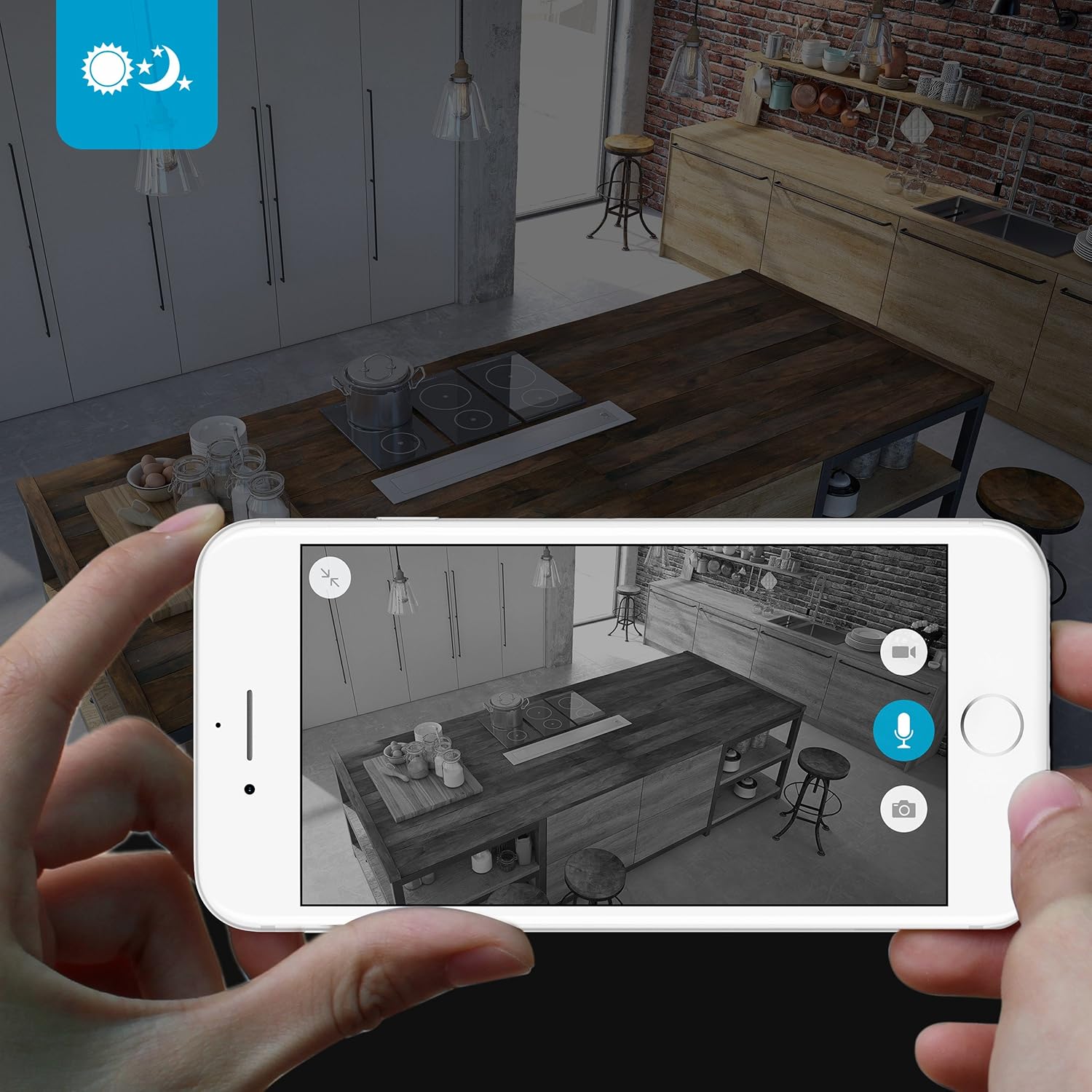
The camera provides clear surveillance even in low-light conditions with its night vision capabilities, offering a range of up to 30 feet. It automatically switches between color day mode and black & white night mode using infrared light.

Obraz 4.3: A smartphone screen showing a black and white night vision view from the Zmodo camera in a kitchen setting. This illustrates the camera's low-light performance.
4.5 szeroki kąt View
The camera features a 115° wide-angle lens, allowing for a broad view of your indoor space.

Obraz 4.4: A smartphone screen showing a wide-angle view from the Zmodo camera in a bedroom, capturing a broad area. This highlights the 115-degree field of view.
5. Konserwacja
5.1 Czyszczenie aparatu
- Przed czyszczeniem upewnij się, że aparat jest wyłączony.
- Use a soft, dry cloth to gently wipe the camera body.
- Aby uniknąć zarysowań, do czyszczenia soczewek należy używać specjalnej ściereczki do czyszczenia soczewek.
- Do not use liquid cleaners or aerosol sprays directly on the camera.
5.2 Względy środowiskowe
- Ta kamera jest przeznaczona wyłącznie do użytku w pomieszczeniach.
- Unikaj wystawiania aparatu na bezpośrednie działanie promieni słonecznych lub umieszczania go w pobliżu źródeł ciepła.
- Keep the camera away from moisture and extreme temperatures.
6. Rozwiązywanie Problemów
6.1 Typowe problemy i rozwiązania
- Kamera nie łączy się z siecią Wi-Fi: Ensure your Wi-Fi network is 2.4GHz. Verify your Wi-Fi password. Try restarting your router and the camera.
- Słaba jakość wideo: Sprawdź prędkość swojego połączenia internetowego. Upewnij się, że obiektyw aparatu jest czysty i nie ma w nim żadnych przeszkód.
- Brak dźwięku lub dźwięk zniekształcony: Verify microphone and speaker settings in the MeShare app. Ensure there are no physical obstructions blocking the microphone or speaker.
- Motion alerts not working: Check motion detection settings in the MeShare app. Ensure notifications are enabled for the app on your mobile device.
- Kamera offline: Check if the camera is powered on. Verify your Wi-Fi network is active and stable. Try restarting the camera.
7. Specyfikacje
| Funkcja | Opis |
|---|---|
| Numer modelu | WAUBMAKGCUVDD |
| Rozdzielczość przechwytywania wideo | Rozdzielczość 720p HD |
| Technologia łączności | Bezprzewodowa (Wi-Fi 2.4 GHz) |
| Dwukierunkowy dźwięk | Tak |
| Szeroki kąt | 115° |
| Zakres noktowizora | Do 30 stóp (podczerwień) |
| Czujnik ruchu | Tak (typ alertu tylko o ruchu) |
| Źródło zasilania | AC/DC (5 Volts, 5 Watts) |
| Zastosowanie wewnątrz/na zewnątrz | Wnętrz |
| Wymiary (dł. x szer. x wys.) | 7 x 2.1 x 4.5 cala |
| Waga przedmiotu | 12 uncji |
| Kompatybilne urządzenia | Video Monitor (Android, iPhone, iPad) |
8. Gwarancja i wsparcie
For warranty information or technical support, please refer to the official Zmodo website or contact Zmodo customer service directly. Keep your purchase receipt for warranty claims.
Aby uzyskać dalszą pomoc, odwiedź stronę Zmodo Store on Amazon.