
1. Wprowadzenie
This manual provides essential information for the setup, operation, and maintenance of your Proscan PLDED3280A 32-Inch 720p LED TV. Please read this manual thoroughly before operating your television and retain it for future reference.
Główne cechy:
- 32-Inch LED HD TV with Built-in ATSC Tuner
- Multiple Connectivity Options: HDMI, VGA, YPbPr, AV Audio/Video, PC Audio, Headphone, Coaxial Out, RF
- Częstotliwość odświeżania 60 Hz zapewnia płynny ruch
- 16:9 Aspect Ratio for widescreen viewwchodzenie
- Slim Bezel Design for a modern aesthetic
2. Co znajduje się w pudełku
Po otwarciu opakowania należy sprawdzić, czy znajdują się w nim wszystkie elementy:
- Proscan PLDED3280A 32-Inch 720p LED TV
- Zdalne sterowanie
- Stojak pod telewizor (2 sztuki)
- Instrukcja obsługi (ten dokument)

Figure 2.1: Proscan PLDED3280A 32-Inch 720p LED TV.
3. Konfiguracja
3.1 Mocowanie stojaka
- Ostrożnie połóż telewizor ekranem do dołu na miękkiej i czystej powierzchni, aby zapobiec zarysowaniu.
- Dopasuj elementy stojaka do otworów montażowych znajdujących się na spodzie telewizora.
- Zamocuj stojak za pomocą dołączonych śrub. Nie dokręcaj ich zbyt mocno.
3.2 Podłączanie zasilania
Plug the power cord into the AC IN port on the back of the TV, then plug the other end into a standard electrical outlet (AC 120V, 60Hz).
3.3 Podłączanie urządzeń zewnętrznych
Your Proscan TV offers various input ports for connecting external devices such as cable boxes, DVD/Blu-ray players, gaming consoles, and computers.
- HDMI: For high-definition audio and video. Connect up to three HDMI devices.
- VGA: Do podłączenia komputera.
- YPbPr (Component): Do analogowego wideo wysokiej rozdzielczości.
- AV (kompozytowy): For standard definition video and stereo audio.
- RF (Antena/Kabel): Do podłączenia anteny lub telewizji kablowej.
- Dźwięk z komputera: For audio input from a PC.
- Słuchawki: Do podłączenia słuchawek.
- Wyjście koncentryczne: Do cyfrowego wyjścia audio.
Ensure all cables are securely connected to the correct ports on both the TV and the external device.
4. Obsługa telewizora
4.1 Włączanie/wyłączanie zasilania
Naciśnij MOC button on the remote control or the power button on the side of the TV to turn the television on or off. A blue indicator light on the front of the TV signifies it is powered on.
4.2 Wybór źródła sygnału wejściowego
To switch between connected devices, press the WEJŚCIE button on the remote control or the side of the TV. A menu will appear on screen, allowing you to select from available inputs such as TV, AV, Component, HDMI1, HDMI2, HDMI3, PC, or USB Media Player.
4.3 Regulacja głośności
Użyj Objętość + I TOM- buttons on the remote control or the side of the TV to adjust the volume level. A volume bar with a numerical indicator will appear on the screen.
4.4 Wybór kanału
If an antenna or cable is connected to the RF input, use the CH+ I CH- buttons on the remote control or the side of the TV to change channels.
4.5 Nawigacja po menu
Naciśnij MENU button on the remote control or the side of the TV to access the on-screen display (OSD) menu. Use the arrow buttons to navigate through options and the OK or WCHODZIĆ przycisk, aby potwierdzić wybór.
5. Konserwacja
Proper care ensures the longevity of your Proscan TV:
- Czyszczenie ekranu: Delikatnie przetrzyj ekran miękką, niepozostawiającą włókien ściereczką. W przypadku uporczywych zabrudzeń delikatnie przetrzyjampPrzetrzyj ściereczkę wodą lub specjalnym środkiem do czyszczenia ekranów. Unikaj silnych środków chemicznych i materiałów ściernych.
- Czyszczenie szafki: Do czyszczenia obudowy telewizora należy używać miękkiej i suchej ściereczki.
- Wentylacja: Ensure adequate ventilation around the TV. Do not block the ventilation openings.
- Przewód zasilający: Regularnie sprawdzaj przewód zasilający pod kątem uszkodzeń. W przypadku uszkodzenia należy go natychmiast wymienić.
- Składowanie: Jeśli telewizor będzie przechowywany przez dłuższy czas, należy odłączyć go od zasilania i umieścić w chłodnym, suchym miejscu.
6. Rozwiązywanie Problemów
Przed skontaktowaniem się z obsługą klienta wypróbuj poniższe rozwiązania typowych problemów:
| Problem | Możliwa przyczyna / rozwiązanie |
|---|---|
| Brak zasilania | Ensure the power cord is securely plugged into both the TV and the outlet. Check if the outlet is working. |
| Brak obrazu/brak sygnału | Verify the correct input source is selected (e.g., HDMI1, AV). Check all cable connections between the TV and external devices. |
| Brak dźwięku | Sprawdź poziom głośności i upewnij się, że telewizor nie jest wyciszony. Sprawdź połączenia kabli audio. |
| Pilot nie działa | Wymień baterie w pilocie. Upewnij się, że między pilotem a czujnikiem podczerwieni telewizora nie ma żadnych przeszkód. |
| Słaba jakość obrazu | Adjust picture settings (brightness, contrast, color). Ensure the input source is providing a high-quality signal. |
7. Specyfikacje
| Funkcja | Szczegół |
|---|---|
| Marka | PROSKAN |
| Numer modelu | PLDED3280A |
| Rozmiar ekranu | 32 cali |
| Technologia wyświetlania | PROWADZONY |
| Rezolucja | 720p |
| Częstotliwość odświeżania | 60 Hz |
| Proporcje obrazu | 16:9 |
| Technologia łączności | HDMI, VGA, YPbPr, AV, PC Audio, Headphone, Coaxial Out, RF |
| Waga przedmiotu | 13.7 funtów |
| Wymiary produktu | 8" gł. x 28.8" szer. x 19.1" wys. |
| Kolor | Czarny |
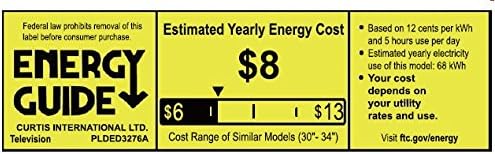
Figure 7.1: Estimated Yearly Energy Cost for similar models.
8. Gwarancja i wsparcie
For detailed warranty information and customer support, please refer to the official Proscan website or the full User Manual PDF.
Możesz pobrać pełną instrukcję obsługi (PDF) Tutaj.
Aby uzyskać dalszą pomoc, odwiedź stronę PROSCAN Store on Amazon.