
FreedConn TCOM-SC
FreedConn TCOM-SC Motocyklowy zestaw słuchawkowy Bluetooth
Instrukcja obsługi
Wstęp
The FreedConn TCOM-SC Motorcycle Bluetooth Headset is designed to provide clear and reliable communication for motorcyclists. This system allows for intercom communication between riders, hands-free phone calls, music streaming, and FM radio reception, enhancing your riding experience with convenience and safety. It features an LCD screen for easy status monitoring and supports Bluetooth 5.0 for stable connections.

Image: Two FreedConn TCOM-SC Bluetooth headset units with included hard and soft microphones and speakers, along with mounting accessories and a user manual.

Image: Icons illustrating key features: Call, Bluetooth 3.0 (note: product is BT 5.0), Pair with phone, Stereo music A2DP, Multi-user Connectivity, FM Radio, Playback Control, and Advanced Noise Control.
Organizować coś
1. Instalacja
The TCOM-SC unit can be mounted to most helmet types using either the screw clamp or the adhesive bracket. Choose the appropriate microphone (hard mic for modular/open-face helmets, soft mic for full-face helmets) and install the speakers inside the helmet's ear pockets.
- Montaż urządzenia: Securely attach the main unit to the side of your helmet using the provided clamp or adhesive pad. Ensure it is positioned for easy access to controls.
- Speaker and Microphone Placement: Carefully route the speaker and microphone wires within the helmet liner. Position the speakers directly over your ears and the microphone in front of your mouth for optimal audio clarity.

Obraz: Zbliżenie view of the FreedConn TCOM-SC unit mounted on the side of a motorcycle helmet, with a gloved hand adjusting the control dial.
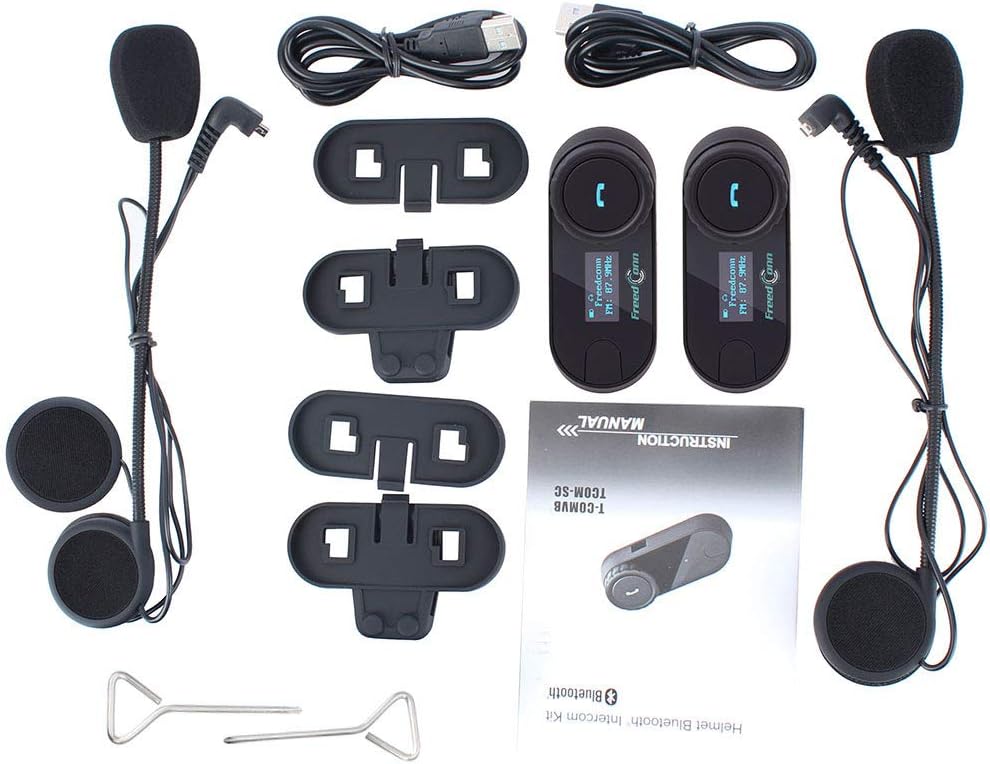
Image: Illustration showing how the interchangeable hard boom mic and soft wired mic adapt to various helmet styles, including full-face, modular, and open-face helmets.
2. Ładowanie początkowe
Before first use, fully charge the device. Connect the USB charging cable to the unit and a compatible USB power adapter (not included). The LCD screen will indicate charging status.
3. Parowanie Bluetooth (telefon)
- Ensure the TCOM-SC unit is off.
- Press and hold the power button until the LCD screen shows 'Pairing' or a similar indicator.
- On your mobile phone, enable Bluetooth and search for 'FreedConn TCOM-SC'.
- Select the device to pair. Once connected, the LCD screen will confirm successful pairing.
4. Parowanie interkomu (kierowca-kierowca)
TCOM-SC obsługuje parowanie z maksymalnie 3 motocyklistami, przy czym 2 z nich może komunikować się jednocześnie.
- Ensure both units are off.
- On both units, press and hold the power button until they enter intercom pairing mode (indicated on the LCD).
- Jednostki będą automatycznie wyszukiwać się i łączyć ze sobą.
- Repeat the process for a third unit if desired.

Image: Three riders on ATVs, with lines indicating 800m Bluetooth connection between two pairs of riders, demonstrating the 3-way conference intercom feature where 2 can talk at once.
Operacyjny
Podstawowe sterowanie
- Włączanie/wyłączanie: Naciśnij i przytrzymaj przycisk zasilania.
- Regulacja głośności: Rotate the large dial clockwise to increase volume, counter-clockwise to decrease.
- Rozmowy telefoniczne: Press the phone button to answer/end calls. Double-press to redial the last number.
- Odtwarzanie muzyki: Press the phone button to play/pause music. Use the dial for track navigation (specific gestures may vary, refer to full manual).
- Radio FM: Press the FM button to activate/deactivate FM radio. Use the dial to scan frequencies.

Image: A motorcyclist wearing a helmet with the FreedConn TCOM-SC unit attached, demonstrating its use while riding.
Komunikacja interkomowa
Once paired, initiate intercom communication by pressing the intercom button. The system supports full-duplex communication between two riders up to 800 meters (875 yards) in open terrain.
Udostępnianie muzyki
The TCOM-SC BT5.0 version allows for music sharing between two paired units. Refer to the detailed manual for specific steps to activate this feature.
Asystent głosowy
Trigger Siri or Google Assistant on your connected phone for convenient voice commands while riding.
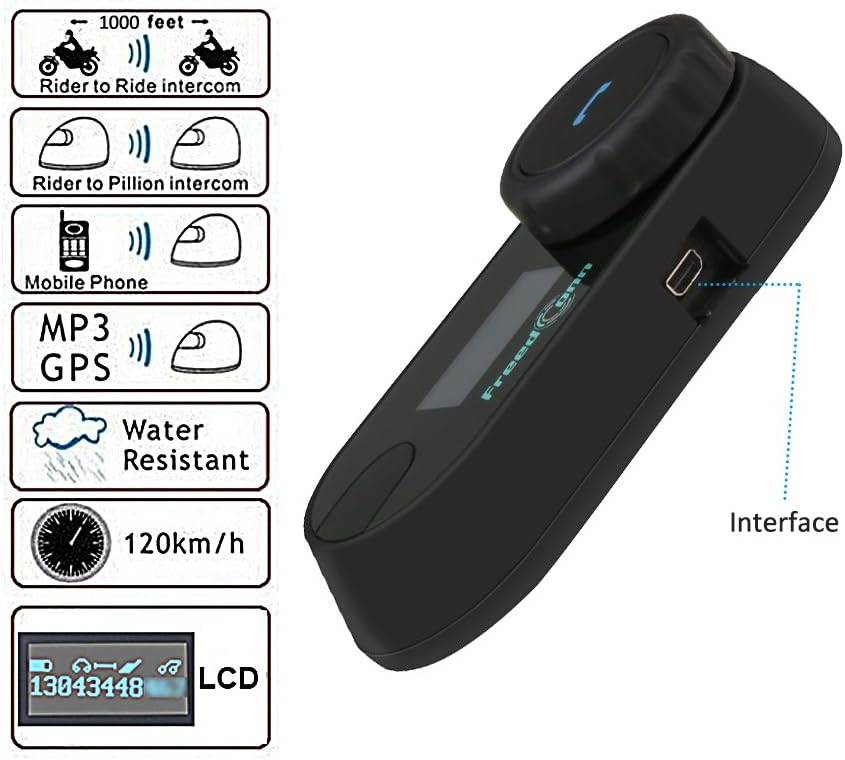
Image: A close-up of the FreedConn TCOM-SC unit's LCD screen, displaying 'Freedconn' and 'FM: 87.9MHz', along with battery and connection icons.
Konserwacja
Ładowanie
Charge the unit using the provided USB cable. A full charge provides approximately 8 hours of intercom time and 120 hours of standby time. The LCD screen indicates battery level.
Czyszczenie
Przetrzyj urządzenie miękką, damp cloth. Do not use harsh chemicals or abrasive cleaners. Ensure the charging port cover is securely closed to prevent water ingress.
Składowanie
Store the unit in a cool, dry place when not in use. For long-term storage, charge the battery to about 50% every few months to maintain battery health.
Odporność na wodę
The TCOM-SC is designed to be waterproof, sunscreen, and dustproof, making it suitable for various riding conditions. However, avoid prolonged submersion or high-pressure water jets.

Image: A rider wearing a helmet with the intercom unit, surrounded by musical notes and sound waves, illustrating crystal clear sound quality.

Image: The FreedConn TCOM-SC unit being splashed with water, with two motorcyclists riding in the background, emphasizing its waterproof, sunscreen, and dustproof capabilities.
Rozwiązywanie problemów
| Problem | Możliwa przyczyna | Rozwiązanie |
|---|---|---|
| No sound from speakers / Only one speaker has sound / Sound cuts in and out | Loose speaker connection; Damaged speakers/cable. | Ensure speaker port is plugged in tightly. If issue persists, contact support for replacement speakers. |
| Nie można sparować z telefonem/domofonem | Incorrect pairing mode; Device already paired; Interference. | Ensure device is in pairing mode. Clear previous pairings if necessary. Move away from other Bluetooth devices. |
| Krótki czas pracy baterii | Akumulator nie jest w pełni naładowany. Starzejący się akumulator. | Przed użyciem upewnij się, że bateria jest w pełni naładowana. Jeśli żywotność baterii znacznie się pogorszy, skontaktuj się z pomocą techniczną. |
| Missing USB charge cable | Cable misplaced or damaged. | Replacement cables can be purchased. For old version mini USB port cable, search for B06XWS8FHK. For new version 5PIN USB port, search for B092ZDTBYM. |
Specyfikacje
- Nazwa modelu: TCOM-SC
- Technologia łączności: Bezprzewodowa, Bluetooth 5.0
- Technologia komunikacji bezprzewodowej: Bluetooth
- Zasięg domofonu: Do 800 metrów (875 jardów)
- Max Speed for Communication: 120 kilometrów na godzinę (75 mil na godzinę)
- Czas pracy baterii: Up to 8 hours talk time, 120 hours standby time
- Kontrola hałasu: Hybrid Noise Cancellation (DSP noise cancellation technology)
- Gniazdo słuchawkowe: 5Pin Speakers and Microphone
- Tworzywo: Plastikowy
- Waga przedmiotu: 1.6 uncji
- Wymiary produktu: 3.2 x 1.2 x 1 cala
- Poziom wodoodporności: Wodoodporny
- Zawartość zestawu: 2 Pack TCOM-SC Bluetooth Motorcycle Headset with Accessory (Stereo Headphones with changeable hard mic and soft mic, Screw Driver, Sticky Clamp, Headsets Clip with Screws, USB Cable, User Manual, Felted Adhesive Earphone Pads)
Gwarancja i wsparcie
FreedConn products are designed for durability and performance. For any issues, questions, or concerns regarding your TCOM-SC Bluetooth Headset, please contact FreedConn customer support directly. While specific warranty details are not provided in this manual, support is available for troubleshooting, replacement parts, or exchanges if a problem is confirmed.
Proszę zapoznać się z oficjalną wersją FreedConn website or your purchase documentation for the most up-to-date warranty information and contact details.
Powiązane dokumenty - TCOM-SC
 |
Instrukcja obsługi zestawu słuchawkowego Bluetooth FreedConn TCOM-SC do motocykla Kompleksowa instrukcja obsługi zestawu słuchawkowego motocyklowego FreedConn TCOM-SC Bluetooth 5.0. Obejmuje instalację, szczegóły produktu, instrukcje obsługi połączeń, muzyki, radia FM i funkcji interkomu, w tym udostępniania muzyki między urządzeniami. |
 |
Instrukcja obsługi zestawu interkomu Bluetooth do kasku FreedConn TCOM-SC Instrukcja obsługi systemu interkomu Bluetooth FreedConn TCOM-SC. Dowiedz się więcej o instalacji, obsłudze, parowaniu, funkcjach takich jak strumieniowe przesyłanie muzyki i połączenia, specyfikacjach technicznych oraz rozwiązywaniu problemów z kaskiem motocyklowym. |
 |
KY-Pro – skrócona instrukcja obsługi i obsługi Kompleksowy przewodnik po systemie KY-Pro, obejmujący instrukcje szybkiego startu, tryby pracy, parowanie i funkcje zaawansowane. W tym dokumencie znajdziesz szczegółowe instrukcje dotyczące korzystania z systemu komunikacji w kasku KY-Pro. |
 |
Instrukcja obsługi zestawu słuchawkowego Bluetooth do kasku motocyklowego Maxto M6s Instrukcja obsługi interkomu Bluetooth do kasku motocyklowego Maxto M6s. W instrukcji opisano instalację i najważniejsze funkcje, takie jak wodoodporność IP67, zasięg komunikacji do 1000 metrów, udostępnianie muzyki i łączność Bluetooth 5.0. |
 |
FreedConn Helmet Bluetooth Intercom System User Manual User manual for the FreedConn Helmet Bluetooth Intercom system, covering product features, parts list, installation guide, and control panel operations for models like T-COM VB and T-COM SC. Includes safety warnings and tips for optimal use. |
 |
Instrukcja obsługi zestawu słuchawkowego Bluetooth BIKECOMM BK-S2 Kompleksowa instrukcja obsługi zestawu słuchawkowego Bluetooth BIKECOMM BK-S2, szczegółowo opisująca instalację, parowanie, odtwarzanie muzyki, funkcje interkomu, wytyczne dotyczące bezpieczeństwa, zgodność z FCC i rozwiązywanie problemów. |
Ask a question about this manual
Ask about setup, troubleshooting, compatibility, parts, safety, or missing instructions. Manuals+ will review the question and use this page’s manual context to help answer it.