
1. Wprowadzenie
This manual provides instructions for the LaView LV-PB932F4 IP Bullet Camera. This camera is designed for surveillance applications, offering 1080P HD resolution for both indoor and outdoor use. It features day and night vision capabilities, with infrared (IR) night vision up to 100 feet. The camera is weatherproof with an IP66 rating and operates in temperatures from -13°F to 140°F (-25°C to 60°C).

Image 1.1: LaView LV-PB932F4 IP Bullet Camera features.
2. Zawartość opakowania
Sprawdź, czy w przesyłce znajdują się wszystkie elementy:
- 1 x LaView LV-PB932F4 2MP 1080P IP Bullet Camera
- (Additional accessories such as mounting screws, anchors, and Ethernet cable may vary by package and are often sold separately.)
3. Konfiguracja i instalacja
3.1 przed instalacją
Ensure your Network Video Recorder (NVR) system is compatible with IP 2MP cameras. Plan the camera's placement to maximize coverage and minimize obstructions.
3.2 Fizyczna instalacja
The camera is designed for wall mounting. Select a suitable location that provides the desired field of view and protection from direct impact.
Etapy montażu:
- Mark drilling points using the camera's base as a template.
- Drill pilot holes appropriate for your mounting surface.
- Secure the camera to the mounting surface using appropriate screws and anchors (not included).
- Dostosuj kąt kamery, aby uzyskać optymalny zasięg.
3.3 Połączenie
This camera utilizes Power over Ethernet (PoE) for simplified installation. A single network cable provides both power and data connection.
- Connect one end of an Ethernet cable (Cat 5e or Cat 6 recommended) to the camera's Ethernet port.
- Connect the other end of the Ethernet cable to a PoE-enabled port on your NVR or a PoE switch.
- The camera should automatically power on and attempt to connect to your NVR system.
Notatka: For systems that do not automatically configure, refer to your NVR's manual for adding IP cameras and network configuration.
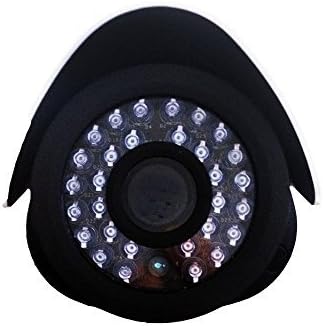
Obraz 3.1: Przód view obiektywu kamery i diod LED IR.
4. Działanie
4.1 Widzenie dzienne/nocne
The camera automatically switches between day (color) and night (black and white, infrared) modes based on ambient light conditions. In night mode, the camera's infrared LEDs activate to provide visibility up to 100 feet in darkness.
4.2 Wykrywanie ruchu
The camera supports motion detection. Configuration of motion detection zones and sensitivity settings is typically done through your connected NVR system's interface. Refer to your NVR's manual for detailed instructions on setting up motion alerts and recording triggers.
4.3 Nagrywanie i odtwarzanie wideo
Video recording and playback functions are managed by your NVR system. Consult your NVR's user manual for instructions on accessing live view, configuring recording schedules, and reviewnagrane footage.
5. Konserwacja
Aby zapewnić optymalną wydajność i długą żywotność aparatu, należy przestrzegać poniższych wskazówek dotyczących konserwacji:
- Czyszczenie: Okresowo czyść obiektyw aparatu miękką,amp cloth. Avoid abrasive cleaners or solvents that could damage the lens coating.
- Kontrola kabla: Regularly inspect all cables for damage, wear, or loose connections.
- Aktualizacje oprogramowania układowego: Check the official LaView website for any available firmware updates for your camera model. Firmware updates can improve performance, enhance security, and add new features.
- Ochrona środowiska: While the camera is IP66 weatherproof, extreme environmental conditions (e.g., direct lightning strikes, prolonged submersion, or corrosive environments) should be avoided.
6. Rozwiązywanie Problemów
6.1 No Image/Video Signal
- Sprawdź moc: Ensure the camera is receiving power via the PoE connection. Verify the Ethernet cable is securely connected to both the camera and the PoE source (NVR/switch).
- Sprawdź połączenie sieciowe: Confirm the Ethernet cable is not damaged. Try a different port on your NVR/switch.
- Zgodność z NVR: Ensure your NVR system is compatible with 2MP IP cameras.
- Konflikt adresów IP: If manually configuring, check for IP address conflicts on your network.
6.2 Słaba jakość obrazu
- Wyczyść obiektyw: Clean the camera lens for any dirt, dust, or smudges.
- Warunki oświetleniowe: Ensure adequate lighting for optimal image quality. In low light, the camera will automatically switch to IR night vision.
- Ustawienia rozdzielczości: Verify the video resolution settings on your NVR are set to 1080P or higher, if supported by your NVR.
6.3 Night Vision Not Working
- Diody IR: In dark conditions, check if the infrared LEDs are illuminating. They may emit a faint red glow.
- Przeszkody: Ensure there are no obstructions directly in front of the camera that could block the IR light.
6.4 Problemy z detekcją ruchu
- Ustawienia czułości: Adjust the motion detection sensitivity on your NVR. High sensitivity can lead to false alarms (e.g., from insects, moving branches).
- Strefy wykrywania: Verify that the motion detection zones are correctly configured to cover the desired areas.
7. Specyfikacje techniczne
| Funkcja | Specyfikacja |
|---|---|
| Numer modelu | LV-PB932F4 |
| Rozdzielczość przechwytywania wideo | 1080p |
| Rozdzielczość czujnika fotograficznego | 2 MP |
| Efektywna rozdzielczość obrazu nieruchomego | 4 MP |
| Technologia łączności | Przewodowy (PoE) |
| Zastosowanie wewnątrz/na zewnątrz | Wewnątrz, Na zewnątrz |
| Stopień wodoodporności | IP66 |
| Zakres noktowizora | 100 stóp |
| Cechy specjalne | Czujnik ruchu, widzenie nocne |
| Temperatura pracy | -13°F do 140°F (-25°C do 60°C) |
| Źródło zasilania | Przewodowe zasilanie elektryczne (PoE) |
| Wymiary przedmiotu | 8.5 x 5 x 5 cala |
| Waga przedmiotu | 1.35 funtów |
| Współczynnik kształtu | Kula |
| Typ mocowania | Montaż ścienny |
8. Gwarancja i wsparcie
8.1 Informacje o gwarancji
This LaView product is covered by a 2-year manufacturer's warranty. Please retain your proof of purchase for warranty claims. The warranty covers defects in materials and workmanship under normal use.
8.2 Wsparcie techniczne
For technical assistance or support, please visit the official LaView website or contact their customer service. Lifetime technical support is provided to assist with setup, operation, and troubleshooting.
LaView Urzędnik Webstrona: www.laviewbezpieczeństwo.com